
B
Fluid Guard Ring Environment Variables
This appendix covers the FGR-specific Layout environment variable names, descriptions, types, and values. For information about the other Virtuoso® Layout Suite L layout editor and graphics editor environment variables, refer to the Environment Variables appendix in the Virtuoso Layout Suite L User Guide.
The graphic environment variables control the characteristics of the window display and the layout environment variables control how various layout editor commands work. Many graphic environment variables have duplicate layout environment variables. In these cases, the layout variable supersedes the graphic variable unless the graphic variable is stored in the cellview. You can set both graphic and layout environment variables.
Setting Environment Variables
You can set the environment variables in the following three ways:
- Within the .cdsenv File
- Within the .cdsinit File
- In the CIW
.cdsenv File
Add environment variables to the .cdsenv file when the settings should be applied while launching Layout L.
layoutenvironmentVariableNamedataTypevalue
layout fgrWrapPlaceAtMinimumDistance boolean t
.cdsinit File
Like the .cdsenv file, the environment variable settings saved in the .cdsinit file get applied when you launch Layout L.
Use the envSetVal() command, which has the following syntax, to add environment variables to the .cdsinit file:
envSetVal("layout" "environmentVariableName" 'dataTypevalue)
envSetVal("layout" "fgrWrapPlaceAtMinimumDistance" 'boolean t)
string, enclose its value within double quotes.CIW
Use the envSetVal() command in the CIW to set an environment variable for the duration of the current session. The syntax is the same as described above for the .cdsinit file.
envSetVal() command in any Cadence SKILL file that you load.If you use the CIW to set an environment variable that controls a widget on the currently open form, the implemented settings get reflected only after you close the form and then re-open it.
Displaying the Current Value of an Environment Variable
To determine the current value of any Layout L environment variable, use the following syntax in the CIW.
envGetVal("layout" "environmentVariableName")
List of Environment Variables
The following environment variables are available for use:
- fgrPostEditPitchCorrection
- fgrWrapPlaceAtMinimumDistance
- fluidGuardRingInstallPath
- grEnclosedBy
- grMode
- keepGuardRingEndsConnected
- vfoShowOnlyFluidShapeForDrag
fgrPostEditPitchCorrection
Syntax
layout fgrPostEditPitchCorrection boolean { t | nil }
In the .cdsinit file or the CIW:
envSetVal("layout" "fgrPostEditPitchCorrection " 'boolean {t | nil})
Description
Controls whether the VFO infrastructure will post-process the merged fluid guard ring instance to ensure that fluid shape data follows the pitch parameters.
fgrWrapPlaceAtMinimumDistance
Syntax
layout fgrWrapPlaceAtMinimumDistance boolean { t | nil }
In the .cdsinit file or the CIW:
envSetVal("layout" "fgrWrapPlaceAtMinimumDistance" 'boolean {t | nil})
Description
Controls the selection of the Place at Minimum Distance check box on the Wrap tab of the Create Guard Ring form.
When fgrWrapPlaceAtMinimumDistance is set to t, the Place At Minimum Distance check box is selected and the Enclose by field is disabled. However, setting the environment variable to nil, deselects the check box and makes the Enclose by field editable for specifying the guard ring distance from the object.
fgrWrapPlaceAtMinimumDistance environment variable to nil is recommended. Examples
-
Deselect the Place At Minimum Distance check box and make the Enclose by field editable:
envSetVal("layout" "fgrWrapPlaceAtMinimumDistance" boolean nil)
-
Return the current value of the
fgrWrapPlaceAtMinimumDistanceenvironment variable:envGetVal("layout" "fgrWrapPlaceAtMinimumDistance")
=> nil
fluidGuardRingInstallPath
Syntax
layout fluidGuardRingInstallPath string alternatePath
Description
Enables you to specify the path from where the FGR-related SKILL files (vfo*.ils) are to be loaded. By default, the value string is empty, in which case these SKILL files are loaded from the following default release installation directory:
<install_dir>/tools/dfII/etc/vfo
vfo*.ils) is not recommended for customized FGRs. If you want to use it, contact your Cadence® Customer Support representative.
Default Value: "" (null string)
Example
Load the FGR-related SKILL files from a path other than the default release installation directory:
layout fluidGuardRingInstallPath string /grid/cic/tool.lnx86/dfII/etc/vfo
grEnclosedBy
Syntax
layout grEnclosedBy <any_positive_floating_point_number>
In the .cdsinit file or the CIW:
envSetVal("layout" "grEnclosedBy" <any_positive_floating_point_number>)
Description
Initializes the Enclose by field on the Create Guard Ring form.
You can replace the default value with another floating point number by updating this environment variable. Otherwise, change the value for the Enclose by field by typing in the field on the Create Guard Ring form.
grMode
Syntax
layout grMode string { Rectangular | Rectilinear }
In the .cdsinit file or the CIW:
envSetVal("layout" "grMode" 'string { "Rectangular" | "Rectilinear" })
Description
Sets the default FGR creation type in Wrap mode.
By default, this environment variable is set to Rectilinear. Therefore, when you launch the Create Guard Ring form, on the Wrap tab, the Rectilinear radio button is selected.
However, when you reset this environment variable to Rectangular, the Rectangular radio button appears as selected on the Wrap tab.
This environment variable is useful when you mostly create Rectangular type of FGR in Wrap mode and want that be selected as the default creation type each time you access the Create Guard Ring form.
keepGuardRingEndsConnected
Syntax
layout keepGuardRingEndsConnected boolean { t | nil }
In the .cdsinit file or the CIW:
envSetVal("layout" "keepGuardRingEndsConnected" 'boolean {t | nil})
Description
Controls whether a guard ring with touching ends will stay connected (t) or will result in opening up the guard ring (nil) during the Stretch and Quick Align command operations.
vfoShowOnlyFluidShapeForDrag
Syntax
layout vfoShowOnlyFluidShapeForDrag boolean { t | nil }
In the .cdsinit file or the CIW:
envSetVal("layout" "vfoShowOnlyFluidShapeForDrag" 'boolean {t | nil})
Description
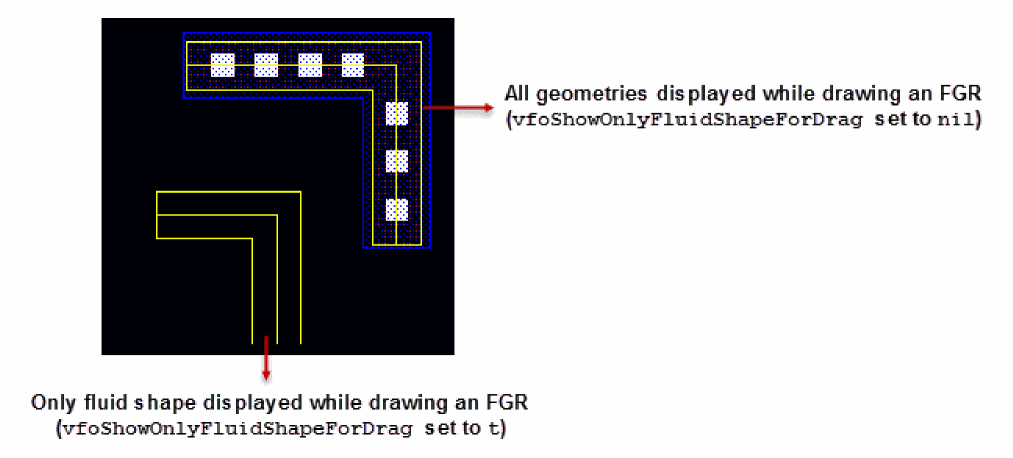
Controls the display of the fluid shape and other geometries like metal layer, diffusion layer, and contacts while drawing an FGR on the layout canvas.
When vfoShowOnlyFluidShapeForDrag is set to nil, all geometries including the fluid shape are visible as you draw the FGR on the layout canvas. However, setting the environment variable to t displays only the fluid shape. The figure below shows the difference in the two approaches.
Return to top