Binding Properties in Configure Physical Hierarchy Form
A floorplan property file is an extension used to store the configurable parameters of a floorplan and reuse those parameters to configure a new design. You can load a floorplan property file using the Configure Physical Hierarchy (CPH) window. These properties are used to create soft blocks for the instances in the physical hierarchy.
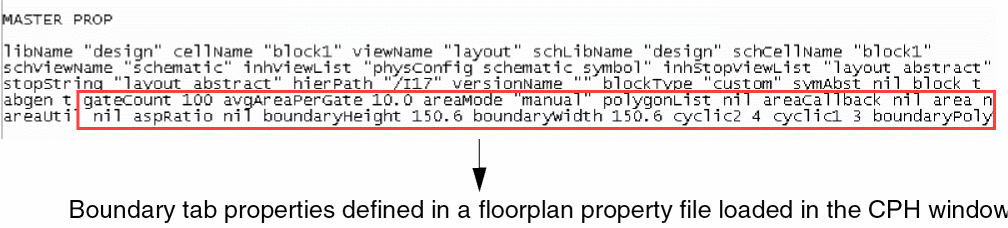
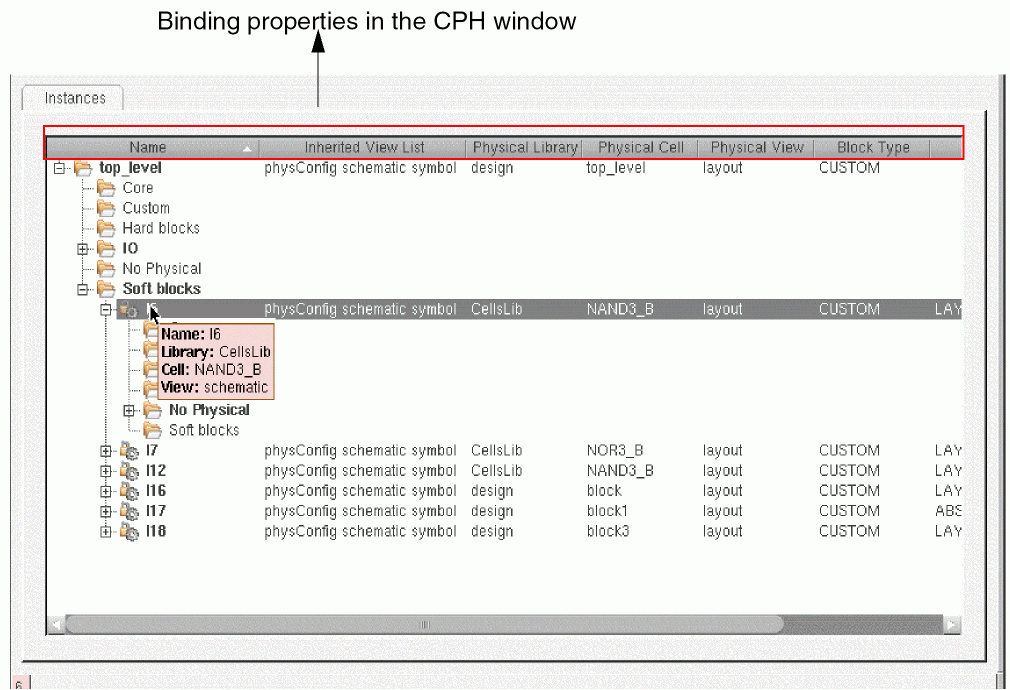
The Master properties consists of binding properties, global variables, and Boundary tab properties. The binding properties are defined in the CPH window as shown in the following figure.
The following table lists the binding properties, their GUI equivalents, and their descriptions.
|
Property Name
|
GUI Option
|
Description
|
|
hierPath
|
Name
|
The absolute hierarchical path of an instance with respect to the top-level cellview.
|
|
schLibName
|
Library (tool tip)
|
Name of the schematic library used to read properties.
|
|
schCellName
|
Cell (tool tip)
|
Name of the schematic cell used to read properties.
|
|
schViewName
|
View (tool tip)
|
Name of the schematic view used to read properties.
|
|
inhViewList
|
Inherited View List
|
The design views that will be used to descend into the hierarchical design to find stop views.
|
|
libName
|
Physical Library
|
Name of the layout library to be generated.
|
|
cellName
|
Physical Cell
|
Name of the layout cell to be generated.
|
|
viewName
|
Physical View
|
Name of the layout view to be generated.
|
|
blockType
|
Block Type
|
Describes the type of block, either CUSTOM or DIGITAL.
|
|
inhStopViewList
|
Inherited Stop List
|
Stops descending the hierarchical design if any of the listed views, such as layout or abstract, are found. The view list then populates the CPH window with its properties.
|
|
stopString
|
NA
|
List of views to be searched for IO pad cells to create a pin list from the main list, which is filtered.
|
|
versionName
|
NA
|
Name of the version used in property file.The default value for this is an empty string.
|
|
symAbst
|
Type
|
Specifies whether or not to create a soft abstract of the block. This property is mostly specified in cases where the instance in schematic is a symbol.
|
|
block, abgen
|
Type
|
If this property is specified as NIL, then it creates a soft abstract.
|
The Boolean properties symAbst, block, and abgen control the soft abstract generation of the block. If symAbst is set to true and block and abgen are set to false, then a soft abstract is created. If symAbst is set to false and block and abgen are set to true, a soft abstract is not created.
Related Topics
Master Properties in Floorplan Property File
Terminal Properties in Floorplan Property File
Halo Properties in Floorplan Property File
Return to top