
Global Variables for Soft Block Generation
A floorplan property file is an extension used to store the configurable parameters of a floorplan and reuse those parameters to configure a new design. You can load a floorplan property file using the Configure Physical Hierarchy (CPH) window.
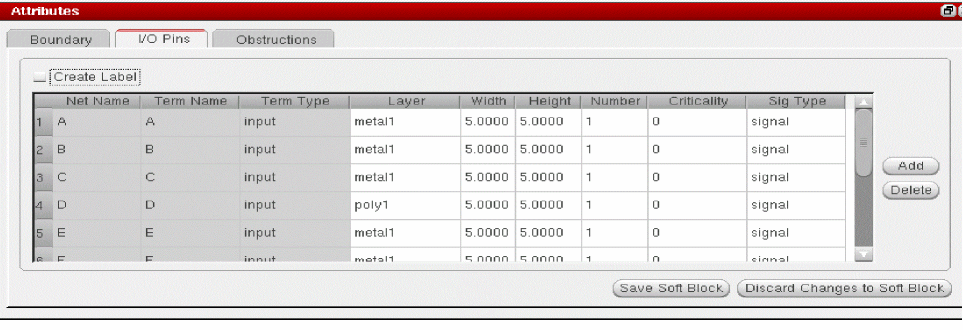
The global variable for soft block generation can be defined using the Soft Block Global Options form or I/O Pins tab in the Attributes pane of the CPH window. You can use the ioPinCreateLabel property which corresponds to the Create Label option to create labels along with the pins when set to true.
Generating Labels for Soft Block Pins
To generate labels for all the pins in the selected soft block:
-
Choose Launch – Configure Physical Hierarchy from the Layout XL window.
The CPH window is displayed. - Click the Cells tab in the CPH window.
-
Click the row containing the cell you want to ignore.
The row is highlighted and the options in the Attributes pane are enabled. -
Select the Create Label option in the Attributes pane of the CPH window.
To generate labels for all pins of all soft blocks in your design:
-
Choose Options – Soft Block Options from the Configure Physical Hierarchy menu bar.
The Soft Block Global Options form appears.
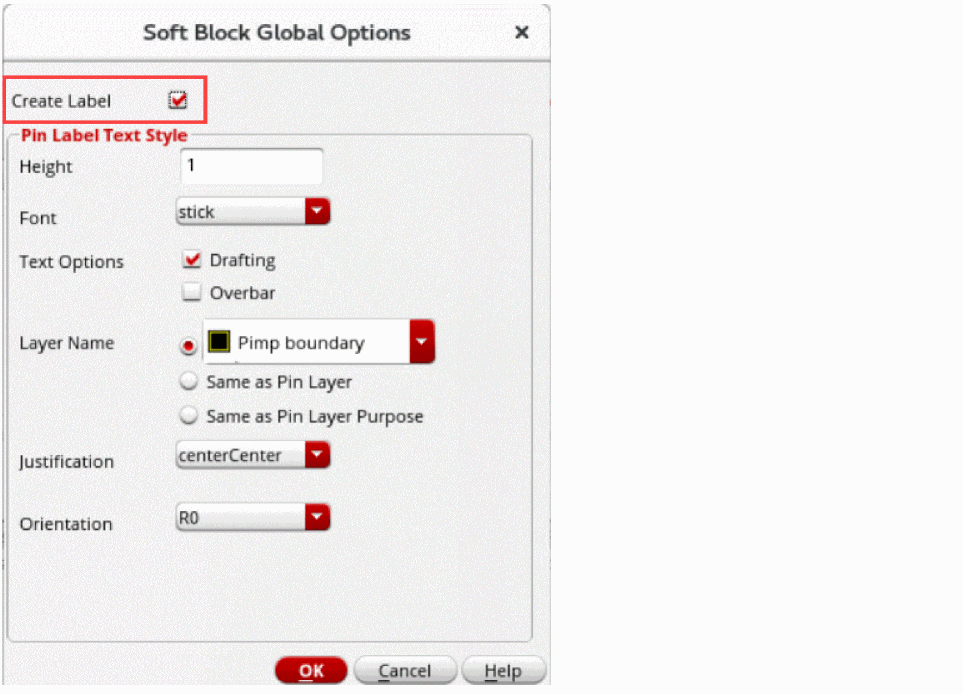
- Select Create Label.
- Select the required label creation options under the Pin Label Text Style group box.
- Click OK.
- Click Save Soft Block.
The label is generated for all pins of all soft blocks in your design.
Related Topics
Master Properties in Floorplan Property File
Terminal Properties in Floorplan Property File
Halo Properties in Floorplan Property File
Return to top