Boundary Tab Properties
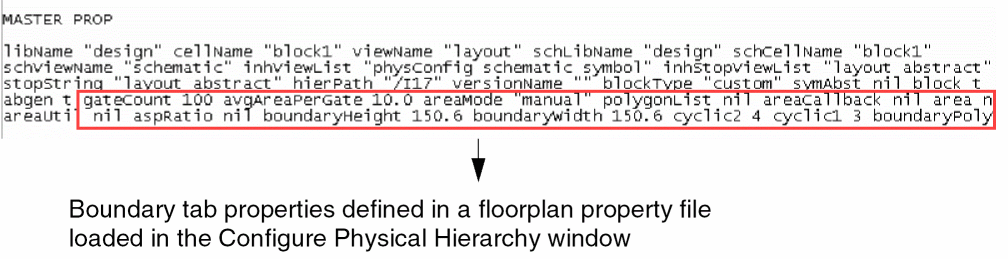
A floorplan property file is an extension used to store the configurable parameters of a floorplan and reuse those parameters to configure a new design. These properties are used to create soft blocks for the instances in the physical hierarchy. The master properties are defined in the Configure Physical Hierarchy (CPH) window when you select the soft block option. The properties that are defined is displayed in the following figure.
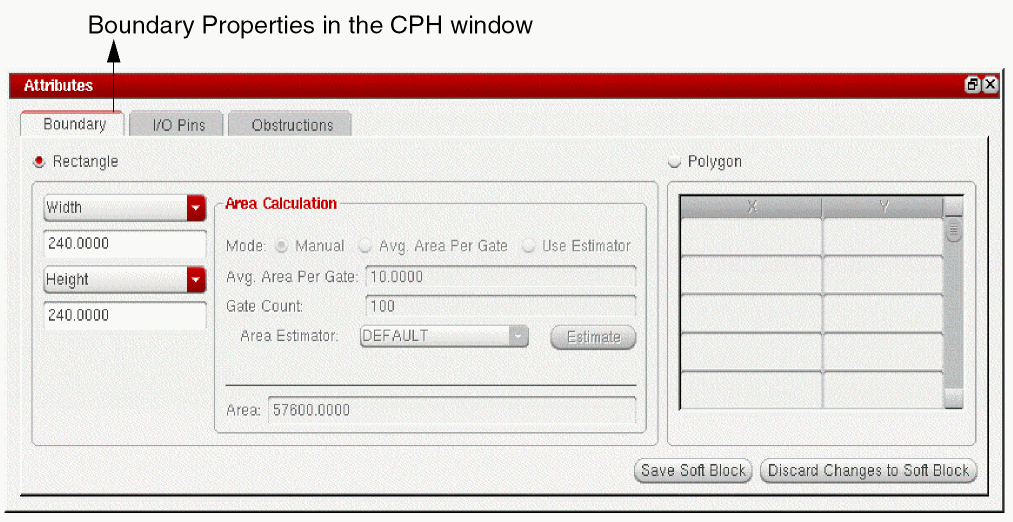
The boundary tab properties are defined to customize the PR boundary created in the layout. The boundary tab properties are defined in the Boundary tab of the CPH window.
The following table lists the boundary properties, their GUI equivalents, and descriptions.
|
GUI Option
|
Property Name
|
Description
|
|
Rectangular or Polygon
|
boundaryPolyType
|
Specifies the type of boundary to be created, either rectangular or polygon.
|
|
Height, Width, Area Utilization, and Aspect ratio
|
cyclic1, cyclic2
|
Specifies the area calculation mode. Each option has a value associated with it, which ranges from 1 to 4, where 1 represents area utilization, 2 is for aspect ratio, 3 for width, and 4 is for height.
|
|
Value of boundary height in any cyclic field
|
boundaryHeight
|
Specifies the height of the PR boundary.
|
|
Value of boundary width in any cyclic field
|
boundaryWidth
|
Specifies the width of the PR boundary.
|
|
Value of area utilization in any cyclic field
|
areaUtil
|
Defines the value of area utilization. For example, if utilization is 25%, then accordingly it will calculate the PR boundary area.
|
|
Value of aspect ratio in any cyclic field
|
aspRatio
|
This is the ratio of width and height values. For example, if aspect ratio is 2, then Width = 2*Height.
|
|
Mode
|
areaMode
|
Describes the area calculation mode, whether Manual, Avg Area Per Gate, or Use Estimator. By default, the area mode is selected as Manual. This is populated in the Boundary tab of the CPH window.
|
|
Area
|
area
|
Provides the fixed value of the PR boundary area.
|
|
Gate Count
|
gatecount
|
Specifies the number of gates. This is in unison with Avg Area Per Gate and is mainly used in digital designs.
|
|
Avg. Area Per Gate
|
avgAreaPerGate
|
Specifies the value for gate area. This is in unison with gate count and is mainly used in digital designs.
|
|
Area Estimator
|
areaCallBack
|
The name of the area estimator function used to calculate the PR boundary.
|
|
X and Y coordinate columns
|
polygonList
|
The list of points defining a polygonal PR boundary. This is populated in the Boundary tab of the CPH window.
|
Related Topics
Master Properties in Floorplan Property File
Terminal Properties in Floorplan Property File
Halo Properties in Floorplan Property File
Return to top