
Placing a Pin on a Lower-level Instance Terminal
To place a pin directly onto its corresponding instance terminal at a lower level of the design hierarchy:
-
From the layout window menu bar, choose Floorplan – Pin Planner.
The Pin Placement form is displayed. - Select the pin from the pin table.
-
Choose Level-1 pin from the Edge drop-down list.
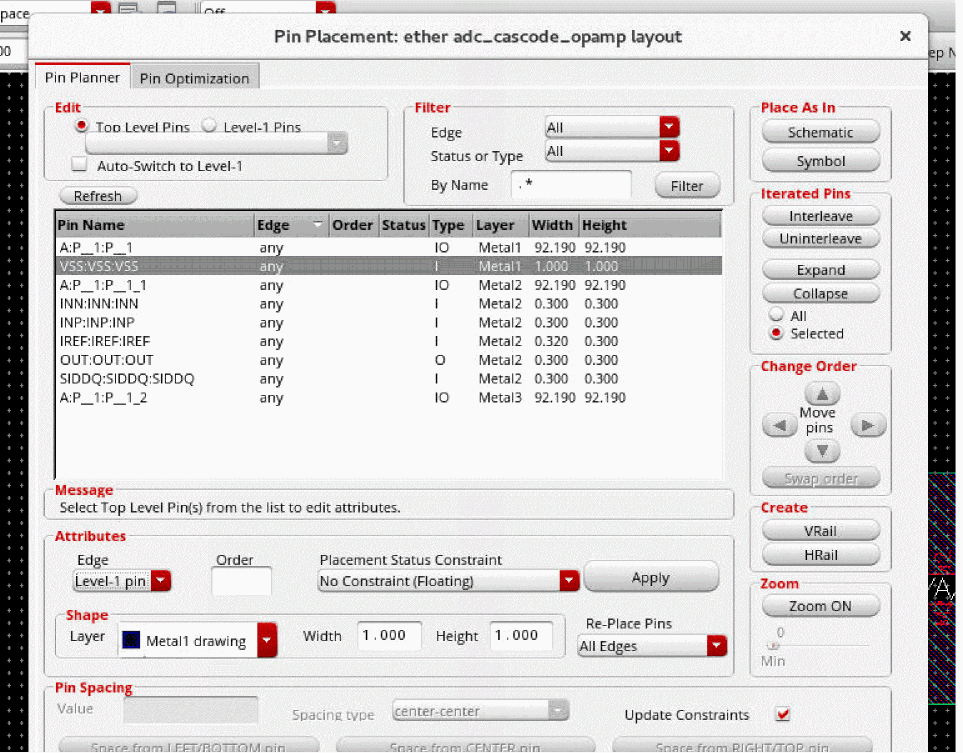
- Choose No Constraint (Floating) from the Placement Status Constraint drop-down list.
- Click Apply. The pin you selected is placed over its corresponding instance terminal in the layout window.
The Connectivity column in the pin table annotates whether pins are connected to buried pins or multiple hard block pins. Pins are re-layered and re-sized automatically. Pin labels are updated if the environment variable is set to t.
Related Topics
Planning Placement of Top-Level and Level-1 Pins
Return to top