
4
CDBA Representation of Elements
This chapter covers the spacial and geometrical elements of a display, and the C functions used to implement them.
For more information, see the following topics:
- Database Units and User Units
- Coordinates
- Points
- Bounding Boxes
- Angles
- Shape Transformation
- Distance, Direction, and Time
Database Units and User Units
A database unit is the smallest unit of spatial resolution that can be represented in the database. To be more efficient, all coordinates in the database are stored as 32-bit integers in database units.
A user unit, on the other hand, is the physical unit of interest to you and is typically equivalent to many database units. The typical user unit for IC layout is one micron. The typical user unit for schematic entry is either one inch or one centimeter, depending on the standard used. Measurements made in user units are usually expressed as floating-point numbers.
Scale Factors
Within each application area, such as layout or schematics, use the same scale factor (database units per user unit) throughout your design.
- The typical scale factor used in IC layout is 100–1000 database units per micron.
- The typical scale factor used in schematic entry is 160 database units per inch (division into 1/16 of an inch) or 100 database units per centimeter.
You must make any conversions between database and user units. Because CDBA handles only database units, the scale factor used at the root of a design hierarchy applies by default to the rest of the hierarchy.
User Unit Type Attributes
Each cellview has two user unit type attributes:
-
DBUPerUU
Stores the number of database units (DBU) per user unit (UU) that was used when the cellview was created. For example, IC layout frequently uses 1000 database units per micron. -
userUnits
Stores the name of the unit being used as a string. The most commonly used units are metric (microns) and English (mils). The following table summarizes the choices available.
User unit Number per inch Per centimeter Per millimeter Although these values are accessible to you, NEVER use the values obtained from these functions to perform your own conversions between database units and user units. Do ALL unit conversions using one of the many conversion functions supplied by the User Interface Manager Human Interface (HI) functions to ensure consistency in converting values back and forth. See the Cadence User Interface SKILL Reference for more information.
Most Cadence® software requires cellviews of the same type (for example, schematic) in a design hierarchy to have the same value of DBUPerUU. These attributes are normally initialized from the corresponding sdatemplate, and you are strongly advised against changing the value of either attribute in a cellview.
Functions for Database and User Unit Information
You can use the following functions to set and retrieve information about database and user units associated with a cellview.
dbGetCellViewDBUPerUU
double
dbGetCellViewDBUPerUU(
dbCellViewId cellViewId
);
Returns the database unit per user-unit attribute associated with the cellview. If the cellViewId does not exist, a message is printed before 0 is returned.
dbSetCellViewDBUPerUU
Boolean
dbSetCellViewDBUPerUU(
dbCellViewId cellViewId, float dbUnitsPerUserUnit
);
Sets the database unit per user-unit attribute on the cellview to the given value. If the cellViewId does not exist, a message is printed before FALSE is returned.
dbGetCellViewUserUnitName
String
dbGetCellViewUserUnitName(
dbCellViewId cellViewId
);
Returns the name of the user units used as a cellview string. If the cellViewId does not exist, a message is printed before dbcNullString is returned.
dbSetCellViewUserUnitName
Boolean
dbSetCellViewUserUnitName(
dbCellViewId cellViewId, String unitName
);
Sets the name of the user units used to the given name. If the cellViewId does not exist, a message is printed before FALSE is returned.
Functions to Convert between Database and User Units
The following routines perform part of the conversions between database and user units. They are called from the edit-to-user-unit conversion routines.
In rare circumstances in standalone applications, you might need these to transform coordinates that are not in the edit cellview. Check that you can call any of the functions documented instead of using these special functions. If the cellViewId does not exist or if any of the bounding boxes are not well-formed, a message is printed before returning.
dbDBToUserCoord
dbUserCoord
dbDBToUserCoord(
dbCellViewId cellViewId, dbCoord coord
);
Converts coordinates from database units to user units.
dbDBToUserPoint
dbUserPoint
dbDBToUserPoint(
dbCellViewId cellViewId, dbPoint point
);
Converts points from database units to user units.
dbDBToUserBBox
Boolean
dbDBToUserBBox(
dbCellViewId cellViewId, dbBBox pBBox, dbUserBBox pUserBBox
);/* modifies UserBBox */
Converts bounding box coordinates from database units to user units. Returns FALSE if any errors are detected.
dbUserToDBCoord
dbCoord
dbUserToDBCoord(
dbCellViewId cellViewId, dbUserCoord userCoord
);
Converts coordinates from user units to database coordinates.
dbUserToDBPoint
dbPoint
dbUserToDBPoint(
dbCellViewId cellViewId, dbUserPoint userPoint
);
Converts points from user units to database units.
dbUserToDBBBox
Boolean
dbUserToDBBBox(
dbCellViewId cellViewId, dbUserBBox pUserBBox, dbBBox pBBox
);/* modifies BBox */
Converts bounding box coordinates from user units to database units. Returns FALSE if any errors are detected.
Coordinates
All coordinates are in database units. A 32-bit integer represents the x or y coordinate in database units. The CDBA representation of a database coordinate is
typedef int dbCoord;
This representation indicates that dbCoord is defined as a 32-bit integer in CDBA, and CDBA allocates space and stores it on disk as the int data type.
Therefore, to prevent overflow and other calculation errors, restrict values to -228 to 228-1.
Points
A point is a structure containing the x and y point coordinates in a two dimensional space.
Points are so fundamental to geometrical operations that they are treated as primitive types, much like integers. Unlike other C structures used in CDBA, points are treated similarly to scalar values in function calls. Entire structures representing points are passed as function arguments and returned as function values. This greatly simplifies bookkeeping and memory allocation.
CDBA Representation of a Point
A point is represented as follows in CDBA:
struct dbPoint{
   dbCoord x, y;
};
typedef struct dbPoint dbPoint;
Point Arrays
The points in a point array specify the vertices of a complex shape. Indexes for point arrays are stored internally as unsigned short (that is, 16-bit) integers. A point array can contain a maximum of 65535 points. The following are functions for point arrays:
dbCopyPointArray
dbPoint *
dbCopyPointArray(
dbPoint pointArray, unsigned nPoints
);
Allocates an array of points with size specified by nPoints, then copies the entire pointArray to the newly allocated storage. It returns a pointer to the newly created point array.
dbFreePointArray
Boolean
dbFreePointArray(
dbPoint pointArray, unsigned nPoints
);
Frees the array of points pointed to by pointArray, which must be allocated by dbCopyPointArray.
Bounding Boxes
The bounding box of a geometrical shape is defined as the smallest completely enclosed rectangle with edges parallel to the x and y axes.
The data in the box must always be well formed. The x and y coordinates of the lower-left corner must have smaller values than the x and y coordinates of the upper-right corner. For calculating the width and height of a rectangle, both the lower-left and upper-right corners are included in the rectangle. A bounding box whose lower-left corner and upper-right corner are the same contains one point.
The database automatically computes and updates the bounding boxes whenever a shape is created, modified, or deleted.
CDBA Representation of a Bounding Box
A bounding box is represented by a structure containing two points specifying the lower-left and upper-right corners of the rectangle.
struct dbBBox{
   dbPoint, lowerLeft, upperRight;
};
typedef struct dbBBox dbBBox;
Functions and Macros for Bounding Boxes
The following macros and functions retrieve information in the database about coordinates for bounding boxes and modify coordinates for bounding boxes.
The first four macros (dbLeft, dbBottom, dbRight, and dbTop) are provided for accessing the four elements in a bounding box.
dbLeft
dbCoord
dbLeft(
dbBBox pBBox
);
Returns the x coordinate of the lower-left corner.
dbBottom
dbCoord
dbBottom(
dbBBox pBBox
);
Returns the y coordinate of the lower-left corner.
dbRight
dbCoord
dbRight(
dbBBox pBBox
);
Returns the x coordinate of the upper-right corner.
dbTop
dbCoord
dbTop(
dbBBox pBBox
);
Returns the y coordinate of the upper-right corner.
dbFillBBox
dbBBox *
dbFillBBox (
dbBBox pBBox, dbCoord x1, dbCoord y1, dbCoord x2, dbCoord y2
);
This macro provides a convenient template for filling in the contents of a bounding box. It lets you fill in a temporary BBox with x and y coordinates and pass the pointer to it as a function argument.
It fills the user-allocated bounding box BBox with the coordinates x1:y1 for the lower-left corner and x2:y2 for the upper-right corner. A pointer to the bounding box is returned for convenience. This macro is useful for filling in a temporary bounding box that can be passed as a function argument to functions such as dbCreateRect.
Example
dbBBox tempBBox;
dbCoord x1, x2, y1, y2;
dbCreateRect(cellViewId, layer, purpose,
dbFillBBox(&tempBBox, x1, y1, x2, y2) )
dbValidBBox
Boolean
dbValidBBox(
dbBBox pBBox
);
This macro returns TRUE if the bounding box is well-formed, which means
- The left edge is coincident with or to the left of the right edge, and
- The bottom edge is coincident with or below the top edge
dbFixBBox
void
dbFixBBox(
dbBBox pBBox
);/* modifies BBox */
This function swaps left and right or top and bottom of the bounding box to make a well-formed bounding box. Most functions that use bounding boxes require them to be well formed. For example, the function to compute the union of two bounding boxes does not work correctly if the left edge of the bounding box is to the right of the right edge.
dbCopyBBox
void
dbCopyBBox(
dbBBox pSrcBBox, dbBBox pDstBBox
);
/* modifies DstBBox */
dbBBoxIntersect
Boolean
dbBBoxIntersect(
dbBBox pBBox1, dbBBox pBBox2
);
Determines whether two bounding boxes intersect. Returns TRUE if the two bounding boxes intersect. If the bounding boxes abut, they are considered to be intersecting.
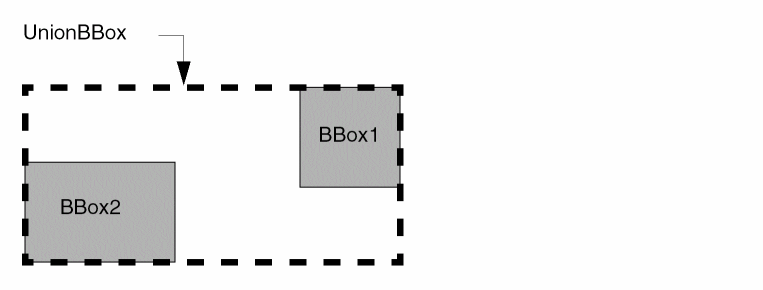
dbUnionBBox
void
dbUnionBBox(
dbBBox pUnionBBox, dbBBox pBBox1, dbBBox pBBox2
);
Computes the smallest bounding box that contains both BBox1 and BBox2. The union bounding box is stored in UnionBBox.
dbUnionBBox2
void
dbUnionBBox2(
dbBBox pUnionBBox, dbBBox pBBox2
);
Computes the smallest bounding box that contains both UnionBBox and BBox2. The union bounding box is stored in UnionBBox.
dbIntersectBBox
void
dbIntersectBBox(
dbBBox pIntersectBBox, dbBBox pBBox1, dbBBox pBBox2
);
Computes the largest bounding box that contains the common area of both BBox1 and BBox2. The intersection bounding box is stored in IntersectBBox.
dbIntersectBBox2
void
dbIntersectBBox2(
dbBBox pIntersectBBox, dbBBox pBBox2
);
Computes the largest bounding box that contains the common area of both IntersectBBox and BBox2. The intersection bounding box is stored in IntersectBBox.
User-Defined Coordinates for Bounding Boxes
The data structures for user-defined coordinates for bounding boxes are similar to the corresponding data structures that store database coordinates for bounding boxes as shown in “CDBA Representation of a Bounding Box”.
typedef double dbUserCoord;
struct dbUserPoint {
    dbUserCoord         x, y;
};
typedef struct dbUserPoint dbUserPoint;
struct dbUserBBox {
    dbUserPoint         LowerLeft, upperRight;
};
typedef struct dbUserBBox dbUserBBox;
Functions and Macros for User Coordinates
The following functions and macros retrieve user-defined information about coordinates of bounding boxes and modify coordinates of bounding boxes.
dbUserLeft
dbUserCoord
dbUserLeft(
dbUserBBox pUserBBox
);
Returns the x coordinate of the left edge of the bounding box.
dbUserBottom
dbUserCoord
dbUserBottom(
dbUserBBox pUserBBox
);
Returns the y coordinate of the bottom edge of the bounding box.
dbUserRight
dbUserCoord
dbUserRight(
dbUserBBox pUserBBox
);
Returns the x coordinate of the right edge of the bounding box.
dbUserTop
dbUserCoord
dbUserTop(
dbUserBBox pUserBBox
);
Returns the y coordinate of the top edge of the bounding box.
dbFillUserBBox
dbUserBBox *
dbFillUserBBox(
dbUserBBox pUserBBox, dbUserCoord x1, dbUserCoord y1, dbUserCoord x2, dbUserCoord y2
);
This macro provides a convenient template for filling in the contents of a bounding box. It fills the user-allocated bounding box, UserBBox, with the coordinates x1:y1 for the lower-left corner and x2:y2 for the upper-right corner. If necessary, it swaps coordinates to make a well-formed bounding box. A pointer to the bounding box is returned for convenience. This macro is useful for filling in a temporary bounding box so it can be passed as an argument to various functions.
dbFixUserBBox
void
dbFixUserBBox(
dbUserBBox pUserBBox
);/* modifies UserBBox */
This function swaps the coordinates, if necessary, to make the data within the box well-formed (with the lower-left corner below and to the left of the upper-right corner).
Angles
All angles in CDBA are specified in radians and measured counterclockwise from the x axis. Radians are used, rather than the more familiar degrees, to be consistent with the trigonometric functions defined in the mathematical library of the C language.
Because of the limited precision inherent in floating-point arithmetic, never test for strict equality between angles, which are represented as floating-point numbers. Use appropriate “fudge” factors when making comparisons between floating-point numbers.
CDBA Representation of an Angle
The following is a type definition for angle (in radians):
typedef double dbAngle;
Functions to Convert between Degrees and Radians
For convenience, two macros are provided to convert between degrees and radians:
dbDegreeToRadian
dbAngle
dbDegreeToRadian(
double angleInDegrees
);
Converts the measurement of an angle from degrees to radians.
dbRadianToDegree
double
dbRadianToDegree(
dbAngle angleInRadians
);
Converts the measurement of an angle from radians to degrees.
Shape Transformation
To transform shapes, use an orientation (angle and mirroring information), an offset in the x and y directions, and a magnification. This information is encapsulated in the dbTransform structure, which is treated like a scalar in argument passing.
CDBA Representation of Shape Transformation
struct dbTransform{ dbOrient orient, dbPoint offset, float mag, };
typedef struct dbTransform dbTransform;
The constant dbcIdentTransform represents the identity transformation. The variable dbvIdentTransform is a variable initialized to the identity transformation.
Functions to Transform Shapes
Use the following functions to transform shapes and perform additional operations on the transformations.
dbInvertTransform
dbTransform
dbInvertTransform(
dbTransform transform
);
Inverts the transformation on transform, and returns the inverted transformation as the value of the function.
dbConcatTransform
dbTransform
dbConcatTransform(
dbTransform trans1, dbTransform trans2
);
Concatenates the second transformation onto the first transformation and returns it as the value of the function. This process is a matrix multiplication that applies transform1 and then transform2. A message is printed if arithmetic overflow is detected.
dbTransformPoint
dbPoint
dbTransformPoint(
dbPoint point, dbTransform transform
);
Transforms the point passed in and returns the new point. A message is printed if there is arithmetic overflow.
dbTransformPointArray
void
dbTransformPointArray(
dbTransform transform, dbPoint pBefore, dbPoint pAfter, int nPoints
);
Transforms the point array passed in and returns the new point array referred to by pAfter. The argument nPoints specifies the number of points in the array.
dbTransformBBox
Boolean
dbTransformBBox(
dbBBox pOldBBox, dbTransform transform, dbBBox pNewBBox
);/* modifies NewBBox */
Transforms a bounding box. Always returns TRUE.
dbTransformFigRec
Boolean
dbTransformFigRec(
dbFigRec pFigRec, dbTransform transform
);
Transforms the figure record pointed by pFigRec. Returns FALSE if the transformation of an unsupported figure type is attempted.
dbTransformAccessDirection is documented in “Pins”.
Distance, Direction, and Time
The dbDistance type, which is declared as an unsigned int, measures scalar distances between objects in the database.
The dbDirection enumeration describes the direction to search for an object from a reference bounding box. A dbDirection can take one of the values dbcTop, dbcBottom, dbcLeft, or dbcRight. dbDirection is used by various neighbor routines, such as dbGetNeighbor and dbGenNeighbor.
The dbTime type is declared as time_t, which is the C language type representing time.
dbConvertTimeString
dbTime
dbConvertTimeString(
String timeString
);
Converts timeString to a dbTime type variable.
dbGetCreateTime
time_t
dbGetCreateTime( dbCellViewId cellViewId
);
Returns the time at which the design was created.
Return to top