
5
CDBA Design Management Functions
The following is required to manage a design:
- Design Data Management System
- Design Library
- Library List
- Library List Generator Functions
- Data Organization
- Object Information Retrieval Functions
- File Location for Reading and Writing
- Synchronization and Access Protection
- File Checkout and Checkin
Design Data Management System
The design data management system has the following objectives:
- Access a design file through logical names
- Provide version control over design data
- Define and reassign a new working context
- Provide hooks for application programs
- Keep track of design evolutions
Some of the functions that appear to be provided by CDBA system calls are provided by a data management system called the Design Data Procedural Interface (DDPI). The DDPI handles the low-level manipulation of the libraries, cells, and views. The DDPI also presents a common programming interface for calling the cdmcheckin and cdmcheckout programs, which can handle multiple design management systems.
The procedural interface (PI) is made up of sets of functions. Many of these functions need to handle objects differently, depending on the object's type and location. To facilitate these differing needs, whenever a PI function locates an object, it returns a ddId, which other PI functions can use to identify the type and location of the corresponding object.
ddIds are unique within the lifetime of the process in which they are issued and are local to that process. They must not be stored in files or databases and are not valid after the process dies. This chapter describes the library procedures available under the DDPI. Higher-level tools can be built on top of these procedures.
Design Library
A design library is a collection of cells, cellviews, and data files under a particular cell and cellview, and of different versions of the data files. It provides a logical view of the design data for the design data management system. The data file locations are transparent to the user. For information about
A design library is organized into four levels. The following illustration shows these levels, and the types of directories and files they contain.
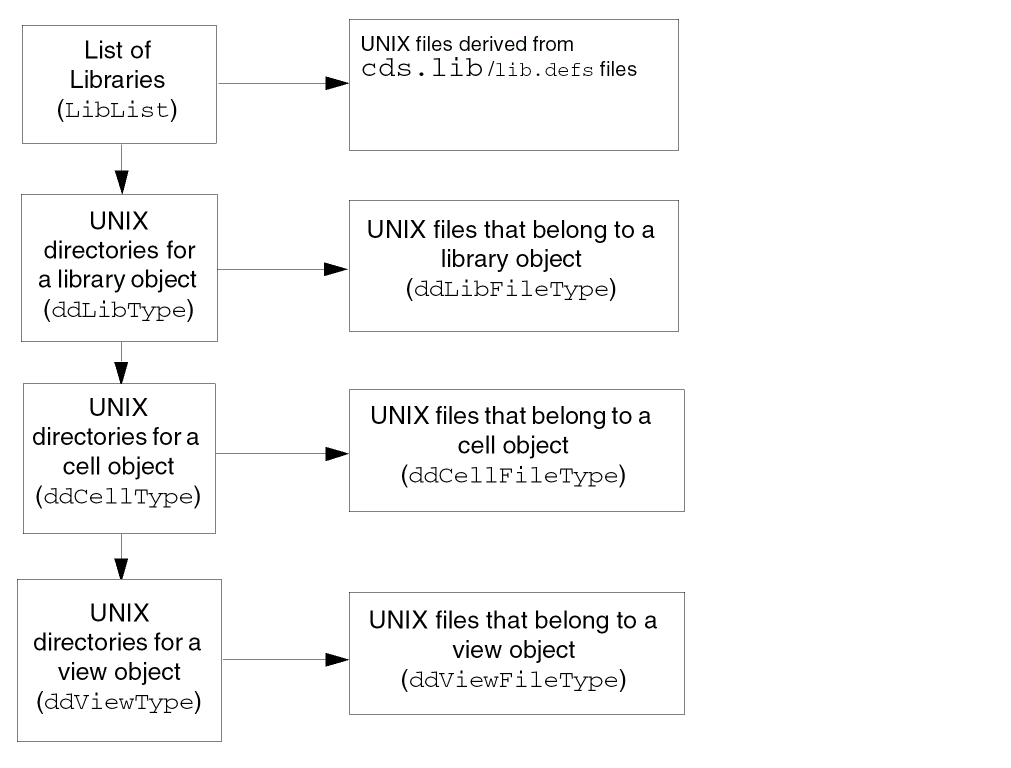
Startup File Locator
The following function returns the path to the startup file (such as the cds.lib file) you specify. The contextId should be NULL for ITKDB users.
String
ddGetStartup(
String fileName, ddId contextId
);
Specify the search path for startup files in the setup.loc file, in either
$CDS_SITE/cdssetup/setup.loc
your_install_dir/share/cdssetup/setup.loc
Because the path returned is a pointer to a static character buffer, copy this path before you make additional calls to ddGetStartup.
Library List
Tools locate the files they need to access by looking in several standard places. Most tools have data search-path functions that enable users to look at a list of places. A library list indicates the search paths for files.
Functions to Generate the Library List
The DDPI supplies the functions ddStartGenLibList, ddGenLibList, and ddStopGen to generate and examine the library list.
Function to Identify a 5x Library
The DDPI supplies the function ddLibIs5X to determine whether the library was created as a 5X library.
cds.lib and lib.defs Files
For information about lib.defs keyword and syntax, DDPI and library manager support for lib.defs and cds.lib files, see
Currently, ITKDB does not allow its users to dynamically edit the cds.lib or lib.defs when running their ITKDB-based tools. Also, it does not allow its users to use the chdir function in their code.
Library List Generator Functions
You can use a library list generator to obtain the list of libraries in virtual memory (VM). The following generator functions work together to find the libraries in a library list.
ddStartGenLibListLib
ddLibListGenState *
ddStartGenLibListLib(
);
Initializes a library list (LibList) library generator.
ddGenLibListLib
ddId
ddGenLibListLib(
ddLibListGenState *pState
);
Finds the next library in the library list given a library list generator. Returns NULL when it finishes.
ddStopGen
void
ddStopGen(
voidstar a
);
Releases the space occupied by the generator pointed to by the parameter a. Function to identify a 5X library
Function to Identify a 5X Library
The following function determines whether a library is a 5X compatible library.
ddLibIs5X
Boolean
ddLibIs5X(
ddId libId
);
OpenAccess supports different types of design management systems using plug-ins. DFII on OpenAccess supports only the FileSys plug-in which provides backwards compatibility with the 5X library structure. This function determines whether a library was created with the 5X library structure.
Returns TRUE if the library was created as a 5X library. Returns False otherwise.
Data Organization
Many tools have the following model for organizing data:
- A library contains collections of module-specific data called cells.
- Cells contain design-specific collections of data called views.
- Views contain files (cellviews).
The following table shows the design data (DD) ID types of the objects that correspond to the libraries, cells, views, and the files contained in them.
| Object | DD ID type |
|---|---|
Object Information Retrieval Functions
The following functions retrieve information about objects.
ddIsId
Boolean
ddIsId(
ddId id
);
Returns TRUE if the parameter id is a 32-bit opaque ID known to the PI, and returns FALSE otherwise.
ddGetObjName
String
ddGetObjName(
ddId obj
);
Returns the name of the object.
ddDeleteObj
Boolean
ddDeleteObj(
ddId obj
);
Deletes the object and removes it from use. Depending on the design management integration, the object may simply be removed from the next release of the project yet remain in the repository, or the object may be completely removed along with its history.
If the underlying design management system is designSync, the design manager removes the object from the next release of the project, but the object remains in the repository. However, if the underlying design management system is versionSync, the design manager deletes the object from the repository, as both the file and its entire history are removed.
If you delete a directory object, ddDeleteObj tries to get an exclusive lock, in non-blocking mode, on every data file in the hierarchy under that directory. If it fails to get any lock, it detects that another process is using that file. It therefore cannot delete the object, and it returns FALSE without deleting anything.
If obj is a library, this function deletes the library directory from the disk and removes the library entry from the cds.lib file. If the library has been defined in more than one cds.lib, ddDeleteObj does not delete the library from the disk; instead, it adds an UNDEFINE statement for the library to the appropriate cds.lib file.
If obj is of any other type, ddDeleteObj removes the object from disk from the master directory.
ddGetObj
ddId
ddGetObj(
String libName,
String cellName,
String viewName,
String fileName,
ddId contextId,
String mode
);
Description
Finds libraries, cells, views, and files, and creates cells, views, and files. The simplest usage is to find a library by name:
library = ddGetObj("libName", NULL, NULL, NULL, NULL, "r")
dbOpenCellViewByType. Do not use ddGetObj. The dbOpenCellViewByType function calls ddGetObj for you.
DDPI uses the following concepts to define the behavior of ddGetObj:
-
A master file is a file that the writing application looks to for source data or data that cannot be recreated without user input. There can be only one master file per view. The master file might be identified by the file belonging to the view named
master.tagcontaining the name of the master file. - A co-master file is a file that the writing application looks to for source data or data that cannot be recreated without user input but is useless without the master. Examples in include an index for the master file; sheets of a multi-sheet schematic, where the index is the master; or separation of graphics and property data into separate files.
-
If a file is not a master or a co-master, it is a
derivedfile. Derived files can be recreated from master files, or master and co-master files, in the same view. Only the creating tool can distinguish between masters or co-masters and derived files.
To access a derived file correctly, the tool must specify thecontextIdfor the master. If writing or appending to the file, use thedmodifier in the mode parameter. -
The
relative namefor a file is specified relative to a library. Files can belong to the library, cell, or view. The name consists of
[/cellName[/viewName]]/fileName
TheddGetObjfunction searches for the object under your specified library in thecds.libfiles until it finds the first occurrence of the “relative named” object. If you requested read access, the function is done and returns anid. It returns an error if the tool does not have read access to that object.
If you request any other access mode,ddGetObjfirst searches for the object as it does in read mode, then returns a value according to whether or not the file exists.
ddGetObj takes string names instead of ddIds as the input for its query because you use it to locate objects when you do not yet have their ddIds. You can supply a context object instead of specifying some of the names. DDPI takes the missing names from the context object for the query.
Arguments
contextId is specified, the fields with an asterisk (*) do not need to be specified, and the libName must not be specified. ddGetObjLib
ddId
ddGetObjLib(
ddId obj
);
Finds the ID of the library path object that contains it when given any ddId. If the object is a library, it returns the same ID.
ddGetObjType
ddType
ddGetObjType(
ddId obj
);
Returns the ddType of the object when given the ddId of an object.
ddGetTypeName
String
ddGetTypeName(
ddType type
);
Returns a string that contains the name of the value, when given an enum of type ddType. This name must be copied before the next call to ddGetTypeName because DDPI allocates it in a static buffer.
ddGetMasterSet
ddGetMasterSet(
g_viewId
);
Description
Returns the list of files in the Master Set (if defined) for the given viewId or returns nil. The Master Set is a subset of the Co-Managed Set composed of master data.
Arguments
Value Returned
Example
viewId=ddGetObj("mylib" "mycell" "layout" "layout.oa" nil "w")
masterSet=ddGetMasterSet(viewId)
("layout.oa" "master.tag")
ddStartGenObjRel
ddObjRelState*
ddStartGenObjRel(
ddId obj, ddObjRelType relType
);
Initializes a generator to get the list of
The obj parameter specifies the parent object, and the relType parameter specifies whether you want the list of child objects or of files. Returns NULL if there are no objects with the specified relationship.
If an object gets created while the generator is active, it is not made visible until the next call to ddStartGenObjRel. If an object is deleted after the generator is started but before you access the object, you might get an “object does not exist” warning when you access it. The ddStartGenObjRel function does not get you any object locks.
ddGenObjRel
ddId
ddGenObjRel(
ddObjRelState* pGen
);
Returns the next entry in the list of files each time you call ddGenObjRel in the generator state specified by pGen. When the list is exhausted, it returns NULL.
ddStopGen
void
ddStopGen(
voidstar a
);
Releases the space occupied by the generator pointed to by the parameter a. This function works with all DDPI generators.
File Location for Reading and Writing
The following functions enable a tool to read from or write to files when it needs to.
ddGetObjReadPath
String
ddGetObjReadPath(
ddId obj
);
Returns the read path to the object when given the ddId for the obj. Because the path that DDPI returns is not persistent, copy it before making any other dd or db calls.
ddGetObjWritePath
String
ddGetObjWritePath(
ddId, obj
);
Returns the write path to the object when given the ddId for obj. Because the path that DDPI returns is not persistent, copy it before making any other dd or db calls.
Synchronization and Access Protection
As workbenches become collections of cooperating tools, the need increases for tools to synchronize their access to files. As Cadence® design framework II design manager goes away, DDPI provides similar file-access synchronization services using this procedural interface.
The following two mechanisms are needed to support cooperative work:
- Access protection so only appropriate files can be accessed (using UNIX mechanisms)
-
Long transactions based on
checkinandcheckout
Multiple users concurrently employing tools need long transactions supplied by a design management system. Checkin and checkout behavior is optional. The procedural interface does nothing unless the data is managed by a design management system.
File Checkout and Checkin
The following functions work together to check files out and back in.
ddNeedCheckout
Boolean
ddNeedCheckout(
ddId file
);
Returns TRUE if the file (given a ddId for a file object) is a DM-managed object that needs to be checked out. Returns FALSE if the library is not DM managed or if the file does not need to be checked out.
ddNeedCheckout exists only so tools that need to provide automatic checkout behavior can determine if they need to call the ddCheckout and ddCheckin functions. An example follows:
/* Suppose you want to update a file that belongs to a library */
ddId fileId = ddGetObj(NULL, NULL, NULL, fileName, libId, "w");

/* NOTE ddGetObj() only returned the id, it didnot open anything
* so it didnot find that the file was not writable.
*/
if(ddNeedCheckout(fileId)){  /* See if it needs checkout */
   ddId fileList[2];
   fileList[0] = fileId;
   fileList[1] = 0;
   void) ddCheckout(fileList,"");    /* Check it out */
}
ddCheckout
Boolean
ddCheckout(
ddId* files, String switches
);
Builds a system command that calls the cdmcheckout command. The cdmcheckout command makes it possible to integrate Cadence tools with Revision Control System (RCS) and other version control applications. The files parameter is a NULL-terminated array of ddIds.
The switches allowable are r and v
|
Specifies a particular version of a file to be checked out. You must always follow this switch with the version of the file you are checking out. |
ddCheckin
Boolean
ddCheckin(
ddId* files, String description, String switches
);
Builds a system command that invokes the cdmcheckin command. cdmcheckin makes it possible to integrate Cadence tools with Revision Control System (RCS) and other version control applications. The files parameter is a NULL-terminated array of ddIds. The switches allowable are c and f
Return to top