
Renaming a Reference Library
You can change the reference library for instances in your design library. For example, if your design library, newLib, contains via cells from the reference library basic, you can change the reference library from the basic library to the analogLib library so that the via cells, and any other cells in your design library that reference the basic library, now reference the analogLib library. This assumes that the analogLib library contains a via cell.
To change a reference library for a design library:
- Select the library that contains references you want to rename.
-
Choose Edit – Rename Reference Library.
The Rename Reference Library form appears.
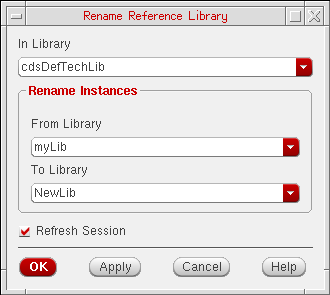
- In the In Library drop-down list, select or type the name of the design library that uses a reference library whose name you want to change.In the From Library drop-down list, select or type the name of the current reference library.
- In the To Library drop-down list, select or type the name of the new reference library.
- Click OK to save the changes and close the Rename Reference Library form.
The system changes the name of the current reference library to the name of the new reference library for all instances in the specified design library.
If you cannot rename the reference library, it might be for one of the following reasons:
- An input parameter is invalid.
- The system cannot automatically open the design library for writing.
- You cannot get access permission to the design library.
Related Topics
Viewing and Changing File Permissions
Return to top