
The licensing components interact in the following ways:
- The license file functions as the communication medium for all parts of Cadence licensing software:
- The license server must have a license file to determine which licenses to serve.
- The application must determine which license server to contact for licenses. It does so by
- Using its own copy of the license file or
- Sharing the license file used by the license server via port@host
- The licensing utilities must have the license file to determine which license servers to contact for administrative actions.
The License Server and the License File
License servers use the license file to determine which daemon to contact to serve the requested licenses. License servers provide licenses to any workstation that contacts them. Here are some reasons why a license may not be available:
- Unmatched host ID for a node-locked license
In this case, the license server still serves the license, but only the computer that has the matching host ID can check out the license. Usually, the application client and the license server are different computers, but they can be the same computer.
- An options file is restricting access
Cadence Products and the License File
Cadence products use the license files to determine which licenses they can check out from which license servers. A single application process (binary) can check out licenses from more than one license server. The benefit of using multiple license servers is for improved reliability. For example,
- If one server goes down, all applications committed to that server automatically reconnect to the other servers.
- If one license server is not available, the application can get a license from another license server.
Methods of Locating License Files
Every Cadence product must be able to access a Cadence license file using one of the methods below. Cadence recommends using the clients file.
|
Method |
Description |
|
clients file |
Specifies license files for application clients. |
|
Environment variables |
Specifies one or more license files.
You can set the CDS_LIC_ONLY environment variable to ignore the LM_LICENSE_FILE variable setting. By setting the CDS_LIC_ONLY environment variable, SoftShare will only look for the setting of the CDS_LIC_FILE environmental variable, the <install_dir>/share/license/clients file, and the <install_dir>/share/license/license.dat file. On Unix: setenv CDS_LIC_ONLY 1 On NT: set CDS_LIC_ONLY=1 |
With the clients File
The clients file lists the license files that application clients can access. Cadence products search the clients file for the appropriate entries and then contact the specified license server for licenses. Cadence products request licenses for an application client from the first license server available to that application client listed in the clients file.
The format of the clients file specifies the path to the license file on a host basis:
hostname license_file
where hostname is either the name of the workstation or an asterisk (*) to indicate all workstations, and license_file is the path to the license file. You can also specify the port@host format instead of the path to the license file.
In the following example, the first line specifies that any application running on the host sunny should look for its license file in /usr/local/ULMlicense.dat. The second line specifies that all workstations (as denoted by the asterisk) should look for their license file in /net/major_server/usr/local/allhosts.license.
sunny /usr/local/ULMlicense.dat
* /net/major_server/usr/local/allhosts.license
The computer sunny looks in both paths for the license file, but other application clients look only on major_server.
Using the port@host format, if the license server specified in the ULMlicese.dat is cloudy, the license server specified in /net/major_server/usr/local/allhosts.license is windy, and the port number is 5280, the clients file would look like this:
sunny 5280@cloudy
sunny 5280@windy
You can also use a clients file to prioritize the search for licenses. In the following example, the application client sunlight searches for licenses from license.00012345 before attempting to access licenses from license servers specified in license.54321000. The application client sunrise searches for licenses in the same manner as sunlight. The application client sundown checks only license.00012345 and cannot access features licensed by the second license file.
sundown /usr1/cds/share/license/license.00012345
sunlight /usr1/cds/share/license/license.00012345
sunlight /usr1/cds/share/license/license.54321000
sunrise /usr1/cds/share/license/license.00012345
Using the port@host format, if the license server specified in /usr1/cds/share/license/license.00012345 is breezy and the port number is 5280, the clients file would look like this:
sundown 5280@breezy
sunlight 5280@breezy
sunlight path
sunrise 5280@breezy
sunrise path
Each application file server should have only one clients file.
A license server needs a clients file only when it is also a Cadence application file server.
With Environment Variables
Several environment variables affect where the Cadence products look for the license file.
|
Environment Variable |
Description |
|
CDS_LIC_FILE |
The path to the license file. Cadence products use this exclusive environment variable. |
|
LM_LICENSE_FILE |
The path to the license file. Other vendors can use this environment variable. If users are already using LM_LICENSE_FILE for non-Cadence software, setting it for the Cadence software can prevent their non-Cadence software from running correctly.
You can set the CDS_LIC_ONLY environment variable to ignore the LM_LICENSE_FILE variable setting. By setting the CDS_LIC_ONLY environment variable, SoftShare will only look for the setting of the CDS_LIC_FILE environmental variable, the <install_dir>/share/license/clients file, and the <install_dir>/share/license/license.dat file. On Unix: setenv CDS_LIC_ONLY 1 On NT: set CDS_LIC_ONLY=1
|
Set the environment variables as shown in this example for CDS_LIC_FILE
- UNIX colon (:) delimited list
setenv CDS_LIC_FILE port@host:pathA:pathB:pathC
An environment variable can specify either a single path or a delimiter-separated list of multiple license file paths to be searched sequentially.
Note: AFS lets you specify paths using an at sign (@). However, because the FlexNet software uses the @ to identify remote hosts in license file paths, AFS users cannot use @ in their license file paths. However, they can copy the license file to the local file server so that there is no @ in the name.
Where Applications Look for Licenses
The application must find the correct license-server location. This figure summarizes how Cadence products build a list of license-server locations.
If the first file encountered in the list is invalid, the application will not start.
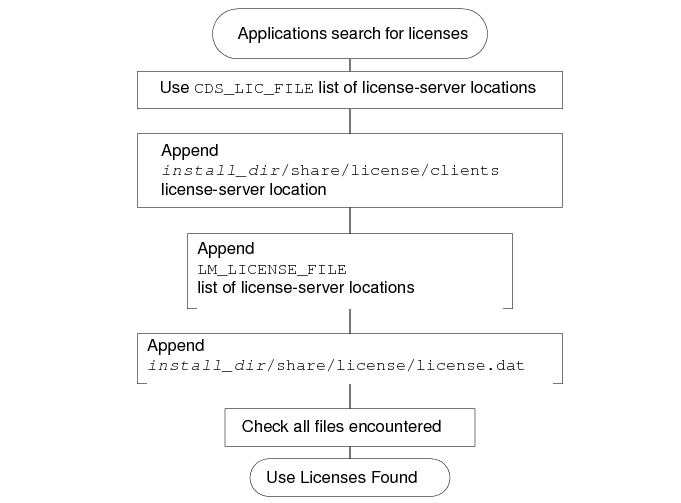
- The CDS_LIC_FILE setting, if already set, is the first server location, or set of server locations, on the list of license-server locations. Cadence applications use the exclusive environment variable. This environment variable is either a single path or a delimiter-separated list of multiple paths.
- (UNIX only) Cadence licensing software adds the license-server locations in the Cadence directories to the list of license-server locations.
Cadence licensing software locates the necessary files and directories.
- Cadence licensing software first locates cds_root and install_dir.
To locate cds_root, it is necessary to know about the directory from which the application started.
If the user started the application using a fully-specified path to the application's executable, the UNIX search path does not need to be searched.
If the user did not use a fully-specified path to the application's executable, the application looks at the user's UNIX search path to determine the full path to the application.
After the application discovers the full path to the executable, it incrementally searches upwards for an executable version of tools/bin/cds_root. If it finds cds_root (normally in a standard Cadence hierarchy), Cadence licensing software uses the result of running cds_root as the path to the Cadence software.
If the Cadence licensing software has still not found the executable or tools/bin/cds_root, the application uses the older strategy of searching the user's UNIX path for a tools/bin directory anywhere containing cds_root. For the first one found, it uses the path two levels above cds_root as the installation root (install_dir).
If Cadence licensing software cannot find a tools/bin directory, it searches the user's entire path a second time, this time looking for an executable cds_root anywhere. If the application finds cds_root, it assumes the installation root to be two levels above cds_root.
If Cadence licensing software cannot find install_dir, it defaults to the current directory.
- Cadence licensing software locates the share/license directory.
After Cadence licensing software locates install_dir, it expects a share/license subdirectory to reside below. This share/license directory should have a clients file that contains one or more lines to specify where applications should look for the appropriate license-server location.
With neither LM_LICENSE_FILE nor CDS_LIC_FILE set, the directory must contain either a clients or license.dat file, or applications cannot find a license-server location.
The default path uses the installation root and expects a install_dir/share/license/license.dat file.
The applications read all legitimate license-server locations to determine the list of available FEATUREs and the corresponding license servers.