In fault-tolerant licensing, each license server needs the Cadence licensing software and a copy of the same or equivalent license file and the optional clients and options files.
To set up fault-tolerant license servers, follow these steps:
- After installing and configuring the first license server, install the Cadence licensing software tools using Cadence installation software on the second and third license servers.
- Copy the licensing files to the second and third license servers.
- Copy the license file to the second and third license servers.
You must list the license servers in the same sequence in each license file. You need to edit the install_dir paths if install_dir is not the same path on each license server. - Copy the clients file (if used) to the second and third license servers.
rcp install_dir/share/license/clients \
server2:install_dir/share/license/clients - Edit the clients file on each license server if install_dir is not the same path on each license server
- Copy the options file (if used) to the second and third license servers.
- Start the license daemons on each license server
/etc/rc.lic
Users starting the license server daemons must have write permission to the debug log file.
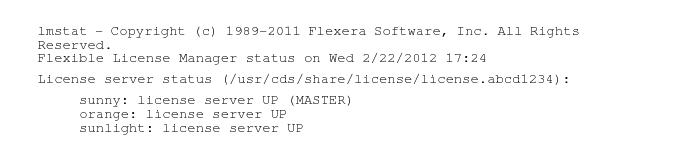
In fault-tolerant licensing, the master server maintains the license debug log file. The other servers do not output licensing transactions to their debug log files. You can use lmstat -a or -c to identify the master server.
You see messages similar to these: