
Preface
Spectre® Circuit Simulator Measurement Description Language (MDL) is a productivity-enhancing tool for simulation and data analysis. This user guide and reference describes MDL and explains how to make the best use of it.
This preface discusses the following:
What MDL Does
MDL is a scripting language that you can use to control the Spectre® circuit simulator and the Virtuoso® Visualization and Analysis tool. With MDL, you can
- Create measurement aliases that can be easily reused in different circuits. A measurement alias is a reusable, easily tailored procedure that includes a single analysis statement and a collection of one or more MDL expressions to be evaluated at runtime.
- Efficiently run simulations in batch mode.
- Parameterize measurement aliases, making them reusable over various applications.
-
Use the wild card (
\*) in the MDL control file for all signals mapping.
With these features, MDL allows you to verify circuits easily and with confidence.
The MDL Flow
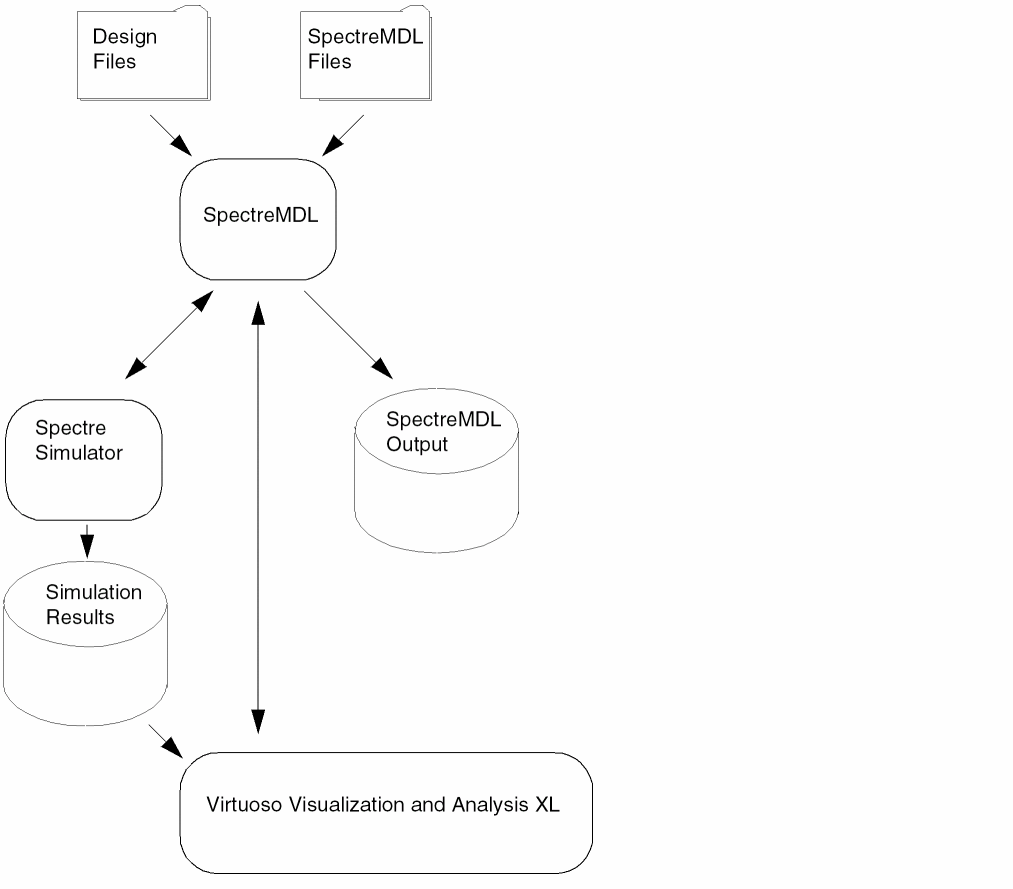
As illustrated by the following figure, MDL interacts with a variety of inputs, outputs, and tools. Inputs consist of design files and files containing measurement blocks. Outputs include sets of simulation results, the values returned by MDL expressions, and log files. Interacting tools include Spectre, which simulates the design, and Virtuoso® Visualization and Analysis tool, which you can use to plot and post-process the results of the simulation.
The MDL Language
Most of this document is devoted to describing the language used by the MDL tool. That language, like any language, has elements that must be used according to rules. You will find that although MDL is easily learned, the power it gives you to control simulations is great.
Related Documents
For information about related products, consult the sources listed below.
- Virtuoso® Analog Design Environment User Guide
- Cadence Analog Mixed-Signal Simulation Interface Option
- Spectre Circuit Simulator Reference
- Spectre Classic Simulator, Spectre APS, Spectre X, and Spectre XPS User Guide
Typographic and Syntax Conventions
Special typographical conventions distinguish certain kinds of text in this document. The formal syntax used in this reference uses the definition operator, ::= , to define the more complex elements of MDL in terms of less complex elements. However, for simplicity, the syntax for the user-compiled functions omits the definition operator.
-
Lowercase words represent syntactic categories. For example,
identifier
-
Boldface words represent elements of the syntax that must be used exactly as presented. Such items include keywords, operators, and punctuation marks. For example,
real
-
Variables are set in italic font,
allowed_errors -
Vertical bars indicate alternatives. You can choose to use any one of the items separated by the bars. For example,
termID ::=
     designID
 |   unsignedInteger
-
Square brackets enclose optional items. For example,
parameter_declaration_statement ::= [ input ] real
parameter[=expression] -
Braces enclose an item that can be repeated zero or more times. For example,
unsigned_num ::=
     decimal_digit { decimal_digit }
Code examples are set in constant-width font.
/* This is an example of the font used for code.*/
Keywords and filenames are set in constant-width font, like this: keyword, file_name.
Return to top