
Grid Placement In Modgens
Grid Placer is a back end placement engine for Modgen to generate DRC-correct array placement. Grid Placer places a set of instances according to their grid indexes into an array-like placement compacted to the minimum DRC and constraint-correct spacing. It also lets you specify the array size in terms of the number of rows and columns.
Grid Placer provides fast and flexible placement and supports the constraints between member instances, well merging, and complex guard ring creation.
The Grid Placer algorithm scales better for large Modgens than the current cell by cell placement implementation.
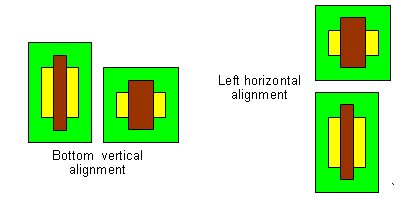
In Grid Placer, the Modgen's horizontal and vertical alignment member parameters are relative to a member's left or bottom neighbor. Therefore, setting a member's alignment to the left aligns its left edge with the left edge of the member below it. If the member is in the bottom row, vertical alignment had no effect, as shown in the following image:
Typically, Modgens are snapped to the manufacturing grid resolution as specified in the technology file when Generate From Source or Generate Selected From Source is used. You can also snap Modgen origins to the snap spacing specified by the modgenUseSnapSpacing environment variable in the .cdsinit file.
figGroup bbox. Snapping is with respect to the Modgen origin.Placement of Modgen Body Contacts on Grids
Grid Placer supports placement of Modgen body contacts on grids. Grid Placer does not create the body contact geometry, but only places the body contacts.
You can define the relative position, such as left, right, top, or bottom and spacing between the body contacts and member instance of the grid. It also incorporates the DRC between the body contact and neighbor grid geometry as a hard constraint.
The Grid Placer also supports automatic minimum DRC spacing based placement for a body contact. This minimum DRC spacing would be obtained from the process rules on the database object.
If there is a conflict between the DRC rules of neighbor member instances, the Grid Placer uses the maximum value as the DRC rule between the two instances.
Calculating DRC Rules
You can use the Process Rule Editor to query minimum spacing rules for a single or different layer to calculate the DRC rules between the neighboring grid objects.
For same layer, use the minSpacing constraint definition, while for different layers use minClearance.
While setting DRC rules between two devices, you must consider the maximum of the minSpacing or minClearance values obtained from the Process Rule Editor on each of the two devices.
Corner Case Conditions for Modgen Grid Placer
User-defined Modgen parameters can be categorized into parameters that define the overall Module and parameters that defines each grid.
The module-level input parameters include the number of rows or columns, guard rings, row routing spacing estimation, and constraints between grid objects.
The grid-level input parameters define each grid object and its neighbors. This includes, row/column index, alignment, custom spacing, abutment, body contact, well layer, and DRC rules.
A combination of both these input parameters can create conflicts.
Body Contact v/s Well Merge
Let’s consider a scenario of a possible conflict between body contact and well merge.
Scenario 1:
If the well-merge option is on, and the body contact has either the same well layer as the instance or no well layer in its geometry. Then, you enclose the body contact geometry with the well layer of the instance as shown in the image below.
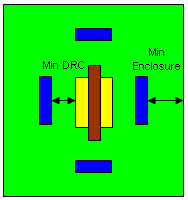
Min-enclosure process rules need to be maintained between the well layer and the body contact geometry. However, if the body contact has a different well layer than the instance, you do not enclose the body contact with the well geometry of the instance.
Scenario 2:
If the well-merge option is on, and two neighboring instances in the grid sharing a common body contact also share the same well layer, then the well layers of both instances are merged maintaining minimum enclosure and minimum DRC rules as shown in the image below.
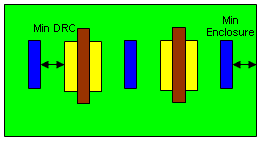
However, if the shared body contact happens to have a different well layer as the neighboring instances, well-merging would be disabled in this special case.
Related Topics
Return to top