
Creating a Modgen
A Modgen is a placeable object that combines multiple device instances, dummy instances, Modgens, figGroups, or mosaics. Modgens can be created from both, schematic and layout designs. There are several ways to create a Modgen:
- Using the Constraint Manager Toolbar
- Using the Place Menu
- Using Convert to Modgen
- Using SKILL Functions
Using the Constraint Manager Toolbar
- Select the required devices from the schematic or layout design.
-
Choose Module Generator from the Constraint Manager toolbar.
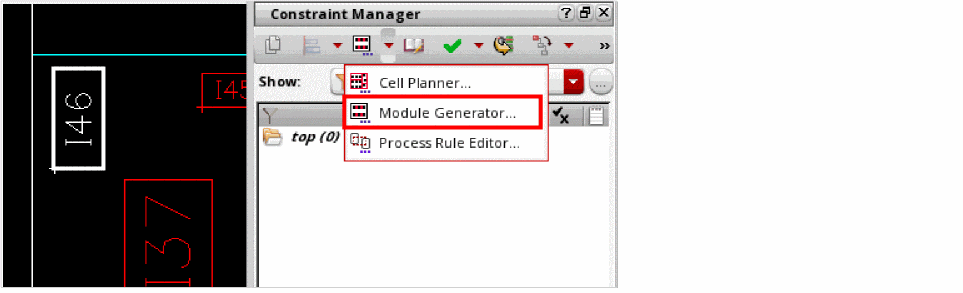
A new Modgen constraint is created and the Modgen Editor is invoked.
Using the Place Menu
- Select the instances, Modgens, figGroups, or mosaics from the schematic or layout design.
- Select Place—Modgen—Create/Edit Modgen.
A new Modgen constraint is created. However, the Modgen Editor is not invoked. Use the Modgen on-canvas commands to edit the Modgen directly in the layout canvas.
Using Convert to Modgen
A mosaic is a compact array of instances that belong to the same mfactored instance, and therefore have the same master and connectivity. You can convert a mosaic in the layout design to a Modgen. To do this:
- Select the mosaic to be converted into a Modgen.
- Select Edit—Convert—To Modgen. Alternatively, right-click the mosaic in the canvas and choose Convert to Modgen from the shortcut menu.
A new Modgen constraint is created. However, the Modgen Editor is not invoked. Use the Modgen on-canvas commands to edit the Modgen directly in the layout canvas.
Using SKILL Functions
Use one of the following SKILL Functions:
- ciConCreate: Creates the Modgen constraint.
- gpeCreateSandbox: Creates a Modgen sandbox object that includes the specified instances.
- mgCreateModgenAsLayout: Creates a Modgen from the list of selected instances and keeps the instance locations inside the Modgen, as close as possible to their original locations in the layout.
- mgCreateModgenConstraintAsLayout: Creates a Modgen constraint that uses the current layout to drive the initial Modgen constraint and row/column assignments.
Related Topics
Return to top