
Generating a Modgen Template File
To generate a Modgen template file:
-
Select the required Modgen constraint either in the layout canvas or in the Constraint Manager assistant.
If no Modgen constraint is selected, templates are extracted from all the Modgens in the active layout canvas. - Open the Reuse Template Exaction form using one of the following methods:
- Specify a Device Group. Template files are created under matching or specified group names. The default is Generic Group.
-
Specify a Pattern File name with the
.txtextension. This is the Modgen template file. - Click Apply to save the template file.
- Click OK.
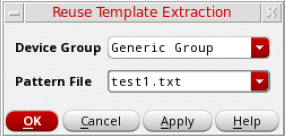
Constraint parameters from the source Modgen are stored in the template file.
Related Topics
Parameters of a Modgen Reuse Template File
Reusing a Modgen Template File
Return to top