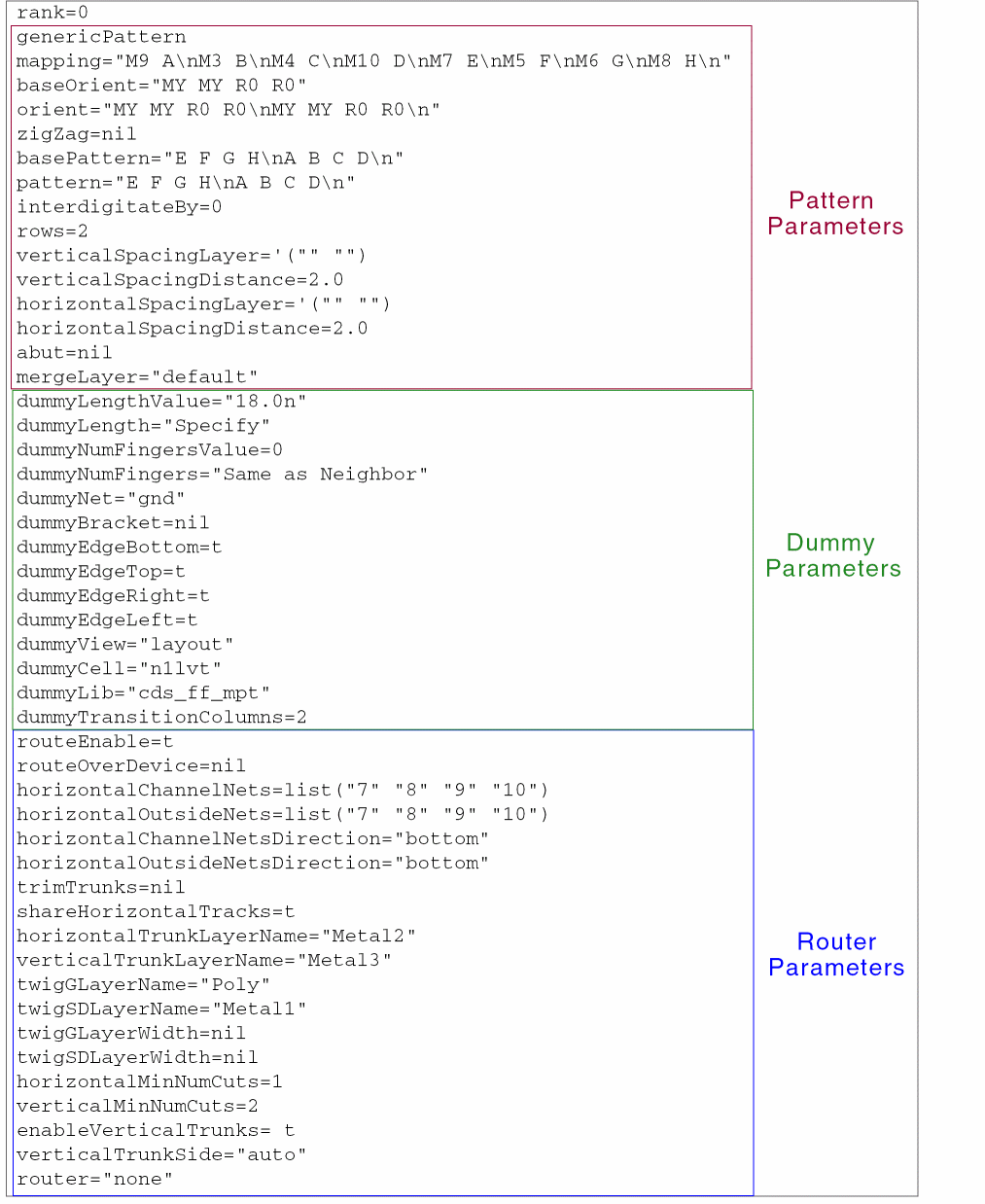
|
mapping
|
Specifies the mapping between devices and symbols. You can also define mapping for dummies.
Value: Pairs of strings t_source t_symbol
Example: "Dummy * S0 B S1 C\nS2 A"
|
|
baseOrient
|
Specifies the interdigitation pattern of Modgen instances in terms of their orientations.
Value: A list of one or more space-separated symbols from the set {"R0", "R90", "R180", "R270", "MX", "MY", "MXR90", "MyR90", "-"}. )
Example: "R270 R90\nMX MY"
|
|
orient
|
Specifies orientations of the Modgen instances.
Value: A list of one or more space-separated symbols from the set {"R0", "R90", "R180", "R270", "MX", "MY", "MXR90", "MyR90", "-"})
Example: "R0 R0 - - R0 R0"
|
|
basePattern
|
Specifies the interdigitation pattern of Modgen instances in terms of their symbols.
Value: String of one or more space-separated symbols t_pattern
Example: "B A * A B"
|
|
pattern
|
Specifies the pattern to place instances in a Modgen.
Value: String of one or more space-separated symbols t_pattern
Example: "- B A *\nA B -"
|
|
zigZag
|
Specifies whether a zigzag pattern is to be followed in the Modgen.
Value: Boolean
Example: t
|
|
interdigitateBy
|
Specifies the integer value based on which instances are interdigitated.
Value: integers zero or greater
Example: 0
|
|
rows
|
Specifies the number of rows in the Modgen array or sandbox.
Value: A positive integer x_rows
Example: 2
|
|
verticalSpacingLayer
|
Specifies the reference layer based on which the vertical spacing of devices must be calculated.
Value: A list of two strings t_layer t_purpose, the string all, or an empty string.
Example: M3 drawing
|
|
verticalSpacingDistance
|
Specifies the vertical spacing of devices in the Modgen.
Value: A number x_verticalSpacingDistance (in user units)or nil
Example: 3
|
|
horizontalSpacingLayer
|
Specifies the reference layer based on which the horizontal spacing of devices must be calculated.
Value: List of two strings in the format t_layer t_purpose, the string all, or an empty string.
Example: M3 drawing
|
|
horiztontalSpacingDistance
|
Specifies the horizontal spacing of devices in the Modgen.
Value: Either a number (in user units) x_horiztontalSpacingDistance or nil
Example: 3
|
|
abut
|
Specifies whether the Modgen instances are to be abutted. The tool attempts to abut all array members.
Value: Boolean
Default Value: nil
Example: t
|
|
mergeLayer
|
Specifies the layers to be merged.
Value: String of colon-separated layer names, the string well, or the string default
Example: Oxide:Metal
|
|
Dummy Type
|
|
dummyOverrideParams
|
Specifies dummy parameters to overrride existing values.
Value: A list of two values in the format '(paramName paramValue))
Example: (dummyParam1 5)
|
|
dummyWidthValue
|
Specifies the dummy width value in terms of the number of fins.
Value: Integer n_dummyWidthValue
Example: 4
|
|
dummyWidth
|
Specifies the mode for specifying dummy width value.
Value: String. The valid values are:
-
CDF Default – The default number of fins specified in the CDF -
Same As Neighbor – The number of fins of the neighboring device -
Specify – You can specify the number of fins
Example: Same as Neighbor
|
|
dummyLengthValue
|
Specifies the dummy length value in terms of the number of fins.
Value: n_dummyLengthValue
Example: 4
|
|
dummyLength
|
Specifies the mode for specifying the length of dummy fingers.
Value: String. The valid values are:
-
CDF Default – The default finger length specified in the CDF -
Same As Neighbor – The length of fingers of the neighboring device -
Specify – You can specify the length of fingers
Example: Specify
|
|
dummyNumFingersValue
|
Specifies the number of dummy fingers to be created.
Value: n_dummyNumFingersValue
Example: 2
|
|
dummyNumFingers
|
Specifies the mode for specifying the number of dummy fingers.
Value: String. The valid values are:
-
CDF Default – The default number of fingers specified in the CDF -
Same As Neighbor – The number of fingers of the neighboring device -
Specify – You can specify the number of fingers
Example: Specify
|
|
dummyNet
|
Specifies the net to which all dummy terminals must connect.
Value: A string representing a valid net name.
Example: net1
|
|
dummyBracket
|
Checks for the presence of surround dummies.
Value: Boolean. The default value is nil.
Example: t
|
|
dummyEdgeBottom
|
Checks for the presence dummies along the bottom edge of the Modgen constraint.
Value: Boolean. The default value is nil.
Example: t
|
|
dummyEdgeTop
|
Checks for the presence dummies along the top edge of the Modgen constraint.
Value: Boolean. The default value is nil.
Example: t
|
|
dummyEdgeLeft
|
Checks for the presence dummies along the left edge of the Modgen constraint.
Value: Boolean. The default value is nil.
Example: t
|
|
dummyEdgeRight
|
Checks for the presence dummies along the right edge of the Modgen constraint.
Value: Boolean. The default value is nil.
Example: t
|
|
dummyTransitionColumns
|
Specifies the number of transition dummy columns to be inserted.
Value: n_dummyTransitionColumns
Example: 2
|
|
dummyLib
|
Specifies the default library to use when creating custom dummy devices.
Value: String
Example: MyLib
|
|
dummyCell
|
Specifies the default cell to use when creating custom dummy devices.
Value: String
Example: MyCell
|
|
dummyView
|
Specifies the default view to use when creating custom dummy devices.
Value: String
Example: MyView
|
|
Guard Ring Type
|
|
guardRingType
|
Determines the presence of the specified type of guard ring in the current Modgen array or sandbox.
Value: String. The valid values are:
-
None (default): Does not look for guard rings. -
FGR: Identifies fluid guard rings. -
MPP: Identifies multipath part guard rings. -
IGR: Identifies identical guard rings.
Example: FGR
|
|
guardRingSubType
|
Determines the geometry configuration of the MPP or IGR guard ring in the current Modgen array or sandbox.
Value: String. the valid values are:
-
ring (default): A single guard ring around the entire Modgen. This type is valid for MPPs guard rings and IGRs. -
pane: A guard ring around all devices as well as the entire Modgen. This type is valid for MPPs guard rings and IGRs. -
stripe: Strips of guard ring between one or more Modgen rows. This type is valid only for IGRs.
Example: pane
|
|
guardRingNet
|
Determines the net to which the guard ring geometry terminals are connected in the current Modgen array or sandbox.
Value: String (net name)
Example: net1
|
|
guardRingShape
|
Determines the surround style of the guard ring in the current Modgen array or sandbox.
Value: String. The valid values are rectangular and rectilinear.
Example: rectilinear
|
|
guardRingDefName
|
Determines an external guard ring definition in the Modgen array or sandbox.
Value: String
Example: myGuardRing1
|
|
guardRingSpacing
|
Specifies the spacing between the sides of a guard ring and the edges of its enclosed Modgen device. The value must be either equal to or greater than the minDRC value.
This value applies only to MPP guard rings.
Value: Integer (in user units)
Example: 3
|
|
guardRingLeftSpacing
|
Specifies the spacing between the left edge of a guard ring and the left edge of the enclosed Modgen device. The value must be either equal to or greater than the minDRC value.
This value applies only to MPP guard rings.
Value: Integer (in user units)
Example: 3
|
|
guardRingRightSpacing
|
Specifies the spacing between the right edge of a guard ring and the right edge of the enclosed Modgen device. The value must be either equal to or greater than the minDRC value.
This value applies only to MPP guard rings.
Value: Integer (in user units)
Example: 3
|
|
guardRingTopSpacing
|
Specifies the spacing between the top edge of a guard ring and the top edge of the enclosed Modgen device. The value must be either equal to or greater than the minDRC value.
This value applies only to MPP guard rings.
Value: Integer (in user units)
Example: 3
|
|
guardRingBottomSpacing
|
Specifies the spacing between the bottom edge of a guard ring and the bottom edge of the enclosed Modgen device. The value must be either equal to or greater than the minDRC value.
This value applies only to MPP guard rings.
Value: Integer (in user units)
Example: 3
|
|
guardRingSides
|
Specifies the sides of the Modgen array or sandbox to be enclosed by a guard ring. This value is applicable to MPP guard rings and IGRs.
Value: A comma-separated string. The valid values are top, bottom, left, and right.
Example: top, bottom
|
|
guardRingHorizontalStripeWidth
|
Specifies the vertical width of the horizontal guard ring strips in terms of either the number of fins or an absolute width value.
This value applies only to IGRs.
Value: Integer (in user units)
Example: 2
|
|
guardRingRowsBetweenStripes
|
Specifies the number of array rows between each guard ring stripe row in the array or Modgen sandbox.
This value applies only to IGRs.
Value: Integer (in user units)
Example: 2
|
|
guardRingBreak
|
Specifies whether the guard ring metal geometry <fill in here> in the Modgen array sandbox.
This value applies only to IGRs.
Value: Integer (in user units)
Example: 2
|
|
guardRingAddCorners
|
Specifies whether the corner guard ring devices must be added to the array or sandbox.
This value applies only to IGRs.
Value: Boolean. The default value is nil.
Example: t
|
|
Routing Type
|
|
router
|
Specifies whether the router must be invoked for the Modgen array or sandbox.
Value: String. The valid values are:
-
none (default): Does not run any router. -
pinToTrunk: Runs the pin to trunk router
Example: pinToTrunk
|
|
horizontalInteriorChannelNets
|
|
|
|
|
|
|
|
|
|
|