
Reusing a Modgen Template File
A Modgen template file can be reused to generate a new Modgen constraint.
To create a Modgen using a template file:
- Open the schematic design in which a Modgen is to be generated.
- Select the required devices. In the schematic view, select devices from the Circuit Prospector assistant. In the layout view, you can select the target instances or figGroups in many ways, for example, from the Navigator assistant or directly on the canvas.
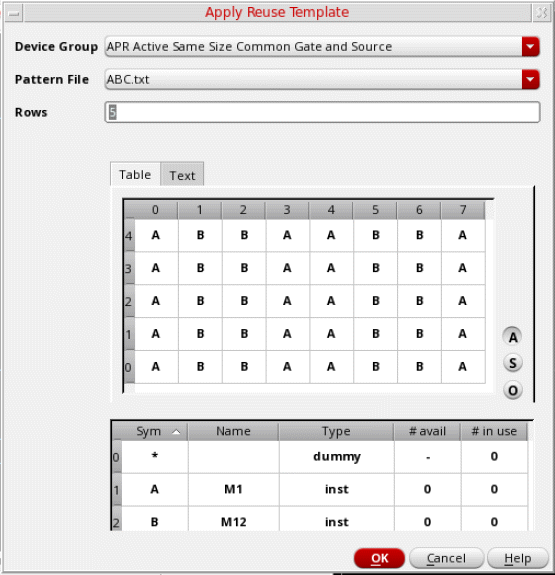
- Open the Apply Reuse Template form using one of the following methods:
- Select the Device Group that contains the required Modgen reuse template.
- Select the Pattern File corresponding to the Modgen template to be applied to the new Modgen. Parameters from the pattern file are loaded in the form.
- Specify the number of Rows to be generated.
- Update the pattern as per your requirements.
- Click OK to generate the Modgen.
The new Modgen is listed in the Constraints Manager assistant.
Related Topics
Generating a Modgen Template File
Parameters of a Modgen Reuse Template File
Parameters of a Modgen Reuse Template File
Return to top