
10
Predefined and Waveform (Calculator) Functions
This chapter contains information about the following functions.
-
Predefined Arithmetic Functions
abs
acos
add1
asin
atan
cos
exp
int
linRg
log
logRg
max
min
mod
random
round
sin
sqrt
srandom
sub1
tan
xor -
Waveform (Calculator) Functions
average
abs_jitter
analog2Digital
awvCreateBus
awvPlaceXMarker
awvPlaceYMarker
awvRefreshOutputPlotWindows
b1f
bandwidth
clip
clipX
closeResults
compare
compression
compressionVRI
compressionVRICurves
complex
complexp
conjugate
convolve
cPwrContour
cReflContour
cross
db10
db20
dbm
delay
delayMeasure
deriv
dft
dftbb
dnl
dutyCycle
evmQAM
evmQpsk
eyeDiagram
eyeAperture
eyeMeasurement
edgeTriggeredEyeDiagram
flip
fourEval
freq
freq_jitter
frequency
ga
gac
gainBwProd
gainMargin
gmax
gmin
gmsg
gmux
gp
gpc
groupDelay
gt
harmonic
harmonicFreqList
harmonicList
histo
histogram2D
iinteg
imag
inl
integ
intersect
ipn
ipnVRI
ipnVRICurves
kf
ln
log10
lsb
lshift
mag
nc
normalQQ
overshoot
pavg
peak
peakToPeak
period_jitter
phase
phaseDeg
phaseDegUnwrapped
phaseDegUnwrappedWithFreq
phaseMargin
phaseRad
phaseRadUnwrapped
PN
pow
prms
psd
psdbb
pstddev
pzbode
pzfilter
rapidIPNCurves
rapidIIPN
real
riseTime
rms
rmsNoise
rmsVoltage
rmsTerminalVoltage
root
rshift
sample
settlingTime
slewRate
smithType
spectralPower
spectrumMeasurement
ssb
stddev
tangent
thd
thd_fd
unityGainFreq
value
xmax
xmin
xval
ymax
ymin
RF Functions in Spectre
Predefined Arithmetic Functions
Several functions are predefined in the Virtuoso® SKILL language. The full syntax and brief definitions for these functions follows the table.
abs
abs(n_number) =>n_result
Description
Returns the absolute value of a floating-point number or integer.
Arguments
Value Returned
Example
abs( -209.625)
=> 209.625
abs( -23)
=> 23
acos
acos(n_number) =>f_result
Description
Returns the arc cosine of a floating-point number or integer.
Arguments
Value Returned
Example
acos(0.3)
=> 1.266104
add1
add1(n_number) =>n_result
Description
Adds 1 to a floating-point number or integer.
Arguments
Value Returned
Example
add1( 59 )
=> 60
asin
asin(n_number) =>f_result
Description
Returns the arc sine of a floating-point number or integer.
Arguments
Value Returned
Example
asin(0.3)
=> 0.3046927
atan
atan(n_number) =>f_result
Description
Returns the arc tangent of a floating-point number or integer.
Arguments
Value Returned
Example
atan(0.3)
=> 0.2914568
cos
cos(n_number) =>f_result
Description
Returns the cosine of a floating-point number or integer.
Arguments
Value Returned
Example
cos(0.3)
=> 0.9553365
cos(3.14/2)
=> 0.0007963
exp
exp(n_number) =>f_result
Description
Arguments
Value Returned
Example
exp( 1 )
=> 2.718282
exp( 3.0 )
=> 20.08554
int
int(n_arg) =>x_result
Description
Returns the largest integer not larger than the given argument.
Arguments
|
A numeric value (which can be integer or floating point number). |
Value Returned
|
The value of the largest integer not larger than the value specified by |
Example
int( 3.01 )
=> 3
int( 3.99 )
=> 3
linRg
linRg(n_from n_to n_by) =>l_range/ nil
Description
Returns a list of numbers in the linear range from n_from to n_to incremented by n_by.
Arguments
Value Returned
Example
range = linRg(-30 30 5)
(-30 -25 -20 -15 -10 -5 0 5 10 15 20 25 30)
log
log(n_number) =>f_result
Description
Returns the natural logarithm of a floating-point number or integer.
Arguments
Value Returned
Example
log( 3.0 )
=> 1.098612
logRg
logRg(n_from n_to n_by) =>l_range/ nil
Description
Returns a list of numbers in the log10 range from n_from to n_to advanced by n_by.
The list is a geometric progression where the multiplier is 10 raised to the 1/n_by power. For example if n_by is 0.5, the multiplier is 10 raised to the 2nd power or 100.
Arguments
Value Returned
Example
logRg(1 1M 0.5)
(1.0 100.0 10000.0 1000000.0)
max
max(n_num1 n_num2[n_num3… ] ) =>n_result
Description
Returns the maximum of the values passed in. Requires a minimum of two arguments.
Arguments
Value Returned
Example
max(3 2 1)
=> 3
max(-3 -2 -1)
=> -1
min
min(n_num1 n_num2[n_num3… ] ) =>n_result
Description
Returns the minimum of the values passed in. Requires a minimum of two arguments.
Arguments
Value Returned
Example
min(1 2 3)
=> 1
min(-1 -2.0 -3)
=> -3.0
mod
mod(x_integer1 x_integer2) =>x_result
Description
Returns the integer remainder of dividing two integers. The remainder is either zero or has the sign of the dividend.
Arguments
Value Returned
|
The integer remainder of the division. The sign is determined by the dividend. |
Example
mod(4 3)
=> 1
random
random( [x_number] ) =>x_result
Description
Returns a random integer between 0 and x_number minus 1.
If you call random with no arguments, it returns an integer that has all of its bits randomly set.
Arguments
Value Returned
Example
random( 93 )
=> 26
round
round(n_arg) =>x_result
Description
Rounds a floating-point number to its closest integer value.
Arguments
Value Returned
Example
round(1.5)
=> 2
round(-1.49)
=> -1
round(1.49)
=> 1
sin
sin(n_number) =>f_result
Description
Returns the sine of a floating-point number or integer.
Arguments
Value Returned
Example
sin(3.14/2)
=> 0.9999997
sin(3.14159/2)
=> 1.0
Floating-point results from evaluating the same expressions might be machine-dependent.
sqrt
sqrt(n_number) =>f_result
Description
Returns the square root of a floating-point number or integer.
Arguments
Value Returned
Example
sqrt( 49 )
=> 7.0
sqrt( 43942 )
=> 209.6235
srandom
srandom(
x_number
)
=> t
Description
Sets the seed of the random number generator to a given number.
Arguments
Value Returned
Example
srandom( 89 )
=> t
sub1
sub1(n_number) =>n_result
Description
Subtracts 1 from a floating-point number or integer.
Arguments
Value Returned
Example
sub1( 59 )
=> 58
tan
tan(n_number) =>f_result
Description
Returns the tangent of a floating-point number or integer.
Arguments
Value Returned
Example
tan( 3.0 )
=> -0.1425465
xor
xor(g_in1 g_in2) =>g_res
Description
Returns the XOR value of the boolean inputs.
Arguments
Value Returned
Example
xor(nil nil)
=> nil
xor(t nil)
=> t
xor(nil t)
=> t
xor(t t)
=> nil
Waveform (Calculator) Functions
The calculator commands are described in this section.
average
average(o_waveform[?overallg_overall] [?continuousg_continuous] ) =>n_average/o_waveformAverage/ nil
Description
Computes the average of a waveform over its entire range.
For a continuous signal, the average is calculated as the integral of the expression f(x) over the range of x, divided by the range of x.
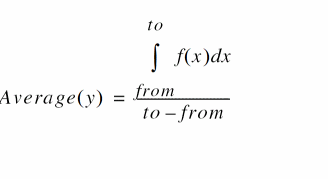
For a discrete signal, the average is calculated by dividing the sum of all y values by the total number of data points.
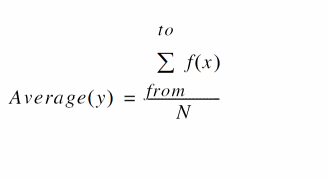
where, from is the initial value for x and to is the final value of x, and N is the total number of data points.
Arguments
Value Returned
|
Returns a number representing the average value of the input waveform. |
|
|
Returns a waveform (or family of waveforms) representing the average value if the input is a family of waveforms. |
|
Example
average( v( "/net9" ) )
Gets the average voltage (Y-axis value) of /net9 over the entire time range specified in the simulation analysis.
abs_jitter
abs_jitter(o_waveformt_crossTypen_threshold[?xUnitt_xUnit] [?yUnitt_yUnit] [ ?Tnomn_Tnom]) =>o_waveform/ nil
Description
Calculates the absolute jitter values in the intput waveform for the given threshold. The output waveform can be expressed in degrees, radians, or unit intervals (UI). The absolute jitter can be plotted as a function of cycle number, crossing time, or reference clock time.
Arguments
Value Returned
|
Returns a waveform representing the absolute jitter value for the given threshold. |
|
Example
abs_jitter(v("net9" "rising" 1.0 ?xUnit "cycle" ?yUnit "UI" )
Gets the absolute jitter /net9 for the threshold value 1.0. Tnom value is selected as nil.
analog2Digital
analog2Digital(o_wave t_thresholdType[?vhin_vhi] [?vlon_vlo] [?vcn_vc] [?timeXn_timex] ) =>o_digWave/n_digval/ nil
Description
Returns the digital form of the analog input, which can be a waveform, list or family of waveforms, or a string representation of expression(s).
Arguments
Value Returned
Example
analog2Digital(v("clk" ?result "tran" ?resultsDir "./mixed/test/adc_8bit.raw") "hilo" ?vHigh 1.78 ?vLow 0.2 ?timeX 1n)
awvCreateBus
awvCreateBus(
w_bus
l_wavelist
r_radix
)
Definition
Creates a bus with the given digital signals and radix.
Arguments
Value Returned
Example
Following are the examples to create a digital binary bus with name bus.
awvCreateBus("bus" list( awvAnalog2Digital( v("/data<0> " ?result "tran-tran") nil nil 0.5 nil "centre")
awvAnalog2Digital( v("/datab<1> " ?result "tran-tran") nil nil 0.5 nil "centre")
awvAnalog2Digital( v("/data<1> " ?result "tran-tran") nil nil 0.5 nil "centre")
awvAnalog2Digital( v("/datab<0> " ?result "tran-tran") nil nil 0.5 nil "centre") ) "Binary")
awvPlaceXMarker
awvPlaceXMarker(w_windowId n_xLoc[?subwindowx_subwindowId] [?labelt_label] ) =>t_xLoc/ t / nil
Description
Places a vertical marker at a specific x-coordinate in the optionally specified subwindow of the specified window.
Arguments
Value Returned
Example
awvPlaceXMarker( window 5) => "5"
Vertical marker info form is opened when the command is executed.
awvPlaceXMarker( window 6 ?subwindow 2) => t
Vertical marker info form is not opened.
awvPlaceYMarker
awvPlaceYMarker(w_windowId n_yLoc[?subwindowx_subwindowId] [?labelt_label] ) =>t_yLoc/ t / nil
Description
Places a horizontal marker at a specific y-coordinate in the optionally specified subwindow of the specified window.
Arguments
Value Returned
Example
-
Paces a horizontal marker with a label,
myHorizontalMarker1, at Y=2.0in the strip number1of the current subwindow of the current graph window:awvPlaceYMarker(gw 2.0 ?label "myHorizontalMarker1" ?subwindow gsw ?stripNum 1)
Where,gw= awvGetCurrentWindow()andgsw= awvGetCurrentSubwindow(gw) -
Paces a horizontal marker with a label,
myHorizontalMarker2, at Y=2.0in the strip number2of the current subwindow of the current graph window:awvPlaceYMarker(gw 2.0 ?label "myHorizontalMarker2" ?subwindow gsw ?stripNum 2)
Where,gw= awvGetCurrentWindow()andgsw= awvGetCurrentSubwindow(gw)
awvRefreshOutputPlotWindows
awvRefreshOutputPlotWindows(
s_session
)
Description
Refreshes all existing plot windows (with new simulation data, if any) attached with the session s_session.
Arguments
Value Returned
b1f
b1f(o_s11 o_s12 o_s21 o_s22) =>o_waveform/ nil
Description
Returns the alternative stability factor in terms of the supplied parameters.
Arguments
Value Returned
|
Waveform object representing the alternative stability factor. |
|
Example
s11 = sp(1 1)
s12 = sp(1 2)
s21 = sp(2 1)
s22 = sp(2 2)
plot(b1f(s11 s12 s21 s22))
bandwidth
bandwidth(o_waveform n_db t_type) =>n_value/o_waveform/ nil
Description
Calculates the bandwidth of a waveform.
Arguments
|
Waveform object representing simulation results that can be displayed as a series of points on a grid. (A waveform object identifier looks like this: |
|
Value Returned
Example
bandwidth( v( "/OUT" ) 3 "low")
Gets the 3 dB bandwidth of a low-pass filter.
bandwidth( v( "/OUT" ) 4 "band" )
Gets the 4 dB bandwidth of a band-pass filter.
clip
clip(o_waveform n_from n_to[?interpolateg_interpolate]) =>o_waveform/nil
Description
Restricts the waveform to the range defined by n_from and n_to.
You can use the clip function to restrict the range of action of other commands. If n_from is nil, n_from is taken to be the first X value of the waveform, and if n_to is nil, n_to is taken to be the last x value of the waveform. If both n_to and n_from are nil, the original waveform is returned.
Arguments
Value Returned
|
Returns a waveform object if the input argument is a waveform object or returns a family of waveforms if the input argument is a family of waveforms. |
|
Example
x = clip( v( "/net9" ) 2m 4m )
plot( x )
Plots the portion of a waveform that ranges from 2 ms to 4 ms.
plot( clip( v( "/net9" )nilnil) )
plot( clip( v( "/net9" ) nil 3m ) )
Plots the portion of a waveform that ranges from 0 to 3 ms.
clipX
clipX(o_waveformn_fromn_to) =>o_waveform/ nil
Description
Restricts the waveform to the range defined by n_from and n_to.
The clipX function works in the same manner as the clip function, with an exception that clipX restricts the waveform within the range [from, to] without interpolating or extrapolating any values. In other words, clipX returns a waveform that consists only data points from the input waveform.
clipX function snaps the from and/or to values to a data point in the input waveform if these values are less than 1e-6 * stepSize, where stepSize is the average step of the input waveform in range [from,to].Arguments
|
Waveform object representing simulation results that can be displayed as a series of points on a grid. (A waveform object identifier looks like this: |
|
Value Returned
|
Returns a waveform object if the input argument is a waveform object or returns a family of waveforms if the input argument is a family of waveforms. |
|
closeResults
closeResults(
t_dirName
)
=> t / nil
Definition
Closes the simulation results stored in the input results directory. The function closes all the internal resources opened by the tool that are related to the results directory. It is recommended that you must call this function before deleting a results directory, moving the directory to any other location, or renaming a results directory.
After calling the closeResults function, the OCEAN commands, such as selectResults, getData, pv, which can also be called without passing the resultsDir argument and run based upon previously called openResults call, stops working if called without passing the resultsDir argument.
Arguments
|
Name of the directory which was earlier used in the |
Values Returned
compare
compare(o_waveform1 o_waveform1[f_abstol[f_reltol] ] ) =>o_comparisonWaveform/ nil
Description
Compares the two given waveforms based on the specified values for absolute and relative tolerances. This function compares only the sections of the two waveforms where the X or independent axes overlap.
The following situations are possible:
- If neither relative nor absolute tolerance is specified, the function returns the difference of the two waveforms (o_waveform1 - o_waveform2).
- If only the absolute tolerance is specified, the function returns the difference of the two waveforms only when the absolute value of the difference is greater than the absolute tolerance (|o_waveform1 - o_waveform2| > f_abstol); otherwise it returns a zero waveform.
- If only the relative tolerance is specified, the function returns the difference of the two waveforms only when the absolute value of the difference is greater than the product of the relative tolerance and the larger of the absolute values of the two waveforms (|o_waveform1 - o_waveform2| > f_reltol * max(|o_waveform1|, |o_waveform2|)); otherwise it returns a zero waveform.
- If both relative and absolute tolerances are specified, the function returns the difference of the two waveforms only when the absolute value of the difference is greater than the sum of the separately calculated tolerance components (|o_waveform1 - o_waveform2| > f_abstol + f_reltol * max(|o_waveform1|, |o_waveform2|)); otherwise it returns a zero waveform.
Arguments
Value Returned
|
Returns the difference of the two given waveforms based on the specified values of the relative and absolute tolerances. |
|
Example
compare( wave1 wave2 2.2 0.4 )
=> srrWave:175051528
Returns the difference of the waveforms wave1 and wave2 based on the specified absolute and relative tolerances of 2.2 and 0.4, respectively.
compression
compression(o_waveform[?xf_x] [?yf_y] [?compressionf_compression] [?ios_measure] [?tanSlopet_tanSlope] ) =>f_compPoint/ nil
Description
Performs an nth compression point measurement on a power waveform.
The compression function uses the power waveform to extrapolate a line of constant slope (dB/dB) according to a specified input or output power level. This line represents constant small-signal power gain (ideal gain). The function finds the point where the power waveform drops n dB from the constant slope line and returns either the X coordinate (input referred) value or the Y coordinate (output referred) value.
Arguments
Value Returned
|
Depending on the setting of s_measure, returns either input referred or output referred compression point. |
|
Example
xloc = compression( wave ?x -25 ?compress 1)
yloc = compression( wave ?x -25 ?measure "Output")
; Each of following returns a compression measurement:
compression(dB20(harmonic(v("/Pif" ?result "pss_fd") 2)))
compression(dbm(harmonic(spectralPower(v("/Pif"
    ?result "pss_fd")/ 50.0
    v("/Pif" ?result "pss_fd")) 2)))
compression(dbm(harmonic(spectralPower(v("/Pif"
    ?result "pss_fd")/resultParam("rif:r"
    ?result "pss_td") v("/Pif"
    ?result "pss_fd")) 2)))
compression(dbm(harmonic(spectralPower(i("/rif/PLUS"
    ?result "pss_fd") v("/Pif" ?result "pss_fd")) 2))
    ?x -25 ?compress 0.1 ?measure "Output")
compressionVRI
compressionVRI(o_vportx_harm[?iporto_iport] [?rportf_rport] [?epointf_epoint] [?gcompf_gcomp] [?measures_measure] [?formatformat] ) =>o_waveform/n_number/ nil
Description
Performs an nth compression point measurement on a power waveform.
Use this function to simplify the declaration of a compression measurement. This function extracts the specified harmonic from the input waveform(s), and uses dBm(spectralPower((i or v/r),v)) to calculate a power waveform. The function passes this power curve and the remaining arguments to the compression function to complete the measurement.
The compression function uses the power waveform to extrapolate a line of constant slope (dB/dB) according to a specified input or output power level. This line represents constant small-signal power gain (ideal gain). The function finds the point where the power waveform drops n dB from the constant slope line and returns either the X coordinate (input referred) value or the Y coordinate (output referred) value.
Arguments
Value Returned
|
Returns a waveform when o_waveform1 is a family of waveforms. |
|
Example
Each of the following returns a compression measurement:
compressionVRI(v("/Pif" ?result "pss_fd") 2)
compressionVRI(v("/Pif" ?result "pss_fd") 2
    ?rport resultParam("rif:r" ?result "pss_td"))
compressionVRI(v("/Pif" ?result "pss_fd") 2
    ?iport i("/rif/PLUS" ?result "pss_fd") ?epoint -25
    ?gcomp 0.1 ?measure "Output")
compressionVRICurves
compressionVRICurves(o_vportx_harm[?iporto_iport] [?rportf_rport] [?epointf_epoint] [?gcompf_gcomp] [?formatformat] ) =>o_waveform/ nil
Description
Constructs the waveforms associated with an nth compression measurement.
Use this function to simplify the creation of waveforms associated with a compression measurement. This function extracts the specified harmonic from the input waveform(s), and uses dBm(spectralPower((i or v/r),v)) to calculate a power waveform.
The compressionVRICurves function uses the power waveform to extrapolate a line of constant slope (1dB/1dB) according to a specified input or output power level. This line represents constant small-signal power gain (ideal gain). The function shifts the line down by n dB and returns it, along with the power waveform, as a family of waveforms.
This function only creates waveforms and neither performs a compression measurement nor includes labels with the waveforms. Use the compression or compressionVRI function for making measurements.
Arguments
Value Returned
|
Returns a family of waveforms containing the output power and tangent line. |
|
Example
Each of following examples returns curves related to a compression measurement:
compressionVRICurves(v("/Pif" ?result "pss_fd") 2)
compressionVRICurves(v("/Pif" ?result "pss_fd") 2
    ?rport resultParam("rif:r" ?result "pss_td"))
compressionVRICurves(v("/Pif" ?result "pss_fd") 2
    ?iport i("/rif/PLUS" ?result "pss_fd") ?epoint -25
    ?gcomp 0.1)
complex
complex(f_real f_imaginary) =>o_complex
Description
Creates a complex number of which the real part is equal to the real argument, and the imaginary part is equal to the imaginary argument.
Arguments
Value Returned
Example
complex( 1.0 2.0 )
=> complex( 1, 2 )
complexp
complexp(
g_value
)
=> t / nil
Description
Checks if an object is a complex number. The suffix p is added to the name of a function to indicate that it is a predicate function.
Arguments
Value Returned
Example
complexp( (complex 0 1) )
=> t
complexp( 1.0 )
=> nil
conjugate
conjugate(
{ o_waveform | n_x }
)
=> o_waveform / n_y / nil
Description
Returns the conjugate of a waveform or number.
Arguments
|
Waveform object representing simulation results that can be displayed as a series of points on a grid. (A waveform object identifier looks like this: |
|
Value Returned
|
Returns the conjugate of a waveform if the input argument is a waveform. |
|
|
Returns the result of n_x being mirrored against the real axis (X axis) if the input argument is a number. |
|
Example
For this example, assume that the first three statements are true for the conjugate function that follows them.
x=complex(-1 -2)
real(x) = -1.0
imag(x) = -2.0
conjugate(x) = complex(-1, 2)
Returns the conjugate of the input complex number.
convolve
convolve(o_waveform1 o_waveform2 n_fromn_tot_typen_by) =>o_waveform/n_number/nil
Description
Computes the convolution of two waveforms.
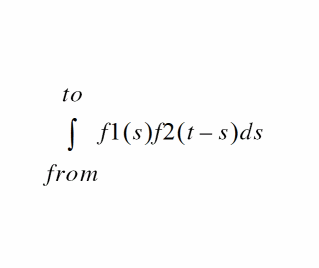
f1 and f2 are the functions defined by the first and second waveforms.
convolve function is numerically intensive and might take longer than the other functions to compute.Arguments
|
Waveform object representing simulation results that can be displayed as a series of points on a grid. (A waveform object identifier looks like this: |
|
Value Returned
Example
sinWave = expr( n sin( n ) linRg( 0 20 0.01 ) )
triWave = artListToWaveform( ’( ( -4, 0 ) ( -3, 1 ) ( -2, 0 ) ( -1, -1 ) ( 0, 0 ) ( 1, 1 ) ( 2, 0 ) ( 3, -1 ) ( 4, 0 ) )
plot( convolve( sinWave triWave 0 10 "linear" 1 ) )
Gets the waveform from the convolution of the sine waveform and triangle waveform within the range of 0 to 10.
cPwrContour
cPwrContour(o_iwaveo_vwavex_harm[?iwaveLoado_iwaveLoad] [?vwaveLoado_vwaveLoad] [?maxPowerf_maxPower] [?minPowerf_minPower] [?numContx_numCont] [?refImpf_refImp] [?closeContg_closeCont] [?modifiers_modifier] [?ifamifam] [?vfamvfam] ) =>o_waveform/ nil
Description
Constructs constant power contours for Z-Smith plotting. The trace of each contour correlates to reference reflection coefficients that all result in the same power level.
The x_harm harmonic is extracted from all the input waveforms. Power is calculated using the spectralPower function. The reference reflection coefficients are calculated using voltage, current, and a reference resistance.
Arguments
Value Returned
|
Returns a family of waveforms (contours) for Z-Smith plotting. |
|
Example
The following example plots constant output power contours according to output:
cPwrContour(i("/I8/out" ?result "pss_fd") v("/net28"
    ?result "pss_fd")1)
The following example plots constant output power contours according to output reflection coefficients:
cPwrContour(i("/I8/out" ?result "pss_fd") v("/net28"
    ?result "pss_fd") 1 ?maxPower 0.002 ?minPower 0.001 ?numCont 9)
The following example plots constant input power contours according to output reflection coefficients:
cPwrContour(i("/C25/PLUS" ?result "pss_fd") v("/net30"
    ?result "pss_fd") 1 ?iwaveLoad i("/I8/out" ?result "pss_fd")
    ?vwaveLoad v("/net28" ?result "pss_fd") ?refImp 50.0
    ?numCont 9 ?modifier "mag")
cReflContour
cReflContour(o_iwaveo_vwavex_harm[?iwaveLoado_iwaveLoad] [?vwaveLoado_vwaveLoad] [?maxReflf_maxRefl] [?minReflf_minRefl] [?numContx_numCont] [?refImpf_refImp] [?closeContg_closeCont] ) =>o_waveform/ nil
Constructs constant reflection coefficient magnitude contours for Z-Smith plotting. The trace of each contour correlates to reference reflection coefficients that all result in the same reflection coefficient magnitude.
The x_harm harmonic is extracted from all the input waveforms. Reflection coefficient magnitude is calculated using voltage, current, reference resistance, and the mag function. The reference reflection coefficients are calculated separately by using voltage, current, and a reference resistance.
Arguments
Value Returned
|
Returns a family of waveforms (contours) for Z-Smith plotting. |
|
Example
The following example plots constant output reflection coefficient contours according to output reflection coefficients:
cReflContour(i("/I8/out" ?result "pss_fd") v("/net28"
    ?result "pss_fd") 1)
The following example plots constant output reflection coefficient contours according to output reflection coefficients:
cReflContour(i("/I8/out" ?result "pss_fd") v("/net28"
    ?result "pss_fd") 1 ?maxRefl 0.7 ?minRefl 0.1 ?numCont 7)
The following example plots constant output reflection coefficient contours according to output reflection coefficients:
cReflContour(i("/C25/PLUS" ?result "pss_fd")
    v("/net30" ?result "pss_fd") 1
    ?iwaveLoad i("/I8/out" ?result "pss_fd")
    ?vwaveLoad v("/net28" ?result "pss_fd") ?refImp 50.0
    ?numCont 9)
cross
cross(o_waveformn_crossVal x_ns_crossType[g_multiple[s_Xname] ] ) =>o_waveform/g_value/ nil
Description
Computes the X-axis value at which a particular crossing of the specified edge type of the threshold value occurs.
Arguments
Value Returned
|
Returns a waveform if the input argument is a family of waveforms. |
|
|
Returns the X-axis value of the crossing point if the input argument is a single waveform. |
|
Example
cross( v( "/net9" ) 2.5 2 ’rising )
Gets the time value (X axis) corresponding to specified voltage "/net9"=2.5V (Y axis) for the second rising edge.
cross( v( "/net9" ) 1.2 1 ’either )
Gets the time value (X axis) corresponding to specified voltage "/net9"=1.2V (Y axis) for the first edge, which can be a rising or falling edge.
cross(VT("/out") 2.5 0 0 t "time") (s)
Returns multiple occurrences of crossing events specified against time-points at which each crossing event occurs.
cross(VT("/out") 2.5 0 0 t "cycle") (s)
Returns multiple occurrences of crossing events specified against cycle numbers, where a cycle number refers to the n’th occurrence of the crossing event in the input waveform.
db10
db10(
{ o_waveform | n_number }
)
=> o_waveform / n_number / nil
Description
Returns 10 times the log10 of the specified waveform object or number. This function can also be written as dB10.
Arguments
|
Waveform object representing simulation results that can be displayed as a series of points on a grid. (A waveform object identifier looks like this: |
|
Value Returned
|
Returns a waveform object if the input argument is a waveform object or returns a family of waveforms if the input argument is a family of waveforms. |
|
Example
db10( ymax( v( "/net9" ) ) )
Returns a waveform representing log10(ymax(v("/net9")) multiplied by 10.
db10( 1000 )
=> 30.0
Gets the value log10(1000) multiplied by 10, or 30.
db20
db20(
{o_waveform | n_number}
)
=> o_waveform / n_number / nil
Description
Returns 20 times the log10 of the specified waveform object or number. This function can also be written as dB20.
Arguments
|
Waveform object representing simulation results that can be displayed as a series of points on a grid. (A waveform object identifier looks like this: |
|
Value Returned
|
Returns a waveform object if the input argument is a waveform object or returns a family of waveforms if the input argument is a family of waveforms. |
|
Example
db20( ymax( v( "/net9" ) ) )
Returns a waveform representing 20 times log10(ymax(v("/net9")).
db20( 1000 )
=> 60.0
Returns the value of 20 times log10( 1000 ), or 60.
dbm
dbm(
{ o_waveform | n_number }
)
=> o_waveform n_number / nil
Description
Returns 10 times the log10 of the specified waveform object plus 30. This function can also be written as dBm.
Arguments
|
Waveform object representing simulation results that can be displayed as a series of points on a grid. (A waveform object identifier looks like this: |
|
Value Returned
|
Returns a waveform object if the input argument is a waveform object or returns a family of waveforms if the input argument is a family of waveforms. |
|
Example
dbm( ymax( v( "/net9" ) ) )
Returns a waveform representing 10 times log10(ymax(v("/net9")) plus 30.
delay
delay( [?wf1o_waveform1] [?value1n_value1] [?edge1s_edge1] [?nth1x_nth1] [?td1n_td1] [?wf2o_waveform2] [?value2n_value2] [?edge2s_edge2] [?nth2x_nth2[ ?td2n_td2] [ ?td2r0n_td2r0]} [?stopn_stop] [?histoDisplayg_histoDisplay] [?noOfHistoBinsx_noOfHistoBins] [?period1period1] [?period2period2] [?multiplemultiple] [?xNamexName]@restargs ) =>o_waveform/n_value/ nil
Description
Calculates the delay between a trigger event and a target event.
The delay command computes the delay between two points using the cross command.
Arguments
Value Returned
|
Returns a waveform representing the delay if the input argument is a family of waveforms. |
|
|
Returns the delay value if the input argument is a single waveform. |
|
Example
delay(?wf1 v("16" ?result "tran"), ?value1 2.5, ?edge1 "rising", ?nth1 1, ?td1 0.0, ?wf2 v("1" ?result "tran"), ?value2 2.5, ?edge2 "rising", ?nth2 1, ?td2 nil , ?stop nil, ?period1 1 ?period2 1 ?multiple t ?xName "trigger" )
Calculates the delay between two waveforms wf1 and wf2 with the argument values specified as above.
delay( ?wf1 wf1 ?value1 2.5 ?nth1 2 ?edge1 ’either ?wf2 wf2 ?value2 2.5 ?nth2 1 ?edge2 ’falling )
Calculates the delay starting from the time when the second edge of the first waveform reaches the value of 2.5 to the time when the first falling edge of the second waveform crosses 2.5.
delay( ?td1 5 ?wf2 wf2 ?value2 2.5 ?nth2 1 ?edge2 ’rising ?td2 5)
Calculates the delay starting when the time equals 5 seconds and stopping when the value of the second waveform reaches 2.5 on the first rising edge 5 seconds after the trigger.
delay( ?wf1 wf1 ?value1 2.5 ?nth1 1 ?edge1 ’rising ?td1 5 ?wf2 wf2 ?value2 2.5 ?nth2 1 ?edge2 ’rising ?td2 0)
Waits until after the time equals 5 seconds, and calculates the delay between the first and the second rising edges of wf2 when the voltage values reach 2.5.
delay(VT(“/out”), 2.5, 1, ‘rising, VT(“/in”), 2.5, 1, ‘rising’, 1, 1, t)
Computes the delay between the rising edges of VT(“/out”) and VT(“/in”) when the waveforms cross their respective threshold values (that is, 2.5).
delay(VT("/out") 1.5 1 "rising" VT("/out") 1.5 2 "rising" 1 1 t "trigger") (s)
Returns multiple occurrences of delay specified against trigger time-points at which each delay event occurs.
delay(VT("/out") 1.5 1 "rising" VT("/out") 1.5 2 "rising" 1 1 t "target") (s)
Returns multiple occurrences of delay specified against target time-points at which each delay event occurs.
delay(VT("/out") 1.5 1 "rising" VT("/out") 1.5 2 "rising" 1 1 t "cycle") (s)
Returns multiple occurrences of delay specified against cycle numbers, where a cycle number refers to the n’th occurrence of the delay event in the input waveform.
delayMeasure
delayMeasure(o_waveform1 o_waveform2[?edge1s_edge1] [?nth1x_nth1] [?value1n_value1] [?edge2s_edge2] [?nth2x_nth2[?value2n_value2] =>n_value/ nil
Description
Calculates the delay between a trigger event and a target event.
Arguments
Example
Calculates the delay between the two waveforms, wave1 and wave2.
delayMeasure( wave1 wave2 ?value1 2.5 ?nth1 2 ?edge1 ’either ?wf2 wf2 ?value2 2.5 ?nth2 1 ?edge2 ’falling )
Calculates the delay starting from the time when the second edge of the first waveform reaches the value of 2.5 to the time when the first falling edge of the second waveform crosses 2.5.
deriv
deriv(o_waveform) =>o_waveform/nil
Description
Computes the derivative of a waveform with respect to the X axis.
- After the second derivative, the results become inaccurate because the derivative is obtained numerically.
- Use the magnitude value instead of dB in frequency domain.
Arguments
|
Waveform object representing simulation results that can be displayed as a series of points on a grid. (A waveform object identifier looks like this: |
Value Returned
|
Returns a waveform object representing the derivative with respect to the X axis of the input waveform. Returns a family of waveforms if the input argument is a family of waveforms. |
|
Example
plot( deriv( VT( "/net8" ) ) )
Plots the waveform representing the derivative of the voltage of "/net8".
plot( deriv( mag(VF( "/OUT" ) ) ) )
Plots the waveform representing the derivative of the frequency of "/OUT".
dft
dft(o_waveformn_fromn_tox_num[t_windowName] [n_param1] [coherentGain] [n_adcSpan] ) =>o_waveform/ nil
Description
Computes the discrete Fourier transform and fast Fourier transform of the input waveform.
The waveform is sampled at the following n timepoints:
from, from + deltaT, from + 2 * deltaT,…,
from + (N - 1) * deltaT
The output of dft is a frequency waveform, W(f), which has (N/2 + 1) complex values—the DC term, the fundamental, and (N/2 - 1) harmonics.
(from + (N - 1) * deltaT), is (to - deltaT) rather than to. The dft command assumes that w(from) equals w(to).
The DFT function assumes that w(from) equals to w(to). A warning message appears when w(from) is not equal to w(to) in the following situation:
window function is Rectangular or not specified, and
|w(from)-w(to)|>1e-3*range(w),
where, range(w) is max(w)- min(w) in [from,to]
Arguments
|
Waveform object representing simulation results that can be displayed as a series of points on a grid. (A waveform object identifier looks like this: |
|
|
Variable representing different methods for taking a
Valid values: For more information about windowName, see the information about Discrete Fourier Transform (dft) in the Virtuoso Analog Design Environment L User Guide. |
|
|
When you apply the function |
|
|
Specifies the peak saturation level of the FFT waveform. When specified the magnitude of the input waveform is divided by adc span value before computing FFT. This is full-scale span ignoring any DC offsets. |
Value Returned
|
Returns a waveform representing the magnitude of the various harmonics for the specified range of frequencies. Returns a family of waveforms if the input argument is a family of waveforms. |
|
Examples
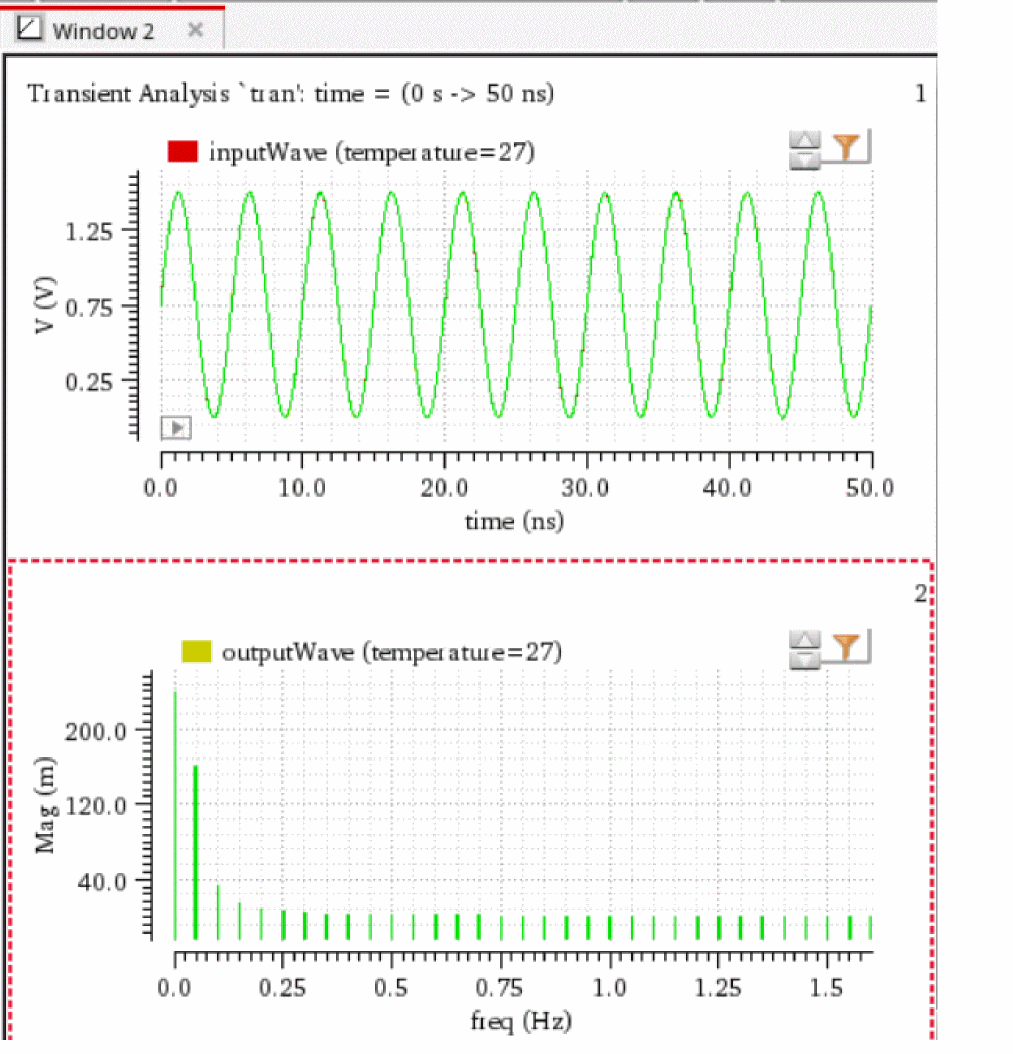
The following example creates the waveform object waveDFT, representing the discrete Fourier transform, fast Fourier transform, of the waveform representing the voltage of the net "in". The computation is done from 0n to 20n with 64 timepoints.
openResults("./simulation/vdr_demo/inverter_chain/maestro/results/maestro/Interactive.1/psf/vdr_demo:inverter_chain_test:1/psf")
;Opens the simulation results stored in the specified results directory.
results()
; Lists the available results in the currently selected results directory.
selectResults('tran)
; Selects the result tran
outputs()
; Lists the outputs available in the selected result.
v=v("in")
;Creates a waveform object v, which represents the voltage waveform of the net 'in'. This is the input waveform to which the function 'dft' will be applied.
waveDFT=dft(v 0 20 64 "HalfCycleSine" 1 2 2.0)
; Creates the waveform object waveDFT, representing the discrete Fourier transform, fast Fourier transform, of the waveform representing the voltage of the net "in". The computation is done from 0n to 20n with 64 timepoints.
window=awvCreatePlotWindow()
; Creates the waveform window.
awvPlotWaveform(
window
list(v waveDFT)
?expr list("inputWave" "outputWave")
?color list("y1" "y66")
?index list(1 2)
?lineType list("line" "line")
)
; Plots the inputWaveform v and output waveform waveDFT in the specified waveform window.
=> "./simulation/vdr_demo/inverter_chain/maestro/results/maestro/Interactive.1/psf/vdr_demo:inverter_chain_test:1/psf"
=>
tran(tranOp model instance output designParamVals
primitives subckts variables
)
=> stdobj@0x37375c80
=>
("/net7" "/net5" "/net6" "/out" "/in"
)
=> srrWave:0x3cd2d180
=> srrWave:0x3cd2d190
=> window:5
=> t
dftbb
dftbb(o_waveform1 o_waveform2 f_timeStart f_timeEnd x_num[?windowNamet_windowName] [?smoothx_smooth] [?cohGainf_cohGain] [?spectrumTypes_spectrumType] ) =>o_waveformComplex/ nil
Description
Computes the discrete Fourier transform (fast Fourier transform) of a complex signal.
Arguments
Value Returned
|
The discrete Fourier transform for baseband signals of the two waveforms returned when the command is successful. |
|
Example
dftbb(VT("/net32") VT("/net11") , 0, 16m, 12000, ?windowName ’Hanning,?smooth 1, ?cohGain 1, ?spectrumType "SingleSided")
dnl
dnl(o_dacSignal o_sample|o_pointList|n_interval[?modet_mode] [?thresholdn_threshold] [?crossTypet_crossType] [?delayf_delay] [?methodt_method] [?unitsx_units] [?nbsamplesn_nbsamples] ) =>n_dnl/ nil
Description
Computes the differential non-linearity of a transient simple or parametric waveform.
Arguments
- For o_sample, the arguments t_mode, n_threshold, t_crossType, f_delay, t_method, and x_units are meaningful.
- For n_pointList, the arguments t_method and x_units are meaningful.
- For n_interval, the arguments t_method, x_units, and n_nbsamples are meaningful.
Value Returned
Example
dnl( wave1 wave2 ?crossType "rising" ?delay 0.4 )
=> srrWave:175051544
Returns the differential non-linearity for wave1 by taking the points at which wave2 crosses the internally calculated threshold while rising as the sample points and adding a delay of 0.4 to them.
dutyCycle
dutyCycle(o_waveform[?thresholdn_threshold] [?xNamet_xName] [?outputTypet_outputType] [?modemode] ) =>o_waveform/f_average/ nil
Description
Computes the duty cycle for a given waveform as a function of time or cycle.
Arguments
Value Returned
|
Returns a waveform that represents duty cycle as a function of time. |
|
Example
dutyCycle( wave1 )
=> srrWave:175051552
Returns the duty cycle as a function of time for the wave wave1.
dutyCycle( wave1 ?outputType "average" )
=> 52.1066
Returns the average (in percentage) of the duty cycle values for the wave wave1.
evmQAM
evmQAM(o_waveformI o_waveformQ n_tDelay n_samplingT x_levels g_normalize[?percentd_percent] ) =>o_waveform/ nil
Description
Processes the I and Q waveform outputs from the transient simulation run to calculate the Error Vector Magnitude (EVM) for multi-mode modulations. The function plots the I versus Q scatterplot. EVM is a useful measurement to describe the overall signal amplitude and phase modulated signal quality. It is based on a statistical error distribution normalized from an ideal digital modulation. Quadrature Amplitude Modulation (QAM) is a typical modulation scheme where EVM is useful. The EVM is calculated by detecting the I and Q signal levels corresponding to the four possible I and Q symbol combinations and calculating the difference between the actual signal level and the ideal signal level.
Arguments
Value Returned
|
Returns a waveform object representing the EVM value computed from the input waveforms. |
|
|
Returns |
Example
evmQAM( v("samp_out_Q"), v("samp_out_I") 1.5u, 181.81n, 4, t )
Calculates the EVM value for the modulation level 4 in normalized form.
evmQpsk
evmQpsk(o_waveform1 o_waveform2 n_tDelay n_sampling g_autoLevelDetect n_voltage n_offset g_normalize[?percentd_percent] ) =>o_waveform/nil
Description
Processes the I and Q waveform outputs from the transient simulation run to calculate the Error Vector Magnitude (EVM) and plot the I versus Q scatterplot. EVM is a useful measurement to describe the overall signal amplitude and phase modulated signal quality. It is based on a statistical error distribution normalized from an ideal digital modulation. Quadrature Phase Shift Keying (QPSK) is a typical modulation scheme where EVM is useful. The EVM is calculated by detecting the I and Q signal levels corresponding to the four possible I and Q symbol combinations and calculating the difference between the actual signal level and the ideal signal level.
Arguments
Value Returned
|
Returns a waveform object representing the EVM value computed from input waveforms. |
|
|
Returns |
Example
evmQpsk( v("samp_out_Q"), v("samp_out_I") 1.5u, 181.81n, t, nil, nil, nil)
Calculates the EVM value when g_autoLevelDetect is set to t. In this case, no values are specified for n_voltage and n_offset.
evmQpsk( v("samp_out_Q"), v("samp_out_I") 1.5u, 181.81n, nil, 1.3, 0, nil)
Calculates the EVM value when g_autoLevelDetect is set to nil. In this case, values are specified for n_voltage and n_offset.
eyeDiagram
eyeDiagram(o_waveform n_start n_stop n_period[?advOptionst_advOptions] [?intensityPlotg_intensityPlot] ) =>o_waveform/ nil
Description
Returns an eye-diagram plot of the input waveform signal. It returns the waveform object of the eye-diagram plot. Using an advanced option, the function also calculates the maximum vertical and horizontal opening of the eye formed when the input waveform is folded by the specified period to form the eye.
Arguments
Value Returned
|
Returns a waveform object representing the eye-diagram plot of the input waveform |
|
Example
eyeDiagram( v("/out" ) 0n 500n 12.5n )
Returns a waveform that represents an eye-diagram plot.
eyeDiagram( v("/out" ) 0n 500n 12.5n ?advOptions “vertical” )
Calculates the maximum vertical opening of the eye that is formed when the input waveform is folded after 12.5n
eyeDiagram( v("/out" ) 0n 500n 12.5n ?advOptions “horizontal” )
Calculates the maximum horizontal opening of the eye that is formed when the input waveform is folded after 12.5n
eyeHeightAtXY
eyeHeightAtXY(o_eyeDiagram f_x f_y[?outputt_output]) =>f_eyeHeight /nil
Description
Calculates the eye height at the specified point (x,y) inside the eye diagram. Eye height is the difference of two intercepts made with the innermost traces of the eye in the y-axis direction.
For more information about how the eye height is calculated, see the
Arguments
|
The eye diagram waveform that is used to calculate the eye height. |
|
|
Specifies whether to calculate the total eye height or the eye height relative to the specified y-axis value. Possible values are: |
Values Returned
|
Returns the eye height at the specified point (x,y) inside the eye diagram. |
|
Example
The following example returns the value of the total eye height at the point, x=70p and y=2.2.
eyeHeightAtXY(eyeDiagram(v("/example_1" ?result "tran") 560p 5.000n 140p ?triggerPeriod 7e-11 ?autoCenter t) 70p 2.2 ?output "total")
=> 1.494594
The following example returns the value of the total eye height at the point, x=40ns, y=500mV.
eyeHeightAtXY(eyeDiagram(v("jitter" ?result "tran-tran") 200n 1.4u 2*40n ?triggerPeriod 40n ?autoCenter t) 40n 0.5 ?output "total" )
=> 838.3E-3
The following example returns the value of the eye height that is above y=0.5V (500mV) at the point, x=40ns, y=500mV.
eyeHeightAtXY(eyeDiagram(v("jitter" ?result "tran-tran") 200n 1.4u 2*40n ?triggerPeriod 40n ?autoCenter t) 40n 0.5 ?output "above" )
=> 439.0E-3
The following example returns the value of the eye height that is below y=0.5V (500mV) at the point, x=40ns, y=500mV.
eyeHeightAtXY(eyeDiagram(v("jitter" ?result "tran-tran") 200n 1.4u 2*40n ?triggerPeriod 40n ?autoCenter t) 40n 0.5 ?output "below" )
=> 399.3E-3
eyeWidthAtXY
eyeWidthAtXY(o_eyeDiagram f_x f_y[?outputt_output]) =>f_eyeWidth /nil
Description
Calculates the eye width at the specified point (x,y) inside the eye diagram. Eye width is the difference of two intercepts made with the innermost traces of the eye in the x-axis direction.
For more information about how the eye width is calculated, see the
Arguments
|
The eye diagram waveform that is used to calculate the eye width. |
|
|
Specifies whether to calculate the total eye width or the eye width relative to the specified x-axis value. Possible values are: |
Values Returned
|
Returns the eye width at the specified point (x,y) inside the eye diagram. |
|
Example
The following example returns the value of the total eye width at the point, x=70p and y=2.2.
eyeWidthAtXY(eyeDiagram(v("/example_1" ?result "tran") 560p 5.000n 140p ?triggerPeriod 7e-11 ?autoCenter t) 70p 2.2 ?output "total")
=> 2.388933e-11
The following example returns the value of the total eye width at the point, x=40ns, y=500mV.
eyeWidthAtXY(eyeDiagram(v("jitter" ?result "tran-tran") 200n 1.4u 2*40n ?triggerPeriod 40n ?autoCenter t) 40n 0.5 ?output "total" )
=> 36.65E-9
The following example returns the value of the eye width that is left to x=40ns at the point, x=40ns, y=500mV.
eyeWidthAtXY(eyeDiagram(v("jitter" ?result "tran-tran") 200n 1.4u 2*40n ?triggerPeriod 40n ?autoCenter t) 40n 0.5 ?output "left" )
=> 18.44E-9
The following example returns the value of the eye width that is right to x=40ns at the point, x=40ns, y=500mV.
eyeWidthAtXY(eyeDiagram(v("jitter" ?result "tran-tran") 200n 1.4u 2*40n ?triggerPeriod 40n ?autoCenter t) 40n 0.5 ?output "right" )
=> 18.21E-9
eyeAperture
eyeAperture(o_waveform f_vref f_acHeight f_dcHeight g_plotBox?optimizeg_optimize) =>o_waveform/aperture_width/ nil
Description
Returns the aperture of the input eye diagram signal.
Arguments
Values Returned
Example
eyeAperture(list(eyeDiagram(v("signal" ?result "tran") 0.1n 200.0n 2.5n) eyeDiagram(v("signal" ?result "tran") 0.3n 200.0n 2.5n) ) 0.75 0.6 0.5 t nil )
This example calculates the eye aperture on the two eye diagram signals, signal1 and signal2, with following values:
eyeMeasurement
eyeMeasurement(o_waveform[?samplen_sample] [?autog_auto] [?horizThresholdn_horizThreshold] [?samplen_sample] [?xTypePercent0g_xTypePercent0] [?startx0n_startx0][?starty0n_starty0] [?yTypePercent0g_yTypePercent0] [?endx0n_endx0] [?endy0n_endy0] [?xTypePercent1g_xTypePercent1] [?startx1n_startx1] [?starty1n_starty1] [?yTypePercent1g_yTypePercent1] [?endx1n_endx1] [?endy1n_endy1] [?noOfBinsn_noOfBins] [?measuret_measure] ) =>o_waveform/ nil
Description
Evaluates the measurements for the eye diagram plot.
Arguments
Value Returned
|
Returns the computed scalar value or a waveform for the specific measure that was passed. |
|
Example
The following function computes the threshold crossing average for the eye diagram for signal /net1 from 0.0 to 2e-08 with a period of 5e-10:
wave_eyeDiagram=eyeDiagram(vtime('tran "/net1") 0.0 2e-08 5e-10 ?intensityPlot t)
eyeMeasurement(wave_eyeDiagram ?horizThreshold 0 ?startx0 40 ?starty0 0 ?xTypePercent0 "t" ?endx0 60 ?endy0 50 ?yTypePercent0 "t" ?startx1 40 ?starty1 50 ?xTypePercent1 "t" ?endx1 60 ?endy1 100 ?yTypePercent1 "t" ?noOfBins 10 ?measure "thresholdCrossingAverage")
The following function is used to get the eye open width:
wave_eyeDiagram=eyeDiagram(vtime('tran "/net1") 0.0 2e-08 5e-10 ?intensityPlot t)
eyeMeasurement(wave_eyeDiagram ?horizThreshold 0 ?startx0 40 ?starty0 0 ?xTypePercent0 "t" ?endx0 60 ?endy0 50 ?yTypePercent0 "t" ?startx1 40 ?starty1 50 ?xTypePercent1 "t" ?endx1 60 ?endy1 100 ?yTypePercent1 "t" ?noOfBins 10 ?measure "width")
edgeTriggeredEyeDiagram
edgeTriggeredEyeDiagram(o_waveform n_start n_stop o_triggerWave n_threshold s_edgeType n_triggerOffset[?intensityPlotg_intensityPlot] ) =>o_waveform/ nil
Desription
Returns a signal triggered at the beginning of the eye diagram instead of a fixed period.
Arguments
Value Returned
|
Returns the computed scalar value or a waveform for the specific measure that was passed. |
|
Examples
In the following example VT("/out") is an input waveform for which eye diagram is to be determined from 0n to 10n. The period to wrap or fold the eye diagram is determined by the cross points of the trigger waveform VT("/clk") at the given threshold.
edgeTriggeredEyeDiagram(VT("/out") 0n 10n VT("/clk") 2.5 "either" 0n)
The above function returns a waveform with the relevant edge Trigger eye diagram attributes set so that when plotted the edge trigger eye diagram is displayed.
The following example shows that an offset of 1n signifies that VT("/clk") is be l-shifted by 1n, lshift(VT("/clk") 1n), before determining the cross points. Also. intensity-based plotting is turned on.
edgeTriggeredEyeDiagram(VT("/out") 0n 10n VT("/clk") 2.5 "rising" 1n ?intensityPlot t)
flip
flip(o_waveform) =>o_waveform/ nil
Description
Returns a waveform with the X vector values negated.
Arguments
|
Waveform object representing simulation results that can be displayed as a series of points on a grid. (A waveform object identifier looks like this: |
Value Returned
|
Returns a waveform object representing the input waveform mirrored about its Y axis. Returns a family of waveforms if the input argument is a family of waveforms. |
|
Example
plot( flip( v("/net4") ) )
Plots the waveform for the voltage of "/net4" with the X vector values negated.
fourEval
fourEval(o_waveformn_fromn_ton_by[?baseBandg_baseBand] ) =>o_waveform/ nil
Description
Evaluates the Fourier series represented by an expression.
This function is an inverse Fourier transformation and thus the inverse of the dft command. The fourEval function transforms the expression from the frequency domain to the time domain.
Arguments
Value Returned
Example
plot( fourEval( v( "/net3" ) 1k 10k 10 )
Plots the waveform representing the inverse Fourier transformation of the voltage of "/net3" from 1k to 10k.
fallTime
fallTime(o_waveformn_initValg_initTypen_finalVal g_finalTypen_theta1 n_theta2[g_multiple[s_Xname][g_histoDisplay][x_noOfHistoBins] ] ) =>o_waveform/n_value/ nil
Description
Returns the fall time measured between theta1 (percent high) to theta2 (percent low) of the difference between the initial value and the final value.
The fallTime function can also be used to compute the rise time if initVal is lower than finalVal.
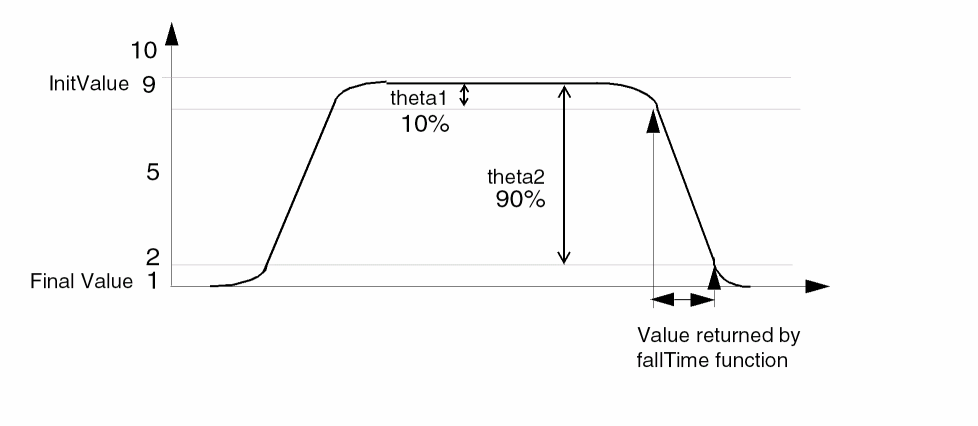
Arguments
Value Returned
Example
fallTime( v( "/net8" ) 9 nil 1 nil 10 90 )
Computes the fall time for the waveform representing the voltage of "/net8" from 9 to 1.
freq
freq(o_waveform t_crossType[?thresholdn_threshold] [?modet_mode] [?xNamexName] [?histoDisplayg_histoDisplay] [?noOfHistoBinsx_noOfHistoBins]) =>o_outputWave/ nil
Description
Computes the frequency of the input waveform(s) as a function of time or cycle.
Arguments
Value Returned
Example
freq( wave1 “rising” ?mode “user” ?threshold 18.5 ?xName “cycle” )
=> srrWave: 170938688
Returns the frequency for wave1 with the threshold at 18.5 against cycle on the x-axis.
freq_jitter
freq_jitter(o_waveform t_crossType[ ?modet_mode] [ ?thresholdn_threshold] [ ?binSizen_binSize] [ ?xNamet_xName] [ ?outputTypet_outputType] ) =>o_waveform/f_val/ nil
Description
Calculates the frequency jitter.
Arguments
Value Returned
|
Returns the frequency jitter values as a function of time or cycle when the outputType is set to |
|
|
Returns the standard deviation value when the outputType is set to |
|
Example
freq_jitter( wave1 “rising” ?mode “user” ?threshold 1 ?binSize 2 ?xName “cycle” ?outputType “sd” )
=> 0.1338585
Returns the standard deviation for the frequency jitter of wave1 with the threshold of 1 against the cycle on the x-axis.
frequency
frequency(o_waveform) =>o_waveform/n_value/ nil
Description
Computes the reciprocal of the average time between two successive midpoint crossings of the rising waveform.
Arguments
|
Waveform object representing simulation results that can be displayed as a series of points on a grid. (A waveform object identifier looks like this: |
Value Returned
|
Returns a waveform representing the frequency of a family of waveforms if the input argument is a family of waveforms. |
|
|
Returns a number representing the frequency of the specified waveform. |
|
Example
frequency( v( "/net12" ) )
Returns the frequency of "/net12".
ga
ga(o_s11 o_s12 o_s21 o_s22[?gsn_gs] ) =>o_waveform/ nil
Description
Returns the available gain in terms of the supplied parameters and the optional source reflection coefficient (Gs).
Arguments
Value Returned
Example
s11 = sp(1 1)
s12 = sp(1 2)
s21 = sp(2 1)
s22 = sp(2 2)
plot(ga(s11 s12 s21 s22))
gac
gac(o_s11 o_s12 o_s21 o_s22 g_level g_frequency) =>o_waveform/ nil
Description
Computes the available gain circles.
The g data type on g_level and g_frequency allows either the level or the frequency to be swept while the other remains fixed.
Arguments
Value Returned
Example
s11 = sp(1 1 ?result "sp")
s12 = sp(1 2 ?result "sp")
s21 = sp(2 1 ?result "sp")
s22 = sp(2 2 ?result "sp")
plot(gac(s11 s12 s21 s22 linRg(-30 30 5) 900M))
gainBwProd
gainBwProd(o_waveform) =>o_waveform/n_value/ nil
Description
Calculates the gain-bandwidth product of a waveform representing the frequency response of interest over a sufficiently large frequency range.
Returns the product of the zero-frequency-gain and 3dB-gain-frequency.

The gain-bandwidth product is calculated as the product of the DC gain Ao and the critical frequency f2. The critical frequency f2 is the smallest frequency for which the gain equals  times the DC gain Ao.
Arguments
|
Waveform object representing simulation results that can be displayed as a series of points on a grid. (A waveform object identifier looks like this: |
Value Returned
Example
gainBwProd( v( "/OUT" ) )
Returns the gain-bandwidth product for the waveform representing the voltage of the "/OUT" net.
gainMargin
gainMargin(o_waveform[g_stable] ) =>o_waveform/n_value/ nil
Description
Computes the gain margin of the loop gain of an amplifier.
The first argument is a waveform representing the loop gain of interest over a sufficiently large frequency range. This command returns the dB value of the waveform when its phase crosses negative pi.
gainMargin( gain ) = 20 * log10( value( gain f0 ) )
The gain margin is calculated as the magnitude of the gain in dB at f0. The frequency f0 is the lowest frequency in which the phase of the gain provided is -180 degrees. For stability, the gain margin will be negative when g_stable is set to nil. If g_stable value is set to t, then a stable design will have a positive value.
Arguments
|
Waveform object representing simulation results that can be displayed as a series of points on a grid. (A waveform object identifier looks like this: |
|
Value Returned
|
Returns a waveform representing the gain margin for a family of waveforms if the input argument is a family of waveforms. |
|
|
Returns the value for the gain margin of the specified waveform. |
|
Example
gainMargin( v( "/OUT" ) ) = -9.234
gainMargin( v( "/OUT" ) nil ) = -9.234
gainMargin( v( "/OUT" ) t ) = 9.234
gmax
gmax(o_s11 o_s12 o_s21 o_s22) =>o_waveform/ nil
Description
Returns the maximum power gain in terms of the supplied parameters.
Arguments
Value Returned
Example
s11 = sp(1 1)
s12 = sp(1 2)
s21 = sp(2 1)
s22 = sp(2 2)
plot(gmax(s11 s12 s21 s22))
gmin
gmin(o_Gopt o_Bopt f_zref) =>o_gminWave/ nil
Description
Returns the optimum noise reflection coefficient in terms of o_Gopt, o_Bopt, and f_zref.
yOpt = o_Gopt + (complex 0 1) * o_Bopt
return ( 1 /f_zref(1) - yOpt ) / ( 1 /f_zref(1) + yOpt )
Arguments
|
Waveform object representing the optimum source conductance. |
|
|
Waveform object representing the optimum source susceptance. |
|
Value Returned
|
Waveform object representing the optimum noise reflection coefficient. |
|
Example
Gopt = getData("Gopt")
Bopt = getData("Bopt")
Zref = zref(1 ?result "sp")
plot(gmin(Gopt Bopt Zref))
gmsg
gmsg(o_s11 o_s12 o_s21 o_s22) =>o_waveform/ nil
Description
Returns the maximum stable power gain in terms of the supplied parameters.
Arguments
Value Returned
Example
s11 = sp(1 1)
s12 = sp(1 2)
s21 = sp(2 1)
s22 = sp(2 2)
plot(gmsg(s11 s12 s21 s22))
gmux
gmux(o_s11 o_s12 o_s21 o_s22) =>o_waveform/ nil
Description
Returns the maximum unilateral power gain in terms of the supplied parameters.
Arguments
Value Returned
|
Waveform object representing the maximum unilateral power gain. |
|
Example
s11 = sp(1 1)
s12 = sp(1 2)
s21 = sp(2 1)
s22 = sp(2 2)
plot(gmux(s11 s12 s21 s22))
gp
gp(o_s11o_s12 o_s21o_s22[?gln_gl] ) =>o_waveform/ nil
Description
Computes the power gain in terms of the S-parameters.
Arguments
Value Returned
Example
s11 = sp(1 1)
s12 = sp(1 2)
s21 = sp(2 1)
s22 = sp(2 2)
plot(gp(s11 s12 s21 s22))
gp( s11 s12 s21 s22 ?gl complex(<realPart> <imagPart>))gpc
gpc(o_s11 o_s12 o_s21 o_s22 g_level g_frequency) =>o_waveform/ nil
Description
Computes the power gain circles.
The g datatype on g_level and g_frequency allows either the level or the frequency to be swept while the other remains fixed.
Arguments
Value Returned
groupDelay
groupDelay(o_waveform) =>o_waveform/ nil
Description
Computes the group delay of a waveform.
This command returns the derivative of the phase of o_waveform / 2pi. Group delay is defined as the derivative of the phase with respect to frequency. Group delay is expressed in seconds.
It is calculated using the vp function as shown below:
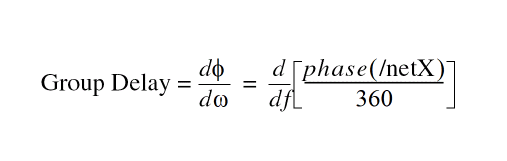
Arguments
|
Waveform object representing simulation results that can be displayed as a series of points on a grid. (A waveform object identifier looks like this: |
Value Returned
|
Returns a waveform representing the group delay of the specified waveform. |
|
Example
plot( groupDelay( v( "/net3" ) ) )
Plots the waveform representing the group delay of the voltage of "/net3".
gt
gt(o_s11 o_s12 o_s21 o_s22[?gsn_gs] [?gln_gl] ) =>o_waveform/ nil
Description
Returns the transducer gain in terms of the supplied parameters and the optional source reflection coefficient (Gs) and the input reflection coefficient (Gl).
Arguments
Value Returned
Example
s11 = sp(1 1)
s12 = sp(1 2)
s21 = sp(2 1)
s22 = sp(2 2)
plot(gt(s11 s12 s21 s22))
gt( s11 s12 s21 s22 ?gl complex(<realPart> <imagPart>))harmonic
harmonic(o_waveformh_index) =>o_waveform/g_value/ nil
Description
Returns the waveform for a given harmonic index.
Arguments
Value Returned
Example
For each of the following commands:
harmonic(v("/net49" ?result "pss-fd.pss") 1)
harmonic(v("/Pif" ?result "pdisto-fi.pdisto") list(1 -1))
Each result is a complex number.
For each of the following commands:
harmonic(v("/net54" ?result "pac-pac") 1)
harmonic(v("/net51" ?result "sweeppss_pss_fd-sweep") list(8))
harmonic(v("/Pif" ?result "sweeppss_pac-sweep") -8)
harmonic(v("/net36" ?result "sweeppdisto_pdisto_fi-sweep") ’(1 -1))
For each of the following commands:
harmonic(v("/net54" ?result "pac-pac") list(1 5))
harmonic(v("/net51" ?result "sweeppss_pss_fd-sweep") ’(1 8))
harmonic(v("/Pif" ?result "sweeppss_pac-sweep") list(-8 0))
harmonic(v("/net36" ?result "sweeppdisto_pdisto_fi-sweep") ’((1 -1) (2 -2) (-1 2)))
Each result is a family of waveforms.
Neither of the following commands should be entered:
harmonic(v("/net49" ?result "pss-fd.pss") list(0 1))
harmonic(v("/Pif" ?result "pdisto-fi.pdisto") ’((1 -1) (-1 2)))
Each resulting waveform is not in a useful format.
harmonicFreqList
harmonicFreqList( [?resultsDirt_resultsDir] [?resultS_resultName] ) =>n_list/ nil
Description
Returns a list of lists, with each sublist containing a harmonic index and the minimum and maximum frequency values that the particular harmonic ranges between.
If both of these frequency values are the same, just one frequency value is returned.
Arguments
|
Directory containing the PSF files (results). If you supply this argument, you must also supply the resultName argument. |
|
Value Returned
Example
For each of the following commands:
harmonicFreqList( ?result "pss-fd.pss" )
harmonicFreqList( ?result "pac-pac" )
harmonicFreqList( ?result "sweeppss_pss_fd-sweep" )
harmonicFreqList( ?result "sweeppss_pac-sweep" )
Each result is a list of integers.
For each of the following commands:
harmonicFreqList( ?result "pdisto-fi.pdisto" )
harmonicFreqList( ?result "sweeppdisto_pdisto_fi-sweep" )
Each result is a list of lists, with each sublist containing a combination of integer numbers that correspond with the frequency names listed in the funds analysis parameter in the netlist. These names can also be extracted from the PSF data by using the resultParam function to find the ’largefundname and ’moderatefundnames values. For example:
strcat(resultParam( ’largefundname ?result "pdisto-fi.pdisto" ) " "
resultParam( ’moderatefundnames ?result "pdisto-fi.pdisto" ))
Returns a string representing the order of the frequency names.
harmonicList
harmonicList( [?resultsDirt_resultsDir] [?resultS_resultName] ) =>n_list
Description
Returns the list of harmonic indices available in the resultName or current result data.
Arguments
|
Directory containing the PSF files (results). If you supply this argument, you must also supply the resultName argument. |
|
Value Returned
Example
For each of the following commands:
harmonicList( ?result "pss-fd.pss" )
harmonicList( ?result "pac-pac" )
harmonicList( ?result "sweeppss_pss_fd-sweep" )
harmonicList( ?result "sweeppss_pac-sweep" )
Each result is a list of integers.
For each of the following commands:
harmonicList( ?result "pdisto-fi.pdisto" )
harmonicList( ?result "sweeppdisto_pdisto_fi-sweep" )
Each result is a list of lists, with each sublist containing a combination of integer numbers that correspond with the frequency names listed in the ’funds analysis parameter in the netlist. These names can also be extracted from the PSF data by using the ’resultParam function to find the ’largefundname and ’moderatefundnames values. For example:
strcat(resultParam( ’largefundname ?result "pdisto-fi.pdisto" ) " "
resultParam( ’moderatefundnames ?result "pdisto-fi.pdisto" ))
Returns a string representing the order of the frequency names.
histo
histo(o_waveformx_binsn_min n_max) =>o_histoWaveform/ nil
Description
Returns a waveform that represents the statistical distribution of input data in the form of a histogram. The height of the bars (or bins) in the histogram represents the frequency of the occurrence of values within a specific period. Using the histo function, the range for capturing these frequencies can be specified through the n_min and n_max values.
Arguments
Value Returned
|
Returns a waveform representing the statistical distribution of the input waveform o_waveform. |
|
Example
histo( VT("/vin") 3 1.5 3.5)
=> out_wave
plot( out_wave )
Plots the output waveform out_wave as a histogram, which represents the statistical distribution of the input waveform VT("/vin").
histogram2D
histogram2D(o_waveformx_nbins[t_type][g_setAnnotation][g_setDensityEstimator] ) =>o_waveform/ nil
Description
Returns a waveform that represents the statistical distribution of input data in the form of a histogram. The height of the bars (or bins) in the histogram represents the frequency of the occurrence of values within a specific period.
Arguments
Value Returned
|
Returns a waveform representing the statistical distribution of the input waveform o_waveform. |
|
Examples
histogram2D(i("/V2/PLUS" ?result "tran") 10 "standard" t t )
Plots the output waveform out_wave as a histogram, which represents the statistical distribution of the input waveform /V2/PLUS.
iinteg
iinteg(o_waveform) =>o_waveform/ nil
Description
Computes the indefinite integral of a waveform with respect to the X-axis variable.
Arguments
|
Waveform object representing simulation results that can be displayed as a series of points on a grid. (A waveform object identifier looks like this: |
Value Returned
|
Returns a waveform representing the indefinite integral of the input waveform. |
|
Example
plot( iinteg( v( "/net8" )))
Computes the indefinite integral of the waveform representing the voltage of "/net8".
imag
imag(
{ o_waveform | n_input }
)
=> o_waveformImag / n_numberImag / nil
Description
Returns the imaginary part of a waveform representing a complex number or returns the imaginary part of a complex number.
Arguments
|
Waveform object representing simulation results that can be displayed as a series of points on a grid. (A waveform object identifier looks like this: |
|
Value Returned
Example
imag( v( "/net8" ) )
Returns a waveform representing the imaginary part of the voltage of "/net8". You also can use the vim alias to perform the same command, as invim( "net8" ).
x=complex( -1 -2 ) => complex(-1, -2)
imag( x ) => -2.0
Creates a variable x representing a complex number, and returns the real portion of that complex number.
inl
inl(o_dacSignal o_sample|o_pointList|n_interval[?modet_mode] [?thresholdn_threshold] [?crossTypet_crossType] [?delayf_delay] [?unitsx_units] [?nbsamplesn_nbsamples] ) =>n_inl/ nil
Description
Computes the integral non-linearity of a transient simple or parametric waveform.
Arguments
- For o_sample, the arguments t_mode, n_threshold, t_crossType, f_delay, and x_units are meaningful.
- For n_pointList, the arguments x_units are meaningful.
- For n_interval, the arguments x_units, and n_nbsamples are meaningful.
Value Returned
Example
inl( wave1 wave2 ?crossType "rising" ?delay 0.4 )
=> srrWave:175051544
Returns the integral non-linearity for wave1 by taking the points at which wave2 crosses the internally calculated threshold while rising as the sample points and adding a delay of 0.4 to them.
integ
integ(o_waveform[n_intial_limit , n_final_limit]) => o_waveform / n_value/ nil
Description
Computes the definite integral of the waveform with respect to a range specified on the X-axis of the waveform. The result is the value of the area under the curve over the range specified on the X-axis.
You should specify either both the limits or neither. In case you do specify the limits, they become the end points of the range on the X-axis for definite integration. If you do not specify the limits, then the range for definite integration is the entire range of the sweep on the X-axis.
Arguments
|
Waveform object representing simulation results that can be displayed as a series of points on a grid. (A waveform object identifier looks like this: |
|
Value Returned
Example
integ( v( "/out" ) )
Returns the definite integral of the waveform representing the voltage of "/out" over its entire range.
integ( VT( "/out" ),12.5n,18n)
Returns the definite integral of the waveform representing the voltage of "/out" within a specified range.
intersect
intersect(o_waveform1 o_waveform2) =>o_wave/ nil
Description
Returns a waveform containing the points of intersection for two waveforms passed as arguments.
Arguments
|
Waveform object representing simulation results that can be displayed as a series of points on a grid. (A waveform object identifier looks like this: |
|
Value Returned
Example
intersect( VT("/inp1") VT("/inp2") )
ipn
ipn(o_spuriouso_reference[f_ordspurf_ordreff_epspurf_eprefg_psweeps_measure] ) =>o_waveform/f_number/ nil
Description
Performs an intermodulation nth-order intercept measurement.
The data for this measurement can be either a single input power value or a parametric input power sweep.
From each of the spurious and reference power waveforms (or points), the ipn function extrapolates a line of constant slope (dB/dB) according to the specified order and input power level. These lines represent constant small-signal power gain (ideal gain). The ipn function calculates the intersection of these two lines and returns the value of either the X coordinate (input referred) or Y coordinate.
Arguments
Value Returned
Example
spurWave = db20(harmonic(wave signalHarmonic))
refWave = db20(harmonic(wave referenceHarmonic))
xloc = ipn( spurWave refWave 3.0 1.0 -25 -25 )
yloc = ipn( spurWave refWave 3.0 1.0 -25 -25 t "Output")
Computes the IP3 point for the given wave.
Each of the following examples returns an ip3 measurement.
ipn(dB20(harmonic(v("/Pif" ?result "pss_fd") 9))
    dB20(harmonic(v("/Pif" ?result "pss_fd") 8)))
ipn(dbm(harmonic(spectralPower(v("/Pif" ?result "pss_fd")/50.0
    v("/Pif" ?result "pss_fd")) 9))
    dbm(harmonic(spectralPower(v("/Pif" ?result "pss_fd")/50.0
    v("/Pif" ?result "pss_fd")) 8)))
ipn(dbm(harmonic(spectralPower(v("/Pif" ?result "pss_fd")
    /resultParam("rif:r" ?result "pss_td")
    v("/Pif" ?result "pss_fd")) 9))
    dbm(harmonic(spectralPower(v("/Pif" ?result "pss_fd")
    /resultParam("rif:r" ?result "pss_td")
    v("/Pif" ?result "pss_fd")) 8)))
ipn(dbm(harmonic(spectralPower(i("/rif/PLUS" ?result "pss_fd")
    v("/Pif" ?result "pss_fd")) 9))
    dbm(harmonic(spectralPower(i("/rif/PLUS" ?result "pss_fd")
    v("/Pif" ?result "pss_fd")) 8))
    3. 1. -25 -25 t "Output")
ipn(dbm(harmonic(spectralPower(v("/Pif" ?result "pac")
    /resultParam("rif:r" ?result "pss_td")
    v("/Pif" ?result "pac")) -21))
    dbm(harmonic(spectralPower(v("/Pif" ?result "pac")
    /resultParam("rif:r" ?result "pss_td")
    v("/Pif" ?result "pac")) -25)))
ipnVRI
ipnVRI(o_vportx_harmspurx_harmref[?iporto_iport] [?rportf_rport] [?ordspurf_ordspur]|[?epointf_epoint] [?psweepg_psweep] [?epreff_epref] [?ordreff_ordref] [?measures_measure] ) =>o_waveform/f_number/ nil
Description
Performs an intermodulation nth-order intercept point measurement.
Use this function to simplify the declaration of an ipn measurement. This function extracts the spurious and reference harmonics from the input waveform(s), and uses dBm(spectralPower((i or v/r),v)) to calculate the respective powers. The function passes these power curves or numbers and the remaining arguments to the ipn function to complete the measurement.
From each of the spurious and reference power waveforms (or points), the ipn function extrapolates a line of constant slope (dB/dB) according to the specified order and input power level. These lines represent constant small-signal power gain (ideal gain). The ipn function calculates the intersection of these two lines and returns the value of either the X coordinate (input referred) or the Y coordinate.
Value Returned
Example
Each of following examples returns an ip3 measurement:
ipnVRI(v("/Pif" ?result "pss_fd") 9 8)
ipnVRI(v("/Pif" ?result "pss_fd") 9 8
    ?rport resultParam("rif:r" ?result "pss_td"))
ipnVRI(v("/Pif" ?result "pss_fd") 9 8
    ?iport i("/rif/PLUS" ?result "pss_fd") ?epoint -25
    ?measure "Output")
ipnVRI(v("/Pif" ?result "pac") -21 -25
    ?rport resultParam("rif:r" ?result "pss_td"))
ipnVRICurves
ipnVRICurves(o_vportx_harmspurx_harmref[?iporto_iport] [?rportf_rport] [?ordspurf_ordspur] [?epointf_epoint] [?psweepg_psweep] [?epreff_epref] [?ordreff_ordref] [?displayLabelsg_displayLabels] ) =>o_waveform/nil
Description
Constructs the waveforms associated with an ipn measurement.
Use this function to simplify the creation of waves associated with an ipn measurement. This function extracts the spurious and reference harmonics from the input waveform(s), and uses dBm(spectralPower((i or v/r),v)) to calculate the respective powers.
From each of the spurious and reference power waveforms (or points), the ipnVRICurves function extrapolates a line of constant slope (dB/dB) according to the specified order and input power level. These lines represent constant small-signal power gain (ideal gain). The function returns these lines and power waveforms (when present) as a family of waveforms.
This function only creates waveforms and does not perform an ipn measurement or include labels with the waveforms. Use the ipn or ipnVRI function for making measurements.
Arguments
Value Returned
|
A family of waveforms that contains the spurious and reference tangent lines, and when g_psweep is |
|
Example
Each of following examples returns curves related to an ip3 measurement:
ipnVRICurves(v("/Pif" ?result "pss_fd") 9 8)
ipnVRICurves(v("/Pif" ?result "pss_fd") 9 8
    ?rport resultParam("rif:r" ?result "pss_td"))
ipnVRICurves(v("/Pif" ?result "pss_fd") 9 8
    ?iport i("/rif/PLUS" ?result "pss_fd") ?epoint -25)
ipnVRICurves(v("/Pif" ?result "pac") -21 -25
    ?rport resultParam("rif:r" ?result "pss_td"))
kf
kf(o_s11 o_s12 o_s21 o_s22) =>o_waveform/ nil
Description
Returns the stability factor in terms of the supplied parameters.
Arguments
Value Returned
Example
s11 = sp(1 1)
s12 = sp(1 2)
s21 = sp(2 1)
s22 = sp(2 2)
plot(kf(s11 s12 s21 s22))
ln
ln(
{ o_waveform | n_number }
)
=> o_waveform / f_number / nil
Description
Gets the base-e (natural) logarithm of a waveform or number.
Arguments
|
Waveform object representing simulation results that can be displayed as a series of points on a grid. (A waveform object identifier looks like this: |
|
Value Returned
Example
ln( v( "/net9" ) )
Gets a waveform that is calculated as the natural logarithm of the input waveform.
ln(ymax(v("/net9")))
Gets a waveform that is calculated as the natural logarithm of the following: ymax(v("/net9")).
ln(100)
=> 4.60517
Gets the natural logarithm of 100.
log10
log10(
{ o_waveform | n_number }
)
=> o_waveform / n_number / nil
Description
Gets the base-10 logarithm of a waveform or a number.
Arguments
|
Waveform object representing simulation results that can be displayed as a series of points on a grid. (A waveform object identifier looks like this: |
|
Value Returned
Example
log10( v( "/net9" ) )
Gets a waveform that is calculated as the base-10 logarithm of the input waveform.
log10( ymax( v( "/net9" ) ) )
Gets a waveform representing the base-10 logarithm of ymax(v("/net9")).
log10( 100 )
=> 2.0
Gets the base-10 logarithm of 100, or 2.
lsb
lsb(o_s11 o_s12 o_s21 o_s22 g_frequency) =>o_waveform/ nil
Description
Computes the load stability circles.
Arguments
Value Returned
Example
plot(lsb(s11 s12 s21 s22 list(800M 1G 100M)))
lshift
lshift(o_waveformn_delta) =>o_waveform/ nil
Description
Shifts the waveform to the left by the delta value.
This command is the inverse of the rshift command.
Arguments
|
Waveform object representing simulation results that can be displayed as a series of points on a grid. (A waveform object identifier looks like this: |
|
Value Returned
|
Returns a waveform object representing the input waveform shifted to the left. Returns a family of waveforms if the input argument is a family of waveforms. |
|
Example
plot( lshift( v( "/net8" ) 30u ) )
Shifts the waveform representing the voltage of "/net8" to the left by 30u and plots the resulting waveform.
mag
mag(
{ o_waveform | n_number }
)
=> o_waveform / n_number / nil
Description
Gets the magnitude of a waveform or number.
Arguments
|
Waveform object representing simulation results that can be displayed as a series of points on a grid. (A waveform object identifier looks like this: |
|
Value Returned
|
Returns a waveform object if the input argument is a waveform object or returns a family of waveforms if the input argument is a family of waveforms. |
|
Example
mag( v( "5" ) )
Gets the magnitude of the waveform representing the voltage at net 5. You can also use the vm alias to perform the same command, as in vm( "5" ).
mag( i( "VFB" ) )
Gets the magnitude of the waveform representing current through the VFB component. You can also use the im alias to perform the same command, as in im( "VFB" ).
mag( -10 ) => 10
nc
nc(o_Fmin o_Gmin o_rn g_level g_frequency) =>o_waveform/ nil
Description
Arguments
Value Returned
Example
Gopt = getData("Gopt")
Bopt = getData("Bopt")
Zref = zref(1 ?result "sp")
Gmin = gmin(Gopt Bopt Zref)
Fmin = getData("Fmin")
rn = getData("NNR")
NC = nc(Fmin Gmin rn 10 list(100M 1G 100M))
displayMode("smith")
smithType("impedance")
plot(NC)
normalQQ
normalQQ(o_waveform) =>o_waveform/ nil
Description
Returns a quantile-quantile plot of the sample quantiles versus theoretical quantiles from a normal distribution. If the distribution is normal, the plot is close to a linear waveform.
Argument
|
Waveform object representing simulation results that can be displayed as a series of points on a grid. (A waveform object identifier looks like this: |
Values Returned
Example
normalQQ(v("net10" ?result "tran"))
Returns the quantile plot for the v("net10" ?result "tran") signal.
overshoot
overshoot(o_waveformn_initValg_initTypen_finalValg_finalType[g_multiple[s_Xname] ] [g_histoDisplay] [x_noOfHistoBins] ) =>o_waveform/n_value/nil
Description
Computes the percentage by which an expression overshoots a step going from the initial value to the final value you enter.
This command returns the overshoot of o_waveform as a percentage of the difference between the initial value and the final value.
In the equation below, M represents Maximum Value of the peak wave, F represents Final Value of the settled wave, and I represents Initial Value of the wave.
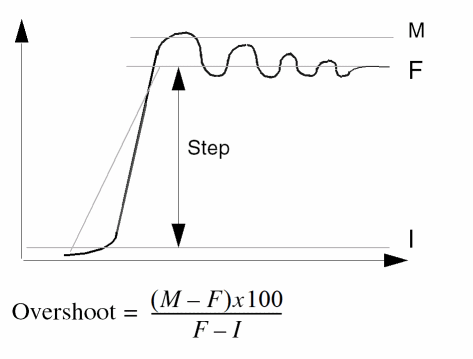
Arguments
Value Returned
Example
overshoot( v( "/net8" ) 7n t 3.99u t )
Returns the value of the overshoot for the waveform representing the voltage of "/net8".
overshoot(VT("/out") 0.5 nil 4.95 nil 5 t ‘time)
Returns multiple occurrences of overshoot specified against time-points at which each overshoot event occurs.
overshoot(VT("/out") 0.5 nil 4.95 nil 5 t ‘cycle)
Returns multiple occurrences of overshoot specified against cycle numbers, where a cycle number refers to the n’th occurrence of the overshoot event in the input waveform.
pavg
pavg(o_waveform n_from n_to[n_period[n_sfactor] ] ) =>o_waveform/ nil
Description
Computes the periodic average of a family of signals for each time point.
Arguments
Values Returned
|
Returns a waveform representing the periodic average of a family of signals. |
|
Example
pavg( v("/net8") ?from 1n ?to 20n ?period 2n ?sfactor 1)
Returns the value of the periodic average for the family of waveforms representing the voltage of "/net8".
peak
peak(o_waveform[ ?fromf_from][ ?tof_to][ ?xtolf_xtol][ ?ytolf_ytol] [ ?withLastg_withLast] ) =>o_waveform/ nil
Description
Detects the peaks in the input waveform and returns the X and Y coordinates of these peak points in the form of a waveform.
Arguments
- The maximum peak is selected first.
- All adjacent peaks in the neighborhood of both f_xtol in the X-axis direction and f_ytolin the Y-axis direction are then filtered.
- Next, all the peaks in the rectangular window thus formed are filtered based on both f_xtol and f_ytol.
If only one of f_xtol or f_ytol is specified, the peaks are filtered only in either the X-axis direction or the Y-axis direction, respectively.
Value Returned
|
Returns a waveform whose X and Y coordinates of the peaks are determined from the input waveform and the peaks are filtered based on thef_xtol and f_ytol criteria. |
|
Example
peak( vt("/out") ?from 1n ?to 20n ?xtol 2n ?ytol 0.5)
Out of all the peaks in the region starting from 1n to 20n, the function returns a waveform comprising of some of these peaks that satisfy the criteria of x-tol (2n) and ytol (0.5).
peakToPeak
peakToPeak(o_waveform[?overalltype_overall] ) =>o_waveform/n_value/ nil
Description
Returns the difference between the maximum and minimum values of a waveform.
Arguments
|
Waveform object representing simulation results that can be displayed as a series of points on a grid. (A waveform object identifier looks like this: |
|
Value Returned
Example
peakToPeak( v( "/net2" ) )
Returns the difference between the maximum and minimum values of the waveform representing the voltage of the "/net2" net.
period_jitter
period_jitter(o_waveform t_crossType[?modet_mode] [?thresholdn_threshold] [?binSizen_binSize] [?xNamet_xName] [?outputTypet_outputType] ) =>o_waveform/f_val/ nil
Description
Computes the period jitter. It returns a waveform or a value representing deviation from the average period.
Arguments
Value Returned
|
Returns the period jitter values as a function of time or cycle when the outputType is set to |
|
|
Returns the standard deviation value when the outputType is set to |
|
Example
period_jitter( wave1 “rising” ?mode “user” ?threshold 1 ?binSize 2 ?xName “cycle” ?outputType “sd” )
=> 1.695467
Returns the standard deviation for the period jitter of wave1 with the threshold of 1 against the cycle on the x-axis.
phase
phase(
{ o_waveform | n_number }
)
=> o_waveform / n_number / nil
Description
Gets the phase of the waveform or number. The phase command is similar to the phaseDegUnwrapped command and returns the unwrapped phase in degrees.
Arguments
|
Waveform object representing simulation results that can be displayed as a series of points on a grid. (A waveform object identifier looks like this: |
|
Value Returned
|
Returns a waveform object if the input argument is a waveform object or returns a family of waveforms if the input argument is a family of waveforms. |
|
Example
phase( v( "5" ) )
Gets the phase of the waveform representing the voltage at net 5. You can also use the vp alias to perform the same command, as in vp( "5" ).
phase( i( "VFB" ) )
Gets the phase of the waveform representing the current through the VFB component. You can also use the ip alias to perform the same command, as in ip( "VFB" ).
phase( -2.0 ) => 180.0
phaseDeg
phaseDeg(
{ o_waveform | n_number }
)
=> o_waveform / n_number / nil
Description
Calculates the wrapped phase in degrees of a waveform and returns a waveform.
Arguments
|
Waveform object representing simulation results that can be displayed as a series of points on a grid. (A waveform object identifier looks like this: |
|
Value Returned
|
Returns a waveform object representing the wrapped phase in degrees of the input waveform. Returns a family of waveforms if the input argument is a family of waveforms. |
|
Example
phaseDeg( v( "vout" ) )
Takes the input waveform, representing the voltage of the "vout" net, and returns the waveform object representing the wrapped phase in degrees.
phaseDegUnwrapped
phaseDegUnwrapped(
{ o_waveform | n_number }
)
=> o_waveform / n_number / nil
Description
Calculates the unwrapped phase in degrees of a waveform and returns a waveform.
The phaseDegUnwrapped function shifts the phase by ±2 pi when the difference in phases of two consecutive points is greater than pi radians.
Arguments
|
Waveform object representing simulation results that can be displayed as a series of points on a grid. (A waveform object identifier looks like this: |
|
Value Returned
|
Returns a waveform object representing the unwrapped phase in degrees of the input waveform. Returns a family of waveforms if the input argument is a family of waveforms. |
|
Example
phaseDegUnwrapped( v( "vout" ) )
Takes the input waveform, representing the voltage of the "vout" net, and returns the waveform object representing the unwrapped phase in degrees.
phaseDegUnwrappedWithFreq
phaseDegUnwrappedWithFreq(o_waveform g_frequency) =>o_waveform/nil
Description
Calculates the unwrapped phase in degrees of a waveform and returns a waveform with the specified start frequency, the phase of which remains in the range of -180 to 180 degrees.
Note that if the phase increases with frequency, the waveform does not start from +180 because otherwise the rest of the waveform will be out of the range. Similarly, if the phase decreases with frequency, the waveform does not start from -180.
Arguments
|
Waveform object representing simulation results that can be displayed as a series of points on a grid. (A waveform object identifier looks like this: |
|
Value Returned
|
Returns a waveform object, representing the unwrapped phase in degrees. |
|
Examples
The following function returns a waveform object representing the unwrapped phase in degrees.
openResults("./simulation/loopfinder/opAmp_tb/maestro/results/maestro/Interactive.3/psf/loopfinder_opAmp_tb_1/psf")
;Opens the simulation results stored in the specified results directory.
results()
;Lists the available results in the specified dirrectory.
selectResult('stb)
;Selects the specified result.
outputs()
;List the available outputs in the selected result.
w=getData("loopGain" ?result "stb")
;Creates the waveform object 'w' for the output 'loopGain' of the result 'stb'.
phaseDegUnwrappedWithFreq(w 10G)
;Creates a waveform object representing the unwrapped phase in degrees of the specified waveform 'w' for the specified start frequency, the phase of which is in the range of -180 to 180 degrees.
plot(phaseDegUnwrappedWithFreq(waveform 10G))
;Plots the waveform object in the Waveform window.
=> "./simulation/loopfinder/opAmp_tb/maestro/results/maestro/Interactive.3/psf/loopfinder_opAmp_tb_1/psf"
=>
(pz stb stb_margin tran tranOp
lf model instance output designParamVals
primitives subckts variables
)
=>
stdobj@0x36c9f2f0
=>
("loopGain")
=>
srrWave:0x3894e260
=>
srrWave:0x3894e270
=>
rdbLoadResults("fnxSession0" "./simulation/loopfinder/opAmp_tb/maestro/results/maestro/Interactive.3/psf/loopfinder_opAmp_tb_1/psf")
=>t
=>t
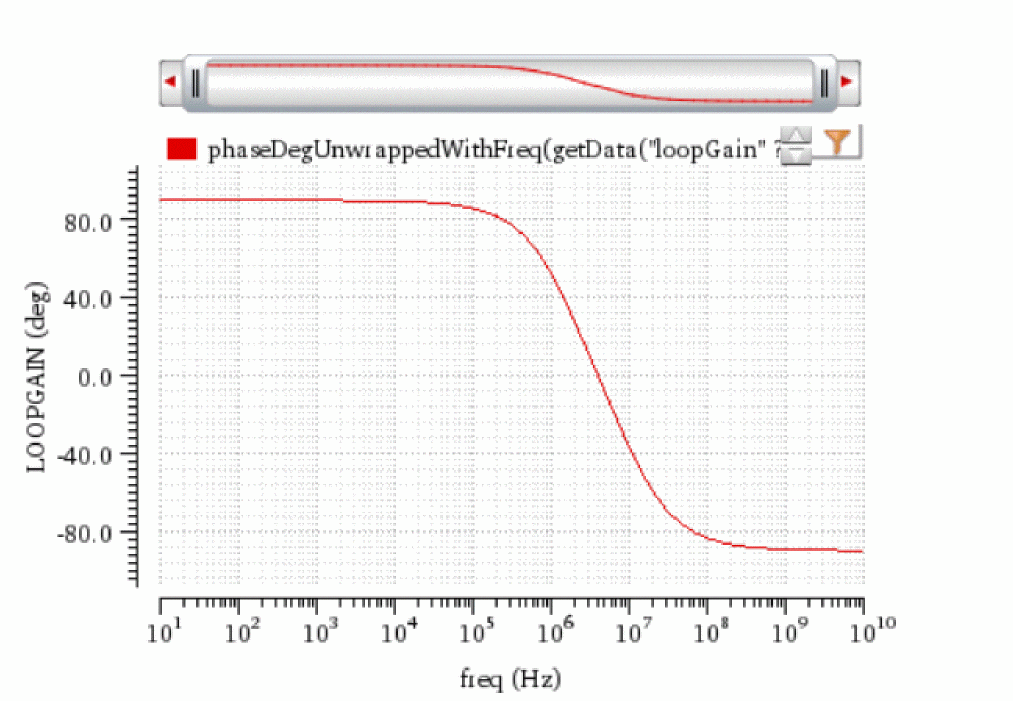
phaseMargin
phaseMargin(o_waveform) =>o_waveform/n_value/ nil
Description
Computes the phase margin of the loop gain of an amplifier.
You supply a waveform representing the loop gain of interest over a sufficiently large frequency range. phaseMargin( gain ) = 180 + phase( value( gain f0 ) ) The phase margin is calculated as the difference between the phase of the gain in degrees at f0 and at -180 degrees. The frequency f0 is the lowest frequency where the gain is 1. For stability, the phase margin must be positive.
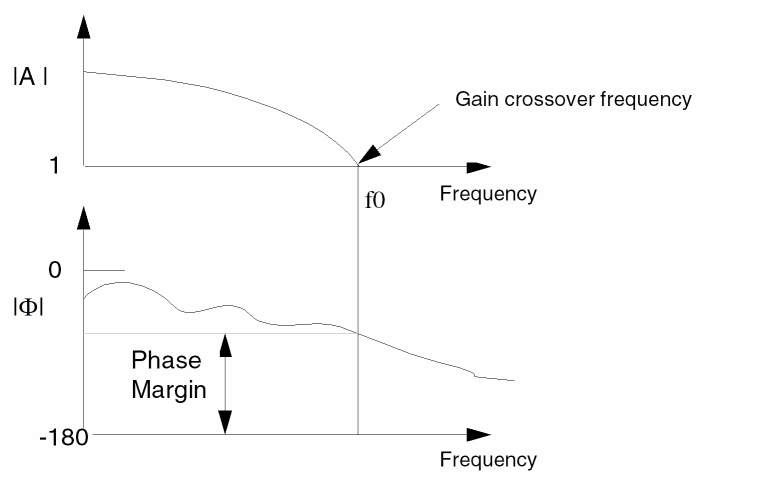
Arguments
|
Waveform object representing simulation results that can be displayed as a series of points on a grid. (A waveform object identifier looks like this: |
Value Returned
Example
phaseMargin( v( "/OUT" ) )
Returns the phase margin for the waveform representing the voltage of the "/OUT" net.
phaseRad
phaseRad(
{ o_waveform | n_number }
)
=> o_waveform / n_number / nil
Description
Calculates the wrapped (discontinuous) phase in radians of a waveform.
Arguments
|
Waveform object representing simulation results that can be displayed as a series of points on a grid. (A waveform object identifier looks like this: |
|
Value Returned
|
Returns a waveform representing a discontinuous value (in radians) for the phase of the input waveform. Returns a family of waveforms if the input argument is a family of waveforms. |
|
Example
plot( phaseRad( v( "/OUT" ) ) )
Returns the wrapped phase of the waveform representing the voltage of the "/OUT" net.
phaseRadUnwrapped
phaseRadUnwrapped(o_waveform) =>o_waveform/ nil
Description
Calculates the unwrapped (continuous) phase in radians of a waveform and returns a waveform.
Arguments
|
Waveform object representing simulation results that can be displayed as a series of points on a grid. (A waveform object identifier looks like this: |
Value Returned
|
Returns a waveform representing the unwrapped (continuous) value for the phase of the input waveform in radians. Returns a family of waveforms if the input argument is a family of waveforms. |
|
Example
plot( phaseRadUnwrapped( v( "/OUT" ) )
Returns the unwrapped phase of the waveform representing the voltage of the "/OUT" net.
PN
PN(o_waveform t_crossType n_threshold 1.0[?windowNamet_windowName] [?smoothx_smooth] [?windowsizex_windowsize] [?detrendingt_detrending] [?cohGainf_cohGain] ) =>o_waveform/ nil
Description
Calculates the transient phase noise of the input waveforms in decibels (dBc/Hz). Phase noise is defined as the power spectral density of the absolute jitter of an input waveform.
Arguments
Value Returned
|
The power spectral density waveform returned when the command is successful. |
|
Example
PN(v("net9") "rising" 1.0 ?windowName "Rectangular" ?smooth 1 ?windowSize 256 ?detrending "Mean" ?cohGain (10**(/20)) )
Returns the Phase Noise waveform, net9, for the window type rectangular at threshold value 1.0.
pow
pow(
{ o_waveformBase | n_numberBas }
{ o_waveformExpn | n_numberExpn }
)
=> o_waveform / n_result / nil
Description
Takes the exponent of a given waveform or number.
Arguments
|
Waveform object to be used as the exponent for the expression. |
|
Value Returned
|
Returns a family of waveforms if one of the input arguments is a family of waveforms or returns a waveform if one of the input arguments is a waveform (and none is a family). |
|
Example
pow( average( v( "/net9" ) ) 0.5 )
Gets the square root of the average value of the voltage at "/net9".
pow( 2 3 )
=> 8
Gets the value of 2 to the third power, or 8.
pow( -2 2 )
=> 4
Gets the value of -2 to the second power.
pow( 2.5 -1.2 )
=> 0.3330213
Gets the value of 2.5 to the power of -1.2.
prms
prms(o_waveform n_from n_to[n_period[n_sfactor] ] ) =>o_waveform/ nil
Description
Computes the periodic root mean square of a family of signals for each time point, which is the square root of the periodic average of the square of the input waveform.
Arguments
Values Returned
|
Returns a waveform representing the periodic root mean square of a family of signals. |
|
Example
prms v("/net8") ?from 1n ?to 20n ?period 2n ?sfactor 1)
Returns the value of the periodic root mean square for the family of waveforms representing the voltage of "/net8".
psd
psd(o_waveformf_timeStartf_timeEndx_num[?windowNamet_windowName] [?smoothx_smooth] [?cohGainf_cohGain] [?windowsizex_windowsize] [?detrendingt_detrending] ) =>o_waveformReal/ nil
Description
Returns an estimate for the power spectral density of o_waveform. If x_windowsize is not a power of 2, it is forced to the next higher power of 2. If x_num is less than x_windowsize, x_num is forced to x_windowsize.
Arguments
Value Returned
|
The power spectral density waveform returned when the command is successful. |
|
Example
psd(VT("/net32" "/hm/test_bench/spectre/schematic"), 0, 16m, 12000,
?windowName’Hanning,?smooth 1, ?windowSize 256,
?detrending’None, ?cohGain 1)
Consider applying this command to one of the waveforms in the following illustration.
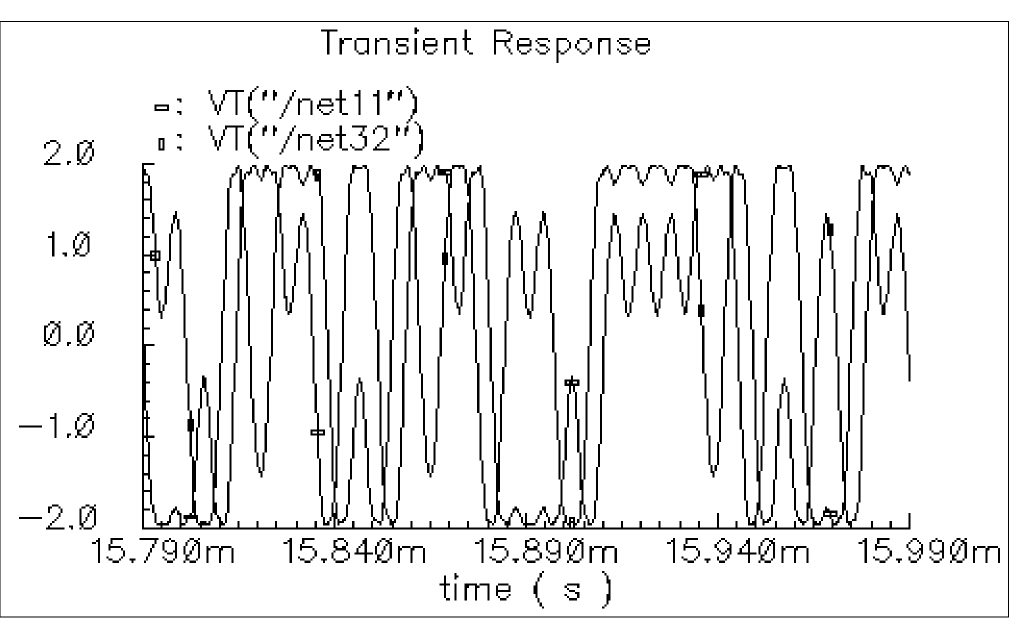
The result is the following spectrum, which is displayed with a logarithmic vertical scale.
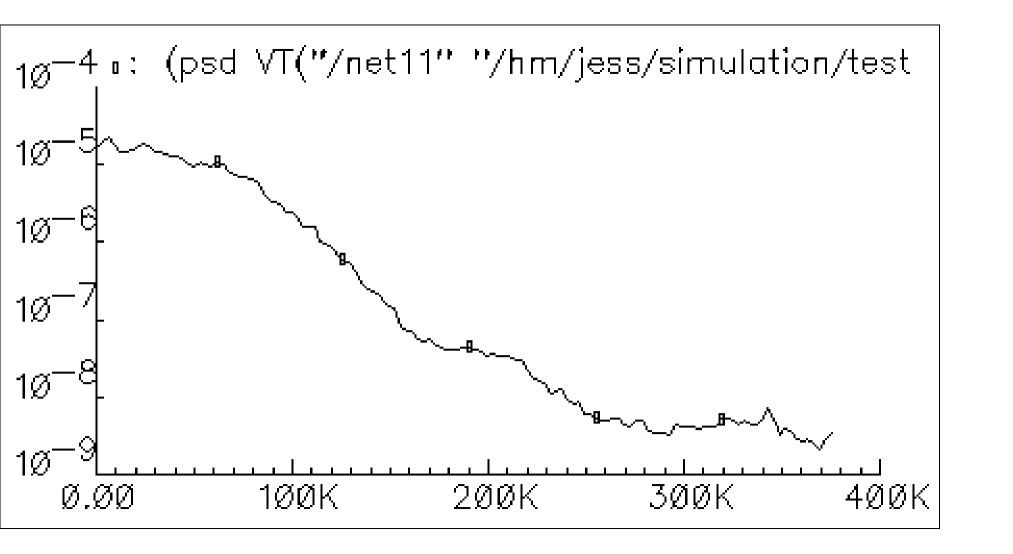
psdbb
psdbb(o_waveform1o_waveform2 f_timeStartf_timeEndx_num[?windowNamet_windowName] [?smoothx_smooth] [?cohGainf_cohGain] [?windowsizex_windowsize] [?detrendingt_detrending] ) =>o_waveformReal/ nil
Description
Returns an estimate for the power spectral density of o_waveform1+j*o_waveform2. If x_windowsize is not a power of 2, it is forced to the next higher power of 2. If x_num is less than x_windowsize, x_num is forced to x_windowsize.
Arguments
Value Returned
|
The power spectral density waveform returned when the command is successful. |
|
Example
psdbb(VT("/net32" "/hm/test_bench/spectre/schematic"),
VT("/net11" "/hm/test_bench/spectre/schematic"), 0, 16m, 12000,
?windowName’Hanning,?smooth 1, ?windowSize 256,
?detrending’None, ?cohGain 1)
Consider applying this command to both of the waveforms in the following illustration.
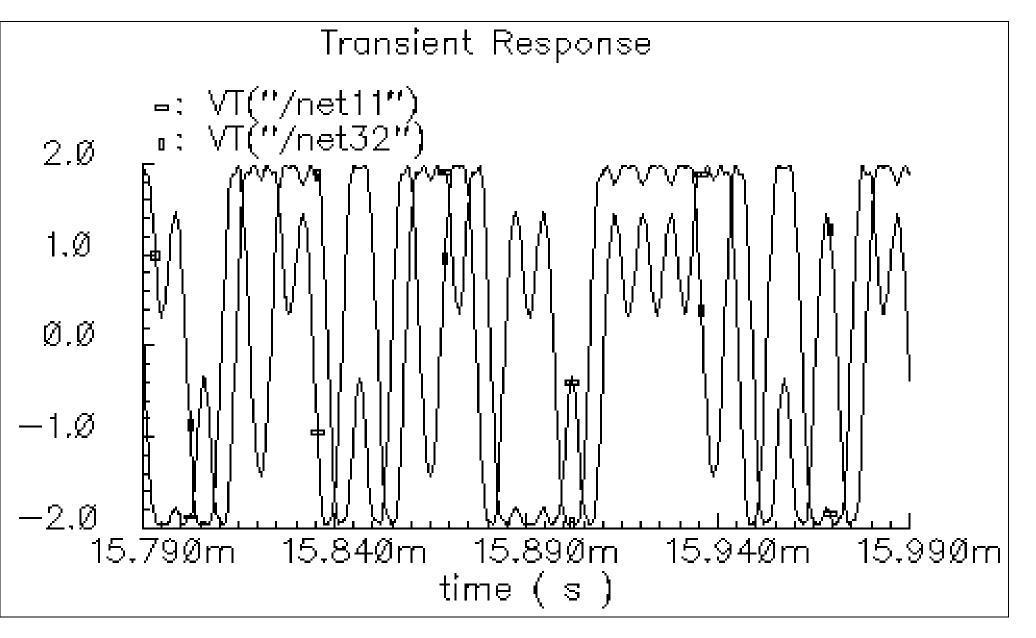
The result is the following spectrum, which is displayed with a logarithmic vertical scale.
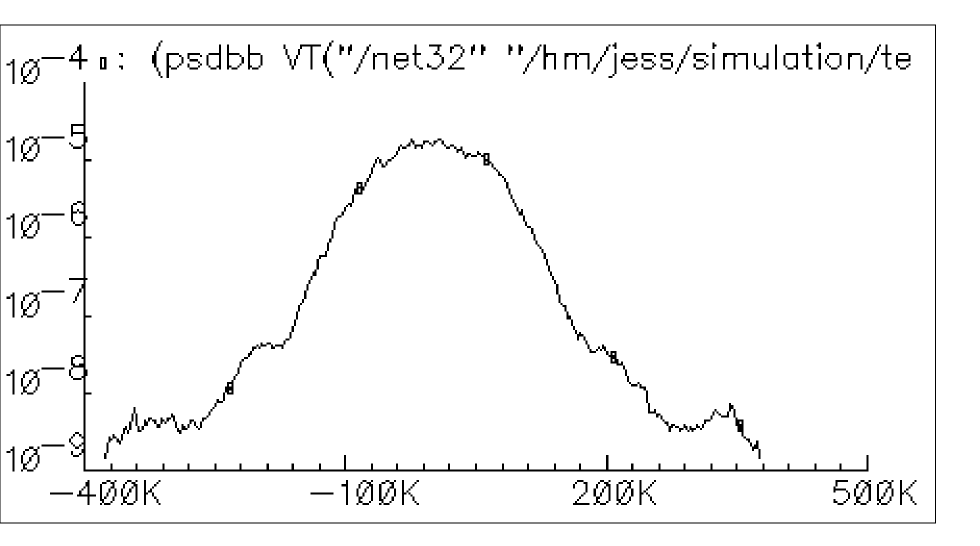
pstddev
pstddev(o_waveform n_from n_to[n_period[n_sfactor] ] ) =>o_waveform/ nil
Definition
Computes the periodic standard deviation of a family of signals for each time point.
Arguments
Values Returned
|
Returns a waveform representing the periodic standard deviation of a family of signals. |
|
Example
pstddev( v("/net8") ?from 1n ?to 20n ?period 2n ?sfactor 1)
Returns the value of the periodic standard deviation for the family of waveforms representing the voltage of "/net8"
pzbode
pzbode(f_transferGain f_minfrequency f_maxfrequency x_nponits[?poleso_waveform1] [?zeroso_waveform2] ) =>o_waveform/ nil
Description
Calculates and plots the transfer function of a circuit from pole zero simulation data.
Arguments
|
The frequency interval for the bode plot, in points per decade. |
|
Value Returned
|
Waveform containing the X and Y points of the transfer function. The scale of the Y-axis will be db20. |
|
Example
pzbode( 1.0 1M 1G 20 ?poles complexPoleWave ?zeros complexZeroWave )
pzfilter
pzfilter([o_PoleWaveform][o_ZeroWaveform][ ?maxfreqt_maxfreq] [?reldistn_reldist] [?absdistn_absdist] [?minqn_minq][ ?output_typeo_output]) =>o_waveform/ nil
Description
Returns the filtered Pole and Zero waveforms.
Arguments
Value Returned
Example
pzfilter( complexPoleWave complexZeroWave )
=> srrWave:175051584
Returns a family of filtered Pole and Zero waveforms, which correspond to the sweep values of “Pole” and “Zero”, respectively.
rapidIPNCurves
rapidIPNCurves(o_result[?resultsDirt_resultsDir] [?resistancen_resistance]@Restargs) =>o_waveformReal/ nil
Description
Arguments
|
Object representing simulation results that can be displayed as a series of points on a grid. |
|
|
List of arguments to be used by the value function on the results data. Refer to the value function for more details. |
|
Value Returned
Example
w2 = rapidIPNCurves("ac-ip3" ?resultsDir "./simulation/amplifier/spectre/schematic/psf" ?r 50)
rapidIIPN
rapidIIPN(o_result[?resultsDirt_resultsDir] [?resistancen_resistance]@Restargs) =>o_waveform/ nil
Description
Arguments
|
Object representing simulation results that can be displayed as a series of points on a grid. |
|
|
List of arguments to be used by the value function on the results data. Refer to the value function for more details. |
|
Value Returned
Example
rapidIIPN("hbac_ip3")
real
real( {o_waveform|n_input} ) =>o_waveformReal/n_numberReal/ nil
Description
Returns the real part of a waveform representing a complex number, or returns the real part of a complex number.
Arguments
|
Waveform object representing simulation results that can be displayed as a series of points on a grid. (A waveform object identifier looks like this: |
|
Value Returned
Example
real( v( "/net8" ) )
Returns a waveform representing the real part of the voltage of "/net8". You also can use the vr alias to perform the same command, as in vr( "net8").
x=complex( -1 -2 ) => complex(-1, -2)
real( x ) => -1.0
Creates a variable x representing a complex number, and returns the real portion of that complex number.
riseTime
riseTime(o_waveformn_initVal g_initTypen_finalValg_finalType n_theta1 n_theta2[g_multiple[s_Xname] [g_histoDisplay] [x_noOfHistoBins] ] ) =>o_waveform/n_value/ nil
Description
Returns the rise time measured between theta1 (percent low) to theta2 (percent high) of the difference between the initial value and the final value.
The riseTime function can also be used to compute the fall time if initVal is higher than finalVal.
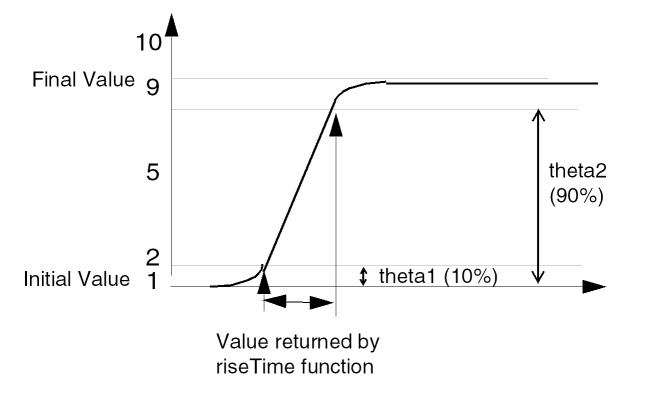
Arguments
Value Returned
Example
riseTime( v( "/net8" ) 0 t 2 t 10 90 )
Computes the rise time for the waveform representing the voltage of "/net8" from 0 to 2.
For the next example, assume that v is the following sinusoidal waveform:
sin( 2 * pi * time)
riseTime( v 0.25 t 0.5 t 10 90)
Computes the fall time of the first falling edge from 1 to 0.
riseTime(VT("/out") 0.5 nil 4.5 nil 10 90 t "time") (s)
Returns multiple occurrences of riseTime specified against time-points at which each riseTime event occurs.
riseTime(VT("/out") 0.5 nil 4.5 nil 10 90 t "cycle") (s)
Returns multiple occurrences of riseTime specified against cycle numbers, where a cycle number refers to the n’th occurrence of the riseTime event in the input waveform.
rms
rms(o_waveform) =>o_waveform/n_value/ nil
Description
Returns the root-mean-square value of a waveform.
Arguments
|
Waveform object representing simulation results that can be displayed as a series of points on a grid. (A waveform object identifier looks like this: |
Value Returned
Example
rms( v( "/out" ) )
Returns the root-mean-square value of the waveform representing the voltage of the "/out" net.
rmsNoise
rmsNoise(n_fromn_to) =>o_waveform/n_value/ nil
Description
Computes the integrated root-mean-square noise over the specified bandwidth.
Arguments
|
Frequency in hertz that specifies the minimum value for the bandwidth. |
|
|
Frequency in hertz that specifies the maximum value for the bandwidth. |
Value Returned
Example
rmsNoise( 100 100M )
=> 250e-6
Computes the integrated root-mean-square noise from 100 to 100M.
rmsVoltage
rmsVoltage(t_net[t_net1] ) =>f_voltage/nil
Description
Calculates the root-mean-square voltage between two nets for fast and regular envelop analysis.
Arguments
|
Name of the second net selected in the schematic. This argument is optional. If not specified, the default value is assumed as |
Value Returned
Example
rmsVoltage( "net1" "!gnd")
=> 120
Calculates the root-mean-square voltage between net1 and gnd.
rmsTerminalVoltage
rmsTerminalVoltage(t_terminal[t_terminal1] ) =>f_voltage/ nil
Description
Calculates the root-mean-square voltage between two terminals for fast and regular envlp analysis.
Arguments
|
Name of the second terminal selected in the schematic. This argument is optional. If not specified, the default value is assumed as |
Value Returned
Example
If the following expression is created and plotted:
clip(psdbb(real(harmonic(v("/I19/M4/G" ?result "envlp_fd" ?type 'terminalV) 1)) imag(harmonic(v("/I19/M4/G" ?result "envlp_fd" ?type 'terminalV) 1)) 0.0 1e-08 4 ?windowName "Hanning" ?windowSize 4 ?detrending "None") 0.0 1e+07)
The rms terminal voltage function creates the following expression:
rmsTerminalVoltage("IO/M1/D")
If the result is re-evaluated, the scalar value is added to the ADE output.

root
root(o_waveformn_rootVal x_n) =>o_waveform/n_value/l_value/ nil
Description
Returns the nth X value at which the Y value equals the specified Y value (rootVal).
Arguments
Value Returned
|
Returns a waveform if the input argument is a family of waveforms. |
|
|
Returns an X value when the input argument is a single waveform. |
|
Example
root( v( "vout" ), 1.0, 4 )
Returns the X value for the point at which the waveform curve crosses the 1.0 Y value for the fourth time.
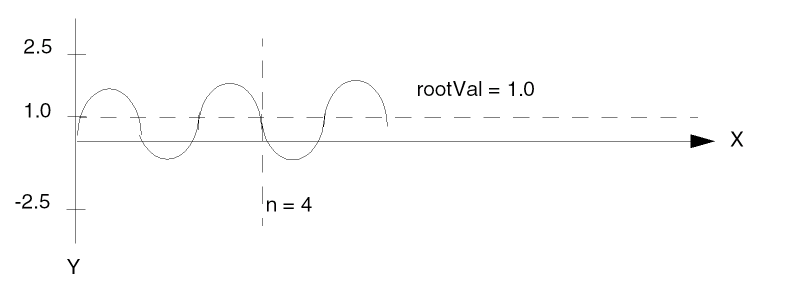
rshift
rshift(o_waveform n_delta) =>o_waveform/ nil
Description
Shifts the waveform to the right by the n_delta value.
This command is the inverse of the lshift command.
Arguments
|
Waveform object representing simulation results that can be displayed as a series of points on a grid. (A waveform object identifier looks like this: |
|
Value Returned
|
Returns a waveform object. Returns a family of waveforms if the input argument is a family of waveforms. |
|
Example
rshift( v( "vout" ) ) 10n )
Shifts the waveform representing the voltage through the "vout" net to the right by 10n.
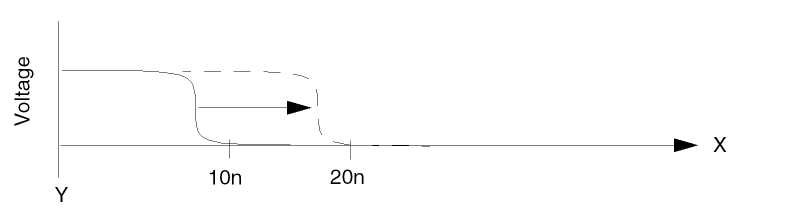
sample
sample(o_waveformn_fromn_to t_type n_by) =>o_waveform/n_number/ nil
Description
Samples a waveform at the specified interval.
You can use this function to reduce the time it takes to plot waveforms that have many data points. If you sample a waveform beyond its range, you get the final value of the waveform. You can use this function to demodulate a signal. Consider an AM modulated sine wave. Assume the carrier frequency is 1 GHz, and the modulation frequency is 1 MHz. If the waveform is sampled every 1 ns, the resulting signal is cleanly demodulated (the 1 GHz carrier is completely eliminated by the sampling).
Arguments
|
Waveform object representing simulation results that can be displayed as a series of points on a grid. (A waveform object identifier looks like this: |
|
Value Returned
Example
sample( v( "vout" ) 0 50n "linear" 0.1n )
Takes a linear sample of the waveform representing the voltage of the "vout" net.
sample( v( "vout" ) 0 100m "log" 10 )
Takes a logarithmic sample of the waveform representing the voltage of the "vout" net.
settlingTime
settlingTime( o_waveform n_initVal g_initType n_finalVal g_finalType n_theta [ g_multiple [ s_Xname ] ] ) => o_waveform / n_value / nil
Description
The settling time is the time by which the signal settles within the specified Percent of step (theta) of the difference between the Final Value and Initial Value from the Final Value.
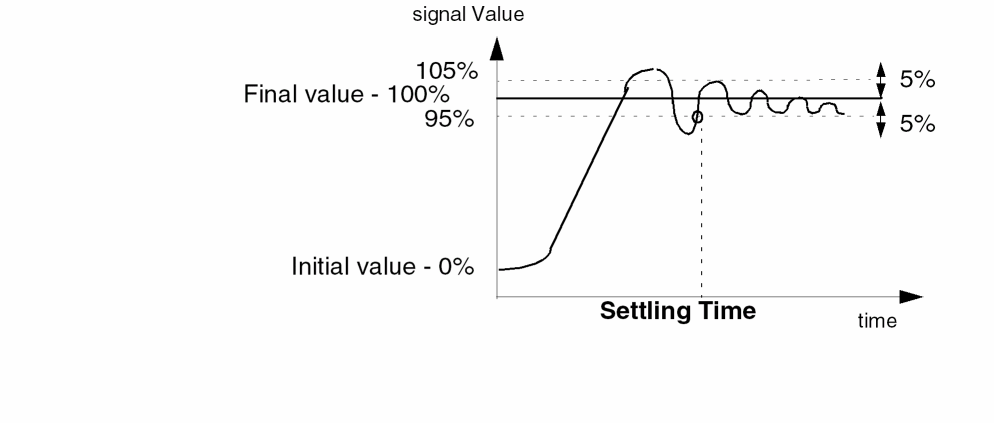
Initial value of the signal as 0% and Final value as 100%. The Percent of Step is taken as 5%.Arguments
Additional Information
The equation used to calculate maximum delta value is:
maxDeltaY = ((theta/100.0)*abs(FinalVal-InitVal))
Firstly, check if the absolute difference between the last element of the waveform and finalVal is less than maxDeltaY. If yes, then compute settlingTime, else returns nil.
To compute settlingTime, subtract finalVal from the waveform, get the subtracted-wave and calculate settling time as first cross on subtracted-wave at maxDeltaY (from opposite direction for falling edge). If no such crossing exists, then return 0.0.
maxDeltaY = ((theta/100.0) * abs(FinalVal -InitVal))
if( abs(last_Y_element_of_waveform - finalVal) < maxDeltaY then
or( cross( abs(waveform - finalVal) maxDeltaY -1 -1) 0.0)
else
nil
)
Value Returned
Example
settlingTime( v("/out" ) 0 t 2 t 90 )
Computes the time required for the waveform representing the voltage of
the "/out" net to settle within 90 percent of the step from 0 to 2.
settlingTime(VT("/out") 0.5 nil 4.95 nil 5 t "time") (s)
Returns multiple occurrences of settlingTime specified against time-points at which each settlingTime event occurs.
settlingTime(VT("/out") 0.5 nil 4.95 nil 5 t "cycle") (s)
Returns multiple occurrences of settlingTime specified against cycle numbers, where a cycle number refers to the n’th occurrence of the settlingTime event in the input waveform.
slewRate
slewRate(o_waveform n_initValg_initType n_finalValg_finalTypen_theta1 n_theta2[ g_multiple [ s_Xname ] ] [ g_histoDisplay ] [ x_noOfHistoBins ] ) =>o_waveform/n_value/ nil
Description
Computes the average rate at which an expression changes from theta1 (percent low) to theta2 (percent high) of the difference between the initial value and final value.
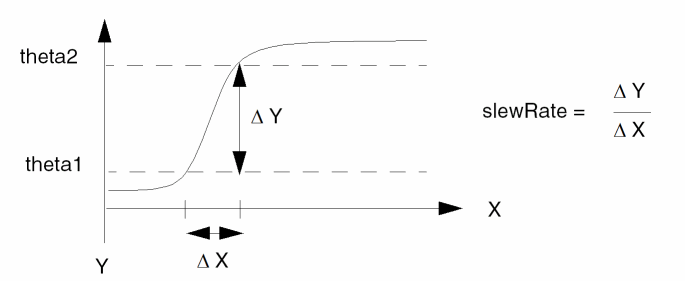
Arguments
Value Returned
Example
slewRate( v( "vout" ) 10n t 30n t 10 90 )
Computes the slew rate for the waveform representing the voltage of the "vout" net from 10n to 30n.
slewRate( v( "vout" ) 0nil10nil5 95 )
Computes the slew rate for the waveform representing the voltage of the "vout" net from 0 to 10. In this example, the initial value and final value are entered as Y values.
slewRate(VT("/out") 0.5 nil 4.5 nil 10 90 t ‘time)
Return multiple occurrences of slewRate values, computed at different time-points.
slewRate(VT("/out") 0.5 nil 4.5 nil 10 90 t ‘cycle)
Returns multiple occurrences of slewRate values specified against cycle numbers (where cycle number refers to the n’th occurrence of slewRate computation).
smithType
smithType(x_mode) =>t/ nil
Description
Sets the Smith display mode type for the active graph.
Arguments.
For more information on circular graphs, see the
Value Returned
Example
smithType("impedance")
=>t
Sets the Smith display to impedance.
spectralPower
spectralPower(o_current o_voltage) =>o_power/ nil
Description
Returns the spectral power given the spectral current and voltage.
To obtain a list of the harmonic frequencies, use harmonicList.
Arguments
|
Waveform representing the current. The current can be obtained by calling the |
Value Returned
Example
plot(db10(spectralPower(i("/PORT0/PLUS") v("/net28"))))
Plots power of the output "/net28". "/PORT0/PLUS" is a member of "/net28".
spectrumMeasurement
spectrumMeasurement(o_waveform g_isTimeWave n_from n_to x_numSamples n_startFreq n_endFreq x_signalBins t_windowNamen_satLvlg_isNoiseAnalysis x_noOfHarmonics t_measType) =>g_value/ nil
Description
Calculates Signal-to-Noise-and-Distortion Ratio (SINAD), Spurious Free Dynamic Range (SFDR), Effective Number of Bits (ENOB), and Signal-to-Noise Ratio (without distortion) by using Fast Fourier Transform (FFT) of any given input signal.
The spectrum measure is used for characterizing A-to-D converters and is typically supported for transient simulation data.
Arguments
Value Returned
|
Returns the spectrum measure specified by the t_measType argument. |
|
Example
spectrumMeasurement(v("/OUT" ?result "tran") t 0 3e-08 1024 0 1.25e+08 0 "Rectangular" 0 0 1 "sinad")
=> -0.07218201
Returns the value of the spectrum measure sinad, as specified by the spectrumMeasurement function.
ssb
ssb(o_s11 o_s12 o_s21 o_s22 g_frequency) =>o_waveform/ nil
Description
Computes the source stability circles.
Arguments
Value Returned
Example
plot(ssb(s11 s12 s21 s22 list(800M 1G 100M)))
stddev
stddev(o_waveform[?overalloverall] [?typet_type] [?continuousg_continuous] ) =>n_stddev/o_waveformStddev/ nil
Description
Computes the standard deviation of a waveform (or a family of waveforms) over its entire range.
You can calculate the standard deviation for a population as well as for a sample. The population standard deviation is a parameter, which is a fixed value calculated from every individual in the population. A sample standard deviation is a statistic, which means that it is calculated from only some of the individuals in a population. Since the sample standard deviation depends upon the sample, it has greater variability. Thus, the standard deviation of the sample is greater than that of the population.
Standard deviation for a population is calculated as follows:
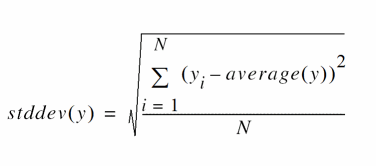
Standard deviation for a sample is calculated as follows:
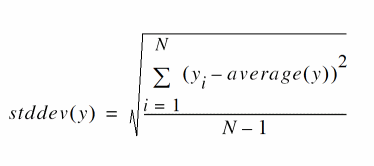
Where N is the total number of data points.
Arguments
Value Returned
|
Returns a number representing the standard deviation value of the input waveform. |
|
|
Returns a waveform representing the average value if the input is a family of waveforms. |
|
Example
Returns the population standard deviation of the voltage (y-axis value) of /OUT by considering it as a continuous signal.
stddev(VS("/OUT") ?type "population" ?continuous t )
=>314.4e-6
Returns the sample standard deviation of the voltage (y-axis value) of /OUT by considering it as a discrete signal.
stddev(VS("/OUT") ?type "sample" ?continuous nil )
=>329.9e-6
tangent
tangent(o_waveform[?xn_x ] [?yn_y ] [?slopen_slope] [?ckmckm] ) =>o_waveform/nil
Description
Returns the tangent to a waveform through the point (n_x, n_y) with the given slope.
Arguments
|
X coordinate of the point. The default value is the X coordinate of the first point on the wave. |
|
|
Y coordinate of the point. The default value is the Y coordinate at the given or default X coordinate. |
|
Value Returned
Example
refLine
=> tangent(refWave ?x -25 ?slope 1.0)
thd
thd(o_waveformn_from n_to x_num n_fund) =>o_waveform/n_thdValue/ nil
Description
The thd function computes the percentage of total harmonic content of a signal with respect to the fundamental frequency expressed as a voltage percentage.
The computation uses the dft function. Assume that the dft function returns complex coefficients A0, A1…, Af , ... . Please note that fundamental frequency f is the frequency contributing to the largest power in the signal. A0 is the complex coefficient for the DC component and Ai is the complex coefficient for the ith harmonic where  . Then, total harmonic distortion is computed as:

Arguments
Value Returned
Example
plot( thd( v( "/net8" ) 10u 20m 64 0 ) )
Computes the absolute value of the total harmonic distortion for the waveform representing the voltage of "/net8". The computation is done from 10u to 20m with 64 time points using the non-zero frequency contributing to the largest power in the signal as the fundamental frequency. The resulting waveform is plotted.
plot( thd( v( "/net8" ) 10u 20m 64 90 ) )
Computes the absolute value of the total harmonic distortion for the waveform representing the voltage of "/net8". The computation is done from 10u to 20m with 64 timepoints using a harmonic frequency, whose absolute difference w.r.t 90 is minimum, as the fundamental frequency. The resulting waveform is plotted.
thd_fd
thd_fd(t_name t_result) =>n_thdValue/ nil
Description
The thd_fd function returns the total harmonic distortion of the input waveform.
Arguments
|
Name of the node for which total harmonic distorted is to be computed. |
|
Value Returned
|
Return a value of total harmonic distortion of the input waveform. |
|
Example
thd_fd( "Plo" ?result "FOUR0-tran.test_fourier" )
Computes the total harmonic distortion for the "FOUR0-tran.test_fourier" dataset in the results, where Fourier is connected to node "Plo".
unityGainFreq
unityGainFreq(o_gainFreqWaveform) =>n_frequency/ nil
Description
Computes and reports the frequency at which the gain is unity.
Arguments
Value Returned
|
Returns a scalar value representing the frequency at which the gain of the input waveform is unity. |
|
Example
unityGainFrequency( VF("/out") )
value
value(o_waveform[?scalescale] [?periodn_period] [?xNames_xName] [?histoDisplayg_histoDisplay] [?noOfHistoBinsx_noOfHistoBins]@Restargs) =>o_waveform/g_value/ nil
Description
Returns the Y value of a waveform for a given X value.
Arguments
For the simplest calls to the function, which specify only the given waveform (o_waveform) and the X value (g_value), the given waveform can be a family of waveforms. If the family is of dimension m, g_value can be either of dimension m-1 or a scalar. If g_value is scalar, the function returns the Y value of all the components of the family at the specified g_value.
Value Returned
Example
value( v( "/net18" ) 4.428e-05 )
Prints the value of "/net18" at time=4.428e-05. This is a parametric sweep of temperature over time.
value( v( "/OUT" )’TEMPDC 20.0 )
Returns srrWave:XXXXX, indicating that the result is a waveform.
print( value( v( "/OUT" )’TEMPDC 20.0 ) )
Prints the value of v( "/OUT" ) at every time point for TEMPDC=20.
print( value( v( "/OUT" ) 200n ?period 100n) )
Prints the value of v( "/OUT" ) at 200n, 300n and so on at intervals of 100n until the end of the waveform.
value(VT("/out") 2e-07 ?period 2e-07 ?xName "time") (V)
Returns multiple occurrences of the value specified against time-points at which each interpolated value occurs.
value(VT("/out") 2e-07 ?period 2e-07 ?xName "cycle") (V)
Returns multiple occurrences of value specified against cycle numbers, where a cycle number refers to the n’th occurrence of the value event in the input waveform.
xmax
xmax(o_waveform x_numberOfPeaks) =>o_waveform/g_value/l_value/ nil
Description
Computes the value of the independent variable (X) at which the Y value attains its maximum value.
Arguments
Value Returned
Example
xmax( v( "/net9" ) 1 )
Gets the time value (X-axis value) at which the voltage of "/net9" attains its first peak value.
xmax( v( "/net9" ) 0 )
Gets the list of time values (X-axis values) at which the voltage of "/net9" attains each of its peak values.
xmin
xmin(o_waveform x_numberOfValleys) =>o_waveform/g_value/l_value/ nil
Description
Computes the value of the independent variable (X) at which the Y value attains its minimum value.
Arguments
Value Returned
Example
xmin( v( "/net9" ) 1 )
Gets the time value (X axis) at which the voltage of "/net9" has its first low point or valley.
xmin( v( "/net9" ) 0 )
Gets the list of time values (X axis) at which the voltage of "/net9" has low points or valleys.
xval
xval(o_waveform) =>o_waveform/ nil
Description
Returns a waveform whose X vector and Y vector are equal to the input waveform’s X vector.
Arguments
|
Waveform object representing simulation results that can be displayed as a series of points on a grid. (A waveform object identifier looks like this: |
Value Returned
|
Returns a waveform if the input argument is a single waveform. Returns a family of waveforms if the input argument is a family of waveforms. |
|
Example
xval( v( "/net8" ))
Returns a waveform in which the X vector for the voltage of "/net8" is also used for the Y vector.
ymax
ymax(o_waveform[?overalloverall] ) =>n_max/o_waveformMax/ nil
Description
Computes the maximum value of the waveform’s Y vector.
A waveform consists of an independent-variable X vector and a corresponding Y vector.
Arguments
|
Waveform object representing simulation results that can be displayed as a series of points on a grid. (A waveform object identifier looks like this: |
|
Value Returned
Example
ymax( v( "/net9" ) )
Gets the maximum voltage (Y value) of "/net9".
ymin
ymin(o_waveform[?overalloverall] ) =>n_min/o_waveformMin/ nil
Description
Computes the minimum value of a waveform’s Y vector.
(A waveform consists of an independent-variable X vector and a corresponding Y vector.)
Arguments
|
Waveform object representing simulation results that can be displayed as a series of points on a grid. (A waveform object identifier looks like this: |
|
Value Returned
Example
ymin( v( "/net9" ) )
Gets the minimum voltage (Y value) of "/net9".
Spectre RF and S-Parameter Calculator Functions
This section describes the following calculator functions used for Spectre RF data analysis:
- ifreq
- ih
- itime
- pir
- pmNoise
- pn
- pvi
- pvr
- spm
- totalNoise
- vfreq
- vfreqterm
- vh
- vhterm
- vtime
- vtimeterm
- ypm
- zpm
ifreq
ifreq(s_ana t_terminal[freqn_freq] ) =>o_waveform/ nil
Description
Returns the current of the terminal at a specified frequency or at all frequencies in the frequency domain.
Arguments
Value Returned
|
Returns a waveform representing current at a specified frequency or at all frequency points. |
|
Example
ifreq("hb" "/load/PLUS" 50 )
Returns the current for /load/PLUS signal, which is obtained from hb analysis, at frequency=50.
ih
ih(s_ana t_terminal[x_hlist] ) =>o_waveform/ nil
Description
Returns the current of the terminal at a specified harmonic or at all harmonics in the frequency domain.
Arguments
Value Returned
|
Returns a waveform representing current at a specified harmonic or at all harmonic points. |
|
Examples
The following example returns a list of available harmonics for the specified results. In this example, two tones are simulated in the hb simulation, and therefore the harmonic list is a list of two-element indices.
harmonicList(?resultsDir "./simulation/ExampleLibRF/db_mixer/maestro/results/maestro/ExplorerRun.0/1/ExampleLibRF_db_mixer_1/psf" ?result 'hb_mt_fi)
=> ((-5 5) (-4 4) (-4 5) (-3 3) (-3 4) (-3 5) (-2 2) (-2 3) (-2 4) (-2 5) (-1 1) (-1 2) (-1 3) (-1 4) (-1 5) (0 0) (0 1) (0 2) (0 3) (0 4) (0 5) (1 0) (1 1) (1 2) (1 3) (1 4) (1 5) (2 -1) (2 0) (2 1) (2 2) (2 3) (2 4) (2 5) (3 -2) (3 -1) (3 0) (3 1) (3 2) (3 3) (3 4) (3 5) (4 -3) (4 -2) (4 -1) (4 0) (4 1) (4 2) (4 3) (4 4) (4 5) (5 -4) (5 -3) (5 -2) (5 -1) (5 0) (5 1) (5 2) (5 3) (5 4) (5 5) (6 -5) (6 -4) (6 -3) (6 -2) (6 -1) (6 0) (6 1) (6 2) (6 3) (6 4) (6 5))
To calculate the current of the terminal /rf/PLUS for the harmonic (0 2), that is 0 times one tone plus 2 times the other tone in hb analysis, specify the following:
ih("hb" "/rf/PLUS" '(0 2) )
=> srrWave:0x3d70db20
This returns a waveform representing the current of the terminal /rf/PLUS at the specified harmonic (0 2).
If you want to plot the current at different harmonic combinations, you can specify the list of harmonics. For example: '((0 2) (0 3) (0 4)).
The following example returns a waveform that represents the current of the terminal /rf/PLUS at different harmonic combinations.
ih("hb" "/rf/PLUS" '((0 2) (0 3) (0 4)))
=> srrWave:0x3d70b470
itime
itime(s_anat_terminal[timen_time] ) =>o_waveform/ nil
Description
Returns the current of the terminal at a specified time point or at all time points in the time domain.
Arguments
Value Returned
|
Returns a waveform representing current at a specified time point or at all time points. |
|
Example
itime("hb" "/load/PLUS" 4 )
Returns the current for /load/PLUS signal, which is obtained from hb analysis, at time=4s.
pir
pir(s_anat_branch1 t_branch2 n_resistance[harmonicx_hlist] ) =>o_waveform/ nil
Description
Returns the spectral power from current and resistance for a specified harmonic list or for all harmonic points.
Arguments
Value Returned
|
Returns a waveform representing spectral power from current and resistance for a specified harmonic list. |
|
pir("hb" "/V1/PLUS" "/rf/PLUS" 2 5 )
This example returns the spectral power for /V1/PLUS and /rf/PLUS, which are obtained from the hb analysis, at resistance=2 ohms and harmonic=5.
pmNoise
pmNoise(s_ana[freqn_freq]s_modifier g_dsb) =>o_waveform/n_pnoise/ nil
Description
Returns the modulated phase noise at a specified frequency or for the entire spectrum.
Arguments
Value Returned
|
Returns the modulated phase noise at the specified frequency point. |
|
|
Returns a waveform representing the modulated phase noise at all frequency points. |
|
Example
pmNoise("hbnoise" 50 "dBc" t )
This example returns the modulated phase noise for hbnoise analysis at frequency=50 and modifier=dBc and double side bands included.
pn
pn(s_ana[freqn_freq] ) =>o_waveform/n_pn/ nil
Description
Returns the phase noise at a specified frequency or at all frequency points.
Arguments
Value Returned
|
Returns a waveform representing the phase noise at all frequency points. |
|
Example
pn("hbnoise" 50 )
This example returns the phase noise for hbnoise analysis at frequency=50.
pvi
pvi(s_anat_pos t_neg t_branch1 t_branch2[harmonicx_hlist] ) =>o_waveform/ nil
Description
Returns the spectral power from voltage and current for a specified harmonic list or for all harmonics.
Arguments
|
Analysis type or analysis name. The available analyses are |
|
|
Positive node or net from the schematic or from the Results Browser. This field can also contain an explicit voltage value. |
|
|
Negative node or net from the schematic or from the Results Browser. This field can also contain an explicit voltage value. |
|
|
First branch name on the schematic or signal name from the Results Browser. |
|
|
Second branch name on the schematic or signal name from the Results Browser. |
|
|
Harmonics for which you want to plot the results. It is an optional field. For analyses, such as Valid values: Any integer or a list from the available list of harmonics. You can find the available harmonics by using the harmonicList function. |
Value Returned
|
Returns a waveform representing the spectral power from voltage and current for a specified harmonic list or for all harmonics. |
|
pvi("hb" "/RFin" "/RFout" "/V1/PLUS" "/V2/PLUS" 2)
This example returns the spectral power for the following values:
-
Analysis Type is
hb -
Positive node is
/RFin -
Negative node is
/RFout -
Branch name 1
/V1/PLUS -
Branch name 2
/V2/PLUS -
Harmonic List is
2
pvr
pvr(s_anat_pos t_neg n_resistance[harmonicx_hlist] ) =>o_waveform/ nil
Description
Returns the spectral power at a specified harmonic list or at all harmonics with resistor and voltage on the positive and negative nodes.
Arguments
|
Analysis type or analysis name. The available analyses are |
|
|
Positive node or net from the schematic or from the Results Browser. This field can also contain an explicit voltage value. |
|
|
Negative node or net from the schematic or from the Results Browser. This field can also contain an explicit voltage value. |
|
|
Specify the harmonics for which you want to plot the results. It is an optional field. For analyses, such as Valid values: Any integer or a list from the available list of harmonics. You can find the available harmonics by using the harmonicList function. |
Value Returned
|
Returns a waveform representing the spectral power on specified harmonic list or on all harmonics with resistor and voltage on the positive and negative nodes |
|
Example
pvr("hb" "/RFin" "/RFout" 2 2 )
This example returns the spectral power for the following values:
-
Analysis Type is
hb -
Positive node is
/RFin -
Negative node is
/RFout -
Resistance is
2 -
Harmonic List is
2
spm
spm(s_anax_index1 x_index2[?port1x_port1] [?port2x_port2] ) =>o_waveform/ nil
Description
Returns the waveform for s-parameters.
Arguments
Value Returned
Example
spm("sp" 1 1 ?port1 nil ?port2 nil)
This example plots the s-parameter waveform for sp analysis with index1=1 and index 2=1.
totalNoise
totalNoise(s_anan_sfreq n_efreq[instancesl_instances] ) =>n_totalNoise/ nil
Description
Returns the total noise in a specified frequency limit.
Arguments
Value Returned
Example
totalNoise("hbnoise" 1k 100k out )
This example returns the total noise for hbnoise analysis in the frequency range 1k to 100k with instance out being excluded.
vfreq
vfreq(s_ana t_net[freqx_freq] ) =>o_waveform/ nil
Description
Returns the voltage of a net at a specified frequency or at all frequencies in the frequency domain.
Arguments
Value Returned
|
Returns a waveform representing the voltage of net at a specified frequency |
|
Example
vfreq("hb" "/outp" 50 )
This example returns the voltage of /outp net from hb analysis at frequency=50.
vfreqterm
vfreqterm(s_anat_terminal [ freq x_freq ]) =>o_waveform|g_value|nil
Description
Returns the voltage of a terminal at a specified frequency or at all frequencies in the frequency domain.
Arguments
|
Analysis type or analysis name. The available analyses are |
|
|
|
Value Returned
|
Returns a waveform representing the voltage at a terminal on the specified frequency. |
|
|
Returns the value of voltage at a terminal on the specified frequency. |
|
Example
vfreqterm( 'ac "/IO/M1/G" )
It returns the following plot.
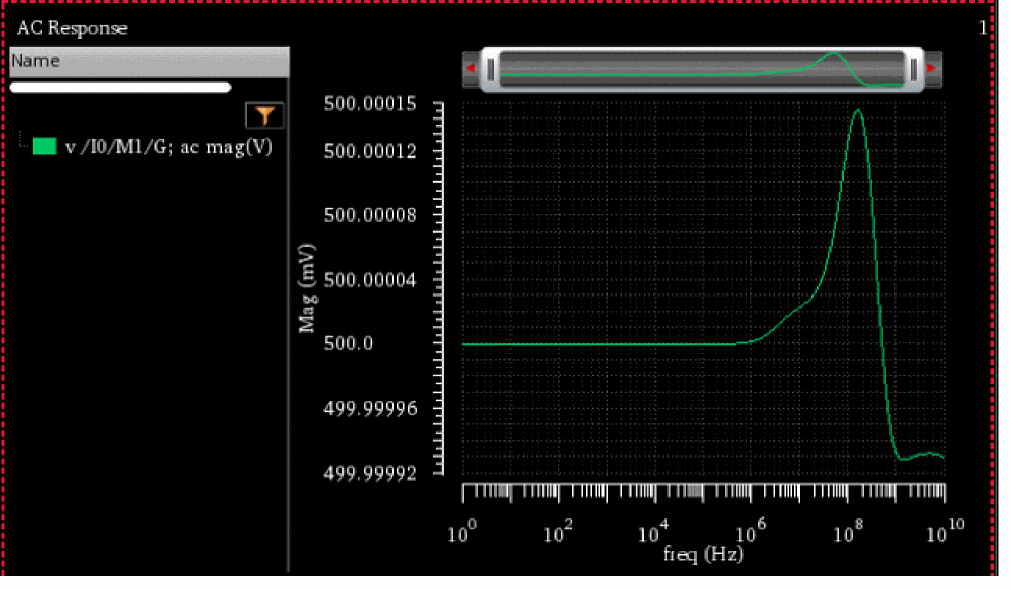
vh
vh(s_anat_net[x_hlist] ) =>o_waveform/ nil
Description
Returns the voltage on a net at a specified harmonic or at all harmonics in the frequency domain.
Arguments
Value Returned
|
Returns a waveform representing the voltage on a net at a specified harmonic or at all harmonic points. |
|
Example
The following example returns a list of available harmonics for the specified results. In this example, two tones were simulated in the hb simulation, and therefore the harmonic list is a list of two-element indices.
harmonicList(?resultsDir "./simulation/ExampleLibRF/db_mixer/maestro/results/maestro/ExplorerRun.0/1/ExampleLibRF_db_mixer_1/psf" ?result 'hb_mt_fi)
=> ((-5 5) (-4 4) (-4 5) (-3 3) (-3 4) (-3 5) (-2 2) (-2 3) (-2 4) (-2 5) (-1 1) (-1 2) (-1 3) (-1 4) (-1 5) (0 0) (0 1) (0 2) (0 3) (0 4) (0 5) (1 0) (1 1) (1 2) (1 3) (1 4) (1 5) (2 -1) (2 0) (2 1) (2 2) (2 3) (2 4) (2 5) (3 -2) (3 -1) (3 0) (3 1) (3 2) (3 3) (3 4) (3 5) (4 -3) (4 -2) (4 -1) (4 0) (4 1) (4 2) (4 3) (4 4) (4 5) (5 -4) (5 -3) (5 -2) (5 -1) (5 0) (5 1) (5 2) (5 3) (5 4) (5 5) (6 -5) (6 -4) (6 -3) (6 -2) (6 -1) (6 0) (6 1) (6 2) (6 3) (6 4) (6 5))
To calculate the voltage on the net /out2 for the harmonic (0 2), that is 0 times one tone plus 2 times the other tone in hb analysis, specify the following:
vh("hb" "/out2" '(0 2))
=> srrWave:0x3d70d3f0
This returns a waveform representing the voltage on the net /out2 at the specified harmonic (0 2).
If you want to plot the voltage at different harmonic combinations, you can specify the list of harmonics. For example: '((0 2) (0 3) (0 4)).
The following example returns a waveform representing the voltage on the net /out2 at different harmonic combinations.
vh("hb" "/out2" '((0 2) (0 3) (0 4)))
=> srrWave:0x3d70dd50
vhterm
vhterm(s_anat_terminal[ harmonic x_hlist ]) =>o_waveform|g_value|nil
Description
Returns the voltage on a terminal at the specified harmonic or at all the harmonics in the frequency domain.
Arguments
|
Analysis type or analysis name. The available analyses are |
|
|
Harmonics for which you want to plot the results. It is an optional field. For analyses, such as
Valid values: Any integer or a list from the available list of harmonics. You can find the available harmonics by using the |
Value Returned
|
Returns a waveform representing the voltage at a terminal on the specified harmonic. |
|
|
Returns the value of voltage at a terminal on the specified harmonic. |
|
Example
vhterm( 'pac "/I19/M5/D" )
It returns the following plot.
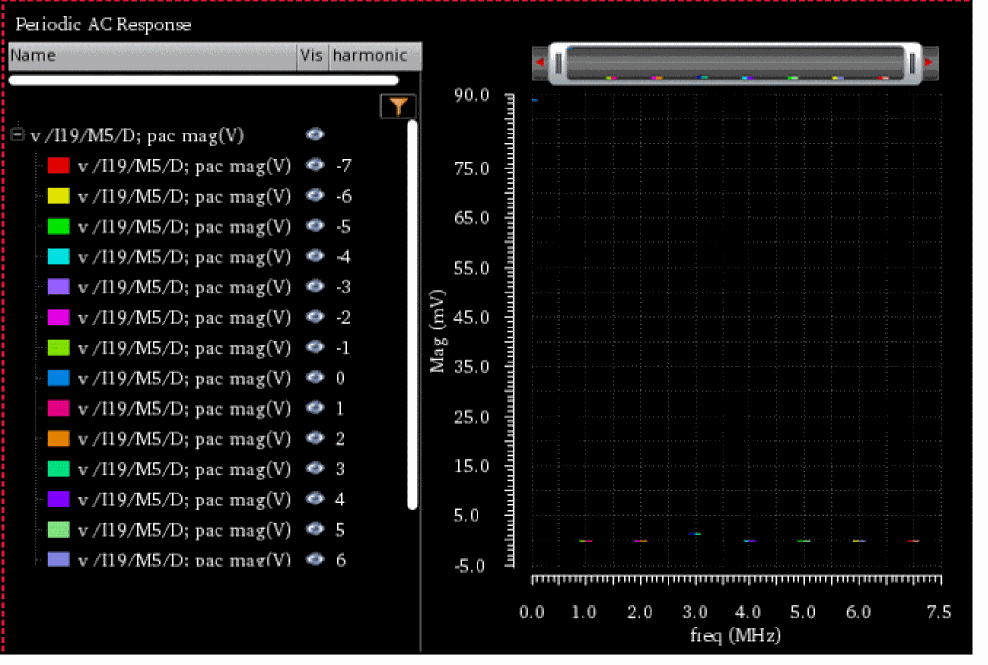
vtime
vtime(s_anat_net[timen_time] ) =>o_waveform/ nil
Description
Returns the voltage of a net at a specified time point or at all time points in the time domain.
Arguments
Value Returned
|
Returns a waveform representing the voltage of net at a specified time point |
|
Example
vtime("hb" "/outm" 20)
This example returns the voltage of /outp net from hb analysis at time=20s.
vtimeterm
vtimeterm(s_anat_terminal [ time n_time ]) =>o_waveform|g_value|nil
Description
Returns the voltage of a terminal at a specified time point or at all time points in the time domain.
Arguments
Value Returned
|
Returns a waveform representing the voltage at a terminal on the specified time point. |
|
|
Returns the value of voltage at a terminal on the specified time point. |
|
Example
It returns the following plot.
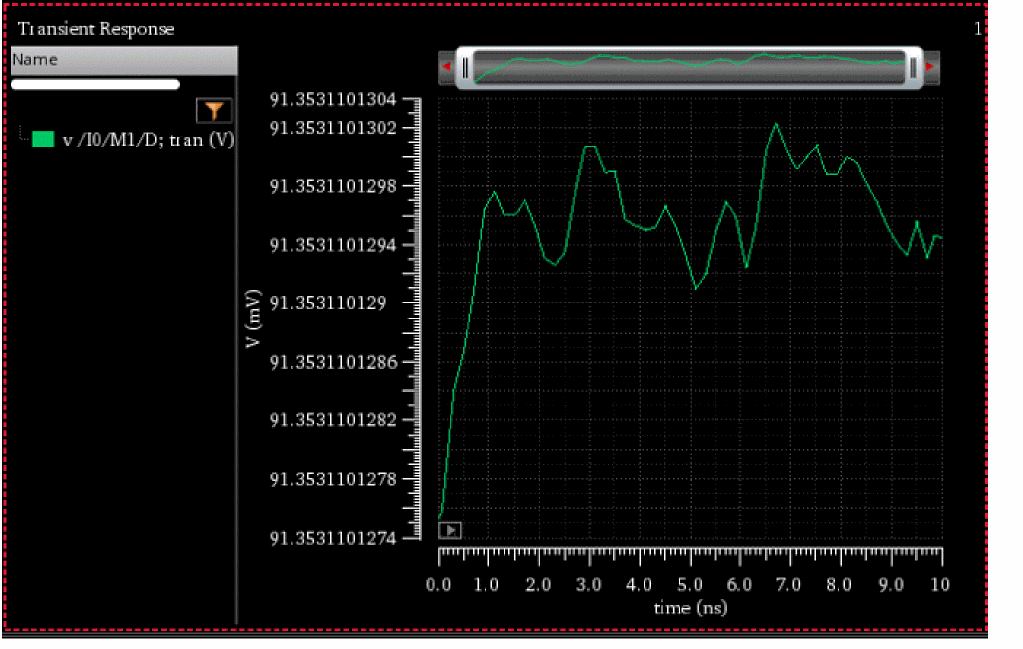
ypm
ypm(s_ana x_index1 x_index2) =>o_waveform/ nil
Description
Returns the waveform for y-parameters.
Arguments
Value Returned
Example
ypm("sp" 1 1)
This example returns the waveform for y-parameters when index1=1 and index2=1.
zpm
zpm(s_anax_index1 x_index2) =>o_waveform/ nil
Description
Returns the waveform for z-parameters.
Arguments
|
Analysis type or analysis name. |
|
|
Port index for sp simulation. By default, this field is set to blank. |
|
|
Port index for sp simulation. By default, this field is set to blank. |
Value Returned
Example
zpm("sp" 1 1)
This example returns the waveform for z-parameters when index1=1 and index2=1.
RF Functions in Spectre
This section describes the OCEAN commands for the following RF functions:
- B1f
- gac_freq
- gac_gain
- Gmax
- Gmin
- Gmsg
- GP
- gpc_freq
- gpc_gain
- GT
- Gmux
- Kf
- loadStability
- nc_freq
- nc_gain
- NF
- NFmin
- rn
- sourceStability
- s11
- s12
- s21
- s22
B1f
B1f( [dataDirt_dataDir] ) =>o_waveform/ nil
Description
Returns the alternative stability factor in terms of the specified parameters.
Arguments
Values Returned
|
Waveform object representing the alternative stability factor. |
|
gac_freq
gac_freq(n_gain n_startFreq n_stopFreq n_step[?resultsDirt_resultsDir] ) =>o_waveform/ nil
Description
Returns the available power gain circles where the gain is fixed and frequency is swept.
Arguments
Values Returned
Example
gac_freq(16 2G 3G 100M)
gac_gain
gac_gain(n_freq n_startGain n_stopGain n_step[?resultsDirt_resultsDir] ) =>o_waveform/ nil
Description
Returns the available power gain circles where the frequency is fixed and gain is swept.
Arguments
Values Returned
Example
Gmax
Gmax( [dataDirt_dataDir] ) =>o_waveform/ nil
Description
Returns the maximum available gain for a two port.
Arguments
Values Returned
Gmin
Gmin( [dataDirt_dataDir] ) =>o_waveform/ nil
Description
Returns the optimum noise reflection coefficient for NFmin.
Arguments
Values Returned
Gmsg
Gmsg( [dataDirt_dataDir] ) =>o_waveform/ nil
Description
Returns the maximum stable power gain for a two port.
Arguments
Values Returned
GP
GP( [dataDirt_dataDir] ) =>o_waveform/ nil
Description
Returns the power gain. Operating power gain, GP, is defined as the ratio between the power delivered to the load and the power input to the network.
Arguments
Values Returned
gpc_freq
gpc_freq(n_gain n_startFreq n_stopFreq n_step[?resultsDirt_resultsDir] ) =>o_waveform/ nil
Description
Returns the operating power gain circles where the gain is fixed and frequency is swept.
Arguments
Values Returned
Example
gpc_gain
gpc_gain(n_freq n_start n_stop n_step[?resultsDirt_resultsDir] ) =>o_waveform/ nil
Description
Returns the operating power gain circles where the frequency is fixed and gain is swept.
Arguments
Values Returned
Example
GT
GT( [dataDirt_dataDir] ) =>o_waveform/ nil
Description
Returns the transducer gain. Transducer power gain, GT, is defined as the ratio between the power delivered to the load and the power available from the source.
Arguments
Values Returned
Gmux
Gmux( [dataDirt_dataDir] ) =>o_waveform/ nil
Description
Returns the maximum unilateral power gain for a two port.
Maximum unilateral transducer power gain, Gumx, is the transducer power gain when S12 is zero, and the source and load impedances conjugate are matching.
Arguments
Values Returned
Kf
Kf( [dataDirt_dataDir] ) =>o_waveform/ nil
Description
Returns the Stern stability factor.
Arguments
Values Returned
loadStability
loadStability(n_startFreq n_stopFreq n_step[?resultsDirx_resultsDir] ) =>o_waveform/ nil
Description
Computes the load stability circles.
Arguments
Value Returned
Example
loadStability(2G 3G 0.2G)
loadStability(2G 3G 0.2G?resultsDir "./psf" )
nc_freq
nc_freq(n_noiseLevel n_startFreq n_stopFreq n_step[?resultsDirt_resultsDir] ) =>o_waveform/ nil
Description
Returns the noise circles with fixed gain and swept frequency.
Arguments
Values Returned
Example
nc_gain
nc_gain(n_freq n_startNoiseLvl n_stopNoiseLvl n_step[?resultsDirt_resultsDir] ) =>o_waveform/ nil
Description
Returns the noise circles with fixed frequency and swept noise level.
Arguments
Values Returned
Example
NF
NF([ dataDirt_dataDir] ) =>o_waveform/ nil
Description
Arguments
Values Returned
NFmin
NFmin( [dataDirt_dataDir] ) =>o_waveform/ nil
Description
Returns the minimum noise figure.
Arguments
Values Returned
rn
rn( [dataDirt_dataDir] ) =>o_waveform/ nil
Description
Returns the normalized equivalent noise resistance as a function of frequency.
Arguments
Values Returned
sourceStability
sourceStability(n_startFreq n_stopFreq n_step[?resultsDirx_resultsDir] ) =>o_waveform/ nil
Description
Computes the source stability circles.
Arguments
Value Returned
Example
sourceStability(2G 3G 0.2G)
sourceStability(2G 3G 0.2G?resultsDir "./psf" )
s11
s11( [?resultsDirt_resultsDir] ) =>o_waveform/ nil
Description
Returns the response at port 1 due to a signal at port 1.
Arguments
Values Returned
s12
s12( [?resultsDirt_resultsDir] ) =>o_waveform/ nil
Description
Returns the response at port 1 due to a signal at port 2.
Arguments
Values Returned
s21
s11( [?resultsDirt_resultsDir] ) =>o_waveform/ nil
Description
Returns the response at port 2 due to a signal at port 1.
Arguments
Values Returned
s22
s22( [?resultsDirt_resultsDir] ) =>o_waveform/ nil
Description
Returns the response at port 2 due to a signal at port 2.
Arguments
Values Returned
Return to top