
1
Overview
The Virtuoso® Parameterized cell software provides guidelines and Application Programming Interface (API) for creating Parameterized cells (Pcells) using SKILL and SKILL++. It also provides a user interface for creating graphical Pcells and debugging them. The more advanced Express Pcells infrastructure helps you evaluate SKILL Pcells in the Virtuoso design environment more efficiently, which can also be leveraged by non-Virtuoso Cadence and third-party applications.
This user guide describes how to create and debug Pcells. This user guide is meant for CAD engineers who are familiar with the development and design of integrated circuits, Virtuoso® Layout Suite L editor, and SKILL programming.
This user guide is aimed at developers and designers of integrated circuits and assumes that you are familiar with:
- The Virtuoso design environment and application infrastructure mechanisms designed to support consistent operations between all Cadence® tools.
- The applications used to design and develop integrated circuits in the Virtuoso design environment, notably, the Virtuoso Layout Suite, and Virtuoso Schematic Editor.
- The Virtuoso design environment technology file.
This chapter describes parameterized cells (Pcells) and the parameters assigned to them. The chapter discusses the following topics:
What Is a Parameterized Cell?
A parameterized cell, or Pcell, is a programmable cell that allows you to create a customized instance through a set of Pcell parameters. These parameters are used in the Pcell programming code. By providing different sets of values to these parameters, different sets of customized Pcells are created. A Pcell can be created either procedurally using SKILL functions or graphically using Virtuoso Pcell application.
Pcell Super and Submaster Cells
Each Pcell contains a supermaster and one or more submasters. A Pcell supermaster is created with the default values of the parameters and resided in hard disk. A Pcell submaster is created for each unique set of parameter values assigned to an instance of a supermaster Pcell and only exists in virtual memory.
See the figure below for the depiction of the Pcell architecture.
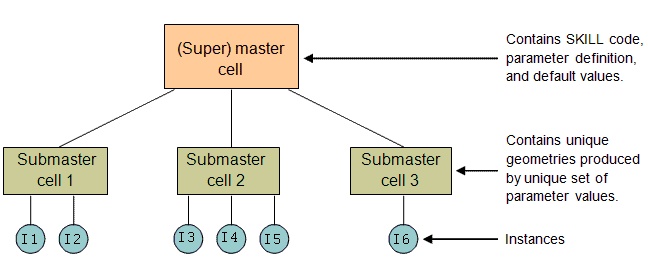
A submaster resides in virtual memory for the duration of your editing session and is accessible by all cellviews. When you create an instance in a cellview, and if a submaster with the same parameter values set already exists in virtual memory, a new submaster is not generated and the new instance references the existing submaster cell.
When you close all cellviews that reference a particular submaster cell, the database software automatically purges (removes) the referenced submaster cell from virtual memory but does not remove the master Pcell from your disk.
When you edit an editing session by exiting the Cadence software, the database software automatically purges (removes) all submaster cells from virtual memory. Purging does not remove master Pcells from your disk.
Advantages of Using Pcells
- Speed up entering layout data by eliminating the need to create duplicate versions of the same functional part.
- Save disk space by creating a library of cells for similar parts that are all linked to the same source.
- Eliminate errors that can result in maintaining multiple versions of the same cell.
- Eliminate the need to explore various levels of hierarchy when you want to change a small detail of a design.
Components of Pcell
A Pcell is made up of the following three components.
A Pcell master is identified by its library name, cell name, view name, and view type.
The Pcell parameter is declared by its name, parameter type, and its default value. The parameter type is optional but recommended. It is necessary to specify the data type for Boolean parameters. If the default value is specified as ‘nil’ without specifying the data type, then the parameter value might be interpreted as the integer zero instead of the Boolean ‘nil’ (false).
It is common to use CDF parameters as Pcell parameters mainly for the parameter callback feature where the relationship between parameters can be established and validity of values can be enforced.
Using CDF enables you to add multiple values of a parameter. For example, you want to declare a parameter to control connection of gates and you have four choices: connect top pin of gates, connect bottom pin of gates, connect both pins of gates, and connect none pin of gates. Using CDF, you can declare the parameter with four cyclic choices. Within the Pcell code, you can use CDF APIs to read the current value of the parameter and do gate connections.
Pcell contents or source code uses SKILL/SKILL++ code for creating geometries and connectivity database objects. Enclose the code in a let or prog statement. If you use variables in the code, define them at the beginning of the let or prog statement. Using let gives faster performance than prog; prog allows multiple exits while let exits only at the end. It is recommended to call SKILL functions, supported application functions, and your own user-defined functions within the body of code.
How can Pcell Source be Represented
The identification and parameters of a Pcell are stored in the database in a persistent manner. The Pcell source can be completely or partially stored in the database and this is a trade-off between ease of delivery versus protection of intellectual property. For more information, see How to Package a Pcell.
The Pcell source can be created manually. You can also create Pcell source automatically using the Graphical Pcell application.
Using SKILL
You can use SKILL function for the implementation of SKILL Pcell using the public SKILL function pcDefinePCell. For more information, refer to Creating SKILL Parameterized Cells.
Using SKILL++
SKILL supports multiple programming paradigms, including object-oriented and functional programming styles. Therefore, it is relatively faster to write the integrated Pcell source code using the object oriented concepts with SKILL++ into the pcDefinePCell SKILL function. For more information, refer to Creating SKILL++ Parameterized Cells.
Using Graphical Entry
The Virtuoso® parameterized cell software provides a graphical user interface that lets you create Pcells for placement in design layouts. Once you define the master cell and its parameters with this tool, you can change parameter values for each instance you create in a layout cellview. For more information, refer to Creating Graphical Parameterized Cells.
Return to top