
1
Introduction to the EPDA Framework
Photonics, the science and technology of generating, controlling, and detecting light, is quickly moving into mainstream electronic designs. This is particularly true for communications hardware, where bandwidth demands are so high that only Photonic Integrated Circuits (PICs) offer a viable solution. Other key application areas include data centers, antenna and RF systems, biophotonics, and environmental sensing systems.
To address the challenges of designing PICs, Cadence® has developed an integrated Electronic-Photonic Design Automation (
EPDA for Photonics Integrated Circuits
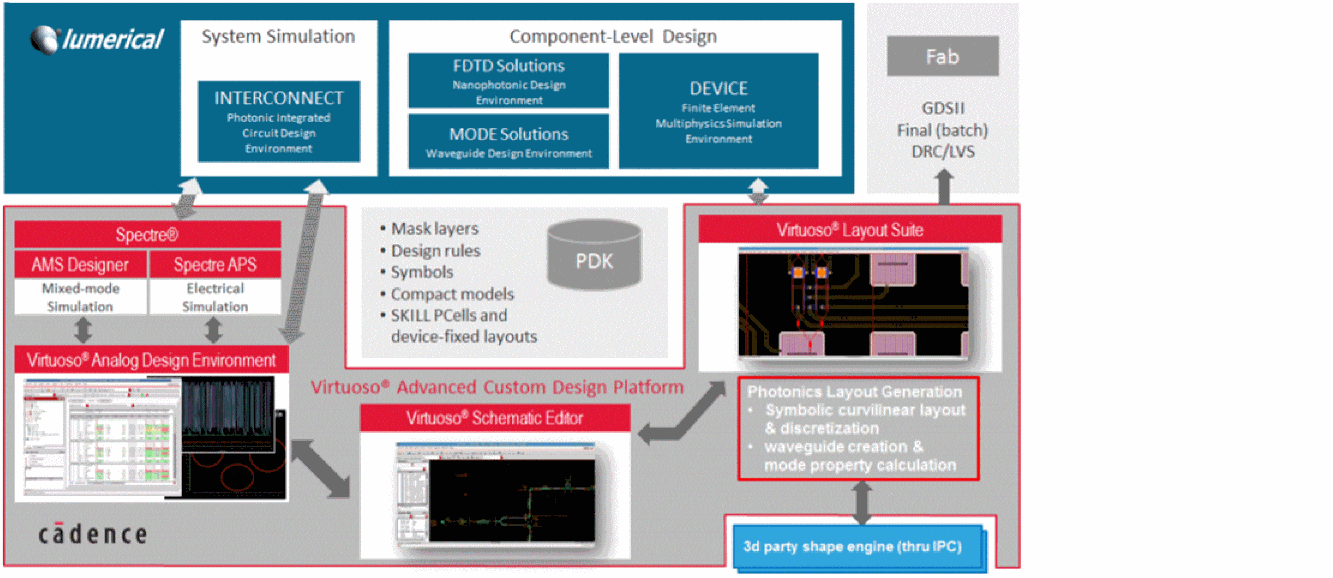
Built on the Cadence® Virtuoso® custom IC Design platform, the EPDA environment supports both the monolithic and hybrid design approaches. In monolithic approach, a single chip carries both traditional electronic and photonic design elements. In hybrid approach, a 3D-IC stack is used with a traditional electronics chip on top of a photonics chip, providing schematic and layout-driven design flows that support:
- Photonic schematic capture in the Cadence® Virtuoso® Schematic Editor.
- Photonic circuit simulation in the Cadence® Virtuoso® Analog Design Environment, using Lumerical® INTERCONNECT®, a dedicated PIC simulation engine.
-
Photonic layout implementation in the Cadence® Virtuoso® Layout Suite environment.
- Schematic-driven layout, using the same golden schematic as the one used for simulation.
- Complex photonic Pcells and advanced photonic layout generators using the Cadence® SKILL® scripting language.
- Backannotation of device and compounded waveguide parameters to schematic for layout-accurate optical re-simulation.
- Photonic component parameter and model generation for custom-defined components.
- Co-design of the electronic and photonic components for hybrid systems.
Prerequisites for Designing Photonics Intergrated Circuits
As a developer and designer of Photonic Integrated Circuits (PIC) using Cadence technology, you should be familiar with:
- The Virtuoso design environment and application infrastructure mechanisms supporting consistent operations between all Cadence tools.
- The applications for designing and developing integrated circuits in the Virtuoso design environment, notably the Cadence® Virtuoso® Schematic Editor, Cadence® Virtuoso® Analog Design Environment, and the Cadence® Virtuoso® Layout Suite XL (Layout XL) layout editor.
- Virtuoso technology data.
- Component description format (CDF), which lets you create and describe components for use with Layout XL.
About the CurvyCore Technology
To support the development of complex curvilinear shapes for photonic designs, which are based on complicated mathematical equations, Cadence natively supports the CurvyCore® technology in Virtuoso® Layout Suite EXL. Integration of the CurvyCore technology in the Virtuoso custom IC design platform makes it possible for designers to work on complex technologies and designs in a familiar design environment. In addition, the collaboration makes it possible for designers to factor in both the electronic- and opto-electronic effects into the design much earlier in the cycle and put together a full electronic-photonic solution within the same design environment. For more information on the CurvyCore technology and how integration in Virtuoso makes it advantageous for a photonics designer, see
Setting Environment Variables
Environment variables control the Photonics design environment. For a list of all the environment variables supported by the Virtuoso Photonics Solution and the default and supported values of these environment variables, see List of Photonics Solution Environment Variables.
There are two ways in which you can set environment variables:
-
To set an environment variable that is applied every time you invoke the Virtuoso Photonics design environment, add the setting to your
.cdsenvor.cdsinitfile. For more information, see Setting Environment Variables in a .cdsenv or .cdsinit File. -
To set an environment variable that is applied for the duration of the current session, use the
envSetVal()command in the CIW. For more information, see Setting Environment Variables in the CIW.
Setting Environment Variables in a .cdsenv or .cdsinit File
To have your environment variables set automatically when you start the Virtuoso Photonics design environment, do one of the following:
-
Include the environment variables in the
.cdsenvfile in your home directory; for example,layoutXL phoAbutNonPcells boolean t
-
Include an
envSetVal( )command in your.cdsinitfileenvSetVal("layoutXL" "phoAbutNonPcells" 'boolean t)
For more information on the .cdsenv and .cdsinit files, see
Setting Environment Variables in the CIW
If you use any environment variable values consistently and do not want to set these values each time you use a command, you can set the variables to the value you normally use in the CIW and it will remain valid for the duration of the current session.
To set environment variables for a single session, do one of the following.
For example, to set the phoAbutNonPcells variable, type the following in the CIW or include it in a setup file.
envSetVal("layoutXL" "phoAbutNonPcells" 'boolean t)
To determine the current value of any environment variable, type the following in the CIW.
envGetVal("layoutXL" "phoAbutNonPcells)
layoutXL, graphic, or schematic—associated with a specific environment variable supported for the Virtuoso Photonics Solution, see the related environment variable documentation.Related Information
- Virtuoso Layout Suite XL: Basic Editing User Guide
- Virtuoso Layout Suite XL: Constraint Aware Editing User Guide
- Virtuoso Design Environment SKILL Reference
- Virtuoso Layout Suite SKILL Reference
Return to top