
G
Code Examples
The examples in this appendix show how you might use Virtuoso® relative object design (ROD) functions to create some commonly used devices.
Using ROD to Create Multipart Paths
Using Stretchable Pcells
Creating a Bus
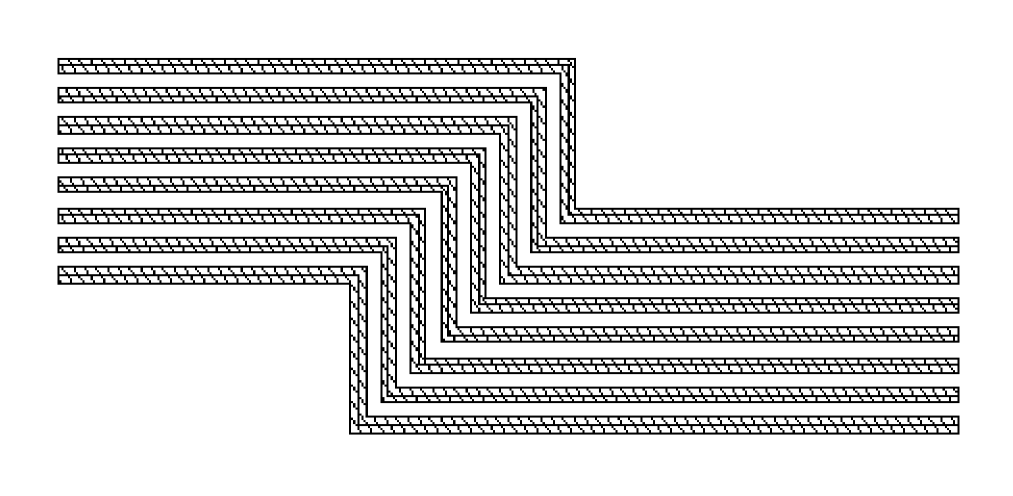
;; Create a bus with 7 offset subpathsprocedure( bus(cv layer)
(let (tfId layerWidth layerSpace)
tfId = techGetTechFile(cv)
layerWidth = techGetSpacingRule(tfId "minWidth" layer)
layerSpace = techGetSpacingRule(tfId "minSpacing" layer)
        rodCreatePath(
            ?name            "bus"
            ?layer           layer
            ?pts             list(20:-20 40:-20 40:-30 80:-30)
            ?width           layerWidth
            ?justification   "center"
            ?cvId            cv
            ?offsetSubPath
            list(
                list(
                    ?layer           layer
                    ?justification   "left"
                    ?sep             layerSpace
                ) ;end subpath1
                list(
                    ?layer           layer
                    ?justification   "left"
                    ?sep             (layerSpace * 2) + layerWidth
                ) ;end subpath2
                list(
                    ?layer           layer
                    ?justification   "left"
                    ?sep         (layerSpace * 3) + (layerWidth * 2)
                ) ;end subpath3
                list(
                ?layer           layer
                ?justification   "left"
                ?sep         (layerSpace * 4) + (layerWidth * 3)
                ) ;end subpath4
                list(
                    ?layer           layer
                    ?justification   "left"
                    ?sep         (layerSpace * 5) + (layerWidth * 4)
                ) ;end subpath5
                list(
                    ?layer           layer
                    ?justification   "left"
                    ?sep         (layerSpace * 6) + (layerWidth * 5)
                ) ;end subpath6
                list(
                    ?layer           layer
                    ?justification   "left"
                    ?sep         (layerSpace * 7) + (layerWidth * 6)
                ) ;end subpath7
            ) ;end list of lists
        ) ;end rodCreatePath
    ) ; end of let
) ; end of procedure
Creating a Contact Array
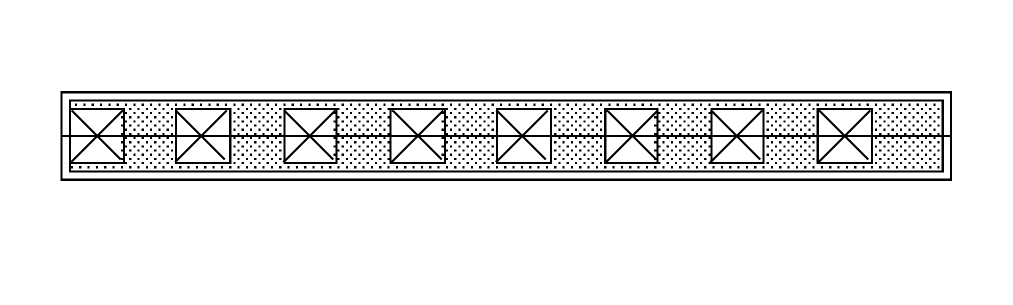
;; Create a contact arrayprocedure(buildCnts(cv layer1 layer2 layer3 width1 width3 length3
        pathpnts terminal pinlabel enc offset chop)
    ; pinlabel is a boolean that determines whether a label will be
    ; created
    let( ( fig )
    fig = rodCreatePath(
        ?cvId cv
        ?layer layer1
        ?width width1
        ?pts pathpnts
        ?encSubPath
        list(
            list(
                ?layer           layer2
                ?enclosure       enc
                ?choppable       chop
                ?pin             t
                ?termName        terminal
                ?pinLabel        pinlabel
                ?pinLabelHeight  length3
                ?pinLabelLayer   "text"
             ) ;end enc sublist1
        ); end enc list
        ?subRect
        list(
            list(
                ?layer           layer3
                ?width           width3
                ?length          length3
                ?endOffset       offset
            ) ;end rect sublist1
        ) ;end subRect list
    ) ;end rodCreatePath
    ) ;end of let
) ;end of procedure
Creating a Guard Ring
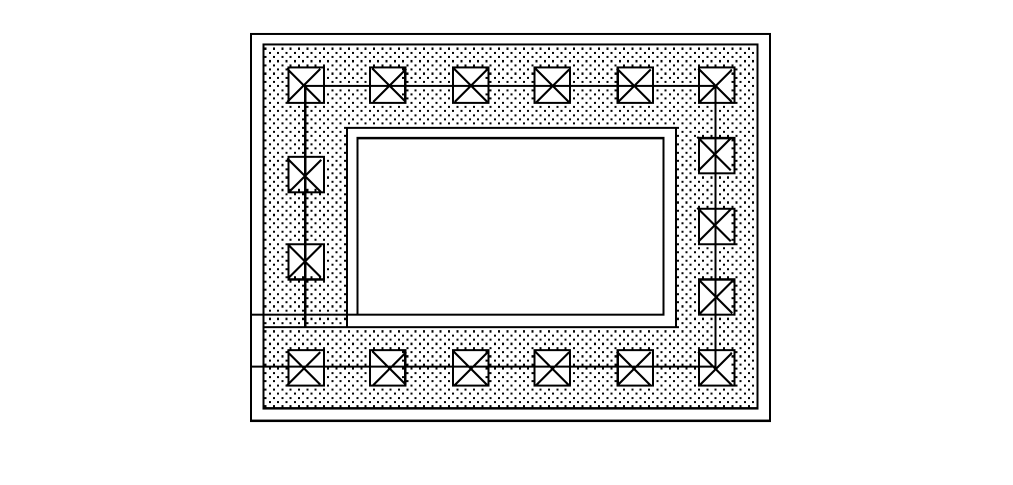
;; Create guard ring
;;
;; This procedure is an example of how to create a guard ring
;; interactively with the layout editor. The sample code assumes that certain
;; design rules are already defined in your technology file. This code builds
;; three types of guard rings: ndiff, pdiff, and poly.
;; The arguments for this procedure are all optional.
;; If you specify no arguments, the guard ring defaults to ndiff.
;; The system prompts you for coordinates and you draw the guard ring
;; in the current open window.
;; Optionally, you can also specify the type of material and
;; cellview ID, and you can pass in a pointlist.
procedure(
    buildGuardRing(
                        @optional (type "ndiff")
                        (winId hiGetCurrentWindow())
                        (pointList nil)
                ) ;end buildGuardRing
    prog(
        (
            cvId tfId botLayNumber topLayNumber viaLayNumber
            viaWidth     botOLvia topOLvia botWidth
            prompt1 prompt2 buildCnts_info
        )
;; Check the cellView. Get the techfile ID.
        if(
            (cvId = geGetEditCellView(winId)) &&
                    cvId->objType == "cellView"
        then
            tfId = techGetTechFile(cvId)
        else
            printf("Invalid cellView %L\n" cvId)
            return()
        ) ;end if
;; Find out what layers to use based on the type of guard ring.
        botLayNumber =
            case(type
                ("ndiff" techGetParam(tfId "ndiff"))
                ("pdiff" techGetParam(tfId "pdiff"))
                ("poly" techGetParam(tfId "poly"))
            ) ;end case
        topLayNumber = techGetParam(tfId "metal1")
        viaLayNumber = techGetParam(tfId "cont")
;; Find the design rules.
        viaWidth = techGetSpacingRule(tfId "minWidth" viaLayNumber)
        botOLvia = techGetOrderedSpacingRule(
                    tfId "minEnclosure" botLayNumber viaLayNumber)
        topOLvia = techGetOrderedSpacingRule(
                    tfId "minEnclosure" topLayNumber viaLayNumber)
        botWidth = (2 * botOLvia) + viaWidth
;; Build a global variable list for the enter function to use.
    buildCnts_info = ncons(nil)
        buildCnts_info->cv =         cvId
        buildCnts_info->layer1 =     botLayNumber
        buildCnts_info->layer2 =     topLayNumber
        buildCnts_info->layer3 =     viaLayNumber
        buildCnts_info->width1 =     botWidth
        buildCnts_info->width3 =     viaWidth
        buildCnts_info->length3 =    viaWidth
        buildCnts_info->pathpnts =   pointList
        buildCnts_info->terminal =   nil
        buildCnts_info->pinlabel =   nil
        buildCnts_info->enc =        (botOLvia - topOLvia)
        buildCnts_info->offset =     -botOLvia
        buildCnts_info->chop =       t
;; Prompts for points if points where not passed in.
        prompt1 = "Enter the first point in the coordinate list:"
        prompt2 = "Enter the next point in the coordinate list:"
        enterPath(
                    ?prompts list(prompt1 prompt2)
                    ?doneProc "guardRingDoneCB"
                    ?pathWidth botWidth
                    ?points pointList
                    ?pathStyle "flush"
                ) ;end enterPath
        return(t)
    ) ;end prog
) ;end procedure
;; The following procedure uses a callback from the enterFunction.
;; car(args)   = winId          ( Current window )
;; cadr(args)  = exitStatus     ( t if applied, nil if canceled )
;; caddr(args) = pointList      ( points entered by user )
;;
;; Use the variable buildCnts_info (define within the buildGuardRing
;; procedure above) to contain the layer and design rule information.
;;
procedure(
    guardRingDoneCB(@rest args)
    let((pointList)
        when(cadr(args) && (pointList = caddr(args)) &&
                                length(pointList) > 1
            when(boundp(‘buildCnts_info) && listp(buildCnts_info)
                    length(buildCnts_info) == 14
                buildCnts_info->pathpnts = pointList
                rodCreatePath(
                    ?cvId       buildCnts_info->cv
                    ?layer      buildCnts_info->layer1
                    ?width      buildCnts_info->width1
                    ?pts        buildCnts_info->pathpnts
                    ?choppable  nil
                    ?encSubPath list( list(
                        ?layer           buildCnts_info->layer2
                        ?enclosure       buildCnts_info->enc
                        ?choppable       buildCnts_info->chop
                        ?pinLabel        buildCnts_info->pinlabel
                        ?pinLabelHeight  buildCnts_info->length3
                        ?pinLabelLayer   buildCnts_info->pinlabel
                                    ) ) ;end encSubpath lists
                    ?subRect list( list(
                        ?layer           buildCnts_info->layer3
                        ?width           buildCnts_info->width3
                        ?length          buildCnts_info->length3
                        ?endOffset       buildCnts_info->offset
                                    ) ) ;end of subRect lists
                ) ;end of rodCreatePath
            ) ;end of 1st when
        ) ;end of 2nd when
    ) ;end of let
) ;end of procedure
Creating a Shielded Path
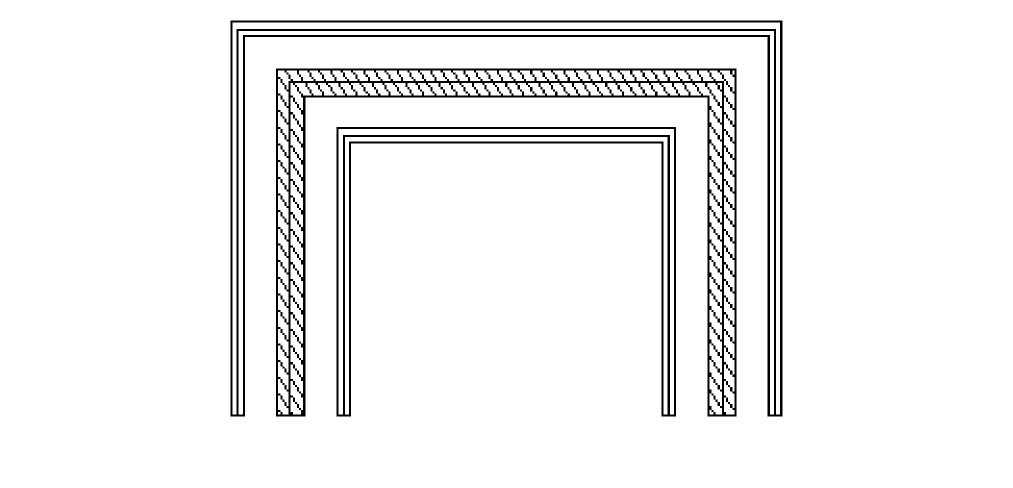
;; Create a shielded pathprocedure( shieldedPath(cv)
    errset(
    (let (tfId)
        rodCreatePath(
            ?name           "shieldedPath"
            ?layer          "metal1"
            ?pts            list(2:-15 2:-5 15:-5 15:-15)
            ?width          .8
            ?justification  "center"
            ?cvId cv
            ?offsetSubPath
            list(
                list(
                    ?layer          "vapox"
                    ?justification   "left"
                    ?sep             1
                    ?width           .4
                ) ;end of offset sublist1
                list(
                    ?layer           "vapox"
                    ?justification   "right"
                    ?sep             1
                    ?width           .4
                ) ;end of offset sublist2
            ) ;end of offset list of lists
        ) ;end of rodCreatePath
    ) ; end of let
    t
    ) ; end of errset
) ; end of procedure
Creating a Transistor
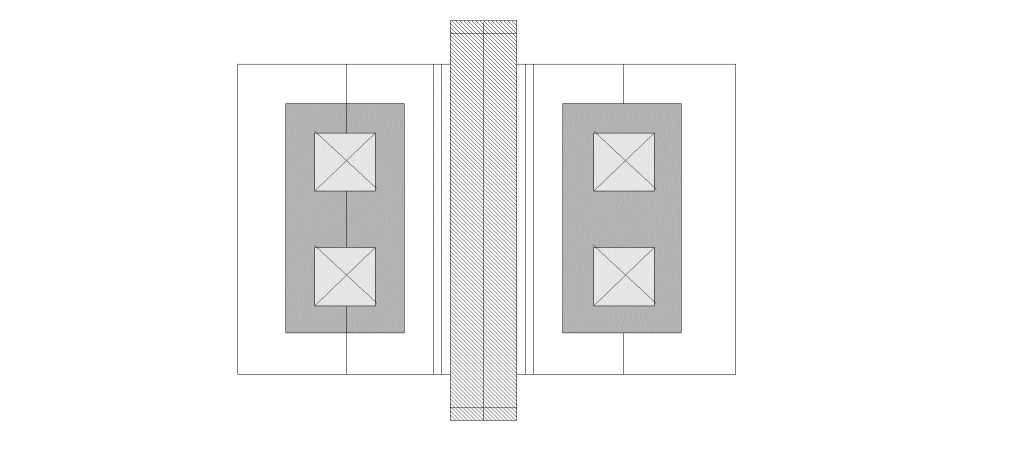
;; Create a gateprocedure( tran(cv w l name)
    let((tfId pext pcs pds cw cs m1oc doc grid ptslist tran)
        tfId = techGetTechFile(cv)
        pext = techGetSpacingRule(tfId "minExtension" "poly")
        pcs = techGetSpacingRule(tfId "minSpacing" "poly" "cont")
        pds = techGetSpacingRule(tfId "minSpacing" "poly" "ndiff")
        cw = techGetSpacingRule(tfId "minWidth" "cont")
        cs = techGetSpacingRule(tfId "minSpacing" "cont")
        m1oc = techGetOrderedSpacingRule(tfId "minEnclosure"
                "metal1" "cont")
        doc = techGetOrderedSpacingRule(tfId "minEnclosure"
                "ndiff" "cont")
        grid = techGetMfgGridResolution(tfId)
        ptslist = list(0:0 0:(w + 2 * pext))
        tran = rodCreatePath(
                    ?name            name
                    ?layer           "poly"
                    ?pts             ptslist
                    ?width           l
                    ?termName        "G"
                    ?justification   "center"
                    ?cvId            cv
                    ?offsetSubPath
                    list(
                        list(
                            ?layer           "poly"
                            ?beginOffset     0.0
                            ?endOffset       -(pext + w + pds)
                            ?width           l
                            ?pin             t
                            ?termName        "G"
                        ) ;end of offset sublist1
                        list(
                            ?layer           "poly"
                            ?beginOffset     -(pext + w + pds)
                            ?endOffset       0.0
                            ?width           l
                            ?pin             t
                            ?termName        "G"
                        ) ;end of offset sublist2
                        list(
                            ?layer           "metal1"
                            ?justification   "left"
                            ?sep             pcs - m1oc
                            ?beginOffset     m1oc - pext - doc
                            ?endOffset       m1oc - pext - doc
                            ?width           cw + 2 * m1oc
                            ?pin             t
                            ?termName        "S"
                        ) ;end of offset sublist3
                        list(
                            ?layer           "metal1"
                            ?justification   "right"
                            ?sep             pcs - m1oc
                            ?beginOffset     m1oc - pext - doc
                            ?endOffset       m1oc - pext - doc
                            ?width           cw + 2 * m1oc
                            ?pin             t
                            ?termName        "D"
                        ) ;end of offset sublist4
                        list(
                            ?layer           "ndiff"
                            ?justification   "left"
                            ?sep             0.0
                            ?beginOffset     -pext
                            ?endOffset       -pext
                            ?width           doc + cw + pcs
                            ?termName        "S"
                        ) ;end of offset sublist5
                        list(
                            ?layer           "ndiff"
                            ?justification   "left"
                            ?sep             0.0
                            ?beginOffset     -pext
                            ?endOffset       -pext
                            ?width           2 * grid
                            ?pin             t
                            ?termName        "S"
                        ) ;end of offset sublist6
                        list(
                            ?layer           "ndiff"
                            ?justification   "right"
                            ?sep             0.0
                            ?beginOffset     -pext
                            ?endOffset       -pext
                            ?width           doc + cw + pcs
                            ?termName        "D"
                        ) ;end of offset sublist7
                        list(
                            ?layer           "ndiff"
                            ?justification   "right"
                            ?sep             0.0
                            ?beginOffset     -pext
                            ?endOffset       -pext
                            ?width           2 * grid
                            ?pin             t
                            ?termName        "D"
                        ) ;end of offset sublist8
                    )
                    ?subRect
                        list(
                            list(
                                ?layer "cont"
                                ?length cw
                                ?width cw
                                ?space cs
                                ?justification "left"
                                ?sep pcs
                                ?beginOffset -(pext + doc)
                                ?endOffset -(pext + doc)
                            ) ;end of subRect sublist1
                            list(
                                ?layer "cont"
                                ?length cw
                                ?width cw
                                ?space cs
                                ?justification "right"
                                ?sep pcs
                                ?beginOffset -(pext + doc)
                                ?endOffset -(pext + doc)
                            ) ;end of subRect sublist2
                        ) ;end of subRect list of lists
                ) ;end of rodCreatePath
    ) ;end of let
) ;end of procedure
Getting the Resistance for a ROD Path
The following procedures create and update a user-defined handle for the resistance of a ROD path. All three procedures require the ROD object ID (rodId) as input.
When you calculate the resistance of a ROD path from within a Pcell, you only need to execute the createResHandle procedure once inside the Pcell because the geometries in a Pcell are recreated every time the Pcell is evaluated.
When you calculate the resistance of a ROD path from outside a Pcell, such as in an open cellview window, you must update the resistance handle (res) by executing the createResHandle procedure in the Command Interpreter Window whenever you make a change to the ROD path, such as stretching or chopping it.
getRodPathLength Procedure
;; This procedure goes through the list of points in a ROD path
;; and adds the lengths of the segments. Returns the total length.
;;
procedure(getRodPathLength(rodId)
    let(
            (
                (total_length 0)
            ) ;end variables for let
            for(i 0 (rodId~>numSegments - 1)
                total_length = total_length +
                    rodGetHandle(rodId
        symbolToString(concat("length" i)))
            ) ;end of for
            total_length
    ) ;end of let
) ;end of procedure
getRodPathRes Procedure
;; This procedure gets the length and sheet resolution values for
;; a ROD path, then calculates and returns the resistance.
;; Remember to load the procedure getRodPathLength
procedure(getRodPathRes(rodId)
    let(( corner_value sheet_res path_width num_segs num_corners
      total_length num_squares )
      ;; Percentage of a square. Usually, values from 0.5 to 0.65
      ;; are used for corner resistance. The rodPcells sample library
      ;; uses .559 for corner resistance, so that value is used here.
      ;; Adjust the value of corner_value to suit your needs.
corner_value = .559
;; Get the sheet resistance for the current layer.
    sheet_res = techGetElectricalRule(techGetTechFile(rodId~>cvId)
      "sheetRes" rodId~>dbId~>layer)
      ;; Get path width, number of segments, number of corners,
      ;; and total path length.
    path_width = rodId~>dbId~>width
    num_segs = rodId~>numSegments
    num_corners = num_segs - 1
    total_length = getRodPathLength(rodId)
      ;; Now compute the number of squares of resistance material
      ;; and calculate the total resistance value.
    num_squares = (total_length / path_width) -
                     (num_corners * corner_value)
;; Return the resistance value.
num_squares * sheet_res
  ) ;end of let
) ;end of procedure
createResHandle Procedure
;; This procedure creates or updates the value of a user-defined
;; resistance handle ("res") for a ROD path, and returns the
;; resistance value.
;;
procedure(createResHandle(rodId)
   let((res)
     when(rodId~>dbId~>objType == "path" &&
                                 (res = getRodPathRes(rodId))
        when((rodHandle = rodGetHandle(rodId "res"))
                          rodDeleteHandle(rodId "res")
        ) ;end of 2nd when
        rodCreateHandle(
             ?rodObj         rodId
             ?name           "res"
             ?type           "float"
             ?value          res
         ) ;end of rodCreateHandle
) ;end of 1st when
  ) ;end of let
) ;end of procedure
Stretchable MOS Transistor
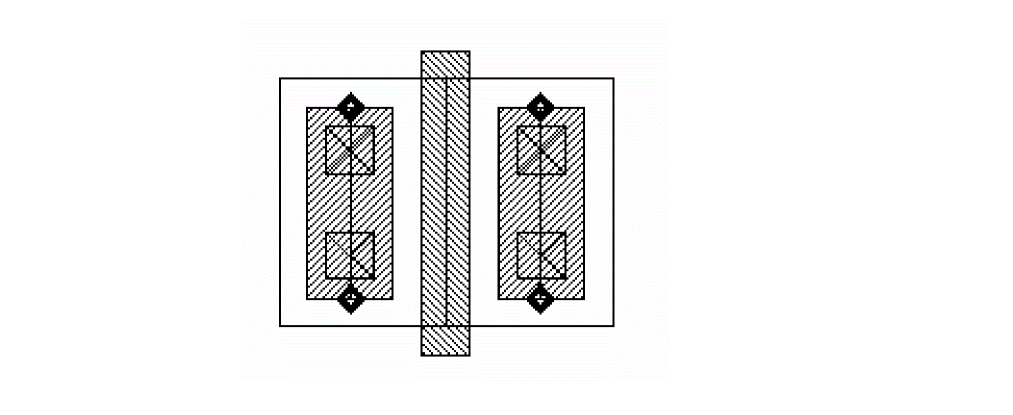
This is an example of a simple MOS transistor with stretchable contact arrays and user-defined functions.This code might not work with your technology file, but you can modify the code as desired. For more complex MOS code examples, see the
The parameters for the sample mos transistor Pcell are specified as follows:
| Parameter Name | Default Value | Parameter Description |
|---|---|---|
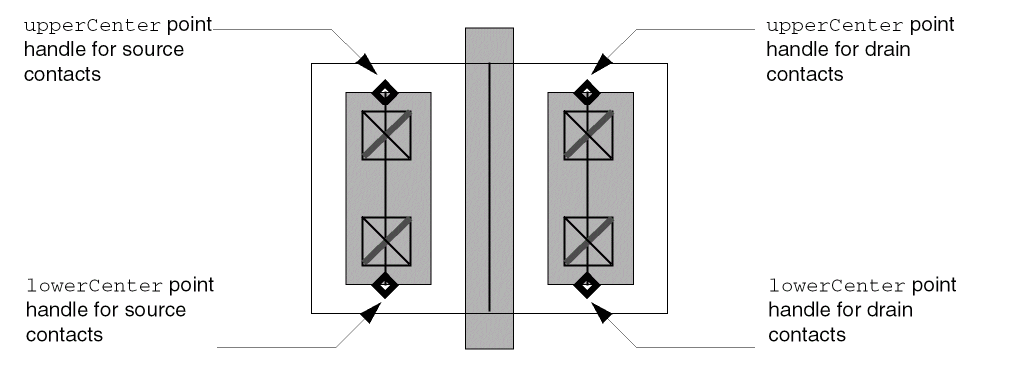
Stretch handles are assigned to the transistor Pcell as follows:
-
To make the source contacts stretchable, the
upperCenterandlowerCenterpoint handles on the source contact array are assigned to the Pcell parameterleftcovwith the stretch typerelativeand the stretch directionY. -
To make the drain contacts stretchable, the
upperCenterandlowerCenterpoint handles on the drain contact array are assigned to the Pcell parameterrightcovwith the stretch typerelativeand the stretch directionY.
Code for simplemos Transistor
devices(
tcCreateDeviceClass("layout" "simplemos"
    ; class parameter name value pairs
      ( ( xtrType "ndiff" ) )
    ; formal parameters (name-value pairs)
    (
        (w           1.3)
        (l           0.25)
        (leftcov     1.0)
        (rightcov    1.0)
        (leftPos     "top")
        (rightPos    "top")
    ) ; end formal parameters
    ; access controls techfile class for layout design rules
    ; and layer info
    tfId = techParam("tfId")
    poly = techParam("poly")         ; poly layer number
    diff = techParam(xtrType)        ; xtrType diff layer number
    contact = techParam("cont")      ; cont layer number
    metal1 = techParam( "metal1")    ; metal1 layer number
    pext = techGetSpacingRule(tfId "minExtension" poly)
    pcs = techGetSpacingRule(tfId "minSpacing" poly contact)
    cw = techGetSpacingRule(tfId "minWidth" contact)
    cs = techGetSpacingRule(tfId "minSpacing" contact)
    m1oc = techGetOrderedSpacingRule(tfId "minEnclosure" metal1
            contact)
    doc = techGetOrderedSpacingRule(tfId "minEnclosure" diff
            contact)
    dop = techGetOrderedSpacingRule(tfId "minEnclosure" diff poly)
    pps = techGetSpacingRule(tfId "minSpacing" poly )
    grid = techGetMfgGridResolution(tfId)
;************* draw gate with connectivity *************
    gate = rodCreateRect(
                ?layer           poly
                ?length          w + (2 * pext)
                ?width           l
    ) ; end gate rodCreateRect
    topPin = rodCreateRect(
                ?layer           poly
                ?length          pext
                ?width           l
                ?termName        "G"
                ?pin             t
    ) ; end topPin rodCreateRect
    botPin = rodCreateRect(
                ?layer           poly
                ?length          pext
                ?width           l
                ?termName        "G"
                ?pin             t
    ); end botrodCreateRectPin
    dbReplaceProp(gate~>dbId "lxBlockOverlapCheck" "boolean" t)
    rodAlign(
                ?refObj          gate
                ?refHandle       "lowerLeft"
                ?alignObj        botPin
                ?alignHandle     "lowerLeft"
    ) ; end rodAlign
    rodAlign(
                ?refObj          gate
                ?refHandle       "upperLeft"
                ?alignObj        topPin
                ?alignHandle     "upperLeft"
    ) end rodAlign
; ******** draw source contacts and source diffusion*************
    metOvDiff = doc - m1oc
    metOvPoly = pcs - m1oc
    cntsw = w - (2*doc)
    length = ((cntsw + (2*m1oc)) * leftcov/grid)*grid
    minLength = cw + (2 * m1oc)
    when(length < minLength
        length = minLength
    ) ; end when
    leftCnts = rodCreatePath(
                ?layer           metal1
                ?width           (2*m1oc)+cw
                ?pts         list(0:0 0:length)
                ?justification "center"
                ?subRect list( list(
                            ?layer      contact
                            ?length     cw
                            ?width      cw
                            ?space      cs
                            ?endOffset  -m1oc
                        )) ; end subrect list
                    ?termName            "S"
                    ?pin                 t
                ) ; end leftCnts rodCreatePath
    leftDiff = rodCreateRect(
                     ?layer      diff
                     ?width      cw + doc + pcs + l/2
                     ?length      w
                ) ; end leftDiff rodCreatePath
    rodAlign(
                ?refObj          gate
                ?refHandle       "cC"
                ?alignObj        leftDiff
                ?alignHandle     "cR"
    ) ; end rodAlign
; ******** make source contacts stretchable *********
    ; The user-defined function "contcov" sets a range for the
    ; contacts from a 100% coverage to minimum contact width
    rodAssignHandleToParameter(
                ?parameter       "leftcov"
                ?rodObj          leftCnts
                ?handleName      list("upperCenter" "lowerCenter")
                ?displayName     "leftcov"
                ?stretchDir      "y"
                ?stretchType     "relative"
                ?userFunction    "contcov"
    ) ; end rodAssignHandleToParameter
; ******** set source contact alignment *********
    ; This is an example where rodAssignHandleToParameter is
    ; being used to set a parameter value and where no display
    ; is required.
    ; The userfunction "mystretch" checks which handle is
    ; currently being stretched and then returns the location
    ; where the contacts should be aligned, either to the top
    ; or bottom.
    rodAssignHandleToParameter(
                ?parameter       "leftPos"
                ?rodObj          leftCnts
                ?handleName      list("upperCenter" "lowerCenter")
                ?stretchType     "relative"
                ?userFunction    "mystretch"
    ) ; end rodAssignHandleToParameter
    case( leftPos
            ("top"
                rodAlign(
                        ?refObj          gate
                        ?refHandle       "uL"
                        ?alignObj        leftCnts
                        ?alignHandle     "uR"
                        ?xSep            -metOvPoly
                        ?ySep            -(pext + metOvDiff)
                ) ; end rodAlign
            ) ; end top
            ("bottom"
                rodAlign(
                        ?refObj          gate
                        ?refHandle       "lowerLeft"
                        ?alignObj        leftCnts
                        ?alignHandle     "lowerRight"
                        ?xSep            -metOvPoly
                        ?ySep            pext + metOvDiff
                ); end rodAlign
            ) ; end bottom
        ); end case
; ******** draw drain contacts and drain diffusion*************
    length = ((cntsw + (2*m1oc)) * rightcov/grid)*grid
    when(length < minLength
        length = minLength
    ) ; end when
    rightCnts = rodCreatePath(
                    ?layer           metal1
                    ?width          (2*m1oc)+cw
                    ?pts            list(0:0 0:length)
                    ?justification  "center"
                    ?subRect        list( list(
                                    ?layer         contact
                                    ?length        cw
                                    ?width         cw
                                    ?space         cs
                                    ?endOffset     -m1oc
                                    )) ; end subrect lists
                    ?termName        "D"
                    ?pin             t
                ) ; end rightCnts rodCreatePath
    rightDiff = rodCreateRect(
                    ?layer           diff
                    ?width           pcs + cw + doc + l/2
                    ?length          w
                ) ; end rightDiff rodCreatePath
    rodAlign(
                ?refObj          gate
                ?refHandle       "cC"
                ?alignObj        rightDiff
                ?alignHandle     "cL"
    ) ; end rodAlign
; ******** make drain contacts stretchable *********
    rodAssignHandleToParameter(
                ?parameter       "rightcov"
                ?rodObj          rightCnts
                ?handleName      list("upperCenter" "lowerCenter")
                ?displayName     "rightcov"
                ?stretchDir      "y"
                ?stretchType     "relative"
                ?userFunction    "contcov"
    ) ; end rodAssignHandleToParameter
; ******** set drain contact alignment *********
    rodAssignHandleToParameter(
                ?parameter       "rightPos"
                ?rodObj          rightCnts
                ?handleName      list("upperCenter" "lowerCenter")
                ?stretchType     "relative"
                ?userFunction    "mystretch"
    ) ; end rodAssignHandleToParameter
    case( rightPos
        ("top"
            rodAlign(
                     ?refObj         gate
                     ?refHandle      "uR"
                     ?alignObj       rightCnts
                     ?alignHandle     "uL"
                     ?xSep           metOvPoly
                     ?ySep -(pext + metOvDiff)
            ) ; end rodAlign
        ) ; end top
        ("bottom"
            rodAlign(
                     ?refObj          gate
                     ?refHandle       "lowerRight"
                     ?alignObj        rightCnts
                     ?alignHandle     "lowerLeft"
                     ?xSep            metOvPoly
                     ?ySep            pext + metOvDiff
            ) ; end rodAlign
        ); end bottom
    ); end case
) ; end tcCreateDeviceClass
; Declare a cvs of device class simplemos called simplepmos
; and simplenmos
tcDeclareDevice(
                "layout"
                "simplemos"
                "simplepmos"
                ( ( xtrType "pdiff" ) )
) ; end tcDeclareDevice
tcDeclareDevice(
                "layout"
                "simplemos"
                "simplenmos"
                ( ( xtrType "ndiff" ) )
) ; end tcDeclareDevice
) ; end devices
Code for contcov User-Defined Function
;; contcov is a user-defined function specified for the pcell created
;; by simplemos.il.
; The user-defined function "contcov" sets a range for the contacts
; from 100% coverage to minimum contact width for the layer from the
; technology file.
procedure( contcov(myDefstruct)
    let(((returnVal myDefstruct->paramVal + myDefstruct->increment)
     tfId metal1 contact m1oc cw length minLength)
     tfId = techGetTechFile((myDefstruct->rodObj)~>cvId)
     metal1 = techGetParam(tfId "metal1")
     contact = techGetParam(tfId "cont")
     m1oc = techGetOrderedSpacingRule(tfId "minEnclosure"
                metal1 contact)
     cw = techGetSpacingRule(tfId "minWidth" contact)
     length = (myDefstruct->rodObj)~>length * returnVal
    minLength = cw + 2*m1oc
    when(returnVal > 1.0 || length < minLength
         progn(warn("returnVal for parameter %s must be < 1
                or > %f\n" myDefstruct->parameter cw)
            if(returnVal > 1.0 then
                 returnVal = 1.0
            else
                 returnVal = cw
             ) ; endif
        ) ; end progn
    ) ; end when
    returnVal
  ) ; end of let
) ; end of procedure
Code for myStretch User-Defined Function
;; myStretch.il is a user-defined function specified for the pcell
;; created by simplenmos.il.
; The user-defined function "mystretch" checks which handle is
; currently being stretched and then returns the location where
; the contacts should be aligned, either to the top or bottom.
procedure( mystretch(myDefstruct)
    let( (leftPos)
              if(myDefstruct->handleName == "upperCenter"
            then
                 leftPos = "bottom"
            else
                 leftPos = "top"
            ) ; endif
    myDefstruct->paramValue = leftPos
    ) ;end let
) ; end procedure
Return to top