
Location of the .simrc File
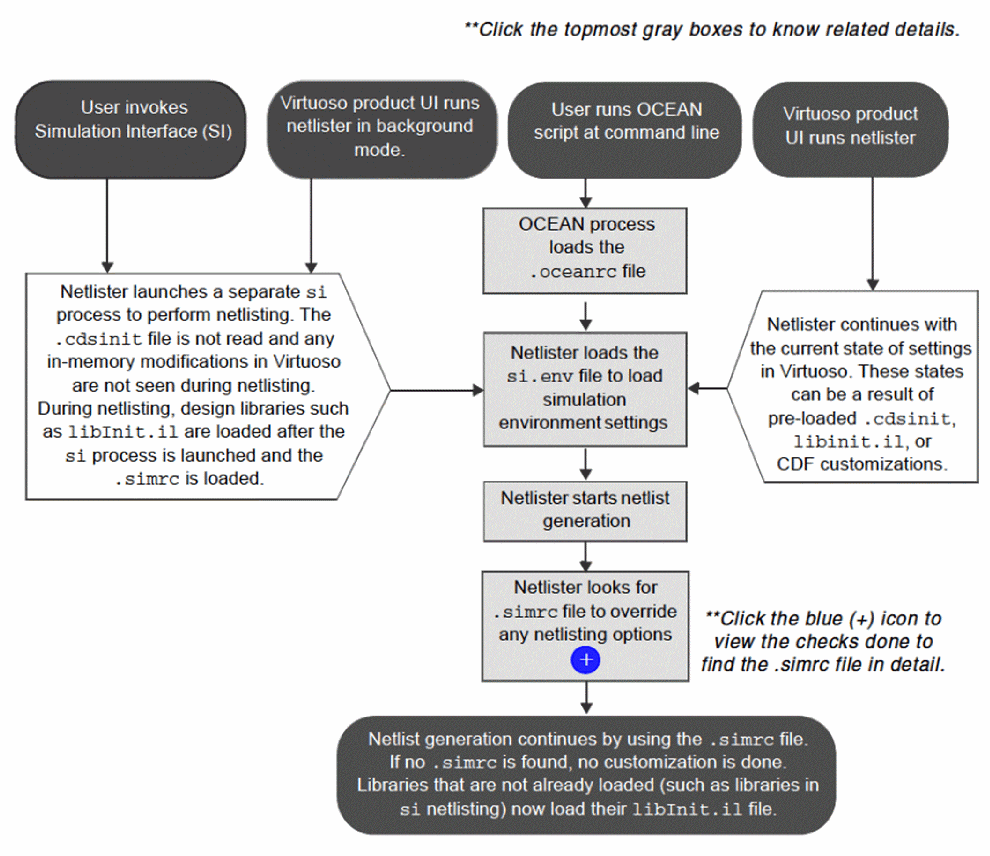
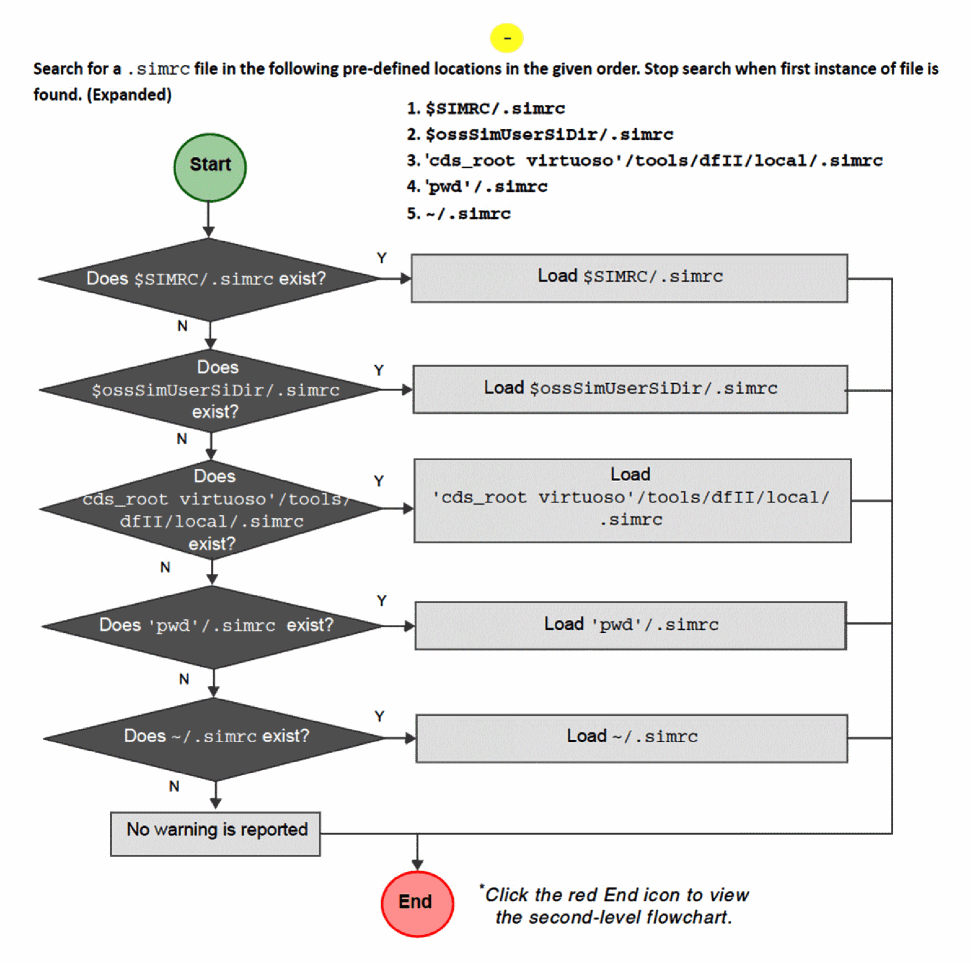
Various Virtuoso tools load the .simrc file during the netlisting process. Depending on the project requirements or setup, a designer may keep the .simrc file at different locations. If your simulation setup contains a.simrc file at multiple locations, refer to the lookup order flowchart in the following figure to understand which of these files is selected for netlist customization.
This flowchart describes the locations and the sequence in which Virtuoso looks for a .simrc file. It also provides guidance to designers on the best location in which to place the .simrc file if they want Virtuoso to use it for netlist customization.
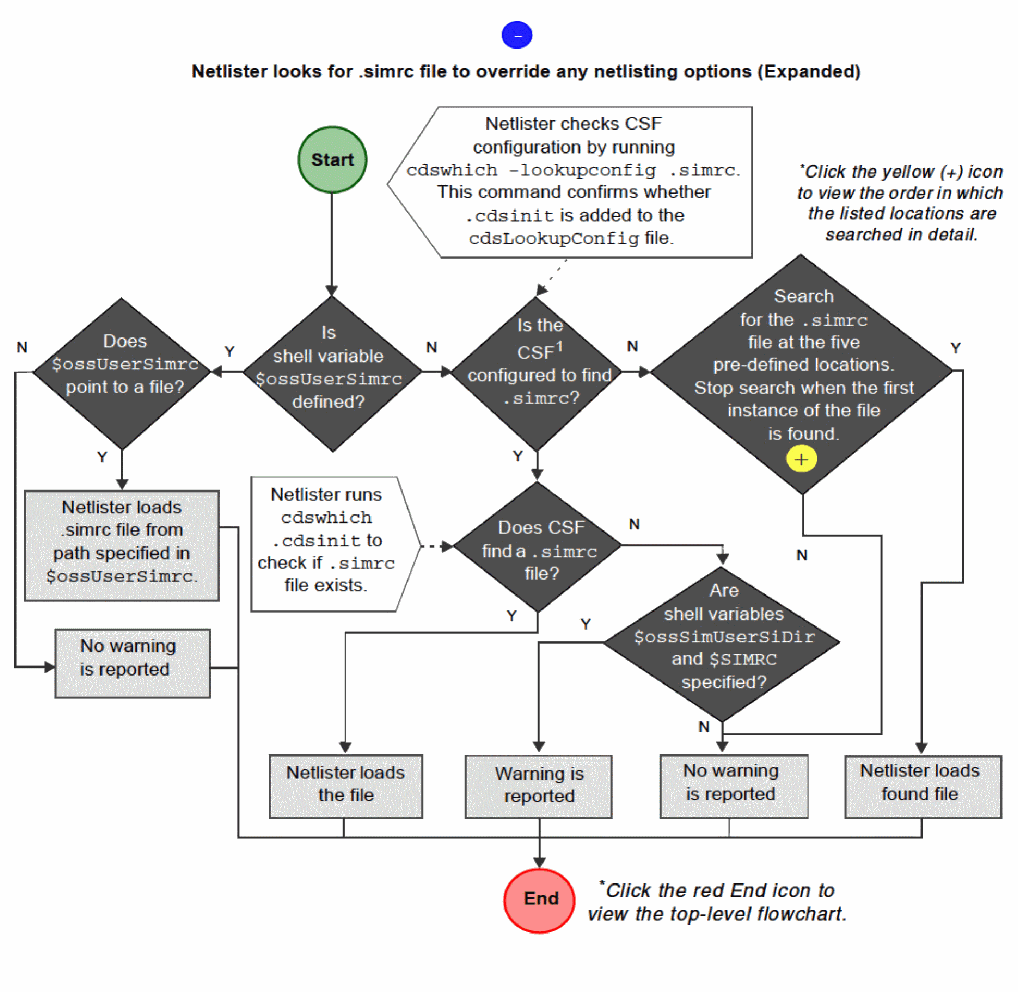
- *Cadence Search Framework. For more details, see Cadence Setup Search File.
$ossUserSimrc variable to a dummy value to avoid loading the .simrc file.
The $SIMRC and $ossSimUserSiDir shell environment variables are set using the setenv command before you start a Virtuoso session.
For example: setenv SIMRC <path>
All netlisters first load the si.env file, which prepares the simulation environment. The.simrc file, if it exists, is loaded whenever netlisting starts in the simulation flow. This file overrides the settings defined in the si.env file and sets default variables for simulations run by a specific user or system without impacting other simulations.
The netlisters that use the .simrc file can be grouped into the following categories:
-
Netlisters that are invoked by running the
si -batchcommand at the command line or through interactive simulation.
In this case, the.cdsinitfile is not loaded and a separatesiprocess is launched to perform the netlisting. Thesi.envis loaded, followed by the .simrcfile, and changes in the current session, such as effective CDF modifications or other in-memory modifications, are visible in the netlist. -
Netlisters that run in the background when the Run in Background check box is selected in the Virtuoso GUI.
For example, the CDL Out form used by Virtuoso lets you select or deselect the Run in Background check box. The.cdsinitfile or the current environment is not used and in addition to the backgroundvirtuosoprocess, a separatesiprocess is launched to perform the netlisting. Thesi.envis loaded, followed by the .simrcfile. For example, CDL, Verilog, or VHDL. Changes in the current session are not visible in the netlist. -
Netlisters that are invoked when an OCEAN script is run at the command-line.
The.oceanrcfile is loaded, followed bysi.env, and then the.simrcfile during netlisting. In-memory modifications are visible in the netlist. -
Netlisters that are invoked by the Virtuoso GUI.
For example, Spectre, HspiceD, CDL, Verilog, or VHDL. Thesi.envfile is loaded, followed by the.simrcfile. Changes in the current session, such as effective CDF modifications,.cdsinitmodifications, or other in-memory modifications are visible in the netlist.
The .simrc file is loaded during each netlist generation and can be loaded multiple times in a Virtuoso session. You can specify simulator-specific customizations by setting the simSimulator variable.
when( and( boundp('simSimulator) (simSimulator == "spectre"))
  printf("Specify Spectre options\n")
)

when( and( boundp('simSimulator) (simSimulator == "auCdl"))
  printf("Specify CDL options\n")
)
Related Topics
Netlist Generation and Customization
Netlist Customization With the .simrc File
Variables for Incremental Netlisting
Customization of Scale Factors
Return to top