
10
Delivering Products
- Contexts
- Autoloading Your Functions
- Encrypting and Compressing Files
- Protecting Functions and Variables
Contexts
Contexts are binary representations of the internal state of the interpreter. Their primary purpose is to help speed the loading of SKILL files. They are best used when the set of SKILL files to load is large.
All SKILL-related structures can be saved in a context except those with values meaningless outside of a session. For example, port values, database handles, and window types are meaningful only to current sessions, whereas lists, integers, floats, defstructs, and so forth are transportable from one session to another.
SKILL contexts contain source code and data. Their main purpose is to allow for fast loading and initializing of product code. One way of looking at contexts is to view them as snapshots of the internal state of the interpreter, much like a core file in UNIX is an image of the running process.
Contexts cannot store at save time and retrieve at load time process-dependent structures. For example, file descriptors stored in port structures or process IDs cannot be saved in contexts. All other non process-dependent SKILL structures can be safely stored: Lists, numbers, strings, arrays, and so forth can be saved into and retrieved from a context.
When a SKILL source file is loaded, it is first parsed. The evaluator is called for each complete expression read in. This is how procedures are defined. Context files, on the other hand, contain binary data that is loaded directly into memory. The binary data stored into a context has been parsed and evaluated before being saved.
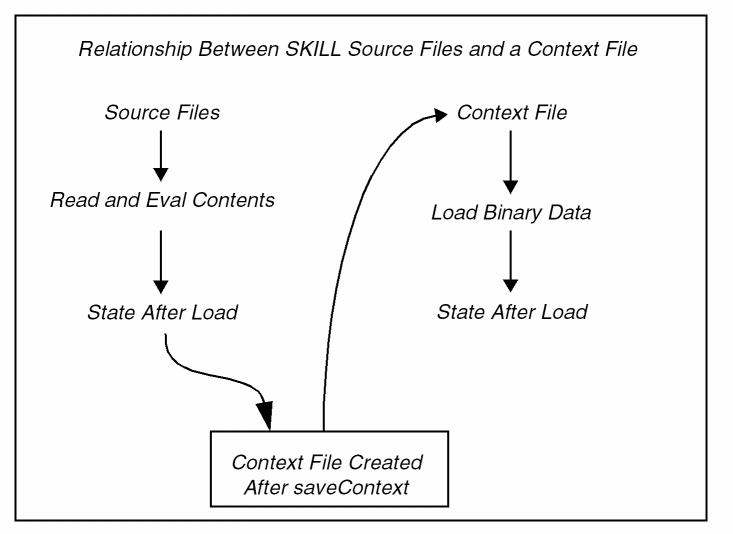
Deciding When to Use Contexts
You must decide when it is better to use contexts versus straight or encrypted SKILL code. Some considerations include the following:
-
Is the code likely to become a product?
Usually, the first criterion is whether the code is likely to become a product that will be shipped. Contexts offer a good vehicle for productizing code. -
How long does the code take to load?
The second criteria is whether there is enough SKILL code to warrant being in a context. This is difficult to measure. A simple test is to load the source code and see if the time it takes is likely to be unacceptable to a user. For example, if the code is likely to be auto-loaded during the physical manipulation of graphics, the impact of the load and initialization should be minimized. Contexts can help in this case.
The more code and initialization needed at load time, the better it is to use contexts. For small amounts of code (200 lines), contexts might be overkill. To load and initialize 20,000 lines of SKILL code without using contexts takes approximately 30 seconds, whereas loading the same code using a context takes approximately 4 seconds. In this case, the perceptible impact is high, so using contexts makes sense. -
Do you need to modularize your code?
Sometimes it is necessary to modularize code according to predefined capabilities. There might be a need to have these capabilities loaded incrementally at run-time. Thus it is not necessary to load all the code at once. Contexts, as snapshots of the interpreter’s internal state, can be saved into separate files, even though code that goes into one context might depend on code in another.
The dependencies are resolved at load time. For example, the SKILL code for the schematics editor relies, among other things, on having code for the graphics editor present, but the context for the schematics editor does not contain any of the graphic editor’s code or structures. -
Can you create contexts at integration time?
The process of creating contexts must always be a separate step done at integration time, the time when all C code is compiled and linked and SKILL files are digested to produce context files. During integration and when contexts are being created, the interpreter enters a state that renders all normal use inefficient.
For example, during context creation, the memory management subsystem works in a special mode such that incremental snapshots of the memory can be made and saved into contexts. Context creation and code that is used to create contexts should not be part of the normal function of any product.
Creating Contexts
When you use SKILL contexts for delivering a product, you must develop an organization for those contexts.
Creating the Directory Structure
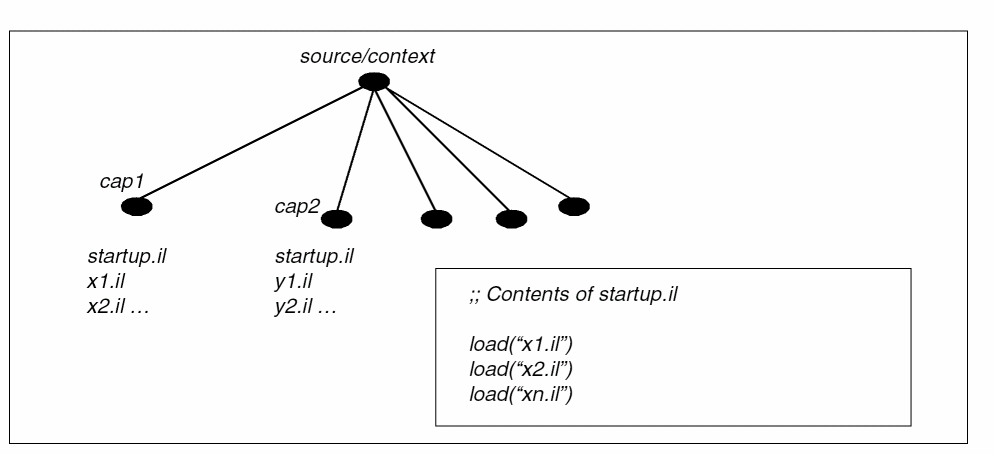
First, group the SKILL code on a product/capability basis. This is best done by designating a special directory, for example, source/context and then using make files or simple scripts to copy the code into separate directories under source/context.
If the capability names are cap1 and cap2, create two directories under source/context named source/context/cap1 and source/context/cap2. Copy the source code for each capability into the respective directory.
For each capability context directory, create a single file named startup.il that uses the SKILL load command to load all the files in that directory in the necessary order. The figure below shows a layout of the context directories. To evaluate a command at the top level, use the loadTopContextForm command instead of load.
How the Process of Building Contexts Works
Using the directory structure described above, the process of building contexts starts by loading code from each directory and generating a binary context corresponding to the state of the interpreter when the files are loaded (in the sequence specified in the startup.il file).
The binary context file can go into one of several directories. If auto-loading of the context is necessary, the file can be placed in the /your_install_dir/tools/dfII/local/context directory. The autoload mechanism looks in this directory.
virtuoso) require 64 bit context files, which should inturn be created using 64 bit SKILL-based programs. In addition, these 64 bit context files should be placed under the /64bit directory. For example, /your_install_dir/tools/dfII/local/context/64bit.Creating Utility Functions
Given the directory structure above, the code for generating the contexts can now be written. First let us define a few utility functions.
Assumptions
Source code is stored under the /user/source/context directory. The created contexts are saved under /user/etc/context, where user is any installation path you choose for keeping sources and contexts. These contexts are hard-coded in the sample code below, but you can pass them as arguments to the functions.
Create myContextBuild.il
Put the following code in a separate file. Call it myContextBuild.il.
procedure( getContext(cxt)
;;------------------------
;; Given a context name load the context into the session
(let ((ff (strcat "/<user>/etc/context/" cxt ".cxt")))
      (cond ((null (isFile ff)) nil)
            ((null (loadContext ff))
                  (printf "Failed to load context %s\n" cxt))
            ((null (callInitProc cxt))
                  (printf "Failed to initialize context %s\n"
                        cxt))
                  (t (printf "Loading Context %s\n" cxt))
      )
      )
)
procedure( makeContext(cxt)
;;-------------------------
;; Given a context name create and save the context
;; under "/<user>/etc/context". Assumes user source
;; code is located under /<user>/source/<context>

(let ( (newPath (strcat "/<user>/source/" cxt))
      (oldPath (getSkillPath))
             (fileName (strcat "/<user>/etc/context/" cxt ".cxt"))
             (oldStatus (status writeProtect))
            )

            (printf "Building context for %s\n" cxt)
      (setSkillPath newPath)
            (sstatus writeProtect t)
      ;; setContext is a function that takes the name of
      ;; a context and indicates to the system that
      ;; whatever is loaded or evaluated from
      ;; the point of this call to the time context
      ;; is saved belongs to the named context.

      (setContext cxt)

      ;; Load all the SKILL files corresponding to the
      ;; given context. Relies on skill path being set earlier

      (loadi "startup.il")

      ;; After the load save the files into a context
      ;; file containing all the necessary data to load
      ;; the context

      (saveContext fileName)

            ;; It is important to call the initialization function
            ;; AFTER the context file is saved. This procedure
            ;; may create structures that can’t be saved into
            ;; a context file but a subsequent load of SKILL files
            ;; for another context may need the call to have taken
            ;; place.

      (callInitProc cxt)

      ;; Set the SKILL path back to what it was.
      (setSkillPath oldPath)
            (unless oldStatus (sstatus writeProtect nil))
))
procedure( buildContext(cxt)
;;--------------------------
;; Deletes existing context and prepares to create the context

(progn
      (deleteFile (strcat "/<user>/etc/context/" cxt ".cxt"))
      (cond ((isDir cxt "/<user>/source/")
                  (makeContext cxt))
            (t (printf "Can’t find context directory %s\n" cxt))
      )
))

;; Using getContext, load all the contexts that the code is
;; likely to need. For instance, the most basic
;; of contexts from Cadence are loaded first.

getContext("skillCore")
getContext("dbRead")
getContext ….

;; After loading all the dependencies, build all local
;; contexts

buildContext("cap1")
buildContext("cap2")
buildContext("capn")

exit
;; end of file myContextBuild.il
Building the Contexts
At this point everything is ready to build the contexts in a special call to the Cadence executable. Let us assume that the executable is called cds. The following line can be typed at the UNIX command line or can be made part of a make file to be called during the normal integration cycle.
cds -ilLoadIL myContextBuild.il -nograph
The output from the cds call can be piped into a file if a record of the build is needed.
ilLoadIL Option
The -ilLoadIL option causes the executable to switch into a special mode for context building and to allow itself to first read and evaluate the SKILL file before doing any of the normal operations for initializing the executable. That is why a call to the exit command is the last thing the file myContextBuild.il performs. It is meaningless to do more with the system after that.
nograph Option
The second option -nograph causes the executable to run with all graphics turned off. This option is useful if the integration is done on a machine that does not have X running. This option is not necessary for context building to work.
Initializing Contexts
Certain process-dependent constructs cannot be saved into a context. In the following example, a file port needs to be opened as part of the initialization phase of the code to be loaded. Use
myFile = outfile("/tmp/data")
The contents of the myFile symbol are not saved into a context because they would be meaningless when loaded into a different session. You need to define a special initialization function to initialize variables or structures that can only be initialized in the current session.
You can use the defInitProc function to define an initialization for each context. Let us assume a capability called cap1 that opens a file and starts a child process. If the code for the capability needs to go into a binary context file, you need an initialization function to set up the file and the child process in the current session. The arrangement is as follows:
procedure(cap1InitProc()
;;---------------------
;; This procedure initializes two global variables: myFile
;; and myChild

      myFile = outfile("/tmp/data")
      myChild = ipcBeginProcess(..)
)

;; The next line of code designates the above function
;; to be the initialization code for the context cap1.

(defInitProc "cap1" 'cap1InitProc)

;; end sample code
The call to defInitProc must be executed when the code is loaded, that is, it should not be included in a procedure but rather it should be placed at the top-level of a file to be executed during the loading of the file.
To summarize the work so far, you have seen how to
- Organize the source code
- Set up code to initialize the context
- Write the SKILL code to drive the building of contexts
Loading Contexts
Context loading can be done in two ways, depending on the need for a particular context.
Loading Contexts at the Start of a Session
If the code in the context is needed at the start of a session, use the .cdsinit file to force the loading of the required contexts by adding the following lines to the .cdsinit file.
loadContext(strcat(prependInstallPath("etc/context/")
                  "cap1.cxt")
callInitProc("cap1")
These two lines are needed for every context that is force-loaded by a call to loadContext.The call to callInitProc is needed to cause the initialization function for the context to be called. The basic loadContext function does not automatically do that.
Loading Contexts on Demand
Another option for contexts is to use the auto-load mechanism. This mechanism forces the context to be loaded on demand. There are two steps to achieving this.
The context is loaded automatically whenever one of its functions is called. To generate the auto-load file, first isolate all the entry point functions of a certain capability/context. When these functions are known, the contents of the auto-load file should look as follows.
;; This is the auto-load file for cap1. func1 through funcN
;; are the entry point functions for the capability cap1.
;; Call this file cap1.al
foreach(x '(func1 func2 func3 ..funcN)
            (putprop x "/<user>/etc/context/cap1.cxt" 'autoload))
;; end of auto-load file
The call to the putprop function causes the symbol name of the function to have the autoload property assigned a string value corresponding to the name of the context, with full path, to which the function belongs. This is how the evaluator makes the connection between function name and context file. The autoload mechanism always looks for a context file to autoload under /your_install_dir/tools/dfII/local/context directory. If you choose to place the file under this directory, you don’t need to give the property a full path; just the name of the context file is enough.
When the function is called during a normal session, and it does not have a function definition, the evaluator force-loads and initializes the context at that point. It is important to stress that the auto-load mechanism automatically calls the initialization function associated with the loaded context. After the context is loaded and the symbol gets a function definition, the evaluator calls the function and continues with the session.
Now that the auto-load file has been created, it can go anywhere the .cdsinit file can find it. You can place this file anywhere you choose, provided it is loaded at startup. The entry in the .cdsinit file needed to load the auto-load file is as follows.
load( "/your_install_dir/tools/dfII/local/context/cap1.al")
Working with a Menu-Driven User Interface
Some applications or capabilities have a menu-driven user interface. This implies that potentially the context for a capability does not have to be loaded, but the menus from which the capability is driven have to be put in place. In this case, the auto-load file (cap.al) must be augmented with the necessary code to create and insert menus in the appropriate places, such as banners.
When the auto-load file is loaded during the initialization phase of the executable, the desired menus appear and the callbacks for menu entries have the auto-load property set as explained above. The effect is that when menu commands are selected, the callback forces the corresponding context to load and execute the selected function. It is always safer to create and insert menus before adding the auto-load property on the function symbols.
Customizing External Contexts
You might want to customize the loading of externally supplied contexts. Consider the following example. Whenever the schematics context is loaded in an instance, a block of customer code needs to execute to set up special menus or load extra functionality. This can be accomplished using the defUserInitProc function. This function takes the following arguments.
- A string denoting the name of the capability and context to customize
- A symbol denoting the user-defined callback function to trigger whenever the named context is loaded.
-
An optional
autoInitargument to automatically initialize the named context.
defUserInitProc("schematic", 'mySchematicCustomFunc 'autoInitschematic)
The defUserInitProc call causes the mySchematicCustomFunc function to be called after the context for schematic is loaded and initialized.
If multiple defUserInitProc calls are defined for the same context, all of them are executed in the order in which they are defined.
For example, the following defUserInitProc calls cause the mySchematicNewFunc function to be called after the mySchematicCustomFunc:
defUserInitProc("schematic", 'mySchematicCustomFunc 'autoInitschematic)
defUserInitProc("schematic", 'mySchematicNewFunc)
The defUserInitProc call is similar to the defInitProc function that initializes a context. The context loading mechanism calls the function defined by defInitProc first and then calls the function defined by defUserInitProc.
The initfunction can be a part of the context. To make it a part of the context, you should define it in the context and call defUserInitProc between setContext and saveContext calls to register the function as an initfunction.
loadContext does not update initfunction name for the context if it has already been set by the defUserInitProc call.Potential Problems
Binary context files are built incrementally. This can introduce inter-context warnings, which means that references are made in one context to values outside its own space. Therefore, when the contexts are loaded independently, those values become meaningless. Because the SKILL language is dynamically scoped, excessive use of global data structures and vague boundaries around the program and data spaces of applications can result in this type of warning. SKILL programmers can practice caution by modularizing their code and by using strict naming conventions for their symbol names.
When inter-context warnings are detected during context building, they are flagged but the context continues to build, leaving the values indicated as crossing context boundaries to be nil. The following sample cases of code cause inter-context warnings.
Sharing Lists Across Contexts
Consider the following sample code involving two contexts.
;; Code in context 1. This code builds list structures by
;; sharing sub-lists

field = list('nil '_item "hello world" 'item2 22)
form1 = list('xxx field)
form2 = list('yyy field)

;; Code in context 2. Also building list structures but
;; sharing sub-lists from context1

form3 = list('zzz field)

;; end sample code
In the three form variables, the field structure is shared. However when contexts are saved separately, the list structure for the field part of form3 is not saved with the data in context 2, because it is outside the context’s bounds. If the two contexts were created in the sequence given, a warning would be flagged indicating the part of the list in context 2 that is crossing boundaries with context 1. Both contexts would be named and the lists involved displayed.
If each context maintained the lists it needs within the context boundary, this would solve the problem. In this case, if the contents of the variable field are needed, a copy should be performed in context 2 to get a copy of the list locally to that context.
The Conditional eq Failure
The context saving algorithms attempt to smooth out the inter-context problems by copying atoms across context boundaries. For instance:
;; Code in context 1. Here a function is defined such that
;; when called it constructs and returns a list.

procedure( foo()
      list(42 "hello world" 42)
)
var1 = foo()

;; Code in context 2. A call to foo is made and the result is
;; stored in var2

var2 = foo()

(eq (cadr var1) (cadr var2))     ;; Normally returns t
(equal (cadr var1) (cadr var2))  ;; Normally returns t

;; end sample code
When separate contexts are generated incrementally for the code above and you load both contexts in a session, the call to eq returns nil indicating the two strings “hello world” in the two separate lists pointed to by var1 and var2 are not the same instance or pointer. That is because the string “hello world” was copied into context 2 when the binary context for context 2 was saved. This allows the list pointed to by var2 to remain complete. Such copying is only done on atomic structures, such as integers or strings.
This condition is not flagged by any errors at context build time.
Execution During Load
The SKILL code executed during the loading of startup.il executes all top-level statements (that is how procedure definitions are done). It was explained earlier that certain data types cannot be saved into a context and have to be regenerated using a context-specific initialization function. There are process-related executions (that is, not necessarily data-related) that have to occur during the context initialization phase. For example, consider the following.
;; Assume the function isMorning is a boolean that calls
;; time related internal functions and returns t if the
;; current time is AM.

if ( isMorning()
then greeting = "good morning"
else greeting = "good afternoon")
form->title->value = greeting

;; end of sample
When the context is built using the code above, the isMorning function is executed and the greeting is set correctly. The value of greeting and the value of form->title->value are “frozen” in the context file. On subsequent loads of the context, the isMorning function will not execute so the greeting will take the value given to it at the time the context was built. To remedy this situation, the code above should be made part of the initialization function for a context.
Context Building Functions
Saving the Current State of the SKILL Language Interpreter as a Binary File (saveContext)
saveContext saves the current state of the SKILL language interpreter as a binary file. This function is best used in conjunction with setContext. saveContext saves all function and variable definitions that occur, usually due to file loading, between the calls to setContext and saveContext. Those definitions can then be loaded into a future session much faster in the form of a context using the loadContext function.
By default all functions defined in a context are read and write protected unless the writeProtect system switch was turned off when the function was defined between the calls to setContext and saveContext. If the full path is not specified, this function uses the SKILL path to determine where to store the context file name.
setContext( "myContext")         => t
load("mySkillCode.il")           => t
defInitProc("myContext" 'myInit) => t
saveContext("myContext.cxt")     => t
Context creation fails when the code size is too big inside a construct. The maximum size is 32KB. To avoid a failure, it is recommended that you divide the code into smaller constructs or use the setSaveContextVersion(getNativeContextVersion()) function to set native save context version and increase the capacity (see Context Version Functions). However, contexts created with increased capacity are not compatible with earlier versions of SKILL.
Saving Contexts Incrementally (setContext)
setContext allows contexts to be saved incrementally, creating micro contexts from a session’s SKILL context. To understand this, think of the SKILL interpreter space as linear; the function call setContext sets markers along the linear path. Any SKILL files loaded between a setContext and a saveContext are saved in the file named in the saveContext call. This function can be used more than once during a session.
Loading the Context File into the Current Session (loadContext)
loadContext loads the context file into the current session. You should always fully qualify the file name. The default directories will be searched for the file if the name is not fully qualified. The context file must have been created using the function saveContext. For example:
loadContext( "/usr/mnt/charb/myContext.cxt" )
Loads the myContext.cxt context.
If your current working directory is /home/user/615/local/context, saveContext( "myContext.cxt" ) places the myContext.cxt file under /home/user/615/local/context/64bit.
Similarly, loadContext( "/home/usr/615/local/context/myContext.cxt") is converted internally to loadContext("/home/usr/615/local/context/64bit/myContext.cxt")
It is advisable to not load context files supplied by Cadence using loadContext. It is better to rely on the autoload mechanism for context files you do not own.
Concatenating the Context Files (UNIX cat command)
You can concatenate two or more context files into one using the UNIX cat command. The concatenated files can then be loaded together in the order of concatenation. For example.
setContext( "myContext")
defun( myContextFunction ()
info( "this is myContextFunction\n"))
defUserInitProc( "myContext" 'myContextFunction t)
saveContext( "myContext.cxt")
setContext( "yourContext")
defun( yourContextFunction ()
info( "this is yourContextFunction\n"))
defUserInitProc( "yourContext" 'yourContextFunction t)
saveContext( "yourContext.cxt")
;;concatenate the context files using the UNIX cat command
system("cat myContext.cxt yourContext.cxt > combinedContext.cxt")
;;load the concatenated context file
loadContext("combinedContext.cxt")
;;The files are loaded in the order of concatenation
=> this is myContextFunction
=>this is yourContextFunction
Calling Initialization Functions Associated with a Context (callInitProc)
callInitProc takes the same argument as loadContext and causes the initialization functions associated with the context to be called. This function need not be used if the loading of the context is happening through the autoload mechanism. Use this function only when calling loadContext manually. For example
loadContext("myContext")     => t
callInitProc("myContext")    => t
Functions defined through defInitProc and defUserInitProc are called.
Registering an Initialization Function for a Context (defInitProc)
defInitProc registers an initialization function associated with a context. The initialization function is called when the context is loaded.
defInitProc always returns t when set up. The initialization function is not called at this point, but is called when the associated context is loaded.
defInitProc("myContext" 'myInitFunc) => t
Registering a Function for Contexts You Don’t Own (defUserInitProc)
defUserInitProc registers a user defined function that the system calls immediately after loading and initializing a context. For instance, this function lets you customize Cadence supplied contexts. Usually, most Cadence-supplied contexts have internally defined an initialization function through the defInitProc function. defUserInitProc defines a second initialization function, called after the internal initialization function, thereby allowing you to customize on top of Cadence-supplied contexts. The call to defUserInitProc is best done in the .cdsinit file.
defUserInitProc always returns t when set up. You can specify the autoInit option to automatically initialize contexts. The initialization function is not called at this point, but is called when the associated context is loaded.
defUserInitProc( "someContext" 'myInitSomeContext 'autoInitsomeContext) => t
Context Version Functions
Contexts created in IC6.1.4 and later releases with a ‘native’ context version could not be loaded with the contexts created in the earlier releases (IC6.1.3, IC6.1.2, IC6.1.1, or IC5.x.41). So, in IC6.1.4, API to set the context version were introduced to resolve these compatibility issues.
As described in the table below, a given product release version (6.1.4) can map to a specific SKILL version (31.00), which in turn can have a native context version (602) or a compatible context version (601). To use SKILL contexts across releases, you need to have compatible context versions.
| CIC Product Release Version | SKILL Version | Native Context Version | Compatible Context Version |
|---|---|---|---|
The saveContext function builds either a native or a compatible context version in IC 6.1.4 (the default is compatible.)
Retrieving the Current saveContext Version (getCurSaveContextVersion)
getCurSaveContextVersion returns the current saveContext version (the version which the new context will have.) The possible return values are, 601 for compatible contexts and 602 for native contexts (for IC 6.1.4/CAT 31.00)
setSaveContextVersion(getNativeContextVersion())
601
getCurSaveContextVersion()
602
Resetting the Current saveContext Version (setSaveContextVersion)
setSaveContextVersion resets the current saveContext version to x_newVers and returns the previous context version. If x_newVers has an unsupported value or the function is called between setContext and saveContext, it returns an error.
setSaveContextVersion(getCompatContextVersion())
601
setSaveContextVersion(0)
*Error* setSaveContextVersion: unsupported context version - 0
Retrieving the Native Context Version (getNativeContextVersion)
getNativeContextVersion returns the native context version (for IC 6.1.4/CAT 31.00, the native context version is 602).
getNativeContextVersion()
602
Retrieving the Compatible Context Version (getCompatContextVersion)
getCompatContextVersion returns the compatible context version (for IC 6.1.4/CAT 31.00, the compatible context version is 601).
getCompatContextVersion()
601
getCompatContextVersion, getNativeContextVersion, or getCurSaveContextVersion instead to retrieve the values of context versions.Autoloading Your Functions
Autoloading is the facility through which SKILL code can be loaded dynamically. That is, the code supporting a capability is not loaded until that capability is needed. The load is usually triggered by a call to a function that is undefined in the current session. The evaluator calls on the loader to locate and load the code for the function. You should use autoloading to tune the amount of code loaded in a session to that only needed for that session.
The autoloader follows these rules:
-
If there is a property on the function being called with the symbol "autoload" and the value of the property is a string denoting the name of a context (with the extension .
cxt), the loader looks for the file under/your_install_dir/tools/dfII/etc/context(this is where Cadence-supplied contexts are stored) and/your_install_dir/tools/dfII/local/context. -
If the value of the autoload property is a string denoting the name of a file with a full path and the file is a context file (.
cxtextension), the context is loaded. If the extension is anything other than .cxt,loadiis called with the file name as its argument. - If the value of the autoload property is an expression, the expression is evaluated. The expression is responsible for taking the necessary steps to define the function triggering the autoload.
Autoloading Your Classes
You can autoload a class definition from your SKILL source file (.il or .ils) or a context file (.cxt) by setting the property autoloadClass on a className as shown in the following examples:
myName.autoloadClass="classX.il"
myName.autoloadClass="contextX.cxt"
The autoload mechanism is triggered when the autoload property is set for some class (symbol) and this class is not yet defined then
You need to implement this feature from the findClass function. You can also implement nested autoloading to retrieve superclasses for a class being autoloaded. However, this is only possible for SKILL source files, nested autoload for context files is not supported. This means that only the first context file can be autoloaded and the remaining nested context files are skipped.
Encrypting and Compressing Files
Encrypting and compressing files allows distribution of SKILL code in a manner that an end user cannot read the code. This is an alternative method to contexts and is intended for small sets of SKILL code that need protection.
Encrypting a File (encrypt)
You can encrypt SKILL programs and data files. These can subsequently be reloaded using the load, loadi, or encrypt encrypts a file and places the output into another file. If a password is supplied, the same password must be given to the command used to reload the encrypted file.
encrypt( "triadb.il" "triadb_enc.il" "option") => t
Encrypts the triadb.il file into the triadb_enc.il file with option as the password. Returns t if successful.
Reducing the Size of a File (compress)
You can compress SKILL files to remove unnecessary blank spaces and comments from the file. compress reduces the size of a source file and places the output into a destination file.
Compression renders the data less readable because indentation and comments are lost. It is not the same as encrypting the file because the representation of destination file is still in ASCII format.
compress( "triad.il" "triad_cmp.il") => t
Protecting Functions and Variables
The following functions get and set the write-protect status bit on functions and variables. These functions can be used to secure the definitions of functions and the contents of variables when delivering products.
You can write protect a function by setting the writeProtect status flag. Once turned on, all subsequent function definitions are write protected.
Explicitly Protecting Functions
Protecting functions on a per-function basis is an alternative to sstatus which protects functions on a per-context basis.
Setting the Write-Protect Bit on a Function (setFnWriteProtect)
setFnWriteProtect sets the write-protect bit on a function.
- If the function has a function value, it can no longer be changed.
- If the function does not have a function value but does have an autoload property, the autoload is still allowed. This is treated as a special case so that all the desired functions can be write-protected first and autoloaded as needed.
This example defines a function and sets its write protection so it cannot be redefined.
procedure( test() println( "Called function test" ))
setFnWriteProtect( 'test ) => t
procedure( test() println( "Redefine function test" ))
*Error* def: function name already in use and cannot be
      redefined - test
setFnWriteProtect( 'plus ) => nil
Returns nil because the plus function is already write protected.
Finding the Value of a Function’s Write-Protect Bit (getFnWriteProtect)
getFnWriteProtect returns the value of the write-protect bit on a function. The value is t if the function is write-protected or nil otherwise.
getFnWriteProtect( 'strlen ) => t
Protecting Variables
Setting the Write-Protect Bit on a Variable (setVarWriteProtect)
setVarWriteProtect sets the write-protect on a variable. Use this function only when the variable and its contents are to remain constant.
- If the variable has a value, it can no longer be changed.
- If the variable does not have a value, it cannot be used.
-
If the variable holds a list as its value, that list can no longer be changed.
For example, if the list is a disembodied property list, attempting to modify the value of properties will fail:y = 5 ; Initialize the variable y. setVarWriteProtect( 'y )=> t ; Set y to be write protected. setVarWriteProtect( 'y )=> nil ; Already write protected.
y = 10                                ; y is write protected.
*Error* setq: Variable is protected and cannot be assigned to - y
getVarWriteProtect
Returns the value of the write-protect on a variable.
x = 5
getVarWriteProtect( 'x )=> nil
Returns nil if the variable x is not write protected.
Global Function Protection
Write-protecting code renders the code secure from tampering.
To turn on global protection for functions saved in a context, be sure the following line is in your makeContext utility function described earlier:
sstatus( writeProtect t)
However, if certain pieces of code need to have write-protection turned off (for example, when a function is user definable), use the following method.
;; Sample code showing how to turn off write-protection
;; The following let statement should surround all
;; that is to have write-protection turned off.

let( ((priorStatus (status writeProtect)))

      ;; Turn off write-protection
      (sstatus writeProtect nil)

      ;; Body of code to have no write-protection
      procedure( proc1() …)
      procedure( proc2() …)
      …etc.

      ;; Turn write-protection status back to what it was
            (sstatus writeProtect priorStatus)
) ;; end-of-let
;; end of sample
The call to sstatus takes only the values t/nil as its second argument.
Return to top