
Multi-Conductor Transmission Line (mtline)
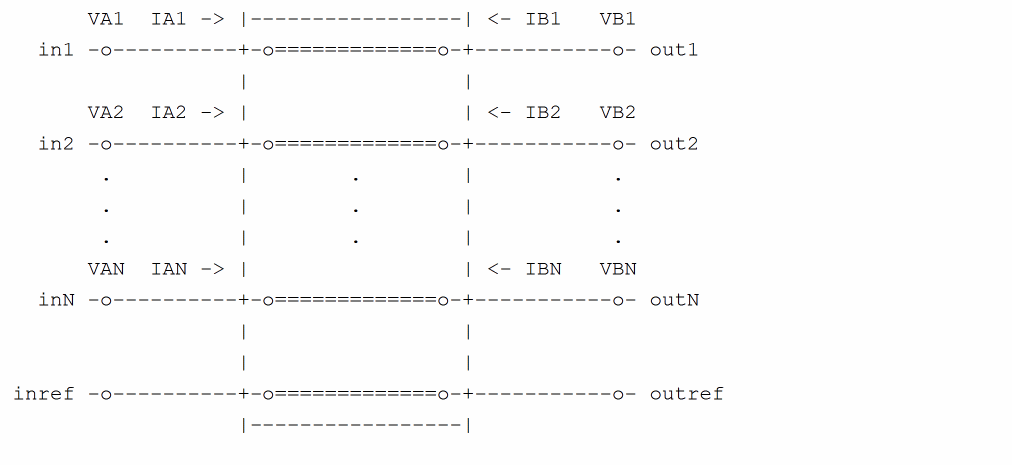
A multi-conductor transmission line (MTLINE) is characterized by constant RLGC matrices or frequency-dependent RLGC data. An MTLINE can have as many conductors as there are described in the input. However, there must be at least two conductors with one conductor used as reference to define terminal voltages. The reference conductor can be ground. The order of the conductors is the same as the order of the data in the input.
All of the conductors are assumed to have the same length, and to be uniform along the length.
MTLINE accepts five different types of input: per-unit-length constant RLGC matrices, per-unit-length frequency-dependent RLGC data, 2-D field solver geometry and material property information, S-parameter data, and the old single-conductor TLINE parameters. These inputs are explained below.
All transmission line parameters (other than conductor length) can be provided through an instance line or model line. When a parameter is specified on both the instance and the model lines, the parameter specified on the instance line takes higher priority.
Constant RLGC Matrices
For narrow band applications, transmission line characteristics are often assumed to be constant over the frequency of interest. The input to MTLINE are per-unit-length resistance (R), inductance (L), conductance (G), and capacitance (C) matrices, and they are usually generated by a third-party field solver. Because these matrices are generally symmetric, MTLINE accepts both full matrix description and lower half matrix description.
For example, the following describes the resistance matrix of a four conductor line system:
The following two model descriptions are equivalent:
Skin Effect and Dielectric Loss
The following equations are used to model skin effect and dielectric loss in addition to the constant RLGC matrices:
If rskin matrix is given, then:
R(f) = r + sqrt(f) * (1 + j) * rskin
If gdloss matrix is given, then:
G(f) = g + f * gdloss
Physical dielectric loss model requires you to specify the cut-off frequency fgdloss and the onset frequency fgdloss1. Dielectric loss equation then becomes:
G(f) = g + f * gdloss * 2/pi*j*log((fgdgloss+jf)/(fgdgloss1+jf))
Frequency-Dependent RLGC Data
Frequency-dependent RLGC data is described in a data file through a parameter file. The frequency axis can be scaled with the scale parameter. The frequencies in the data file are then multiplied by scale before the simulator uses them. The default scale factor is unity.
An example data file is listed below:
: Comments: rlc.dat
FORMAT FREQ: R1:1 R2:1 R2:2
L1:1 L2:1 L2:2
C1:1 C2:1 C2:2
0.001e+9: 4.444 0.000383 4.444
4.565 0.3545 4.565
4.565 0.3545 4.565
0.010e+9: 4.447 0.003834 4.447
4.565 0.3545 4.565
4.565 0.3545 4.565
0.100e+9: 4.476 0.03834 4.476
4.565 0.3545 4.565
4.565 0.3545 4.565
1.000e+9: 4.762 0.3834 4.762
3.103 0.2357 3.103
3.103 0.2357 3.103
10.00e+9: 13.96 1.082 13.96
2.718 0.2058 2.718
2.718 0.2058 2.718
100.0e+9: 56.88 3.294 56.88
2.531 0.1866 2.531
2.531 0.1866 2.531
: end of file rlc.dat
You can mix the constant RLGC parameters with frequency-dependent RLGC data. When a particular parameter (R, L, G or C) is specified in both constant matrix and frequency-dependent data file, the constant matrix is the first choice of input. If only one frequency point is specified in the file, the RLGC data is assumed to be constant over the frequency of interest.
When providing the frequency-dependent RLGC data, one should always try to provide accurate and sufficient data points. There should be enough data points to cover low-frequency characteristics, and there should be enough data points to capture the changing nature in the high-frequency range. A rule of thumb is that the lowest frequency point should be down to 1kHz, and there should be at least 5 points per decade, particularly in the high-frequency range where RLGC data tends to change rapidly.
2-D Field Solver Information
MTLINE directly supports a built-in 2-D field solver. The output of the 2-D field solver is RLGC data. The data can be stored for re-use through the file parameter if the global option mtlinereuse is set to no. If the global option mtlinereuse is set to yes, the RLGC data can be stored for re-use through a file which is located in the path specified by mtlinecachedir. This makes the actual RLGC model generation a one-time cost, provided the field solver input is unchanged.
Line Configuration (linetype)
MTLINE supports four interconnect line configurations: microstrip line, strip line, coplanar waveguide, and substrate lossy line.
Model Type (modeltype)
For each line configuration, you can choose between three model types. In the lossless model, the internal inductance of the conductor is disregarded by setting the frequency value high; 50 GHz for cases without substrate loss and 15 GHz for cases with substrate loss, and ignoring the value of fmax. For the narrow band model, the RLGC data is calculated at frequency fmax and assumed to be constant over the frequency of interest. The third choice is the wideband model where true frequency dependent RLGC data is calculated over the frequency of interest. For most applications, you should choose the wideband model as it provides the best model accuracy.
Ground Plane (numgnd)
For microstrip line, the number of ground planes is fixed to 1, at the bottom of the 2-D interconnect cross section.
For strip line, the number of ground planes is fixed to 2, at both the bottom and top of the 2-D interconnect cross section.
For coplanar waveguide and substrate lossy line, the number of ground planes can be 1 or 2, at the bottom and top of the 2-D interconnect cross section. For coplanar waveguide, you can also specify 0 ground planes because there will be two ground strips added automatically to the cross section. The width, height, thickness, and spacing of these ground strips can be specified in the same way as conductors are specified.
The gndthickness parameter can be used to specify the thickness of the ground plane(s), and the gndsigma parameter can be used to specify the ground plane conductivity.
Dielectric Layer (numlayer)
Dielectric layers are either stacked above the ground plane (when numgnd=1), or between the ground planes (when numgnd=2). There can be many dielectric layers.
The thickness of the dielectric layer can be provided through the layerthickness parameter, and the relative dielectric constant of the dielectric layer can be provided through the er parameter. Both the layerthickness and er parameters are of vector type to handle different layer geometries and layer properties. When the number of elements in the vector is less than the number of layers, the value of the last element in the vector is applied to all of the remaining layers.
A particular dielectric layer can be lossy, and either the loss tangent parameter (tan = sigma/(w*ep0)) or the loss sigma parameter (sigma = tan*w*ep0) can be used. This is decided through the dlosstype parameter and the actual loss value(s) is provided through the dloss vector parameter.
Signal Line
The signal line conductivity can be specified using the linesigma parameter.
There can be many signal lines. The geometry of the signal line(s) are decided through parameters linewidth, linethickness, lineheight, and linespace. The parameter lineheight specifies the distance between the signal line and ground plane at the bottom of the 2-D interconnect cross section. The parameter linespace specifies the distance between the signal lines; it can be set to a negative value to describe overlapping signal lines.
RLGC Reuse
If the geometry and material property information of the mtline instance is not specified, the file parameter must be given. Spectre reads the file parameter to reuse the RLGC data directly. If any one of the geometry and material property information of the mtline instance is specified and the global option parameter mtlinereuse is set to yes, you can calculate the MD5 code by using this information. If the MD5 file exists in the path set by the global option parameter mtlinecachedir, Spectre reads the MD5 file directly.
The parameter mtlinecachedir can be used to specify the directory where the mtline RLGC data file will be written to or reused from. If an absolute path is not given, the file will be written to the /home/<username>/.cadence/mmsim/ directory. If the MD5 file is not specified using mtlinecachedir, Spectre checks for the existence of the file . If the file does not exist, the RLGC model is generated by the field solver and the output is stored in the directory specified by mtlinecachedir. However if the file exists, Spectre checks if the RLGC data stored in the file matches the MTLINE 2-D field solver input. If the data does not match, a new set of RLGC data is generated and the MD5 file is stored in the directory specified by mtlinecachedir. Otherwise, the data is re-used from the file. If the mtlinereuse option is set to no, Spectre stores the RLGC data in the specified file or %C:t:r_InstanceName.rlgc file after the simulation.
Stackup-based Input of Cross-section Geometry and Material Properties
The side dielectric always has the thickness of the conductor and cannot be changed. The side dielectric is always the same material on both sides. The field solver cannot handle different materials on the two sides.
The names definition describes the stackup from bottom to top. The next dielectric name after the conductor is the side dielectric.
If you want to have side dielectrics in the top layer, add a very thin dielectric layer above the top conductor, which causes the side dielectric to be added automatically. The material must be the same on both sides.
The stackup and layer parameters can be used to specify the cross-section geometry and material properties for the 2-D field solver. Three extra Spectre primitives: stackup, conductor, and dielectric have been added for this purpose.
The stackup parameter is used to specify the ID (name) of the stackup instance that contains the cross-section geometry and material properties. The syntax is:
stackup=<ID of stackup instance>
layer=[<vector of layer names >]. The size of this vector should be equal to the number of signal conductors. If the size of layer vector is less than the number of signal conductors, the last value is used.
For more information on stackup, dielectric, and conductor , use
spectre -h stackup, spectre -h conductor, and spectre -h dielectric respectively.
S-Parameter Data File
MTLINE also supports S-parameter data file input describing a transmission line system using the file parameter. MTLINE converts the frequency-dependent S-parameter to frequency-dependent RLGC data and stores the results in the file %C:t:r_InstanceName.rlgc for reuse in subsequent simulations.
If the file parameter corresponds to S-parameter data, MTLINE first checks the existence of the file %C:t:r_InstanceName.rlgc to determine if the S-to-RLGC extraction has been performed in a previous simulation.
The S-parameter data file formats supported include Touchstone, Spectre, and Citi.
The physical length of the line must also be specified using the len parameter.
The ordering of the S-parameter input file should be in the format of input ports followed by the output ports of the transmission line system, for example, Pin1, Pin2, Pin3, ..., Pout1, Pout2, Pout3, ...
Old TLINE Parameters
MTLINE directly supports the old single-conductor TLINE parameters to ease migration, as MTLINE has a more accurate and robust modeling algorithm.
Due to a name conflict, the TLINE parameter r has been renamed to seriesr in MTLINE, and the TLINE parameter g has been renamed to shuntg in MTLINE.
In addition, the terminal maps between TLINE and MTLINE are different. The following TLINE syntax
Name ( t1 b1 t2 b2 ) tline <parameter=value> ...
should be mapped to the following MTLINE syntax
Name ( t1 t2 b1 b2 ) mtline <parameter=value> ...
For a detailed explanation of TLINE parameters, refer to the TLINE help page (spectre -h tline).
This device is not supported within altergroup.
Sample Instance Statement
x1 (a1 b1 a2 b2 0 0) mtline len=0.01
+ r=[ 0.3
+ 0.0 0.3 ]
+ c=[ 0.35p
+ -0.03p 0.35p ]
MTL1 (net01 net02 0 0) mtline len=0.1 linewidth=[ 79u ]
stackup=stk layer=["Strip"]
stk stackup
names=["RefBottom" "dielBelow" "Strip" "dielStrip" "dielAbove" "RefTop" ]
thickness=[15u 138u 5u 5u 60u 10u]
type=["Ref" "Diel" "Cond" "Diel" "Diel" "Ref"]
material=[cu d34 cu d34 d34 cu]
d34 dielectric type= "const" nd=2 data= [3.4 0]
cu conductor nd=1 data=[ 5.8e7] type="smooth"
MTL2 (a1 b1 a2 b2 0 0) mtline len=0.037 linewidth=[ 101.6u ]
stackup=stack1 layer=["top" "top"] linespace=[ 203.2u ]
// linespace is the edge to edge distance, *not* between the
// centerlines of the conductors.
stack1 stackup
type=["Ref" "Diel" "Cond"] thickness=[19.558u 58.42u 30.48u]
names=["reference" "dielectric" "top"] material=[copper wd4p1 copper]
wd4p1 dielectric type= "wideband_debye" nd=5
data= [1e9 4.1 0.01 628318.5307179586 6.283185307179586e12]
// Note: both 'hammerstad' and 'hammerstadt' work correctly
copper conductor nd=1 data=[ 5.8e7 1u] type="hammerstad"
Sample Model Statement
+ r=[ 0.3
+ 0.0 0.3 ]
+ c=[ 0.35p
+ -0.03p 0.35p ]
+ r=[ 0.3 0.0
+ 0.0 0.3 ]
+ c=[ 0.35p -0.03p
+ -0.03p 0.35p ]
+ c=[ 0.35p
+ -0.03p 0.35p ]
+ file="rl.data" scale=1
Instance Syntax
Name in1 out1 in2 [out2] ... ModelName parameter=value ...
Name in1 out1 in2 [out2] ... mtline parameter=value ...
The last two terminals are used as refin and refout respectively.
Instance Parameters
|
Should mtline generate noise. Possible values are |
RLGC data parameters
|
RLGC data file that contains the frequency-dependent RLGC data or S-parameter data file. |
|
|
Frequency scale factor for frequency-dependent RLGC data and S-parameter data. |
|
2-D Field Solver parameters
Rational fitting parameters
|
Maximum signal frequency used to determine the relevant range of rational fitting or used in the 2D field solver. |
TLINE-related parameters
TLINE conductor loss parameters
TLINE dielectric loss parameters
|
Dielectric loss quality factor at |
Noise parameters
Stackup Parameters
Model Syntax
model modelName mtline parameter=value ...
Model Parameters
This topic lists the model parameters for mtline.
RLGC data parameters
|
RLGC data file that contains the frequency-dependent RLGC data or S-parameter data file. |
|
|
Frequency scale factor for frequency-dependent RLGC data and S-parameter data. |
|
2-D Field Solver parameters
Rational fitting parameters
|
Maximum signal frequency used to determine the relevant range of rational fitting used in the 2-D field solver. |
TLINE-related parameters
TLINE conductor loss parameters
TLINE dielectric loss parameters
|
Dielectric loss quality factor at |
Noise parameters
Rational Fitting
Spectre uses rational fitting algorithm to build a stable model that approximates the desired transmission line characteristics. Maximum signal frequency fmax is used to determine the relevant range of rational fitting. The accuracy of the mtline model is solely dependent on how well the rational approximation is over the frequency range [fmin, fmax].
When constant RLGC matrices are provided, 1Hz is used as fmin and fmax defaults to 25GHz. Three times the inverse of rise time in the input signal can be used as a good estimation of fmax. When RLGC data file is provided, the lowest frequency point in the data file is used as fmin, and the largest frequency point in the data file is used as fmax. You should provide sufficient data points to cover both low frequency and high frequency for an accurate, stable model.
Modeling Frequency Dependent Effects
One can model the frequency-dependent RLGC matrices by providing data using the file parameter. One should always try to provide accurate and sufficient data to describe the frequency-dependent RLGC matrices.
Related Topics
Return to top