
A
Virtuoso Text Editor and HDL Package Setup Functions
This topic lists the Cadence® SKILL functions associated with Virtuoso® Text Editor and Virtuoso HDL Package Setup.
Only the functions listed below are supported for public use. All other functions, regardless of their name or prefix, and undocumented aspects of the functions described below, are private and are subject to change at any time.
-
Text Editor Functions - This following SKILL functions let you perform various tasks using the Virtuoso Text Editor.
-
Virtuoso HDL Package Setup Functions - This following SKILL functions let you perform various tasks using the Virtuoso HDL Package Setup.
Related Topics
hdlPkgCreateEnvSetupFile
hdlPkgCreateEnvSetupFile(t_fileName[ ?formatLList { t | nil }]) => t / nil
Description
Saves the environment variables used by the HDL Package Setup from the current Virtuoso setup database into a specified file. Each name-value pair for a variable is printed in the following format:
envSetVal(t_tool[.Partition] t_varName s_varType g_newValue)
Arguments
Value Returned
|
The environment variables used by the HDL Package Setup are saved in a file. |
|
Examples
Before making a call to the function, ensure the following:
-
The shell environment variable
PROJis set before launching Virtuoso. - The required settings are applied in the Virtuoso HDL Package Setup form.
The following example describes how to use the hdlPkgCreateEnvSetupFile function in the CIW to save the HDL Package Setup settings from the current Virtuoso session.
hdlPkgCreateEnvSetupFile("$PROJ/myHDLPkgSetup")
=> t
Contents of the file "$PROJ/myHDLPkgSetup", when ?formatLList is set to t.
/**************************************************************************
                     Virtuoso HDL Package Setup
***************************************************************************/

envSetVal("hdlPkg" "hdlPkgEnableHdlSetup"        'toggle  '(t))
envSetVal("hdlPkg" "hdlPkgProjDir"               'string  "$PROJ/compileScratch")
envSetVal("hdlPkg" "hdlPkgEnableUVM"             'toggle  '(t))
envSetVal("hdlPkg" "hdlPkgUVMVersion"            'string  "IEEE")
envSetVal("hdlPkg" "hdlPkgEnableUPF"             'toggle  '(t))
envSetVal("hdlPkg" "hdlPkgUseHdlvar"             'toggle  '(nil))
envSetVal("hdlPkg" "hdlPkgHdlvarFile"            'string  "")
envSetVal("hdlPkg" "hdlPkgAdvancedMode"          'toggle  '(t))
envSetVal("hdlPkg" "hdlPkgUseXmlibdirname"       'toggle  '(t))
envSetVal("hdlPkg" "hdlPkgXmlibdirname"          'string  "XM2109")
envSetVal("hdlPkg" "hdlPkgMakeLibTree"           'string  "(
    (t \"pkgLib\" \"$PROJ/pkg_source/bill_pkg.sv\" \"\")
    (t \"pkgLib\" \"$PROJ/pkg_source/fred_pkg.sv\" \"\")
)")
envSetVal("hdlPkg" "hdlPkgXrunArgsFileTableList" 'string  "(
    (t \"$PROJ/user_1.f\")
    (nil \"$PROJ/user_2.f\")
)")
Contents of the file "$PROJ/myHDLPkgSetup", when ?formatLList is set to nil.
/**************************************************************************
                     Virtuoso HDL Package Setup
***************************************************************************/

envSetVal("hdlPkg" "hdlPkgEnableHdlSetup" 'toggle '(t))
envSetVal("hdlPkg" "hdlPkgProjDir" 'string "$PROJ/compileScratch")
envSetVal("hdlPkg" "hdlPkgEnableUVM" 'toggle '(t))
envSetVal("hdlPkg" "hdlPkgUVMVersion" 'string "IEEE")
envSetVal("hdlPkg" "hdlPkgEnableUPF" 'toggle '(t))
envSetVal("hdlPkg" "hdlPkgUseHdlvar" 'toggle '(nil))
envSetVal("hdlPkg" "hdlPkgHdlvarFile" 'string "")
envSetVal("hdlPkg" "hdlPkgAdvancedMode" 'toggle '(t))
envSetVal("hdlPkg" "hdlPkgUseXmlibdirname" 'toggle '(t))
envSetVal("hdlPkg" "hdlPkgXmlibdirname" 'string "XM2109")
envSetVal("hdlPkg" "hdlPkgMakeLibTree" 'string "((t \"pkgLib\" \"$PROJ/pkg_source/bill_pkg.sv\" \"\")(t \"pkgLib\" \"$PROJ/pkg_source/fred_pkg.sv\" \"\"))")
envSetVal("hdlPkg" "hdlPkgXrunArgsFileTableList" 'string "((t \"$PROJ/user_1.f\")(nil \"$PROJ/user_2.f\"))")
Related Topics
hdlPkgExportXrunArgs
hdlPkgExportXrunArgs(t_fileName[ ?format{ t | nil } ] [ ?isExpandPath { t | nil } ] [ ?userSpecOnly { t | nil } ] ) => t / nil
Description
Exports the xrun arguments corresponding to environment variables used by the HDL Package Setup from the current Virtuoso setup database into the specified file.
Arguments
Value Returned
|
The environment variables used by the HDL Package Setup are saved in a file. |
|
Examples
Before making a call to the function, ensure the following:
-
The shell environment variable
PROJis set before launching Virtuoso. - The required settings are applied in the Virtuoso HDL Package Setup form.
The following example describes how to use the hdlPkgExportXrunArgs function in the CIW to export the xrun arguments corresponding to the HDL Package Setup settings from the current Virtuoso session into a file.
hdlPkgExportXrunArgs("$PROJ/xrunArgs_exported")
=> t
Contents of the file $PROJ/xrunArgs_exported when ?userSpecOnly is set to t.
// Virtuoso HDL Package Setup
// User Name: xxxxxxx
// Save Time: Mar 16 02:35:52 2022
// Xcelium Version: 22.03-a001-20220315
// IC subversion:  ICADVM20.1-64b.XXXX.xxx

// -xmlibdirpath $PROJ/compileScratch
-xmlibdirname XM2109
// -cdslib $PROJ/compileScratch/cds.lib
// -hdlvar $PROJ/compileScratch/hdl.var
-uvm
-uvmhome CDNS-IEEE
-makelib worklib
-sv
${_XRUNROOT_}/inca/files/1801/upf_package.sv
-endlib
-f $PROJ/user_1.f
-makelib pkgLib
$PROJ/pkg_source/bill_pkg.sv
-endlib
-makelib pkgLib
$PROJ/pkg_source/fred_pkg.sv
-endlib
Contents of the file $PROJ/xrunArgs_exported when ?userSpecOnly is set to nil.
// Virtuoso HDL Package Setup
// User Name: xxxxxxx
// Save Time: Mar 16 02:35:52 2022
// Xcelium Version: 22.03-a001-20220315
// IC subversion:  ICADVM20.1-64b.XXXX.xxx

-xmlibdirpath $PROJ/compileScratch
-xmlibdirname XM2109
-cdslib $PROJ/compileScratch/cds.lib
-hdlvar $PROJ/compileScratch/hdl.var
-uvm
-uvmhome CDNS-IEEE
-makelib worklib
-sv
${_XRUNROOT_}/inca/files/1801/upf_package.sv
-endlib
-f $PROJ/user_1.f
-makelib pkgLib
$PROJ/pkg_source/bill_pkg.sv
-endlib
-makelib pkgLib
$PROJ/pkg_source/fred_pkg.sv
-endlib
Related Topics
teDiscardEdits
teDiscardEdits(
d_cvId
)
=> t / nil
Description
Rolls back the recent updates being done in all the opened editors displaying the specified cellview to the last saved changes.
Arguments
|
Cellview ID of the schematic in which the edits have been discarded. |
Value Returned
Example
Consider that the myCellView is the id of text cellview opened in Virtuoso Text Editor. You can discard the edits as shown here:
myCellView = ddGetObj(“myLib” “myCell” “myVerilogView”)
teDiscardEdits(myCellView)
teGetCursorPosition
teGetCursorPosition( [g_windowId] ) =>charPosition/ nil
Description
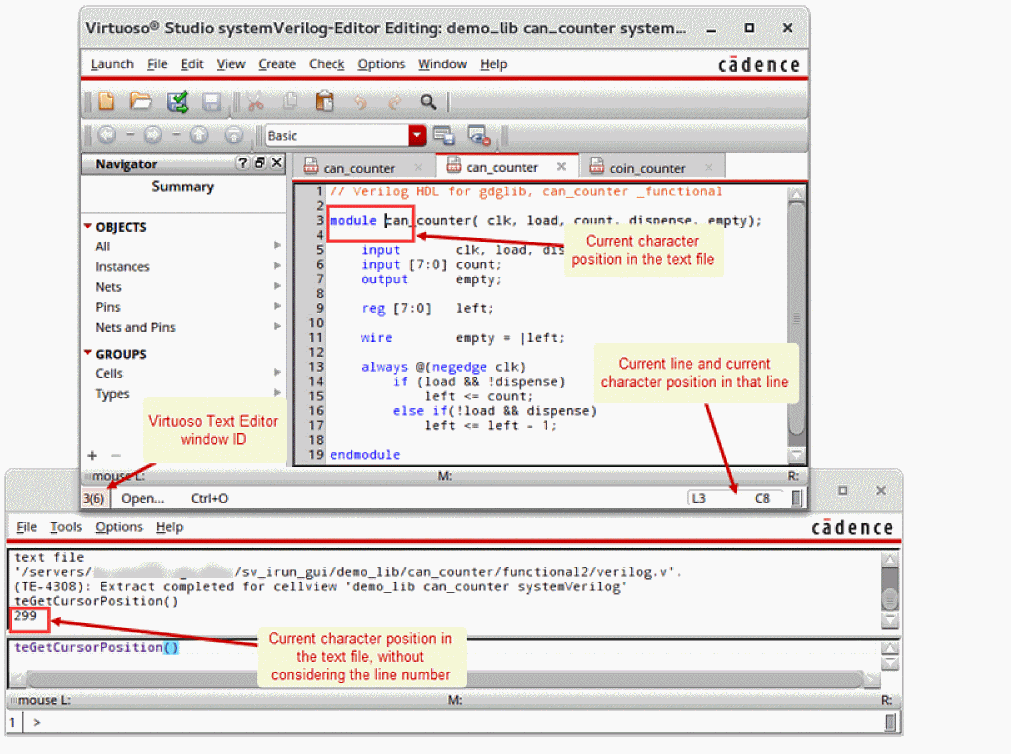
Returns the character position of the cursor in the current or specified Virtuoso Text Editor window.
The character position that this function returns is different from the line and character position displayed at the bottom-right side of the Virtuoso Text Editor window. The function counts all the characters before the current position starting from zero, and does not consider the line number. See the following figure.
Arguments
Value Returned
|
The character position is not retrieved because of an error. |
Example
Consider that a text cellview is opened in Virtuoso Text Editor whose window ID is 2. The following are the first two lines of the text cellview:
//systemVerilog HDL for "demo_lib", "can_counter" "systemVerilog"
module can_counter ( clk, load, count, dispense, empty );
Place the cursor after module and just before can_counter on the second line. Notice that the line and character position displayed at the bottom-right corner of the window is L2 C8 for line 2 and character 8.
As illustrated below, run teGetCursorPosition from Virtuoso CIW to get the character position in the text cellview. Then run the same function to display the character position on window ID 2. Run the function using another window ID and notice the return value.
teGetCursorPosition()
73
teGetCursorPosition(window(2))
73
teGetCursorPosition(window(1))
nil
teIsModified
teIsModified(
d_cvId
)
=> t / nil
Description
Checks if a given text cellview been modified since last save.
Arguments
Value Returned
|
The text cellview has been modified by any active text editor. |
|
Example
Consider that the myCellView is the ID of the text cellview opened in Virtuoso Text Editor. You can check for the edits as shown here:
myCellView = ddGetObj(“myLib” “myCell” “myVerilogView”)
when(teIsModified(myCellView) info(“CellView is modified\n”))
teSave
teSave(
d_cvId
)
=> t / nil
Description
Saves the edits done in the text editor cellview.
Arguments
Value Returned
Example
Consider that the myCellView is the ID of the text cellview opened in Virtuoso Text Editor. You can save the edits as shown here:
myCellView = ddGetObj(“myLib” “myCell” “myVerilogView”)
teSave(myCellView)
teSaveWithDerivedData
teSaveWithDerivedData(
d_cvId
)
=> t / nil
Description
Saves the in-memory content of the text editor open for the given cellview and generates the derived data (typically, creates a shadow database).
Arguments
Value Returned
|
The text cellview has been saved and derived data created successfully. |
|
|
The the cellView is not a text cellview, has not been saved, or the derived data could not be created. |
Example
Consider that the myCellView is the ID of the text cellview opened in Virtuoso Text Editor. You can save the edits as shown here:
myCellView = ddGetObj(“myLib” “myCell” “myVerilogView”)
teSaveWithDerivedData(myCellView)
teSetCursor
teSetCursor(x_charPosition[g_windowId] ) => t / nil
Description
Places the cursor on the specified character position in the current or specified Virtuoso Text Editor window.
Arguments
Value Returned
Example
Consider that a text cellview is opened in Virtuoso Text Editor whose window ID is 2. The following are the first two lines of the text cellview:
//systemVerilog HDL for "demo_lib", "can_counter" "systemVerilog"
module can_counter ( clk, load, count, dispense, empty );
Place the cursor after module and just before can_counter on the second line. As illustrated below, run teGetCursorPosition from Virtuoso CIW to get the character position. Run teSetCursor to place the cursor on the fifth character. Notice that the line and character position displayed at the bottom-right corner of the Virtuoso Text Editor window becomes L1 C6 for line 1 and character 6. Run teGetCursorPosition again. Now, place the cursor in the begining of the text cellview using teSetCursor for the window ID 2.
teGetCursorPosition()
73
teSetCursor(5)
t
teGetCursorPosition()
5
teSetCursor(0 window(2))
t
teSetEditMode
teSetEditMode(
d_cvId
d_mode
)
=> t / nil
Description
Sets the editing mode for the specifed cellview to read-only(r)or editable(a) based on the value of the mode argument.
Arguments
|
Cellview ID of the schematic which is being set to the edit mode. |
|
Value Returned
Example
Consider that the myCellView is the ID of the text cellview opened in Virtuoso Text Editor. You can set the edit mode as shown here:
myCellView = ddGetObj(“myLib” “myCell” “myVerilogView”)
teSetEditMode(myCellView "a")
teRegPostExtractTrigger
teRegPostExtractTrigger(
s_symbol
)
=> t / nil
Description
Registers a user-defined function that is triggered after the text editor extraction completes.
Arguments
|
SKILL symbol for the trigger function. This trigger function further accepts the following two arguments: |
Value Returned
Examples
The following example shows how the ExampTextPostExtract trigger procedure uses the ddID argument to retrieve the lib/cell/view names and the success argument to report a successful operation. The viewType and lib/cell/view names let you make the trigger function dependent upon the language used. The teRegPostExtractTrigger function is then used to register the trigger function.
procedure(ExampTextPostExtract(ddId success)
    letseq(
     ( (viewName ddId~>name)
  (cellName ddId~>cell~>name)
  (libName ddId~>lib~>name)
  (masterId ddGetObj(libName cellName viewName "*"))
  (viewType ddMapGetFileViewType(masterId))
  )
  printf("Library %L Cell %L View %L ViewType %L was extracted with success %L\n" libName cellName viewName viewType success )
 )
)
teRegPostExtractTrigger('ExampTextPostExtract)
Related Topics
teRegPreExtractTrigger
teRegPreExtractTrigger(
s_symbol
)
=> t / nil
Description
Registers a user-defined function that is triggered before the text editor extraction starts.
Arguments
|
SKILL symbol for the trigger function. This trigger function further accepts the following argument: |
Value Returned
Examples
The following example shows how the ExampTextPreExtract trigger function uses the ddID argument to retrieve the lib/cell/view names. The viewType and lib/cell/view names let you make the trigger function dependent upon the language used.The teRegPreExtractTrigger function is then used to register the trigger function.
procedure((ExampTextPreExtract(ddId)
    letseq(
     ( (viewName ddId~>name)
  (cellName ddId~>cell~>name)
  (libName ddId~>lib~>name)
  (masterId ddGetObj(libName cellName viewName "*"))
  (viewType ddMapGetFileViewType(masterId))
  )
  printf("Library %L Cell %L View %L ViewType %L will be extracted\n" libName cellName viewName viewType )
 )
)
teRegPostExtractTrigger('ExampTextPreExtract)
Related Topics
teUnRegPostExtractTrigger
teUnRegPostExtractTrigger(
s_symbol
)
=> t / nil
Description
Unregisters functions previously registered by you so that they are no longer triggered after the text editor functionality is being run.
Arguments
Value Returned
Example
You can unregister post trigger as shown here:
;; define post trigger
defun( postTrigger (cvId success)
info("*** postTrigger called with lcv = '%s %s %s' and success = %L\n"
cvId~>parent~>parent~>name cvId~>parent~>name cvId~>name success)
;; The success can have one of the following values: t, nil, or unknown.
;; ‘unknown’ refers to the scenario when there are warnings displayed but cannot determine if the operation was successful or not.
t
)
;; register post trigger
teRegPostExtractTrigger('postTrigger)
;; unregister post trigger
teUnRegPostExtractTrigger('postTrigger)
teUnRegPreExtractTrigger
teUnRegPreExtractTrigger(
s_symbol
)
=> t / nil
Description
Unregisters functions previously registered by you so that they are no longer triggered prior to running the text editor functionality.
Arguments
Value Returned
Example
You can unregister pre trigger as shown here:
;; define pre trigger
defun( preTrigger (cvId)
info("*** preTrigger called with lcv = '%s %s %s'\n"
cvId~>parent~>parent~>name cvId~>parent~>name cvId~>name)
t
)
;; register pre trigger
teRegPreExtractTrigger('preTrigger)
;; unregister pre trigger
teUnRegPreExtractTrigger('preTrigger)
hdlGenerateTextDatabase
hdlGenerateTextDatabase(t_libName t_cellName t_viewName) =>t/nil
Description
Generates the text database for analog and digital languages without requiring the Text Editor.
Arguments
Value Returned
Example
To generate the text database for a given cell and print terminals:
when(hdlGenerateTextDatabase("myLib" "myCell" "myView")
cv = dbOpenCellViewByType("myLib" "myCell" "myView")
when(cv
cv~>terminals~>name
)
Return to top