
Dynamic Display Measurements for a Virtual Hierarchy
When manually adjusting the area boundary of a virtual hierarchy, you can select the Measurement Display On option on the Dynamic Display form to dynamically display virtual hierarchy measurements, such as Area, Label, Stop Level, Type, Placement Status, and similar others.
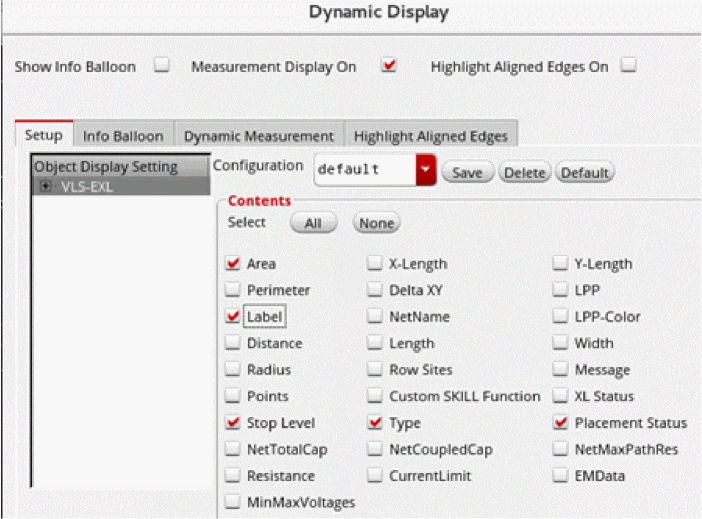
The measurements appear dynamically on the canvas during an edit, such as when using the Stretch command to adjust the area boundary of a virtual hierarchy.
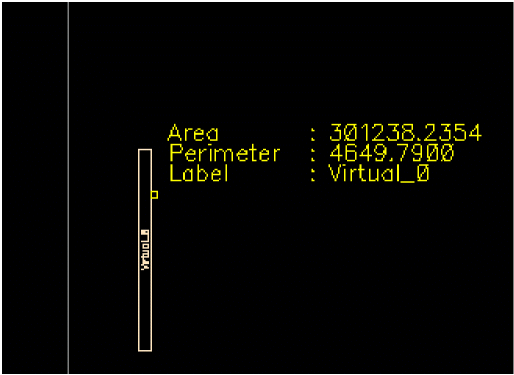
The in-context availability of the key measurements enables you to be precise when selecting the area for a virtual hierarchy during a Stretch or a Constant area stretch operation.
The measurements, as shown, are displayed dynamically on the layout canvas as you perform the Stretch command.
You can also choose to display the virtual hierarchy measurements in an information balloon to make them available when the cursor hovers over a virtual hierarchy.
To display the delta x, y measurements dynamically, you must also select them for display in the information balloon.
Alternatively, you can define a
Related Topics
Return to top