
1
Import Tools in the Virtuoso Studio Design Environment
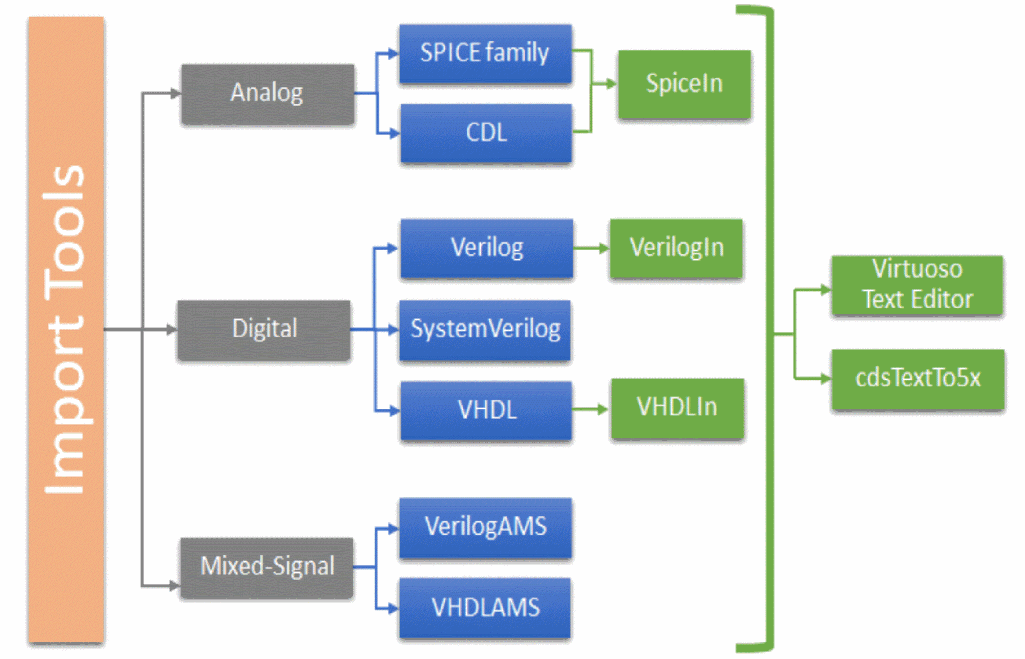
Import tools in the Virtuoso® Design Environment let you import analog, digital, and mixed-signal netlists into the Virtuoso Studio Design Environment. Importing a file includes converting the information it contains to a syntax that Virtuoso can understand.
Import tools can be classified on the basis of the language used to describe the design information:
-
Analog import tools – SpiceIn, Virtuoso Text Editor, cdsTextTo5x
Used for analog designs written in languages, such as SPICE, HSPICE, PSPICE, SPECTRE, and CDL. -
Digital import tools – VerilogIn, VHDLIn, Virtuoso Text Editor, cdsTextTo5x
Used for digital designs written in languages, such as Verilog and VHDL. Here, VerilogIn and VHDLIn are language dependent. These files can also be imported using the Virtuoso Text Editor and cdsTextTo5x tools. -
Mixed-signal import tools – Virtuoso Text Editor, cdsTextTo5x
Used for digital designs written using SystemVerilog and the mixed-signal design files written using Verilog AMS and VHDL AMS.
In addition to being language-specific, these tools also have their individual benefits and uses.
cdsTextTo5x
The cdstextTo5x binary lets you import analog, digital, and mixed-signal text files of designs written in various languages into the Virtuoso Studio Design Environment. It supports information written in SPICE, CDL, Verilog, SystemVerilog, Verilog AMS, VHDL, or VHDL AMS.
For more information, see Design Data Import by Using cdsTextTo5x.
Virtuoso Text Editor
Virtuoso Text Editor lets you work with the text cellviews stored in HDL files, such as Verilog, SystemVerilog, VHDL, PSpice, HSPICE, Spectre, and SPICE text files, in Virtuoso libraries.
Design Data Import by Using Virtuoso Text Editor
Virtuoso Text Editor User Guide
Verilog In
Verilog In lets you convert structural Verilog netlists into one of the following forms:
For more information, see Verilog In User Guide.
VHDL In
VHDL In lets you convert a VHDL structural or behavioral description into one of the following forms in Cadence OpenAccess database (OA) storage format:
For more information, see VHDL In for Virtuoso Studio Design Environment User Guide and Reference
Connectivity to Schematic
Connectivity-to-Schematic (conn2sch) lets you generate schematic views from netlist views. A netlist view contains only connectivity information for a design. The Connectivity-to-Schematic tool generates a fully placed and routed schematic view using the connectivity information. You can create both, digital and analog schematic views using this tool. The Connectivity-to-Schematic tool provides different placement and routing engines to generate digital and analog schematic views. A schematic view can be opened, viewed, and edited using Virtuoso® Schematic Editor.
For more information, see Connectivity to Schematic User Guide
The following illustration shows the import tools classification with the Virtuoso import tools shown in green:
Related Topics
Design Data Import by Using cdsTextTo5x
Return to top