
Known Problems and Solutions in Virtuoso RF
This document describes the known issues with Virtuoso® RF Solution and suggests the workarounds for these issues. Each issue is identified by a Cadence Change Request (CCR) number.
Related Topics
CCR 2814557: Help forms are not working for many forms in Virtuoso Multi-Technology Solution
Description: Form Help buttons for tags, such as vrfCreateConnectivity, vrfSaveLayoutConnectivity, vrfSaveSchConnectivity, and vrfConfigureModuleStack, and all forms related to the Bump Management feature have a number appended at the end. The number changes randomly in run time and the associated help page never opens correctly.
Solution: Search for the desired topics in the Doc Assistant directly to see the related information.
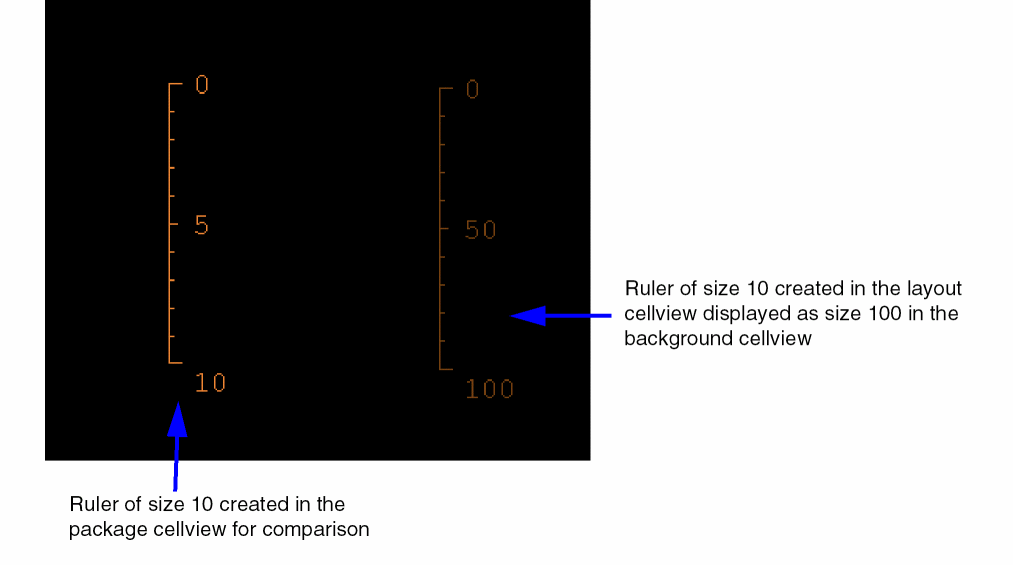
CCR 2353478: Rulers are scaled in Edit in Concert mode by the ratio of DBUPerUUs
Description: In a package cellview, when using the Edit in Concert mode, rulers displayed in the background layout cellview get scaled up or down by the ratio of their DBUPerUU and package DBUPerUU if the rulers were created in the layout cellview.
For example, when you create a ruler of size 10 in a layout cellview, it might get displayed as size 100 in the background layout cellview in the package layout.
Solution: There is no workaround available.
CCR 2147217: Stacked designs are not supported during import or export from Allegro
Description: There is an interoperability issue between Virtuoso and Allegro for Package-on-Package designs.
Solution: This issue has been documented for your information only. There is currently no workaround available.
CCR 1917125: DieExport: Not able to perform undo once die export is completed
Description: If you open two cellviews in Virtuoso and make changes in both of them. Thereafter, saving one of the cellview would not allow the undo action for the other cellview as well. In export die feature, a new cellview is generated and saved. However due to this, the undo action stops working for the existing view. As part of exporting the die, the new cellviews are created and saved, and therefore, the undo action does not work for the edits made in other cellviews that are open in the same virtuoso session.
Solution: This issue has been documented for your information only. There is currently no workaround available.
Return to top