
Known Problems and Solutions in Virtuoso Schematic Editor
This document describes the known issues with Virtuoso® Schematic Editor L and Virtuoso® Schematic Editor XL and suggests the workarounds for these issues. Each issue is identified by a Cadence Change Request (CCR) number.
This document is divided into the following sections:
- Virtuoso Schematic Editor L: Describes CCRs that impact both Virtuoso Schematic Editor L and Virtuoso Schematic Editor XL (unless otherwise stated).
- Virtuoso Schematic Editor XL: Describes CCRs that impact only Virtuoso Schematic Editor XL.
Related Topics
CCR 1316417: VSE loses CDF parameters entered in a secondary form raised inside Edit Object Properties
Description: When you select a component and open VSE's Edit Object Properties form, one of the component's CDF parameters shows an additional form that lets you enter more detailed parameter information. However, when you complete and save this form, VSE ignores the values you entered. The values are not applied for the selected instance and do not show when you open the secondary form.
VSE's Edit Object Properties form uses its own distinct copy of the CDF data for a selected object, rather than sharing the same data as the rest of the Virtuoso forms. This prevents other forms from impacting the VSE form data when you use both the forms simultaneously.
Solution: If you are able to edit the CDF parameters for your PDK, consider removing any "?dontBlock t" arguments from the forms raised by your parameter callbacks. These arguments break the link between the callback form and the main Edit Object Properties form. However, do check that your forms still work as intended. Alternatively, you can have Edit Object Properties use the same CDF data as the rest of the system, by setting this variable in your .cdsenv:
schematic editPropProtectCDF boolean nil
CCR 1292974: Annotations are not displayed if the value of opParamExprList is modified in the user CDF and you do not recreate the netlist
Description: If you modify the value of opParamExprList in the Simulation Information tab of the Edit CDF form for a cell, and choose the Run option, the annotations for the selected cell are not displayed in the schematic.
Solution: To view the annotation for the selected cell, recreate the netlist by selecting Simulation –Netlist – Recreate before selecting the Simulation – Run or Simulation – Netlist and Run option in the simulation window.
CCR 1245576: Modifying a waveform using SKILL affects other waveforms
Description: If you modify the existing waveform using a SKILL function, then the data of the other waveforms also gets affected.
In the following example, the x value of the i0 instance can be 0, 0.5, 1, and 100. However, this also changes the x value of instance i1.
openResults("./CCR_TESTCASE/schematic/psf")
selectResult('dcOp)
i0 = i("/V0/PLUS" ?result 'dcOp)
i1 = i("/V1/PLUS" ?result 'dcOp)
famAddValue(i0 100 100)
In the following example, the value of the last x-vector is changed to 10.
wave = getData("1" ?result 'tran ?resultsDir "nand2_ring.raw")
xvec = drGetWaveformXVec(wave) ;; changes the value of the last x-vector element to 10
drSetElem(xvec drVectorLength(xvec)-1 10)
However, the change in x-vector also reflects in other waveforms that are retrieved for transient analysis using the nand2_ring.raw database. For example,
wave2 = getData("2" ?result 'tran ?resultsDir "nand2_ring.raw")
Solution: The data reader optimizes memory usage for waveforms, and therefore, sharing of waveform vectors for raw data is an inherent feature.
If the waveform sharing is required, a copy() function can be written in SKILL to make a duplicate copy of the waveform. You can write the copy() function using the following SKILL functions:
CCR 1235337: Want to turn off annotation balloons on schematic on startup of Virtuoso
Description: By default, the annotation balloons are not visible on the schematic. If you saved the annotation settings in the previous simulation run with annotation balloons visible on the schematic, the status of the balloon visibility is also saved in the .cadence/dfII/annotationSetups/balloonSetup.ini file.
Solution: If you do not want the annotation balloons to appear, perform any one of the following actions:
-
Delete the
balloonSetup.inifile before launching Virtuoso. -
The first line in the
balloonSetup.inifile isannBalloonVisibleField=t. Reset the value ofannBalloonVisibleFieldtonil.
CCR 1207859: Drawing a wire from an instance pin goes to the right rather than up as expected.
Description: For those viewing in ASCII, when you draw a wire from a pin located at the top right of an instance. In some cases, the wire leaves the right side of the pin:
|
|
o ---+
XXX
XXX
XXX
However, you might expect see a different behavior, such as
In this case, go vertically first when in Draw Mode : Route and Route and Method : Full.
+---
|
|
o
XXX
XXX
XXX
VSE routes a wire away from the edge of the instance on which the pin lies. Specifically, it's the bBox edge closest to the pin's center point.
But, a pin located exactly on a corner of the instance's bBox touches two edges, for example, top and right in the above examples. In this ambiguous case, the preferred wiring direction is left and right not top and bottom, therefore, you observe the behavior as mentioned here.
Solution: Adjust the instance bBox so that pins lie on a definite edge, instead of the corner. However, this may not be an option if you are unable to edit your device symbols.
CCR 1172191: Pinned annotation balloons do not scale with the canvas when zooming.
Description: Currently, pinned annotation balloons stay the same size when zooming in or out of the schematic.
Solution: There is no workaround available.
CCR 1139057: Incorrect value of expression is displayed on canvas
Description: The value of an expression annotated on the annotation balloons is different from that on the schematic canvas. In this example the following expressions are created for Transient Operating points.
new=(gm-vdsat*vgs)*(gm/vth+ids)/(vds+vth)
v=ids-new
The values of these expressions are evaluated correctly on the annotation balloons, but not on the schematic canvas.
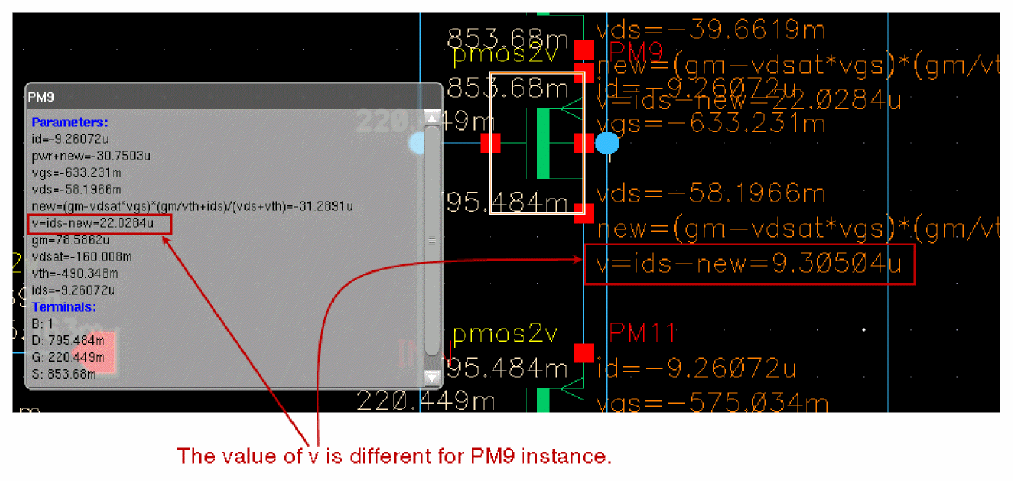
In the above example, for the PM9 instance, the value of v is 22.0284u on the annotation balloon, however, on the canvas, the value of v is 9.30504.
Solution: The correct value of the expression is not evaluated on the schematic canvas because the variables new and v are defined as global SKILL variables. The values of expressions evaluated on the schematic canvas depend upon the order in which the Graphic Editor evaluates the label values. To avoid this issue ensure that different variable names are used for different instances, that is, v1 and new1 for PM1, v2 and new2 for PM2, and so on.
CCR 1041966: Exclude Inherited Connection Pins field of Symbol Generation Options
Lib: ether
Cell: try
View: schematic
When you create a symbol using Create CellView from CellView, a symbol view is generated. However, you get the following warning message while running Check > Current Cellview.. or Check > Cross View… command in the symbol view.
Warning: Port "G" in the portOrder property not found in "try symbol".
The warning is generated because the Create > CellView > From CellView… command adds a portOrder property to the symbol view during the symbol creation. This has the pin G mentioned in the portOrder. Now, you should be able to take this pin name out of the portOrder property, but it is not recommended to do so, because during implicit netlisting, the ports are printed in the order specified by this property.
Solution: There is no workaround available.
CCR 992203: Replace function attempts to revert changes on exit
Description: In Edit->Replace, there is no OK or Done button to allow you to save your changes when renaming cells or instances. For example, when you fill out the Search and Replace fields and press Apply, VSE finds the matches, and then, Replace All replaces instances in the schematics. It auto-checks out the schematic.
Solution: The only way to stop canceling the checkout is to press the Save Changes check box on the replace form.
CCR 893019: Remastering an instance adds the additional CDF parameters of the previous master as user properties in the new instance
Description: The master of an instance in a design can have modified CDF parameters saved as user-defined properties. If you remaster such an instance using the Schematic Replace form, the new instance contains the additional CDF parameters of the previous master as user-defined properties. Such user-defined properties in the new instance can cause issues while performing tasks, such as generating the netlist.
Solution: Manually remove the additional user-defined properties that were added to the new instance.
CCR 799319: Indicator of instance is different between descended hierarchy and returned hierarchy.
Description: The Navigator assistant shows the instance as a block to start with as there are instances in the cellview. However, when descending into the cellview, the masters of these instances are bound and identified as ignored instances. At this point, the HED elaborator modifies the type of instance from block to leaf to reflect that there are no valid instances in the cellview.
Solution: This behavior is by design to limit the amount of bound masters in order to provide performance enhancements in Navigator. If a valid, not ignored, design instance is placed in the cellview the problem is not reproducible. This is an issue only in partially completed designs.
CCR 661800: Labels in title blocks of sheet borders can not be edited with on-canvas editing
Description: Sheet border title blocks with labels can not currently be edited with on-canvas editing.
Solution: Use Edit – Sheet Title to access and edit the labels in title blocks.
CCR 529150: Expanding a directory in the Navigator takes an excessive amount of time for large designs
Description: It can be time consuming to expand a large design, or a design with multiple hierarchy levels, in the Navigator.
Solution: If the design is large, a Descend Edit operation, or the use of another assistant such as the Search assistant, may be preferable to find particular objects in a sub-level.
CCR 459242: When two instances of the same sub-cells are open in tabs, selection in the canvas is not unique to the current instance
Description: When a top cell has multiple instances of the same cell, and you want to set a constraint at the top level for design objects in the sub-cell, selection in the canvas can create an unexpected number of selections of that instance member.
The number of selected objects depends on the number of windows that are open for the sub-cell as an instance sub-cell.
Solution: To set a constraint for design objects located in sub-cell instances, the selection must be done in the Navigator rather than the canvas.
CCR 331210: Hierarchical selection notification missing for the first bus
Description: Due to a lack of schematic extraction, hierarchical selection can fail to notify the selection of the first of two selected buses (or ordinary nets). For example, if you:
- Create two narrow wires in a new Schematics XL cellview.
-
Create two net names, for example:
a<0:5>andx<4:1>. - Assign the net names to the wires.
-
Select
a<0:5>. -
Shift select
x<4:1>.
The CIW will therefore only display notification of the second, x<4:1>, object selection. As a consequence of this only one bus form will be displayed.
Solution: There is no workaround available.
CCR 322217: Limitation in extraction behavior on iterated instances
Description: The extractor can produce variable results as final design connectivity, obtained after running the extractor, is not only dependent upon the design geometry (that is, the placement of instances, wires, wire labels, and so on), but also upon current connectivity.
Solution: There is no workaround available.
CCR 287619: Delete net does not update Navigator
Description: You must perform a File – Check and Save so that the Navigator will be consistent with the canvas if nets/pins are drawn, renamed, deleted, and so on.
This is necessary because of the way nets and pins are currently created in a schematic.
Solution: There is no workaround available.
CCR 256810: schHiCreateWire does not work in Edit In Place
Description: When editing in place, the create wire command, in default Draw Mode = Route and Route Method = Full mode, does not take account of the edit in place coordinates. Instead, it will use the top level coordinates and snap in incorrect locations.
Solution: There is no workaround available.
CCR 217698: Problem creating netSet property on instance with terminal as inherited connection
Description: There is a current limitation with inherited connections where iterated instances, for example x<0:3>, cannot be used as intended.
This is because of a limitation in the CDBA and OpenAccess 2.0 databases, in that there are no placeholders to store property information on a per-bit instance basis.
Although you can have netSet on an iterated instance, care must be taken as it will overwrite ALL bits identically.
bitInstance property values.
Solution: The workaround is to create multiple instances, for example, x<0>, x<1>, x<2>, and x<3> rather than a single iterated instance named, in this case, x<0:3>.
CCR 206260: Schematic route flight shorts nets
Description: There can be a problem with the schematic router where shorts are created between nets when the route flight line command is used.
Solution: As a workaround, you should perform the following:
-
Define a SKILL procedure as follows:
procedure( CCSrouteFlightLines()
let((cv f_lines)
cv = geGetEditCellView()
f_lines = setof(x cv~>shapes x~>lpp == list("wire" "flight"))
foreach(line f_lines
geSelectFig(line)
schHiRouteFlightLine()
)
t
)
)
- Call this newly created function, for the cellview in question, and it will perform the routing of all flight lines, one by one.
CCR 196645: Instance renumbering overflows when numeric entry >=2e10
Description: If you attempt to enter a number >=2e10 in the “Start resulting sequence with index” field, of the Renumber Instances form (first select Design – Renumber Instances), the schematic editor will encounter problems due to a numeric overflow.
This overflow causes further numeric entries in the index field to no longer be accepted, and for the schematic editor to continue to display solely on those components of the resultant overflow.
Solution: This problem occurs because the renumber instances command uses signed, rather than unsigned, integers when generating the index. The field entry limit here is (2^31 - 1).
A negative number can also be entered in the “Start resulting sequence index” field, and this will cause instances to be renumbered as appropriate. Note however, that instances with negative indices will not be renamed by subsequent applications of renumber instances.
CCR 2746849: Navigator to display the sets with the probed and selected objects
Description: In Virtuoso IC6.1.8 and ICADVM20.1, a workaround was provided to establish a way to see selected and probed objects in a self-contained manner in the Navigator assistant using SKILL customizations.
Solution: Starting with Virtuoso IC23.1 ISR1, probed and selected objects are displayed in the Navigator assistant by default. Cadence recommends not using the previous workaround any longer.
CCR 941270: CPF parser fails and gives the tclsh: not found error
Description: CPF parser fails on the Solaris machine and gives the tclsh: not found error.
Solution: Before starting Virtuoso, make sure that tclsh is installed in the path. It is recommended to use tclsh 8.4 or a higher version.
CCR 849686: Voltage range step values for level shifter cells are not supported in CPF import and export
Description: Currently, Virtuoso does not support step values for the -input_voltage_range and -output_voltage_range options of the define_level_shifter_cell CPF command.
Solution: There is no workaround available. However, you can add the step values manually in the CPF file. The issue will be resolved in a future release.
Return to top