
Known Problems and Solutions in Virtuoso Layout Suite XL
This document describes the known issues with Virtuoso® Layout Suite XL and suggests the workarounds for these issues. Each issue is identified by a Cadence Change Request (CCR) number.
Related Topics
CCR 2676756: Stipple fill style disappears from layout after zoom-in
Description: When you choose View – Zoom In, the stipple fill style disappears from the layout after the zoom-in operation.
Solution: Install the latest drivers for graphics support.
CCR 2353478: Rulers are scaled in Edit in Concert mode by the ratio of DBUPerUUs
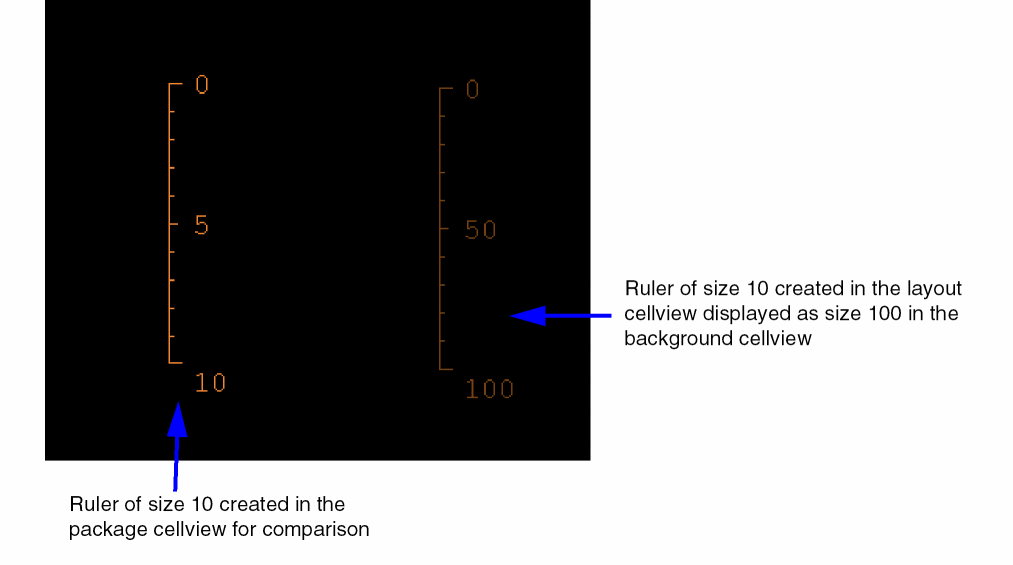
Description: In a package cellview, when using the Edit in Concert mode, rulers displayed in the background layout cellview get scaled up or down by the ratio of their DBUPerUU and package DBUPerUU if the rulers were created in the layout cellview.
For example, when you create a ruler of size 10 in a layout cellview, it might get displayed as size 100 in the background layout cellview in the package layout.
Solution: There is no workaround available.
CCR 1404861: Crash observed in Property Editor for CDF list type parameter
Description: Currently the CDF parameter of list type is not supported for edit through the Property Editor. If user tries to edit CDF parameter of list type then it may result in a crash. The complete support is not in place in the current release.
Solution: There is no workaround available.
CCR 1279557: Changing via definition should take width and length specified values
Description: Currently when using the Property Editor assistant to change a via definition to a transition with different cutClass values, the old cut size is retained in the layout even if it is not valid with respect to the cutClass constraint for the layer in question.
Solution: Use the Reset Parameters to drop-down in the Property Editor to reset the cutClass to the default cutClass for the transition in question. Note that this resets ALL the parameters for the via definition in question.
CCR 942040: Need to preserve length in resistor
Description: If you have defined the split parameter value for a resistor as “r R” but Virtuoso Layout Suite XL still splits the length of the resistor across the segments, the order in which your CDF parameters are defined may be incorrect.
For example, you want to split a resistor in your design by using the split parameter, r. However, you have defined the CDF for the resistor to have a property named l, which is listed before r in the
Edit CDF
form, as shown below:
Since the parameter l appears before r in the Edit CDF form, Virtuoso Layout Suite XL uses l for splitting the parameter instead of using r. As a result, the resistor is split into two resistors of l = 2 and r = 6.
To work around this issue, define the component types using the LAM file and specify the split parameter for the component type that needs to be split. For this example, the component type should be defined as RESISTOR, but for a different case, the component type could be defined as INDUCTOR or CAPACITOR, as appropriate.
Alternatively, to get the correct results:
-
Change the order in which the parameters are defined in your CDF file. To do this, use the Edit CDF form from the Tools menu in the CIW.
For the example given above, the CDF parameters should be listed as below for the resistor to be split using therparameter:
s = 2
r = 6
l = 4
Here, since therparameter is listed beforel, the resistor is split as desired. As a result of the split, two resistors ofr=3andl=4are obtained. -
Change the value of the inductanceParamNames environment variable to a value other than “
l” so that Virtuoso Layout Suite XL does not incorrectly consider it as the split parameter value for the resistor.
CCR 853968: Need the Help Button ID for Object-Guides Options form
Description: When, you click the help button on the Objects-Guides Options form, the form help is not displayed correctly. Clicking the help button should take us to the correct documentation in cdnshelp.
Solution: There is no workaround available.
CCR 852661: Can select Mosaic even if Selectability is Off
Description: When you choose View By – None, Palette is unable to reflect the None state after the View or Sort By operations are performed.
Solution: There is no workaround available.
CCR 852639: Loading display.drf file does not update canvas despite Auto redraw ON
Description: When display.drf file is loaded manually from some location other than cwd, the layout canvas does not get updated despite Auto redraw set to ON in Palette.
Solution: To update the layout canvas view, choose View – ReDraw/Fit-Edit.
CCR 852254: ViewBy in Palette shows corrupted view after some View By/SortBy operations in Palette
Description: View By in Palette shows corrupted view after some ViewBy or SortBy operations are performed in Palette.
Solution: There is no workaround available.
CCR 851265: Delete command is not enabled after loading "LSW Info File"
Description: The Delete command in the palette is not enabled even after loading LSW Info File.
Solution: There is no workaround available.
CCR 845311: Canvas is not synchronized with its layer palette
Description: When the two open cellviews are attached to two different technology files, the palettes are not synchronized. Also, the layout canvas is not synchronized with its palette, which is an issue.
Solution: There is no workaround available.
CCR 839265: Issues with Object and guides Lpps when changing display sets
Description: The visibility and selectability of the objects and elements in the Objects and Guides assistant are not in sync when I change the displaySet model.
Solution: There is no workaround available.
CCR 824448: Unable to close window having multi tabs after edits on routing direction on ITDB design
Description: Unable to close window having multitabs after edits on routing direction on ITDB design.
Solution: There is no workaround available.
CCR 820657: Issues with Layer Palette while working with ITDB
Description: In some cases, when using the Palette with ITDB the visibility changes are not reflected in the layout canvas.
Solution: There is no workaround available.
CCR 792878: Support backannotate to mfactored dummy symbols
Description: For PDKs that use simM as the schematic multiplier, the mfactorNames environment variable should be set to simM using:
envSetVal("layoutXL" "mfactorNames" 'string "simM")
This allows dummies to be generated as mfactored devices for such PDKs.
mfactorNames parameter, such as m. This will set the schematic mfactor parameter, for example, simM to m. The CDF callbacks will then be fired to keep the parameters in sync.CCR 778617: After "View By None" column settings are not applied correctly
Description: The columns size setting is lost when you View by Layer and then View by None.
Solution: There is no workaround available.
CCR 694637: Layers not in the layerset remains valid when that layerset is loaded
Description: When a layerset is loaded, it is expected that all the layers in the layerset become valid and the layers become invalid. However, after loading a layerset, if the Edit Valid Layer form is opened, all the layers in All Valid Layers are shown as valid layers.
Solution: There is no workaround available.
CCR 640482: Rounding can only be applied to the width parameter
Description: To prevent folded devices from becoming off-grid; you can round their "width" parameter value. To do this, you must specify the appropriate rounding argument in the Parameters tab on the Configure Physical Hierarchy window.
Note that the window also accepts rounding values for Resistance, Capacitance and Inductance but does not support rounding for these parameters. The system does not generate any warning messages to indicate that rounding of these parameters is not supported.
Solution: This issue has been documented for your information only. There is currently no workaround available.
CCR 419455: mFactor split does not work on hierarchical design
Description: The mfactorSplit parameter is not handled correctly on hierarchical designs. Layout XL does not generate the correct number of mfactored instances. When the mfactor is changed, Layout XL does not succeed in binding all the instances generated.
Solution: This issue has been documented for your information only. There is currently no workaround available.
CCR 318593: Edit Properties brings up old form
Description: The Edit Properties form is not displayed in the new format.
Solution: There is no workaround available.
CCR 240272: No warning is issued when auto via is not placed because it is not defined in the constraint group
Description: If a valid via is not defined in the constraint group used in the current context, and you try to place a via using auto via, the via is not placed and no warning is issued. For example, if path segments intersect on layer 3 and layer 4 and no vias are defined in the current context constraint group to traverse layers 3 and 4, no vias are valid, so none are placed.
Solution: Define valid vias in the corresponding constraint group in the technology file.
CCR 8060: icfb errors if first cellview opened is abstract
Description: When the first cellview you open has the view name abstract, the menus in the layout editor window banner are not built correctly. The Tools menu is the only menu displayed in the editing window banner.
Solution: Select Tools — Layout, then Tools — Abstracts and the menu banner will appear correctly.
CCR 6968: Layer Selection in Edit Properties Form
Description: When the number of layers defined is large (500+), the system might not be able to display all of the layers in the layer menu on an Edit Properties form.
Solution: Specify a smaller number of valid layer-purpose pairs. Alternately, you could subdivide the full set of layer-purpose pairs into separate technology files, each of which would define a subset of the total number of valid layer-purpose pairs. You could then assign bindkeys to facilitate the quick loading of the technology files.
CCR 4393: The Layer Selection Window (LSW) does not recognize Opus*LSWGeometry setting
Description: When Opus*LSWGeometry is set in the .Xdefaults file, the Layer Selection Window displays the name Abbrv instead of the layer name at initialization
Solution: There is no workaround available.
CCR 4162: Underscore characters disappear in Editor Properties Form
Description: Underscore characters are not visible in text entry fields on the Edit Properties form when the text default font (- *-courier-medium-r-*-*-12-*) is used.
Solution: Do not set the default text font to (- *-courier-medium-r-*-*-12-*. Instead, set it to
(-adobe-courier-bold-r-*-*-12-*), like this:
hiSetFont("text" "-adobe-courier-bold-r-*-*-12-*")
You can set the default text font by adding the statement above to your .cdsinit file.
CCR 3397: Hierarchical marker deletion sometimes does not work
Description: You cannot delete markers below the top level when lower levels are open in read-only mode.
Solution: Open all necessary cellviews in append mode by typing the following in the CIW:
foreach(cv gevMarkerCVList
     dbReopen(cv "a")
)
Then try to delete the markers again with the Verify — Markers — Delete All command.
CCR 3361: Verify – Markers – Explain gives no response for dot markers
Description: The Verify — Markers — Explain command does not work for dot markers.
Solution: Use Verify — Markers — Find to display the reason for each marker.
Return to top