This topic provides a high-level overview of the new features in the IC23.1 release.
IC23.1 ISR3
Abutting Using sdFirst during syncChain
You can now use the chainSyncChainsSDFirst environment variable to specify whether synchronizes chains should attempt to abut using the sdFirst strategy which orients the devices so that the Source/Drain nets match for any subsequent abutment using the dummyFirst strategy.
Backannotating Library and Cell of a Layout Device as the Schematic Master
You can now use the backAnnotateIgnoreBoundMasters environment variable to specify whether backannotation should use the library and cell of a layout device as the schematic master.
Controlling Equivalence Between <> and [] During XL Compliance Check
You can use the checkTermLabelAllowBracketDiff environment variable to specify whether the difference between the brackets [] and <> be ignored during an XL Compliance terminal label check.
Checking for Equivalent Figures in a Synchronous Clone Family
You can now use the lxCloneGetEquivalentFigs SKILL function to retrieve the list of equivalent figures in other clones of the synchronous clone family.
Controlling Whether Illegal Hierarchical Connections are Reported the XL Status Shorts
You can now use the xlStatusHierShorts environment variable to specify whether illegal hierarchical connections are reported as XL status shorts in Navigator during interactive editing.
Specifying Controls for Stop Layers during Extraction
You can now specify the following options on the Option – Connectivity – Connectivity – Control tab to control stop layers during extraction:
-
Promote all stop shapes to specify whether stop shapes at the extractStopLevel + 1 level are visible to the extractor.
Environment variable: extractPromoteAllStopShapes
-
Ignore color lock state to specify whether the lock state of shapes should be ignored during extraction.
Environment variable: extractIgnoreColorLockState
Saving the Results of Find and Replace Operations into a File
You can now use the Reports section in the Find/Replace form to save the results of find and replace operations into a file.
- Enable the Save Report To option for the find and replace operations.
Environment variable: saveFindReplaceReportToFile
- Specify the input file name to save the detailed report of the find and replace operations.
Environment variable: findReplaceReportFileName
- Generate a detailed report for any find and replace operation and show the report of Find, Replace and Replace All operations in the CIW.
Environment variable: showFindReplaceReport
Snapping the Coordinates of a Chopped Shape to the Manufacturing Grid
You can snap the coordinates of a chopped shape to the manufacturing grid by using the All edges to manufacturing grid option added in the Chop form.
Zooming the Stretch Handle Display
You can now use the minInstSizeInPixelsForStretchHandles environment variable to display the stretch handle according to the specified pixel value.
Setting the Snap Selection by Giving Preference to an Instance as Reference Object
You can now use the snapUsingInstanceAsReference environment variable to select an instance as the reference object for snapping.
Synchronizing the Display of Shapes and Short Markers in the Cross Section Viewer with the Palette Visibility
You can now use the Sync With Palette Visibility option in the cross section viewer form to synchronize the display of shapes and short markers in the cross section viewer with the palette visibility.
Environment variable: crossSectionSyncWithPaletteVisibility
Ability to Select and Add Nets/Instances from the Dynamic Selection Assistant
You can now use the geDSAGetSelectedSet SKILL function to get the hierarchical selected set from the Dynamic Selection assistant.
IC23.1 ISR1
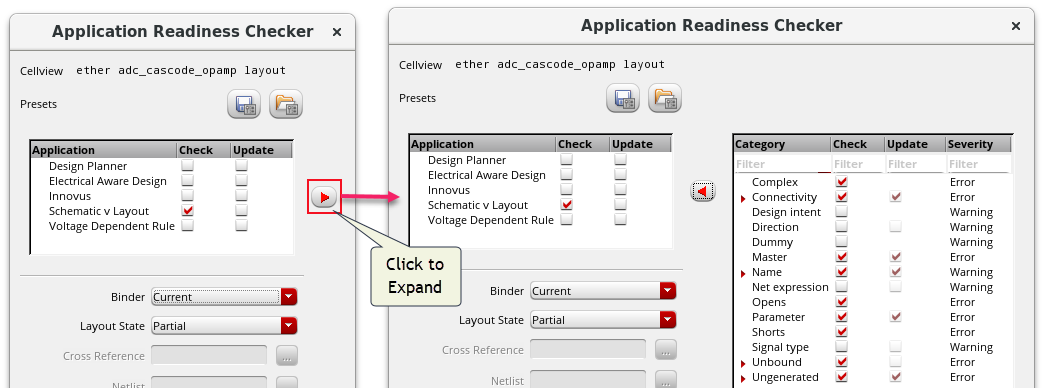
Enhancements in the Application Readiness Checker Form
You can now specify:
- The path to the PVS LVS .ixf instance cross-reference file using the Cross Reference option.
- The path to the PVS LVS .net or .spi extracted netlist file using the Netlist option.
- Whether to run check and update in the current cellview, selected set, all cells in library, or all cells in the design using the options in the Scope drop-down list.
Enhancements in the Back Annotate Dummies Form
In the Back Annotate Dummies form, you can now:
- Update the layout of instances in a grid to be as close to a square aspect ratio using the
 button.
 - Switch between column-priority packing and row-priority packing for the grid of instances being placed down using the
 and
and  buttons.
 - Change orientation of the dummy instances using the orientation buttons
 ,
, ,
, , and
, and  .
.
Controlling Chaining Behavior
You can now control whether dummy devices can be changed during chaining by using the chainDummyUpdate environment variable.
Setting Limit for Incremental Check Against Source
You can now control the number of objects that can be processed by the incrementalCas variable at one time by using the incrementalCasLimit environment variable.
Specifying Component Classes NGAA and PGAA in CPH
(Virtuoso Advanced Node Option for GAA) You can now specify the component classes NGAA and PGAA for Gate All Around transistor devices in Layout EXL or higher tiers.
Specifying Connections Requiring an Extra Layer
You can now use a stdViaDef to define a connectivity model in which an extra layer is required to connect to the diffusion layer.
Arranging Postselected Objects in Square Format in an Array
You can now arrange selected objects in an array in square format using the  button.
Updating Schematic Parameters for Layout Instances
You can now update the schematic instance parameters for hierarchical layout instance masters or layout instances bound to the top-level schematic instances by using the lxHierUpdateSchematicParameters or lxUpdateSchematicParameters SKILL functions.
IC23.1 Base
Application Readiness Checker Form
Application Readiness Checker has been introduced to improve the process of checking and updating the layout from the source and to provide a one-to-one correspondence between the checks and updates, with the ability to choose the checks you want for different applications. You can also extend the checks by registering SKILL-based check and update tests. For LVS-complete designs, the tool automatically updates the schematic and layout correspondence to the best match before running the checks and updates.
Schematic Assistant
Schematic Assistant is a docked assistant now available in Layout XL and higher. It lets layout designers easily refer and use the schematic in the assistant instead of referring the schematic in a separate window. Schematic Assistant is a read-only view that supports zoom, probe and cross-select along with descend options.
The assistant can be made the default option without opening the full schematic window in the background by setting Layout – Connectivity – Connectivity Reference – Open With: No Schematic
Enhanced Search Criteria
You can now search for paths and pathSegs using the length search criterion. Also, you can now use the area criterion to search for rectangles, donuts, ellipses, labels, polygons, paths, and pathSegs.
Enhanced Dummy Instances BackAnnotation Flow
Enhanced interactive back annotation to the schematic for dummy instances to keep the two views synchronized. Back Annotate Dummies Form has improved row and column placement and support for mfactored or iterated instances.
Related Environment Variable: backAnnotateInstances
Related SKILL Function: lxHiBackAnnotateDummies
Enhancements in Automatic Chaining
The automatic chaining process has been to enhanced to let you:
- Optimize the chains using the chainOptimize environment variable or by setting the Chain optimize option in the Device Chaining section on the Generation tab of the Connectivity form.
- Control the effort applied during chaining by using the chainEffort environment variable or by setting the Chain effort option in the Device Chaining section on the Generation tab of the Connectivity form.
- Control if the post process to combine distinct chains into one chain by abutting on the dummy pins is performed by using the chainDummyAbutment environment variable.
Incremental Check Against Source
Check against source can now run dynamically to create markers and glyphs on canvas when an edit command introduces differences between the layout and the schematic. This lets you get instant feedback and enables you to correct the issues and maintain correspondence with the schematic. This is enabled using the incrementalCas environment variable
Applying Previous Data from the Property Editor Cache
After you have edited the properties of an object, you can now apply the same changes to another object by using the Apply Previous button in the Edit Properties form for the object. To view the previously applied data, you can use the lePlGetApplyPrevData SKILL function.
Capturing and Replaying Design Actions
With this release, you can record a series of actions in a design and replay them across cellviews and sessions by using the Capture and Replay assistant.
In addition to the assistant, you can use the following SKILL functions to capture and replay your actions: leCARStartCapture, leCARStopCapture, and leCARCommand.
Checking if Extracted Shape is Trimmed
You can now use to lceIsShapeTrimmed SKILL function to check if the specified shape has been trimmed during connectivity extraction.
Checking Points Within a Polygon
You can check whether a point lies inside a polygon by using the geIsPointInsidePolygon SKILL function.
Creating Repeated Patterns Using Group Arrays
You can now use group arrays to quickly create repeated patterns of objects in your designs. You can easily customize group array attributes such as the number of rows and columns, spacing between cells, and orientation of individual cells. You can also activate a lock to ensure group arrays are created using a predefined spacing mode and values. You can create group arrays by using the Copy, Generate Selected Components, or Generate Clones forms or the lxCreateGroupArray SKILL function.
Determining Application Tiers
You can now use the following SKILL functions to find out the application tier to which an application belongs: leIsEXLAppOrAbove, leIsLayoutAppOrAbove, leIsMXLAppOrAbove, leIsXLAppOrAbove, leLayoutAppNames, and leLayoutViewTypes.
Dimming a Design in Gray
You can now use the dimmingInGray environment variable to dim a design in gray. This helps you to follow highlighted nets when tracing nets in a hierarchy.
Displaying Ruler Length at the End of a Ruler
You can now use the displayRulerDistanceAtEnd environment variable to display the ruler length at the end of a ruler during the drag operation when you create a single- or multi-segment ruler.
Enabling Partial Selection of Vias and Mosaics Using the Stretch Form
You can now enable partial selection of vias and mosaics by selecting the Mosaic Partial Selection and Via Partial Selection options on the Stretch form. Earlier these options were available only on the Selection Options form.
Extracting Off-Pin Connections Using the Connectivity Extractor
You can now use the extractDeepOffPinConnectionsToLevel environment variable to enable the connectivity extractor to extract off-pin connections. It also enables the detection of shorts and opens for off-pin connections.
Launching Layout MXL from Schematic Window
You can use the lxLaunchLayoutMXL to launch Layout MXL from a specified schematic window.
Propagating Net Information
The Propagate Nets form is no longer available. Selecting the Connectivity – Nets – Propagate command now opens the Connectivity tab of the Edit Instance Properties form for the selected instance. You can use the tab to propagate the net information from an instance in your cellview. When you hover over a terminal or net name on the Connectivity tab, that terminal or net now gets highlighted on the canvas, enabling you to easily identify it in the design.
Snapping Chopped Coordinates to the Manufacturing Grid
You can now snap chopped coordinates to the manufacturing grid by using the Modified edges to manufacturing grid option on the Chop form.
Specifying the Copy Type
In the Copy form, you can now specify the type of copy to be created as Single, Step, or Array. You can create a single copy of objects, a line, or an array of copied objects.
Related environment variable: copyOrder
Specifying the Method for Saving Visible Traces in a Design
In the Save Traced Nets View form, you can now specify the method to be used for saving visible traces in a design. You can choose to save each visible trace in a separate view or save all visible traces into a single view. You can also let the system to automatically determine which of these methods should be used.
Related environment variable: netTracerSaveMethod
Specifying Details for Displaying PR Boundary Interior Halo Shape
In designs with 3NM or 2NM technology libraries, the Generate All from Source lets you create a PR Boundary interior halo shape from the supported snap patterns in 3NM and derived layer in 2NM that have a minPRBoundaryInteriorHalo technology file constraint. The interior halo is maintained during interactive editing commands. You can display the option form using the lxHiPRBoundaryInteriorHaloSKILL function.
Specifying Highlight Color for Rows in Annotation Browser Tree View
You can now use the abSetColorOnSelection SKILL function to set the color to highlight all selected rows in the Annotation Browser tree view.