
Creating a cdsVia
You can create a cdsVia in your design if you have installed the cdsVia device in the technology file.
- In the layout window, open the Layout Editor Options form and ensure that the required constraint group is selected in the Via list in the Create Via section. You can access the form by using Options – Editor.
- Choose Create – Via to open the Create Via form.
- Select Single as the Mode for creating the cdsVia.
-
Select a cdsVia from the Via Definition list.
The Purpose section is added to the Create Via form if you select a cdsVia from the Via Definition list.
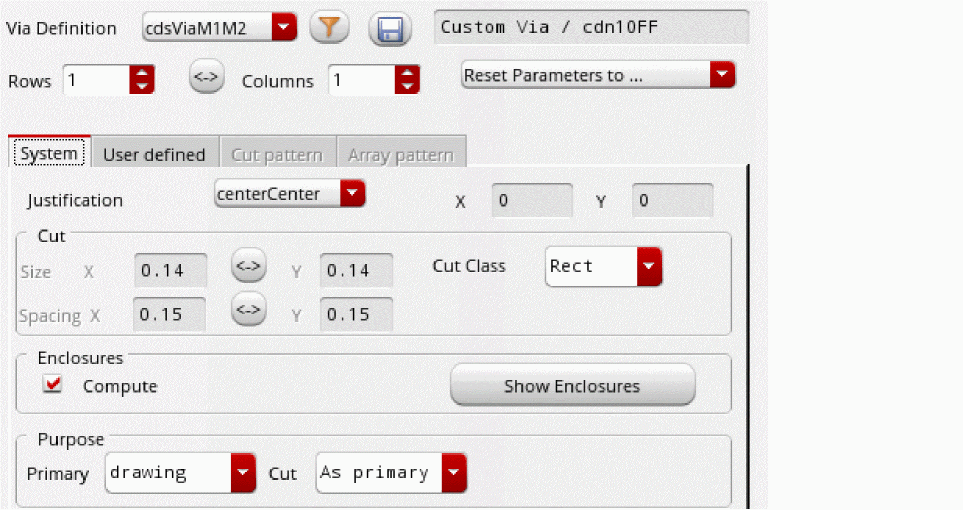
-
In the Purpose section, select another purpose from the Cut list.
The cut values are automatically re-calculated. These values are picked from the entries in the constraint group. -
Click the Show Enclosures button
The enclosure values update automatically depending on the purpose you select from the Cut list in the Purpose section and based on the constraints defined in the constraint group.
Note that implant layer enclosures cannot be specified for custom vias.
Enclosure parameters are supported on Pcell vias. - Click on the canvas where you want to place the cdsVia.
- Place as many vias as required.
- Press Esc or click Cancel in the Create Via form to finish creating cdsVias.
Related Topics
Return to top