
Placing a Pin Array
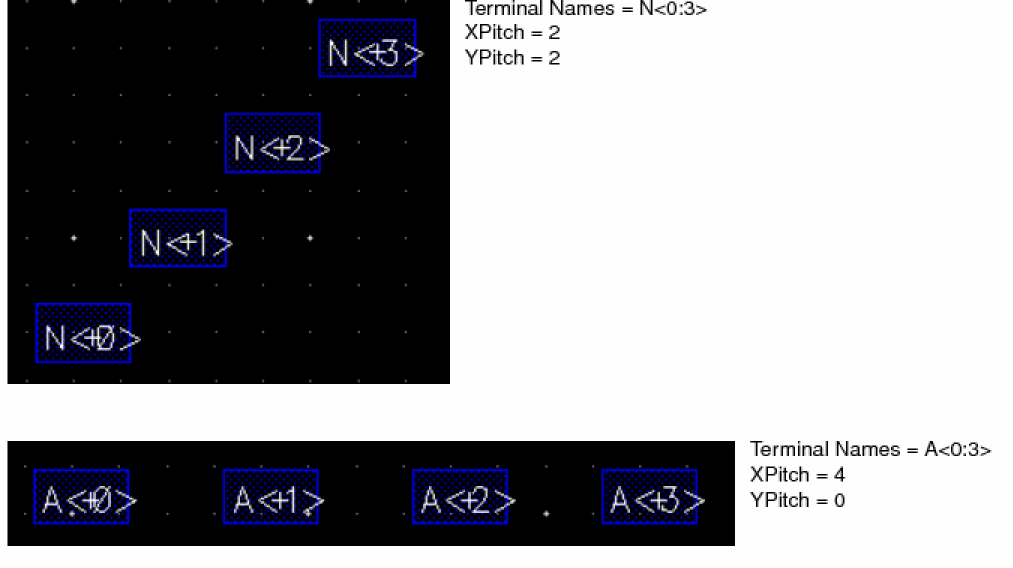
A pin array is a line of pins with a single origin. You might create such an array if you have many nets bundled together into a bus. The pins in the array are placed for every bit of the bus and are spaced according to the XPitch and YPitch coordinates.
-
In the layout window, choose Create – Pin.
The Create Pin form appears. -
Type the net bus name in the Terminal Names field as follows: baseName
<x:x>
For example,NetA<0:5> - Type the horizontal and vertical pitch for the array in the X Pitch and Y Pitch fields.
- Move the pointer on the canvas and place the first pin where you want to start the array. The rest of the pins are automatically placed at the designated X and Y locations for every bit of the bus. They are measured from the center point of the previously placed pin.
The following figures show the examples of pin arrays with different X and Y pitch.
Related Topics
Setting Pin Label Text Style Options
Support for Orthogonal WSP Grid
Return to top