
Edit In Place in Post-Selection Mode
The behavior of the Edit In Place command in post-selection mode depends on the area clicked for selection. Consider a sample design where cellview cv1 contains the instance ILevel1. The instance ILevel1 contains a polygon, the Pcell instance ILevel2pcell, and the instance Ilevel2.
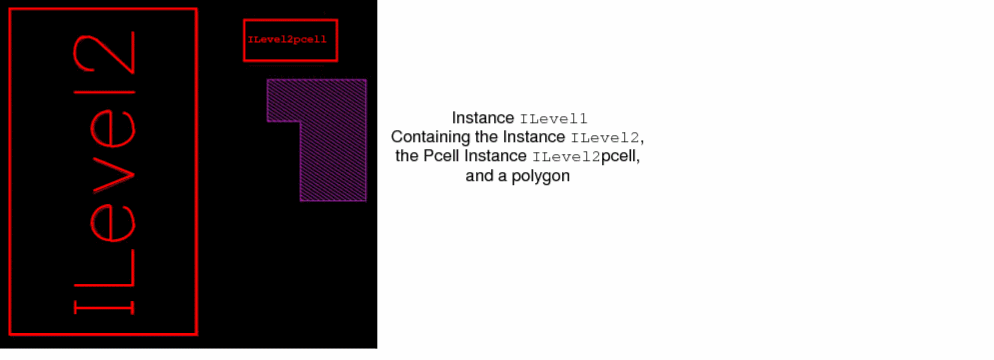
When you invoke the Edit - Hierarchy - Edit In Place command and then click the bounding box of the instance ILevel1, the following situations are possible in the sample design:
-
If the click point is on the bounding box of
ILevel2, the master cellview ofILevel2becomes the cellview to be edited in place. The banner at the top of the layout window changes to show that the master cell for that instance is open for edit. If the EIP Surround is off in the Display Options form, only the cell to be edited in place appears. -
If the click point is in the area of
ILevel2pcell, the following message displays: Cannot edit in place a parameterized cell. This is because the cellview at the lowest level in the hierarchy at the point of click is a Pcell. If the click point is on an empty area within theIlevel2pcellbounding box, there is a beep sound and the following prompt displays: Point at a shape in the cellview to be edited-in-place. -
If the click point is in the area of the polygon, the master cellview of
ILevel1becomes the cellview to be edited in place. -
If the click point is in an empty area in
ILevel1, there is a beep sound and the following prompt displays: Point at a shape in the cellview to be edited-in-place.
In post-selection mode, when the pointer is over a shape of the cellview to be edited in place, the shape is highlighted. You can edit in place ‘n’ levels; the destination cellview (the master of the lowest instance in the hierarchy) must not be a Pcell.
When you are done editing with editing in place, and as you return up the hierarchy, each level you pass is accessible in edit mode if you started in a cell that is in edit mode. If a lower-level cell was originally in read-only mode, it will return to read only once you return up the hierarchy. Additionally, if you have changed anything in a lower cell, you will be prompted to save that master cell.
Edit In Place and Descend Edit options are available for virtual hierarchies.
Related Topics
Return to top