
Copying and Cutting Through the Hierarchy
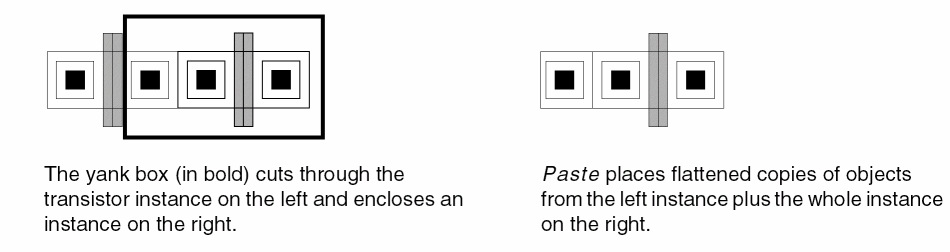
Yank and Paste can cut and copy all or part of instances and shapes in a designated area.
To copy parts of cell instances:
-
In the layout window, choose Options – Display.
The Display Options form appears. - Set the Start and Stop levels in Display Levels to display details of all the instances that you want to copy. Then, click OK.
-
Choose Edit – Basic – Yank.
The Yank form appears. Else, pressF3to open the form. - Set the yank shape, yank level, and snap mode.
- Click and drag on the canvas to create a box around the area you want to yank.
- Choose Edit – Basic – Paste.
-
Click on the canvas where you want to place the copy.
A copy of the selected part of the instance is placed at the specified reference point.
Related Topics
Return to top