
Terminal Checking During Instance Remastering
While remastering cellviews, you can choose to check instTerms of cellviews for matching or a subset of matching instTerms. When the Check Terminals check box is enabled in the Remaster Instances form, and the instTerms of the cellview in the Search for section are equivalent to or are a subset of the instTerms of the cellview in the Update to section, the cellviews are remastered.
Terminals expose a net up to the next level of the hierarchy. For example, a master might have 10 nets and 4 terminals, associated with 4 of the nets.
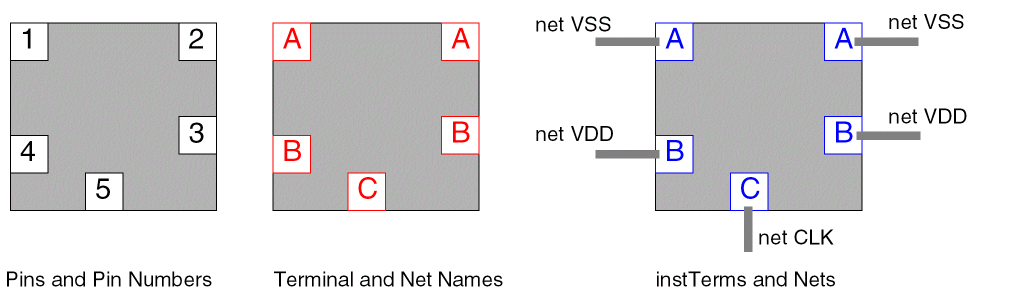
When you create an instance of a master, it may have objects called instTerms associated with it. These instTerms map terminals in the instance’s master to the nets of the cellview in which the instance has been placed. The Layout XL editor creates and assigns the instTerms automatically. To expose the nets to the next level of the hierarchy, you create terminals for the nets, which are then mapped using instTerms at the next level.
For example, the following figure represents an instance that contains five pins: two on net A, two on net B, and one on net C. These nets need to be available at the next level of the hierarchy, so you create three terminals named A, B, and C.
Related Topics
Replacing Instance Abstract Views with Layout Views
Return to top