
Replacing Instance Abstract Views with Layout Views
You can use the File – Discard Edits command to restore data to the last saved design in the event you make an error when replacing data. However, due to the extensive changes available when using this command, it is recommended that you make a backup copy of your design to guard against errors when replacing data.
To search and replace instance abstract views with layout views:
-
Open the cellview in which you want to remaster instances.
Instances are remastered only in the currently open cellview. -
Choose Tools – Remaster Instances.
The Remaster Instances form appears. -
Specify the following in the Search for section:
- In Library, type the name of the library that contains the abstract cellviews you want to remaster.
-
In CellName, type the name of the block or cellview that contains the cellviews you want to remaster.
If the CellName field is left blank, the Remaster Instances command searches throughout the entire library in the Update to section for matching cellview names. - In ViewName, type the name of the view (abstract) to be remastered.
-
Specify the following in the Update to section:
- In Library, type the name of the library that contains the layout cellviews.
-
In CellName, type the name of the block or cellview that contains the layout cellviews.
If the CellName field is left blank, all cellviews that have matching cellview names specified by Library name and ViewName in the Update to section are remastered. - In ViewName, type the name of the view (layout) that will remaster the current abstract cellviews specified by the Search for library.
Alternatively, you can use the Browse button to open the Library Browser to specify the details. The Library Browser lets you look though the libraries specified in your cds.lib file and set the library, cell, and view names for the form. -
Optionally, turn on Check Terminals to check all corresponding cellviews for matching or a subset of matching instTerm information.
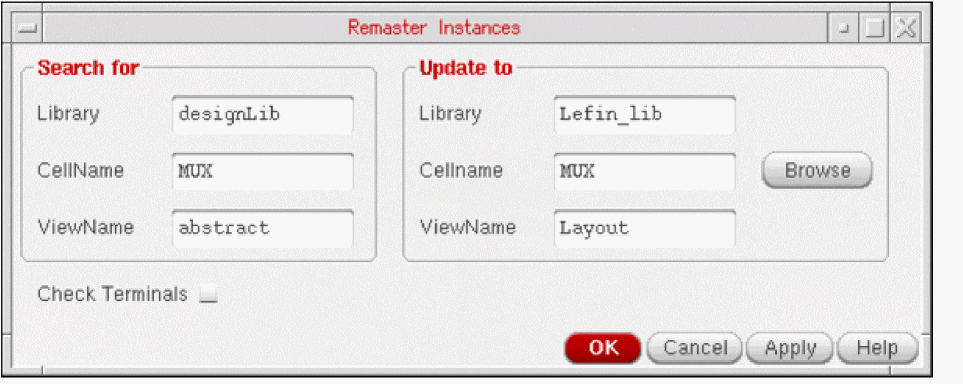
- Click OK or Apply.
-
Optionally, choose File – Summary to check the results of the Remaster Instance command.
In the Instance Statistics section of the summary, the master cellview name, view name, and library are listed for each cellview. Verify the results of the command by checking the master cellview names and views names for the specified cellview.
Due to the complexity of different types of errors, the CIW does not display a confirmation of the command or warning messages if the Remaster Instance command is not successful.
Related Topics
Terminal Checking During Instance Remastering
Return to top