
Calculating Area and Density
You can calculate the area and density of shapes on specified layers within a region. You can calculate the area of metal lines, resistor networks, and MOS devices placed together. You can also calculate the layer density in a specified region.
Area is defined as the total area of the specified layers within the region that you select. Density is defined as the total area divided by the area of the region that you specify. You can calculate the area and density by using the Area and Density Calculator command. You can also use the SKILL function leComputeAreaDensity.
To calculate the area and density of a region:
-
In the layout window, choose Tools – Area and Density Calculator.
The Area and Density Calculator form is displayed. You can specify the object, layer, hierarchy range, and region for which you want to calculate the area and density.
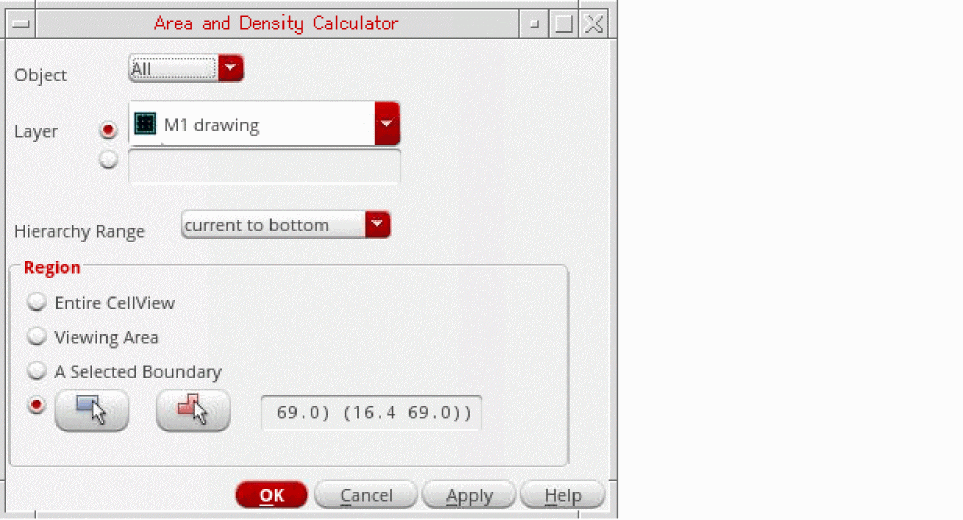
- From Object, select the object range for which you want to calculate the area. You can consider all objects or only selected objects for area calculation.
- From Layer, select a single layer or specify multiple layers for area calculation.
- From Hierarchy Range, select the search depth. You can select the search depth as current cellView, current to bottom, current to stop level, or current to user level.
- In the Region section, select the region for which you want to calculate the area and density. You can select Entire CellView, Viewing Area, A Selected Boundary, Draw a Rectangle Region on the Canvas, or Draw a Polygon Region on the Canvas.
-
Click OK.
The area and density calculation report is displayed.
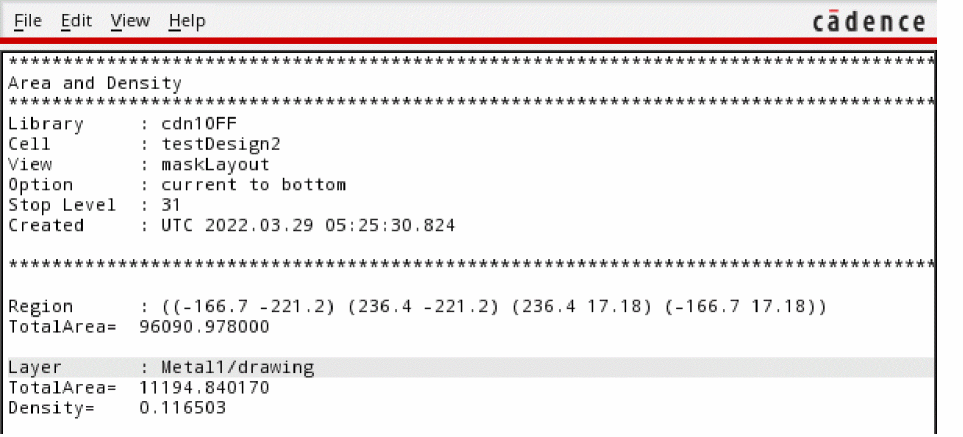
For an overview of how to use the area and density calculator, see the video Using the Area and Density Calculator.
Related Topics
Area and Density Calculator Form
Return to top