
Converting Polygons to Paths
With the Convert – To Path command, you can convert polygons and rectangles into paths. This command works in both pre-selection and post-selection modes. However, only supported objects, polygons or rectangles, are converted into paths.
The Convert – To Path command can convert the polygons to paths if the following criteria are met:
- Polygons must have a consistent width to be converted to a path.
- The edges of polygons must be orthogonal or 45 degrees.
- The number of vertices of polygons must be even.
Polygons with rounded ends cannot be converted to a path.
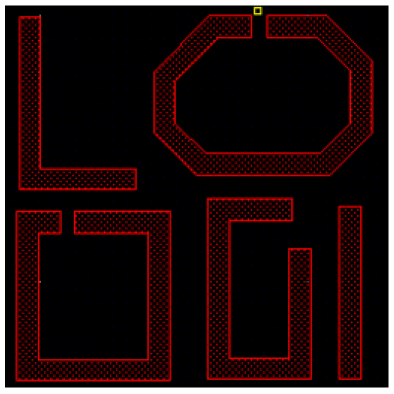
The following figure shows examples of polygons that can be converted to a path.
The following figure shows examples of polygons that cannot be converted to paths.
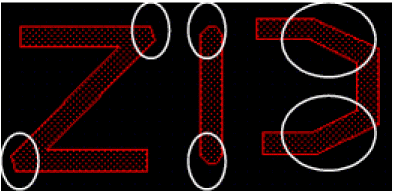
The first polygon in the above figure, the Z shape, cannot be converted to a path. This is because it does not have exact matching vertices on the inside and outside of the bends of the polygon. The inside of the bends has one vertex and the outside has two vertices. The second polygon, the I shape, has rounded ends, so this also cannot be converted to a path. The third polygon, mirrored C, has anyAngle segments, so this cannot be converted to a path.
To convert a polygon or rectangle to a path:
- In the layout window, choose Edit – Convert – To Path.
-
On the canvas, click the polygon or rectangle you want to convert.
The polygon or rectangle is converted to a path. - Continue clicking each polygon or rectangle that you want to convert.
-
Press
Escto cancel the command.
Alternatively, you can right-click a selected polygon or rectangle on the canvas and select Convert To Path from the shortcut menu.
You can partially select the point or edge of a polygon, which is then used as the starting point for deducing the path from a polygon or rectangle. This enables you to control the direction of the path.
(Virtuoso RF Option) The Convert – To Path command is not supported for curved shapes.
Related Topics
Converting Instances to Mosaics
Converting Circles, Donuts, and Ellipses to Polygons
Return to top