
Predefined Orientation Patterns for a Group Array
To define the orientation pattern for individual cells of a group array, you can choose a predefined pattern or create your own pattern. Predefined patterns cannot be deleted but you can delete a custom pattern if required.
The following image displays the list of predefined orientation patterns available for a group array in the Array Pattern form.
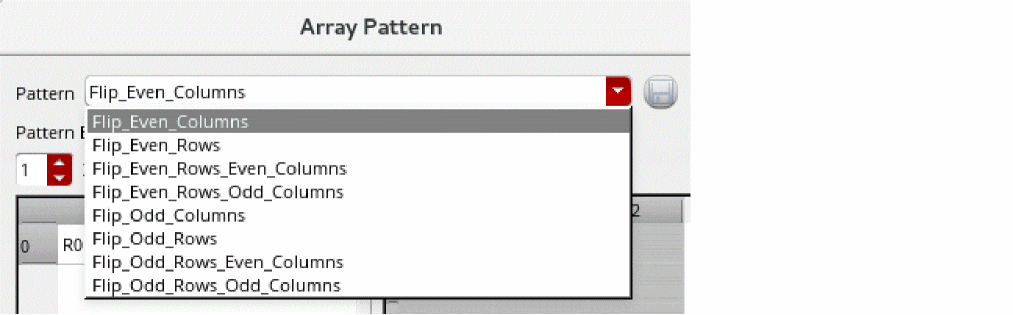
The following table describes the various predefined orientation patterns. For each predefined pattern, the table displays the orientation value for each individual cell and the total number of rows and columns available in the pattern.
| Predefined Pattern | Orientation Value | Number of Rows/Columns in a Pattern |
|---|---|---|
In the following image, the Array Pattern form displays the Flip_Even_Rows_Even_Columns pattern selected, which is a 2x2 pattern with "R0 MY" "MX R180" orientation values. The Preview section displays how the selected pattern is applied to the group array. It shows the actual number of rows and columns defined for the group array and the orientation value of each cell.
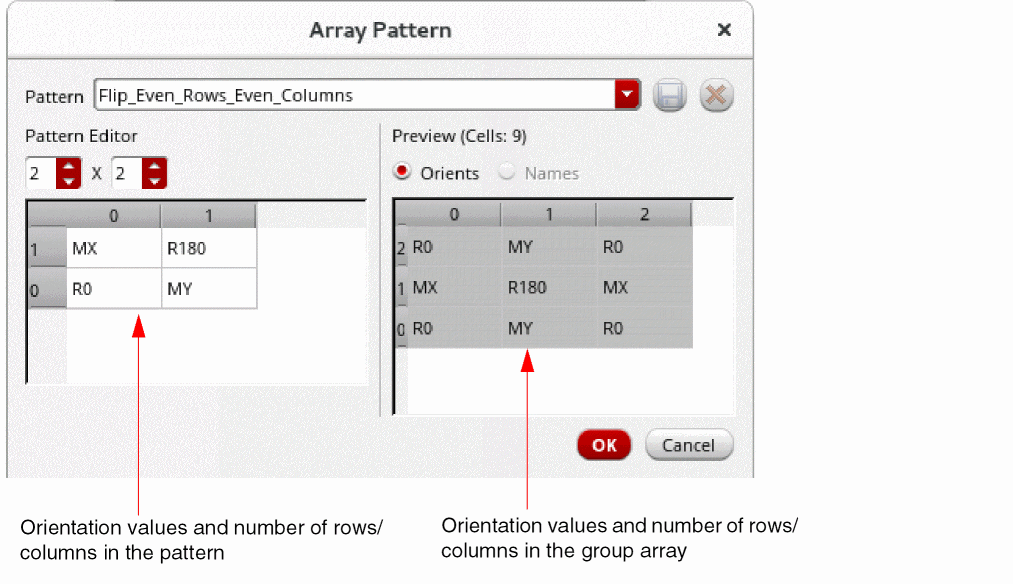
Your group array can be smaller or larger than a predefined pattern. Depending on the size of your group array, the selected pattern is applied accordingly. For example, when you are creating a group array that is larger than the selected pattern, the pattern is repeated across cells.
Related Topics
Creating a Group Array by Using the Copy Form
Specifying Group Array Orientation Using the Array Pattern Form
Saving a Custom Orientation Pattern for a Group Array
Return to top