
9
Group Arrays
Certain custom and digital designs, such as those containing memory arrays and routing channels, might require patterns of objects to be repeated across a design. You can use group arrays to create such repeated patterns in your designs.
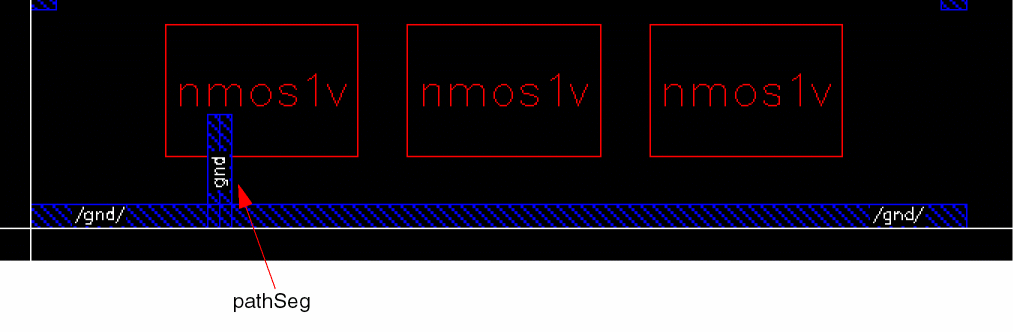
The following image shows a design with three devices and a power rail, with routing created for the first device using a pathSeg.
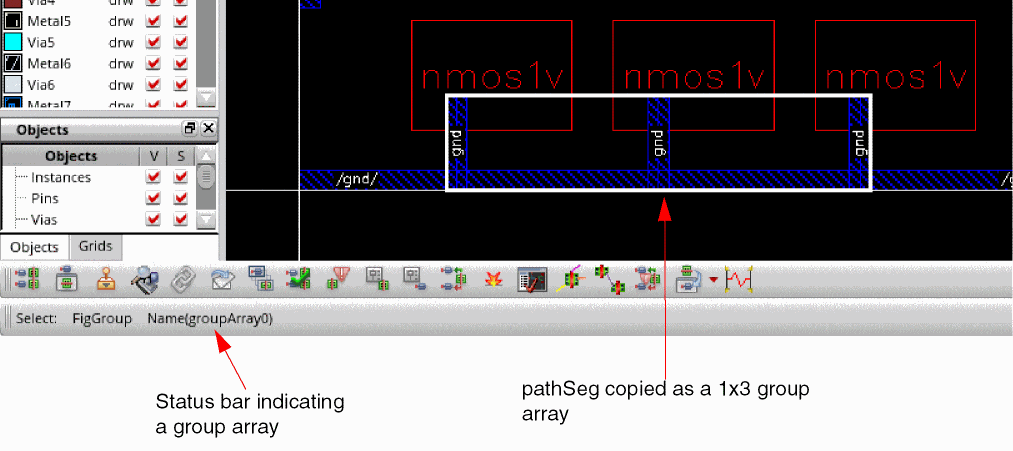
You can create routing for the entire design by using a group array. The following image shows the pathSeg copied to create a 1x3 group array, with 1 row and 3 columns, to create routing for all devices.
To create repeated design patterns, you can specify the following attributes for a group array:
- Number of rows and columns, which represent the number of cells
- Spacing between cells
- Orientation pattern of each cell.
The following are some of the key benefits that group arrays offer:
- After you have created a group array, you can easily customize any of its attributes. For example, you can increase or decrease the number of cells in a group array.
- Group arrays support synchronous editing. Changes made to one cell of a group array are replicated across all other cells. You can make changes to a cell by editing it in place.
- Group arrays do not introduce any additional level of hierarchy in a design, thus enabling you to keep your designs simple.
Related Topics
Predefined Orientation Patterns for a Group Array
Creating a Group Array by Using the Copy Form
Specifying Group Array Orientation Using the Array Pattern Form
Saving a Custom Orientation Pattern for a Group Array
Return to top