
Snap Pattern Display Packets
You can define display packets for snap patterns to control the display of tracks and fins, such as the stipple patterns, line styles, fill colors, outline colors, and fill styles of tracks and fins. To define a display packet, you can add the drSetPacket entry in the drDefinePacket section of the display.drf file. You can also use the Display Resource Editor to define a display packet.
You can define separate display packets for tracks and fins of a snap pattern.
-
Display information for snap pattern tracks: You can define a display packet by using the snapPatternPacket_
snapPatternTracksnaming convention. Where, snapPatternPacket refers to the name of the packet used by the layer-purpose pair defined in the snap pattern definition in the technology file, andsnapPatternTracksis the suffix you add to that name. For example, if the snap pattern packet is namedM1_finPurpose, you need to define the display packet asM1_finPurpose_snapPatternTracks, as shown in the following sample:
AdrSetPacket("display" "M1_finPurpose_snapPatternTracks" "x" "solid" "red" "red" "outlineStipple")snapPatternTracksdisplay packet defines the color of the centerline of tracks. -
Display information for snap pattern fins: You can define a display packet by using the snapPatternPacket_
snapPatternFullnaming convention. For example:drSetPacket("display" "M1_finPurpose_snapPatternFull" "x" "solid" "green" "green" "outlineStipple")
The following image shows the fins in green and the track centerline in red.
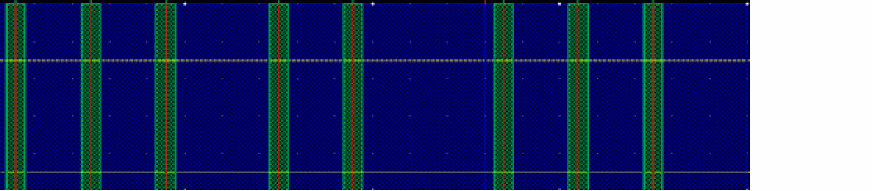
The display packets you define by using snapPatternTracks and snapPatternFull are applied to all tracks and fins in a snap pattern. However, you can create additional packets if you want to control the display of alternate tracks and fins in a snap pattern.
-
To control the display of every alternate snap pattern track, define a display packet by using the snapPatternPacket_
snapPatternTracksAltnaming convention. For example:M1_finPurpose_snapPatternTracksAltdrSetPacket("display" "M1_finPurpose_snapPatternTracksAlt" "x" "solid" "green" "green" "outlineStipple")
-
To control the display of every alternate snap pattern fin, define a display packet by using the snapPatternPacket_
snapPatternFullAltnaming convention. For example:M1_finPurpose_snapPatternFullAltdrSetPacket("display" "M1_finPurpose_snapPatternFullAlt" "x" "solid" "red" "red" "outlineStipple")
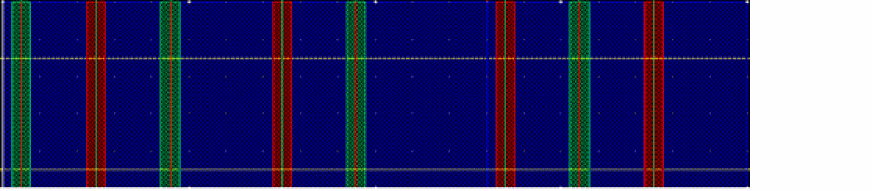
The image shows how the alternate snap pattern tracks and fins appear in different colors when you define the following display packets in display.drf:
drSetPacket("display" "M1_finPurpose_snapPatternTracks" "x" "solid" "red" "red" "outlineStipple")
drSetPacket("display" "M1_finPurpose_snapPatternFull" "x" "solid" "green" "green" "outlineStipple")
drSetPacket("display" "M1_finPurpose_snapPatternTracksAlt" "x" "solid" "green" "green" "outlineStipple")
drSetPacket("display" "M1_finPurpose_snapPatternFullAlt" "x" "solid" "red" "red" "outlineStipple")
The snapPatternTracksAlt and snapPatternFullAlt display packets are used for every other track, starting at the reference track.
Related Topics
Return to top