
Create Via Options Form
Use the Create Via Options form to specify via creation options during the Create Via command.
You can also use the form to specify via definitions during the Create Wire command. In that case, the form excludes the Override Variant Parameters, Extend Enclosure Beyond Overlap, and Fill Overlap With Enclosure options.
| Field | Description |
|---|---|
|
Lets you to update a via variant and overwrite the existing via parameter values. If this check box is selected, it allows the via engine to update a via variant. Environment variable: autoViaOverrideVariantParameters |
|
|
Lets you to extend the via enclosures beyond the overlap region between two intersecting shapes. The shape layer that exists beyond the overlap region helps to accommodate the extended enclosures. Environment variable: viaExtendEnclosureBeyondOverlap |
|
|
Lets you to create a via in a new route. If this option is selected, every new via is created in a new route. This check box is selected by default. Environment variable: viaCreateInRoute |
|
|
Lets you to extend via enclosure such that it covers the complete overlap area between the two intersecting shapes, that is, the bounding box of the via enclosure coincides with the bounding box of the overlap region. Environment variable: viaFillEnclosureOverlap |
|
|
Enables you to create vias using top two layers only. Environment variable: viaAutoOnlyOnTopLayers |
|
|
Does not create any via in case a blockage exists between the top and bottom metal of the current overlap. Only via and cut layer blockages are considered, metal layer blockages are not considered. Environment variable: viaCheckBlockageTypes |
|
|
Lets you to specify a list of valid purposes for via creation in automated modes: auto, fast edit, compute from shape: single, compute from shape: stack. The via will not be created even if one purpose of the overlap shapes does not belong to the list of valid purposes specified in this field. Environment variables: viaEnableValidPurposes, viaValidPurposes |
|
|
Lets you specify the list of purposes that will be ignored for via creation in automated modes: auto, fast edit, compute from shape: single, compute from shape: stack. Environment variable: viaIgnorePurposes |
|
|
Lets you to select whether the cut spacing is spread or is using the minimum spacing rule constraints. You can select distribute or minimum from the drop-down list. Environment variable: viaCutSpacingMethod 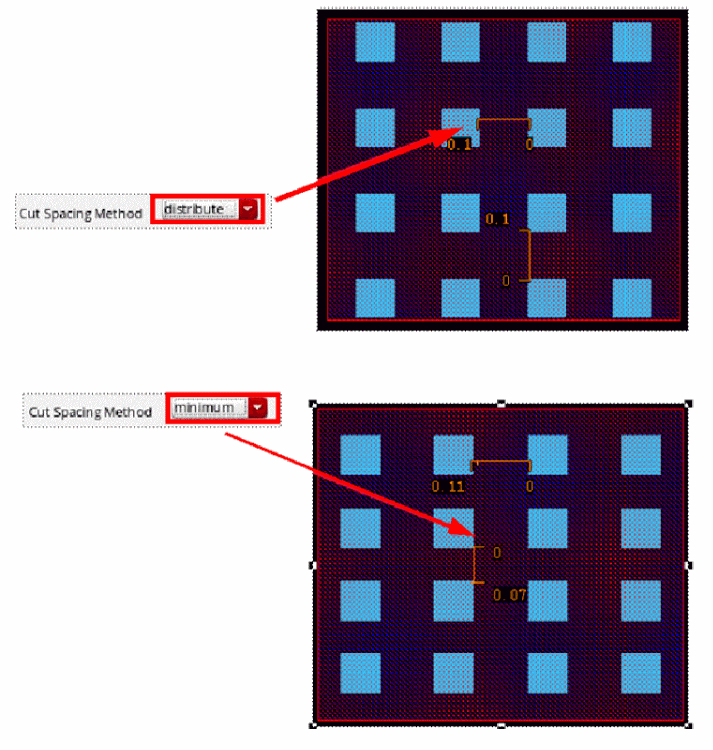 |
|
|
Lets you to select the transitions when creating a via. You can select all the transitions by selecting the All check box. You can also select the transitions for which you want the via to be created. |
|
|
Lets you to define the default viaDefs/via variants to be used in the Single, Stack, and Auto via creation modes. The selected values appear as the default values in the Single and Stack modes when you open the Create Via Form. |
|
|
Lets you to set up the default cut class for each viaDef/via variant to be used in the Single, Stack, and Auto via creation modes. The list displays the cut class choices if a
|
|
|
Lets you to specify the X and Y cut spacing for a transition. Select the check box to enable the X and Y fields for the transition for which you want to specify the min cut spacing values. |
Related Topics
Creating or Updating a Via Variant
Setting Up Via Creation Options
Return to top