ROD Subpart Form
Use the ROD Subpart form to define, change, or delete subparts for the associated master path. You can access this form from the Create Multipart Path form.
The following table describes the sections and common options available in the ROD Subpart form.
|
Field
|
Description
|
|
Offset Subpath Fields
|
Lets you create a new offset sub-path. It lets you view one line of data for each existing offset sub-path in the scroll window. When you select the Offset Subpath check box, the form displays the fields for offset subpaths.
|
|
Enclosure Subpath Fields
|
Lets you create a new enclosure sub-path. When you select the Enclosure Subpath check box, the form displays the fields for enclosure subpaths.
|
|
Subrectangle Fields
|
Lets you create a new set of sub rectangles. When you select the Subrectangle check box, the form displays the fields for subrectangles.
|
|
Scroll window
|
Shows the list of offset, enclosure, or sub-rectangle sub-paths that already exist for the MPP that you are creating, depending on whether you select the Offset Subpath, Enclosure Subpath, or Subrectangle check box.
There is one line of data for each sub-path of the type selected. Each data element in a line corresponds to a field in the lower part of the ROD subpart form. When you click an existing subpart in the scroll window, the system fills the fields in the rest of the ROD Subpart form with the values for that subpart. You can add a new subpart, delete an existing subpart, or change the values for an existing subpart.
|
|
Add
|
Lets you create a new subpart from the values currently in the ROD Subpart form.
|
|
Delete
|
Lets you delete the highlighted subpart.
|
|
Edit
|
Lets you change the values for an existing subpart. Highlight the subpart that you want to change, specify the updated values in the ROD Subpart form, and then click the Edit button. The system replaces the field values of the highlighted subpart with the values currently in the ROD Subpart form.
|
Offset Subpath Fields
The following table describes the fields available in the Offset Subpath section of the ROD Subpart form.
|
Field
|
Description
|
|
Scroll window
|
Displays a list of offset subpaths that already exist for the current MPP. There is one line of data for each offset subpath. Each data element in a line corresponds to a field in the ROD subpart form. The data for an offset subpath is displayed in the following sequence:
-
Layer
-
Width
-
Choppable
-
Separation
-
Justification
-
Begin Offset
-
End Offset
-
List of connectivity elements, if any.
|
|
|
When a subpart has connectivity, the connectivity data is listed in the following sequence.
-
Net Name
-
I/O Type
-
Connectivity = Pin
-
Access Direction
-
Display Pin Name
-
Height
-
Layer
-
Justification
-
Font
-
Text Options
-
Orientation
-
Reference Handle
-
Offset X:Offset Y
When Display Pin Name is equal to t, the following elements correspond to fields on the Pin Name Display form: Height, Layer, Justification, Font, Text Options, and Orientation.
|
|
Layer
|
Lets you choose the layer-purpose pair for the subpart. The default purpose is drawing. Choosing a layer-purpose pair for a subpart does not change the current layer in the Layers assistant.
If the layer-purpose pair you choose is not valid in the Layers assistant, the system displays a dialog box asking if you want to add the layer-purpose pair to the Layers assistant. If you agree, the system adds the layer-purpose pair, but does not change the current layer-purpose pair. If do not want to add the layer-purpose pair to the Layers assistant, choose a layer-purpose pair that is already in the Layers assistant or the system will use the current layer-purpose pair.
The layer selection using the search filter is available only if the Use Layer Palette LPPs Only option is selected in the Layout Editor Options form.
|
|
Choppable
|
Indicates whether or not the subpart can be chopped. The default is choppable. When the master path is choppable, all of its subparts must be choppable. When the master path is not choppable, each of its subparts can be choppable or not.
|
|
Begin Offset
|
Specifies the offset of the starting edge of the subpath from the starting edge of the master path.The value must be a signed integer or floating-point number. A positive number extends the beginning of the subpath beyond the beginning of the master path; a negative number retracts the beginning of the subpath from the beginning of the master path. The default is End Offset, if specified; otherwise 0.
|
|
End Offset
|
Specifies the offset of the ending edge of the subpath from the ending edge of the master path.The value must be a signed integer or floating-point number. A positive number extends the end of the subpath beyond the end of the master path; a negative number retracts the end of the subpath from the end of the master path. The default is Begin Offset, if specified; otherwise 0.
|
|
Width
|
Specifies the width of the offset subpath. The value must be a positive integer or floating-point number. If you do not specify the width, the system uses the minWidth rule for the offset subpath layer from the technology file. If the minWidth rule is not defined in the technology file, the system uses the width of the master path. If the minWidth rule is not defined in the technology file, and
-
This is the first time you have used this form in your current editing session and you do not specify a width, the system supplies a default and displays an warning saying that the default width is being used.
-
You have used this form earlier in your current editing session, the previous value for this field is displayed and the system displays a warning.
|
|
Justification
|
Specifies from which part of the master path to separate the subpath, in relation to the direction of the master path. When the value is left, the right edge of the subpath is separated from the left edge of the master path. When the value is right, the left edge of the subpath is separated from the right edge of the master path. When the value is center, the centerline of the subpath is separated from the centerline of the master path. The default is center.
|
|
Separation
|
Specifies the distance between the centerline or an edge of the subpath and the centerline or an edge of the master path, depending on the value of the Justification field. The value must be a signed integer or floating-point number; the default is 0.
|
|
Connectivity
|
Determines whether to associate the subpart with a net and whether to make it into a pin. The default is None. When you choose Net, the ROD Subpart form expands to show the net connectivity fields. When you choose Pin, the form expands to show both the net and pin connectivity fields.
-
None: Specifies that you do not want to define connectivity.
-
Net: Specifies that you want to associate the subpart with a specific net. Type a value in the Net Name field.
-
Pin: Specifies that you want the subpart to be a pin. To define a pin, you must also specify a value for the Net Name field.
|
Enclosure Subpath Fields
The following table describes the fields available in the Enclosure Subpath section of the Rod Subpart form.
|
Field
|
Description
|
|
Scroll window
|
Lists the enclosure subpaths that already exist for the current MPP. There is one line of data for each enclosure subpath. Each data element in the line corresponds to a field on the ROD subpart form.
|
|
Enclosure
|
Specifies the enclosure of the subpath in relation to the master path. To calculate the width of an enclosure subpath, the system subtracts two times the enclosure value from the width of the master path:
Width of Enclosure Subpath = Width of Master Path - (2 * Enclosure Value)
The value must be a signed integer or floating-point number. If you do not specify this field, the system uses the minExtensionDistance rule from the technology file for the master path layer to the subpath layer. If the minExtensionDistance rule is not defined in the technology file, the system sets the value to zero.
Connectivity is the same as for offset subpaths.
|
Subrectangle Fields
The following table describes the fields available in the Subrectangle section of the ROD Subpart form.
|
Field
|
Description
|
|
Scroll Window
|
Lists the sets of subrectangles that already exist for the current MPP. There is one line of data for each set of sub-rectangles. Each data element in the line corresponds to a field in the lower part of the ROD subpart form.
|
|
Begin Offset
|
Specifies the offset of the starting edge of the first sub rectangle from the starting edge of the master path.The value must be a signed integer or floating-point number. A positive number extends the beginning of the sub rectangles beyond the beginning of the master path; a negative number retracts the beginning of the sub-rectangles from the beginning of the master path. The default is End Offset, if specified; otherwise 0.
|
|
End Offset
|
Specifies the offset of the ending edge of the last sub rectangle from the ending edge of the master path.The value must be a signed integer or floating-point number. A positive number extends the end of the sub-rectangles beyond the end of the master path; a negative number retracts the end of the sub-rectangles from the end of the master path. The default is Begin Offset, if specified; otherwise 0.
|
|
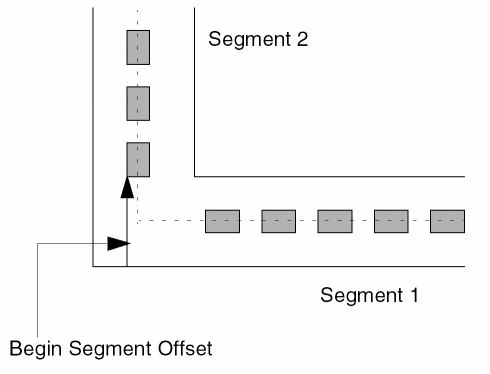
Begin Segment Offset
|
Specifies the offset of the first rectangle in a segment from the edge of the master path.The value must be a positive integer or floating-point number. Does not apply to the first segment of a sub rectangle sub path; the position of the first rectangle in the first segment is determined by the value of the Begin Offset option.
If the segment begins before the full distance specified by Begin Segment Offset, then it is not applied, and a sub rectangle could be placed at the corner of the sub rectangle path. The system will not create a spacing error; if the first sub rectangle in a segment would be too close to the last sub rectangle in the previous segment (if there would be less space than you specified for the Space option), the system discards the last sub rectangle in the previous segment. The default is 0.
|
|
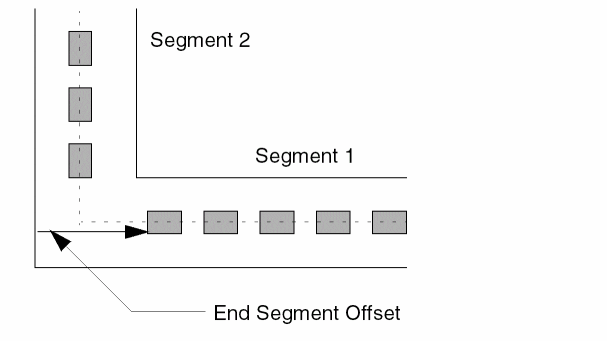
End Segment Offset
|
Specifies the offset of the last rectangle in a segment from the edge of the master path.The value must be a positive integer or floating-point number. Does not apply to the last segment of a sub rectangle sub path; the position of the last rectangle in the last segment is determined by the value of the End Offset option.If the segment ends before the full distance specified by End Segment Offset, then it is not applied, and a subrectangle could be placed at the corner of the subrectangle path. The system will not create a spacing error; if the first subrectangle in a segment would be too close to the last subrectangle in the previous segment (if there would be less space than you specified for the Space option), the system discards the last subrectangle in the previous segment. The default is 0.
|
|
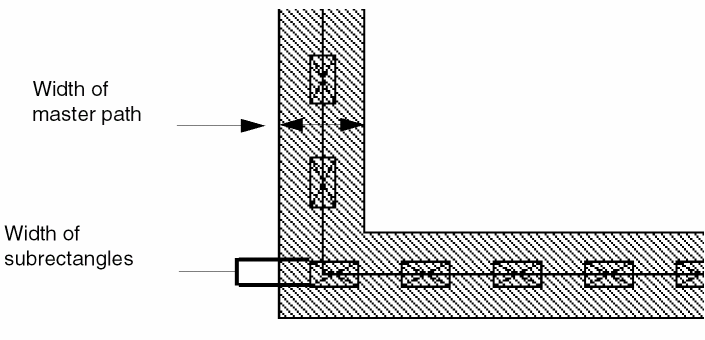
Width
|
Specifies the width of the rectangle(s). The width is parallel to the width of the master path. The value must be a positive integer or floating-point number.
If not specified, the system uses the value of the Length field; if neither is specified, the system uses the minWidth rule for the subrectangle layer from the technology file. If the minWidth rule is not defined in the technology file, the system uses the width of the master path.
|
|
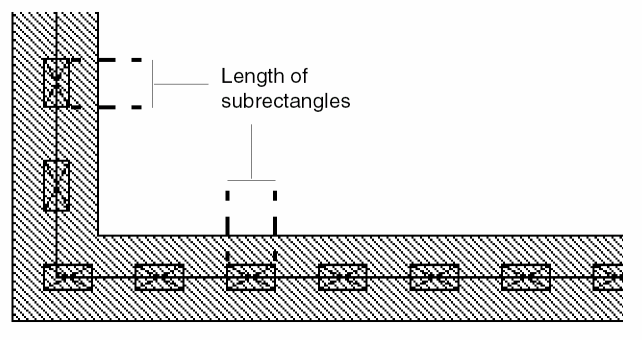
Length
|
Specifies the length of the subrectangle(s). The length is parallel to the master path centerline.
If not specified, the system uses the minWidth rule for the subrectangle layer from the technology file. If the minWidth rule is not defined in the technology file, you must specify a length; otherwise, the length remains zero, the system displays a warning in the CIW, and no subrectangles are created.
|
|
Space
|
Specifies the distance between the edges of adjoining rectangles. The value must be a positive integer or floating-point number. If not specified, the system uses the minSpacing rule for the subrectangle layer from the technology file. If the minSpacing rule is not defined in the technology file, you must enter a number or the system displays an error in the CIW.
|
|
Gap
|
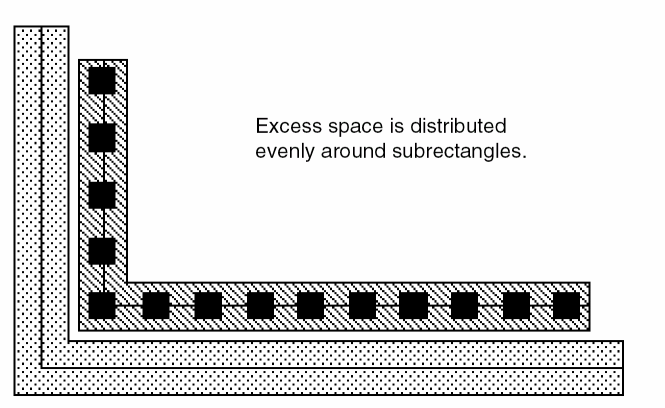
Specifies the method the system uses to place subrectangles within each segment. The default is distribute. The system always uses the value of the Space field for minimum space between subrectangles and calculates the maximum number of rectangles that fit in the segment. When the value of Gap is distribute, the system distributes the space around subrectangles as evenly as possible, in multiples of the grid space specified by mfgGridResolution. Any remaining space is left after the last subrectangle in the segment.
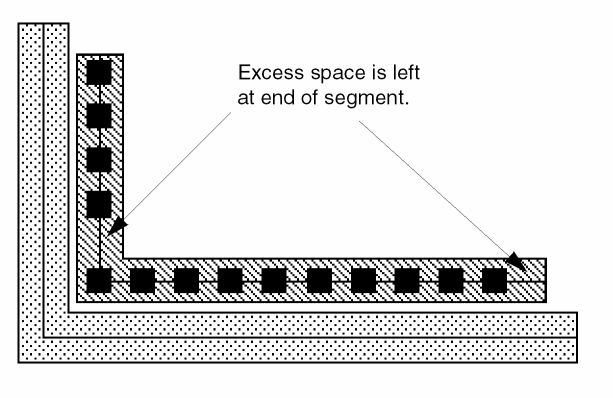
When the value of Gap is minimum, the system places subrectangles Space apart until there is no space for another rectangle, then leaves the excess space after the last subrectangle in the segment.
|
|
Justification
|
Specifies from which part of the master path to separate the sub-rectangles, in relation to the direction of the master path. The default is center. When the value is left, the right edge of the sub-rectangles is separated from the left edge of the master path. When the value is right, the left edge of the sub rectangles is separated from the right edge of the master path. When the value is center, the centerline of the sub rectangles is separated from the centerline of the master path.
|
|
Separation
|
Specifies the distance between the centerline or an edge of the sub rectangles and the centerline or an edge of the master path, depending on the value of the Justification field. The default is 0.
|
|
Diagonal
|
Specifies whether to create sub rectangles on diagonal portions of the path. Setting this option to t works only when diagonal path segments are 45 degrees and all sub rectangles on the path are square.
|
For Separation, whether you enter a positive or negative number depends on where you want to define the set of subrectangles in relation to the master path.
|
Separation
|
Center Justification
|
Left Justification
|
Right Justification
|
|
Zero
|
Center of width of subrectangles on master path centerline
|
Left edge of master path coincident with right edge of subrectangles
|
Right edge of master path coincident with left edge of subrectangles
|
|
Positive number
|
Center of width of subrectangles on left side of master path centerline
|
Left edge of master path on right side of right edge of subrectangles
|
Right edge of master path on left side of left edge of subrectangles
|
|
Negative number
|
Center of width of subrectangles on right side of master path centerline
|
Left edge of master path on left side of right edge of subrectangles
|
Right edge of master path on right side of left edge of subrectangles
|
Related Topics
Subparts of a Multipart Path
About Sets of Subrectangles
About Enclosure Subpaths
Create Multipart Path Form
Return to top