
D
Layout Editor Plug-Ins
Virtuoso® Layout Suite cockpit supports various plug-ins. Plug-ins are applications that can be dynamically added to the layout editor user interface to perform some specialized design task, and then removed again when no longer required.
The Launch - Plugins menu contains all the applications that are available from the layout editor. To use any application listed in the menu, you must first load it.
When you load a plug-in application, it appears in the layout editor, typically as a separate menu on the menu bar, but sometimes as a user interface docked on the left- side of the layout window. Some plug-ins open the related applications directly on the layout canvas itself.
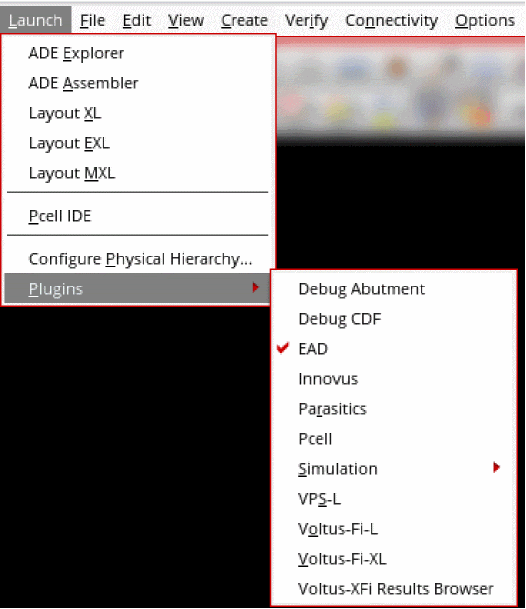
The following figure shows the Plugins submenu available on the Launch menu of Virtuoso Layout Suite.
The following table describes the plug-ins available in the layout editor and provides links for further information on associated features.
|
Lets you debug the abutment using the Pcell IDE window. |
|
|
Lets you debug CDF callback procedures using simple SKILL expressions for form initialization ( |
|
|
Adds the Innovus menu to the layout editor menu bar. The Innovus Implementation System is used as the design cockpit if a Verilog netlist is used for the top-level design. |
|
|
Adds the Pcell menu to the layout editor menu bar to let you create graphical Pcells. |
|
|
Opens the Virtuoso Verilog Environment for NC-Verilog Integration application. |
|
|
Adds the Simulation menu to the layout editor menu bar. |
|
|
Adds the Spectre menu to the layout editor menu bar. This application provides a solution for digital circuit designers to netlist a Virtuoso transistor-level schematic for the Spectre circuit simulator. |
|
|
Adds the UltraSim menu to the layout editor menu bar. This product provides a solution for digital circuit designers to netlist a Virtuoso transistor-level schematic for the Virtuoso UltraSim circuit simulator. |
|
|
Adds the VPS-L menu to the layout editor. The Virtuoso Power System L application provides a view of IR drop, electromigration (EM), and signal net EM analysis. |
|
|
Opens the Voltus-Fi-L application, which uses the extracted view to perform IR drop and Electromigration (EM) analysis. |
|
|
Opens the Voltus-Fi-XL application, which performs multi-mode simulation (MMSIM), electromigration, and voltage drop (EMIR) analysis for power and signal nets using the simulation database generated by Spectre APS/XPS. |
|
|
Adds the Voltus-XFi Results Browser assistant, which you can use to analyze the EM and IR drop violations in detail. For more information, see |
Return to top