
Analyze Tab
Use the Analyze tab to analyze vias in your design for locations where you can create vias.
The following table describes the options available on the Analyze tab of the Auto Via Assistant.
| Field | Description |
|---|---|
 |
|
 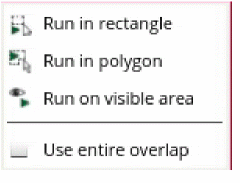 |
Runs analysis in the specified area. The options are: in rectangle, in polygon, or on visible area. Select the Use entire overlap option to use the entire overlap for analysis. |
 |
|
|
This section provides options to analyze the possibility of via creation for the specified nets. Environment Variable: viaAutoViaOnSelectedNets |
|
|
Excludes the specified nets from the analysis. Environment Variable: viaAutoViaExcludeNetsName |
|
|
Excludes the power and ground nets from the analysis. Environment Variable: viaAutoViaExcludePowerAndGroundNets |
|
|
This section provides options to specify constraint overrides. The Auto Via Assistant uses constraints from a constraint group or locally to override from environment variables. If no constraint override is selected then the assistant uses constraints from the constraint group. If any constraint override is selected then the assistant uses constraints from the environment variables. |
|
|
Displays all constraint override options. Environment Variable: viaShowAllConstraintOverride |
|
|
Specifies the minimum number of cuts to be automatically created for overlapping areas between shapes. Environment Variable: viaOverrideMinNumCutsConstraint, viaAutoViaMinNumCuts |
|
|
Specifies the alignment of vias. The choices are Auto, Top left, Top center, Top right, Center left, Center center, Center right, Bottom left, Bottom center, Bottom right, Edge align, Two edge align, or Two edge align center. The default is Auto . Environment Variable: viaOverrideAlignmentConstraint, viaAutoViaAlignment |
|
|
Specifies the preferred orientation for the cut class. The choices are Auto, Horizontal, Vertical, or Same orientation. Environment Variable: viaOverrideCutClassOrientConstraint, viaCutClassOrientation |
|
|
Specifies the preferred direction for the cut box as Auto, Horizontal, or Vertical. The default is Auto. Environment Variable: viaOverrideCutArrayDirConstraint, viaAutoViaCutArrayDirection |
|
|
Specifies the preferred enclosure direction for the via engine in auto mode as XY, Wire, Min area, Horizontal, or Vertical. Environment Variable: viaOverrideEnclosureDirConstraint, viaAutoViaEnclosureDirection |
|
|
Specifies whether the via is placed on the centerline. Environment Variable: viaOverrideOffCenterViaConstraint, viaPreventOffCenterVia |
|
|
Adds a metal layer to the via. Environment Variable: viaOverrideAddMetalConstraint, viaEnableAddMetal |
|
|
Lets you get a bigger cut size at the cost of more added metal outside the overlap. Environment Variable: viaOverrideMaximizeCutsConstraint, viaMaximizeCuts |
|
|
Places a via with a smaller cut class if a larger via is not DRC aware. Environment Variable: viaTryWithSmallerCutClass |
|
|
Places a bridge via according to the topology. If the bridge via is invalid, a basic via is created. Environment Variable: viaAttemptToUseBridgeVias |
|
|
Prevents the creation of a via if it introduces DRC violations on an overlap. If this option is not selected, the via is created even if it introduces DRC violations on the overlap. Environment Variable: viaFixOverlapShapeViolations |
|
|
Species the processing options to be used during via analysis. The choices are Distribute on multi CPU, or Single CPU. Environment Variable: viaMultiProcessMode |
|
|
Specifies the number of CPUs to be used during via analysis. Environment Variable: viaMultiProcessNumCPU |
|
|
Specifies the value of maximum stack depth to search the overlap with the same number of transitions or less than the specified number. Environment Variable: viaMaxStackDepth |
|
Related Topics
Auto Via Assistant Options Form
Analyzing a via using Auto Via Assistant
Creating a via using Auto Via Assistant
Return to top