
Multipart Path Environment Variables
You can set the following environment variables to work with multipart paths:
mppTemplate Environment Variable
You can set mppTemplate to control the default values for the fields in the Create Multipart Path form the first time the form is opened during an editing session. The system default for mppTemplate is New. When you open the Create Multipart Path form, the system sets the Template Name and MPP Template fields to New and the remaining fields to their system default values. Whenever you click New in the MPP Template field, the system resets all the fields in the Create Multipart Path and ROD Subpart forms to the system defaults.
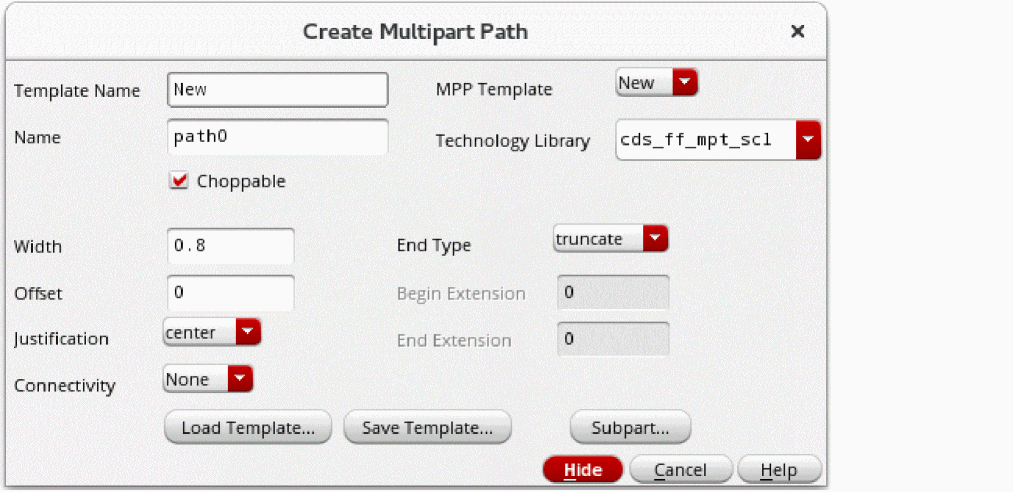
To preset the Template Name and MPP Template fields to the name of an MPP template you have already saved, set the mppTemplate environment variable to the template name. Then when you open the Create Multipart Path form for the first time during an editing session, the system sets the Template Name and MPP Template fields to the name of your template and uses the template values as defaults for the remaining fields.
When you choose a different value for the MPP Template field in the Create Multipart Path form, the system automatically resets the values of all the fields in the Create Multipart Path and ROD Subpart forms and updates the mppTemplate environment variable to match the template name you chose. For example:
-
If the MPP Template field is set to New, which is the default, and you change it to
guardring, the system resets all form fields to the values defined for theguardringtemplate and updates themppTemplateenvironment variable toguardring. -
Conversely, if the value of the MPP Template field is set to
guardringand you change it to New, the system resets all fields to the system defaults and updates themppTemplateenvironment variable to New.
mppASCIIFileName Environment Variable
You can set the mppASCIIFileName editor environment variable to control default values for the first time you open the following forms during an editing session:
- The ASCII File field in the Save Multipart Path Templates form
- The Template File field in the Load Multipart Path Template form
You can set this environment variable to a filename or to a path and filename. When you do not specify a path, the system uses your current directory.
The system lets you set mppASCIIFileName to a filename that does not exist yet. When you save a template to an ASCII file, the system creates the file. However, if you try to load before the file is created, the system displays a warning.
When the mppASCIIFileName environment variable is undefined or set to nil,
-
For the ASCII File field in the Save Multipart Path Templates form, the first time you open the form, the system supplies a default value that is based on your technology library name followed by
.mpp.templates.il. For example,myTechLib.mpp.templates.il.
You can change the ASCII File field by typing in it. If you do not type the .ilsuffix, the system appends it. - For the Load Multipart Path Template form, the system does not supply a default value.
When you set the mppASCIIFileName environment variable to a specific filename or path and filename, the system supplies your value as the default for both the ASCII File field in the Save Multipart Path Templates form and the Template File field in the Load Multipart Path Template form.
When you change the value of the ASCII File field in the Save Multipart Path Templates form, the system automatically resets the value of the Template File field in the Load Multipart Path Template form to match and also updates the mppASCIIFileName environment variable to match the value. However, if you change the Template File field in the Load Multipart Path Template form, the system does not change the value of the ASCII File field in the Save Multipart Path Templates form and does not change the mppASCIIFileName environment variable.
Related Topics
Load Multipart Path Template Form
Save Multipart Path Templates Form
Return to top