
Multipart Path Selection
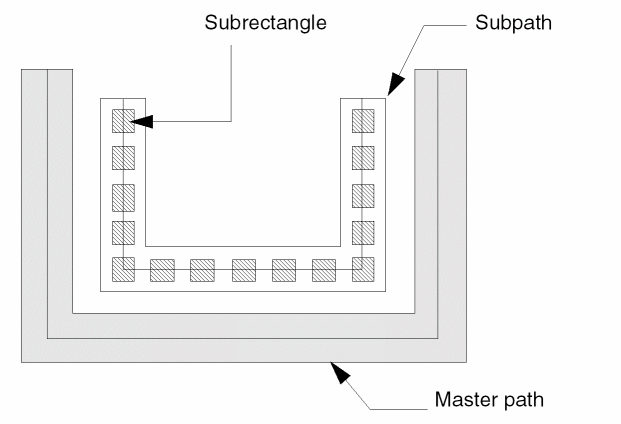
A multipart path (MPP) is a single object composed of multiple parts on the same or different layers. The parts are a single master path and one or more subparts. The master path is the primary part; subparts exist in relation to the master path. A subpart can be an offset subpath, an enclosure subpath, or a set of subrectangles. Individual subrectangles are not individual shapes but are part of a specific set of subrectangles.
The following figure shows an MPP that has one subpath and one set of subrectangles. Both the subpath and the set of subrectangles are offset from the master path.
Selecting multipart paths is similar to selecting regular paths: you point and click or create a selection box in a similar manner. In general, you cannot select subparts separately from the master path; however, you can select the chopped end of subpaths to stretch them.
- In full selection mode, when you select any part of a multipart path, the whole multipart path is selected. The master path is highlighted on the current selection layer, while subparts are highlighted on a different layer. This lets you see which part is the master path and which parts are subparts.
- In partial selection mode, you can select an end, segment, or vertex of the master path. In this mode, you can select the chopped ends of one or more subpaths and stretch them. When you stretch a chopped subpath, all other choppable subparts are stretched too.
You cannot directly select a set of subrectangles, but selecting and stretching the chopped end of a subpath causes all chopped parts in the multipart path to be regenerated, including chopped sets of subrectangles. The system regenerates subrectangles along orthogonal segments only.
Related Topics
Selecting a Whole Multipart Path
Selecting Chopped Subpath Ends in Multipart Paths
Selecting Multipart Path Segments
Selecting a Multipart Path Vertex
Return to top