
Annotation Browser Assistant
Use the Annotation Browser to view and manage the violation markers generated for the current design by different Virtuoso applications.
The Annotation Browser displays the violation markers due to the current environment of the design window. If you modify the environment by editing a cellview in place or descending into a hierarchical cellview, the Annotation Browser gets updated accordingly to reflect a different set of violation markers.
In addition to the generic methods for showing or hiding an assistant, you can use the Layout XL toolbar button,  , to show and hide the Annotation Browser.
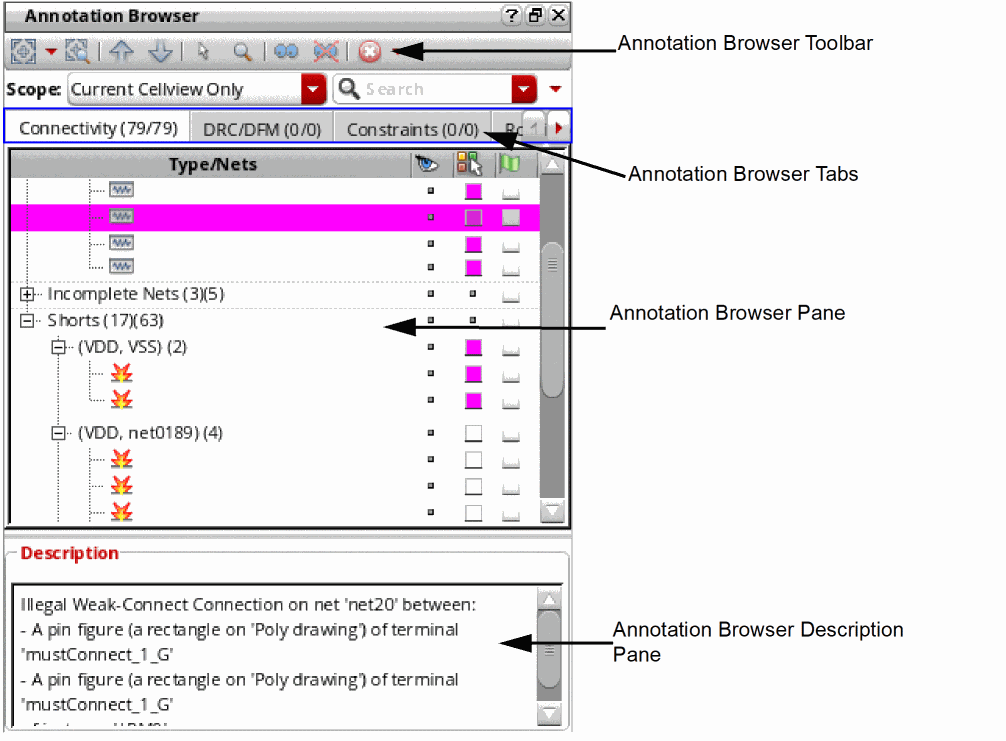
The Annotation Browser graphical user interface consists of the following elements.
Related Topics
Annotation Browser Shortcut Menus
Annotation Browser Options Form
Markers Generated by Connectivity Extractor
Return to top