
Selection of a Multipart Rectangle
A multipart rectangle is a single object composed of multiple parts on the same or different layers. The parts consist of one or more named master rectangles and one or more arrays of unnamed subrectangles. Each named master rectangle is a separate object with ROD attributes, created at level zero in the hierarchy. Each unnamed sub-rectangle is an ordinary, unnamed database shape with no ROD attributes, created at level zero in the hierarchy.
The figure illustrates a multipart rectangle that has one master rectangle and two arrays of subrectangles. Both arrays of subrectangles are offset from the master rectangle.
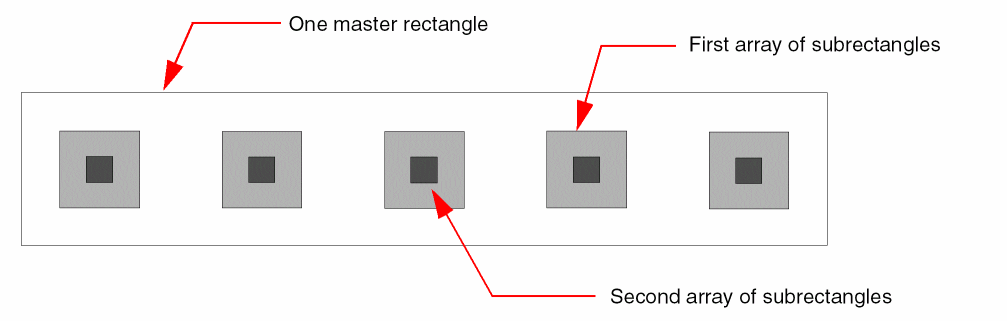
Selecting the master rectangle of a multipart rectangle is similar to selecting a regular rectangle, you click it or create a selection box.
- In full selection mode, when you select any part of a master rectangle or its associated subrectangles, the whole master rectangle and all its subrectangles are selected. The master rectangle is highlighted on the current selection layer, while the associated arrays of subrectangles are highlighted on different layers. This lets you view which part is the master and which parts are subrectangles.
- In partial selection mode, you can select an edge or vertex of a master rectangle.
Related Topics
Return to top