
1
Relative Object Design Functions
Virtuoso® relative object design (ROD) is a set of high-level functions for defining simple to complex layout objects and their relationships to each other, without the need to use low-level Cadence® SKILL language functions.
This user guide is aimed at CAD engineers and assumes that you are familiar with the development and design of integrated circuits, Virtuoso® Layout Suite L editor, and SKILL programming. This user guide also assumes that you are familiar with the creation of parametrized cells using SKILL or the graphical user interface.
This chapter contains information you need to know before using the Virtuoso® relative object design (ROD) functions and describes the ROD functions.
For more information on relative object design concepts, refer to the Virtuoso Relative Object Design User Guide.
Important Information related to Using ROD SKILL Functions
Editing ROD Objects with the Virtuoso Layout Editor
Using Variables in ROD Functions
Maximum String Length for ROD Function Arguments
List of ROD SKILL Functions
Functions are listed in alphabetical order
Editing ROD Objects with the Virtuoso Layout Editor
For information about how the Virtuoso layout editor commands work with Virtuoso relative object design (ROD) objects, see
Using commands that are not fully supported for ROD objects could cause the objects to lose the ROD information associated with them, changing the objects into ordinary shapes.
Using Variables in ROD Functions
The following variables are useful in ROD functions:
-
pcCellView
An internal variable automatically created by thepcDefinePCellfunction.pcCellViewcontains the database ID of the cellview you are creating. Within the body of your Pcell code, use thepcCellViewvariable as the cellview identifier for which you create objects. In SKILL expressions (ILExpr) for ROD arguments, use therodCellViewvariable rather thanpcCellView. -
tcCellView
An internal variable automatically created by thetcCreateCDSDeviceClassfunction.tcCellViewcontains the database ID of the cellview you are creating. Within the body of your Pcell code, use thetcCellViewvariable as the cellview identifier for which you create objects. In SKILL expressions (ILExpr) for ROD arguments, use therodCellViewvariable rather thanpcCellView. -
rodCellView
When used in a SKILL expression (ILExpr) for a ROD argument, such as when specifying the n_xSep and n_ySep arguments forrodCreatePath,rodCellViewcontains the database ID of the current cellview. UsingrodCellViewallows you to reference rules in your technology file so that your code will work in different technologies. For example, you can create alignments at the zero-level in your hierarchy, and the system automatically updates the alignments when you make changes to technology file rules that affect them. You can userodCellViewinside or outside of Pcells.
Maximum String Length for ROD Function Arguments
The maximum number of characters you can specify for a ROD function argument that accepts a string is 1,024. If you specify a string having more than 1,024 characters, you get a syntax error. When you assign a string value to any of the following name arguments, use less than 1,024 characters:
- Paths, rectangles, or polygons when you create them
-
Objects using the
rodNameShapefunction - User-defined handles
If you specify a name using a symbol, use no more than 255 characters in the symbol name. Any symbol name longer than 255 characters results in an error.
Using Special Characters in Names
When possible, avoid using special characters in the names of handles or ROD objects. Using a special character requires you to type a backslash as an escape character every time you type the name.
If you must use a special character in a string, type a backslash followed by the code for the special character, as shown in the following table:
| Special Character | Escape Sequence |
|---|---|
rodAddMPPChopHole
rodAddMPPChopHole(R_rodObj l_pts);end rodAddMPPChopHole =>t/nil
Description
Adds a chop hole to all choppable parts of a ROD multipart path. To define a chop hole, you specify a list of points on the centerline of the master path. The results depend on whether the master path is choppable or not.
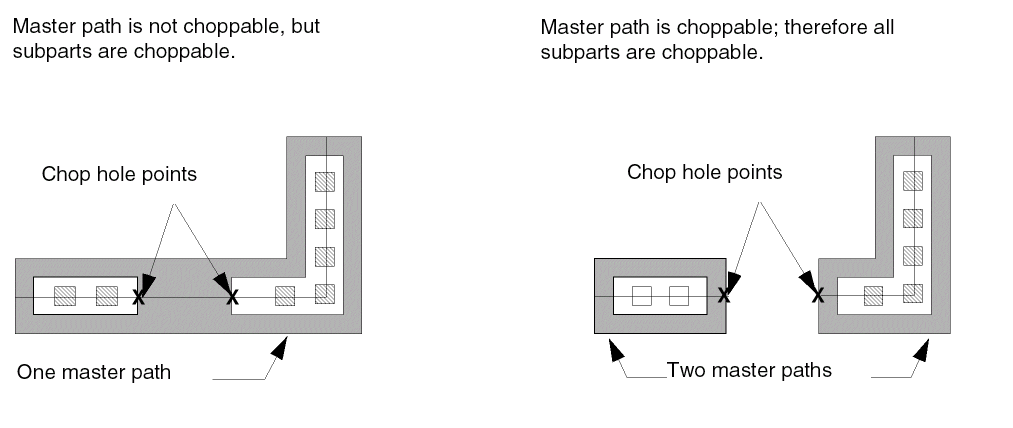
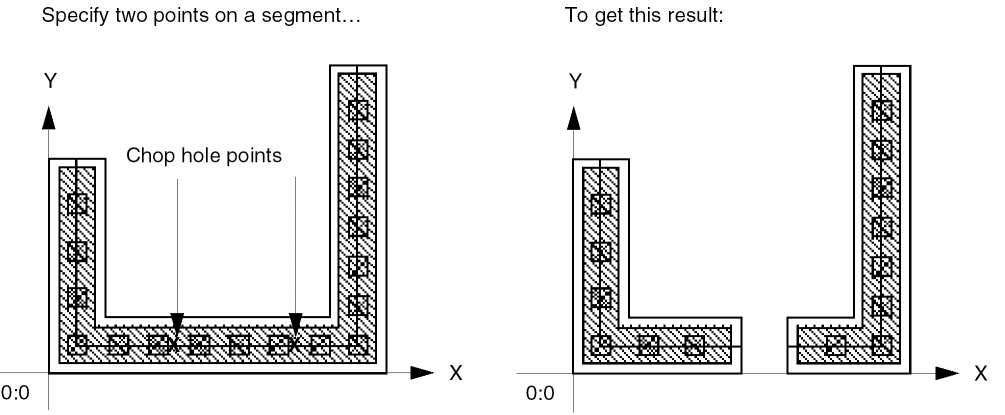
To add a chop hole to a segment of a multipart path, you must specify two points on the same segment. If you specify only one point on a segment, the system ignores the point.
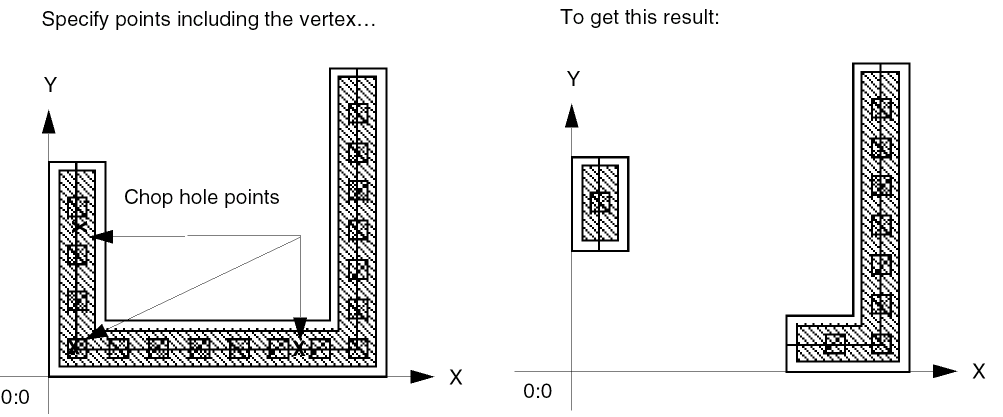
To add a chop hole that includes a vertex (the intersection of two segments), you must include the vertex point in your list.
For more information about how chop holes affect multipart paths, see
Arguments
Value Returned
rodAddPoints
rodAddPoints(l_point1 l_point2);end rodAddPoints =>l_point/nil
Description
Adds two points together and returns the resulting point as l_point.
Arguments
|
A set of coordinates in one of the following formats: |
|
|
A set of points in one of the following formats: |
Value Returned
rodAddSubPart
rodAddSubPart(R_rodObjIdt_subpartType l_subpartParamList);end rodAddSubPart =>R_rodSubpartId/nil
Description
Creates a new subpart of the type specified by t_subpartType with the given list of parameters (l_subpartParamList) and adds it to an existing multipart path (MPP).
Arguments
|
String specifying the subpart type. It can be an offset, enclosure, or a rectangle subpart. |
|
|
|
|
|
|
|
|
|
|
|
|
|
|
|
|
|
 |
|
|
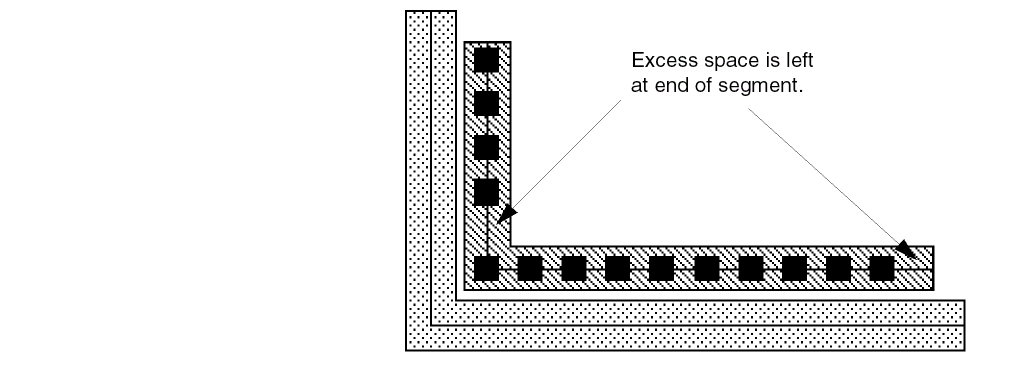
When the value of S_gap is
When the value of S_gap is |
|
 |
|
Value Returned
|
Returns R_rodSubpartId if the subpart was created and added successfully to the MPP. |
|
Example
rodAddSubPart(mppId "offset" list(list("poly1" "drawing") 1.0 t 0.0 "center" 0.1 0.1))
Related Topics
rodAddToX
rodAddToX(l_point n_num);end rodAddToX =>l_point/nil
Description
Adds a number to the X coordinate of l_point and returns the resulting point as l_point.
Arguments
|
A set of coordinates in one of the following formats: |
|
Value Returned
|
The point resulting from adding n_num to the X coordinate of l_point. |
|
rodAddToY
rodAddToY(l_point n_num);end rodAddToY =>l_point/nil
Description
Adds a number to the Y coordinate of l_point and returns the resulting point as l_point.
Arguments
|
A set of coordinates in one of the following formats: |
|
Value Returned
|
The point resulting from adding n_num to the Y coordinate of l_point. |
|
rodAlign
rodAlign( [ ?alignObjR_alignObj] [ ?alignHandleS_alignHandle] [ ?refObjR_refObj] [ ?refHandleS_refHandle] [ ?refPointl_refPoint] [ ?maintaing_maintain] [ ?xSeptxf_xSep] [ ?ySeptxf_ySep] );end rodAlign =>R_rodObj/nil
Description
Aligns a named object by a point handle on that object to a specific point or to a point handle on a reference object. You can align objects that are at different levels of hierarchy as long as both objects are in the same top-level layout cellview. You can specify positive or negative separation between alignment points in the direction of both the X and Y axes, either as absolute distances or with Cadence SKILL language expressions. The system applies the offset from the reference point or reference object to the object to be aligned.
Arguments
Value Returned
|
ROD object ID for the ROD object information associated with R_alignObj. |
|
Additional Information
When you align an object to a point, the system creates a user-defined handle for the point with the system-assigned name handlen, where n is a number that makes the handle name unique in the cellview. For information about user-defined handle, see
You can also use the rodAlign function to quickly arrange objects in relation to each other by temporarily aligning them. When the g_maintain argument is set to nil, alignments are no longer maintained after the function is executed.
For an overview about aligning objects, see
Figure 1-1 shows the object polyRect before and after it is aligned to the reference point 0:0.
Figure 1-1 Aligning a Rectangle to a Point
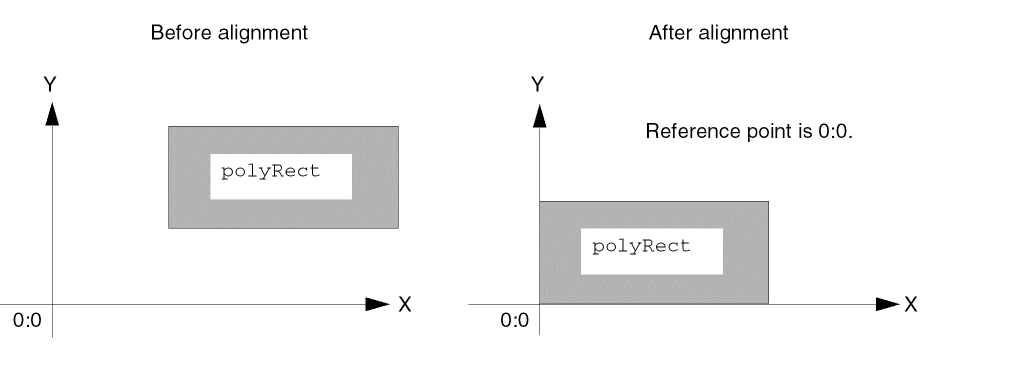
Figure 1-2 shows the objects polyRect and rect0 both before and after polyRect is aligned to rect0. After alignment, the centerLeft handle of polyRect is aligned to the centerRight handle of rect0, with a positive separation along the X axis. The object polyRect is on the right side of rect0 because the system applies the offset from the reference object rect0 to the aligned object polyRect.
Figure 1-2 Aligning Two Rectangles with Positive Separation
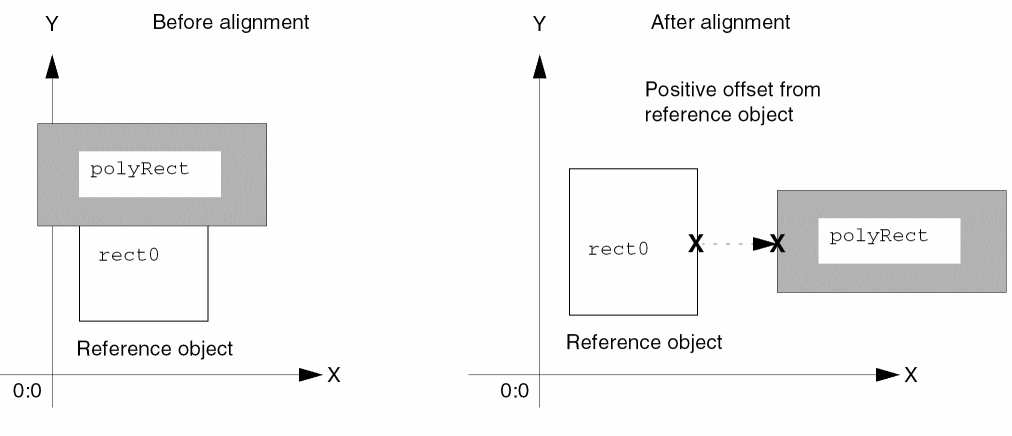
Figure 1-3 shows instance I1 and the rectangle rect0. Instance I1 contains instance I2, which contains the object polyRect.
Figure 1-3 Aligning an Instance and Rectangle Across Hierarchy
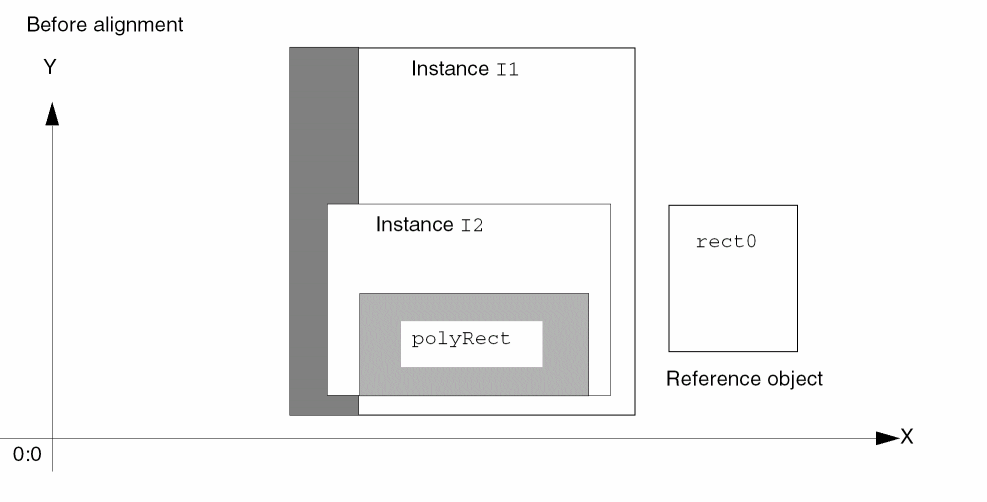
The hierarchical name for polyRect is I1/I2/polyRect.
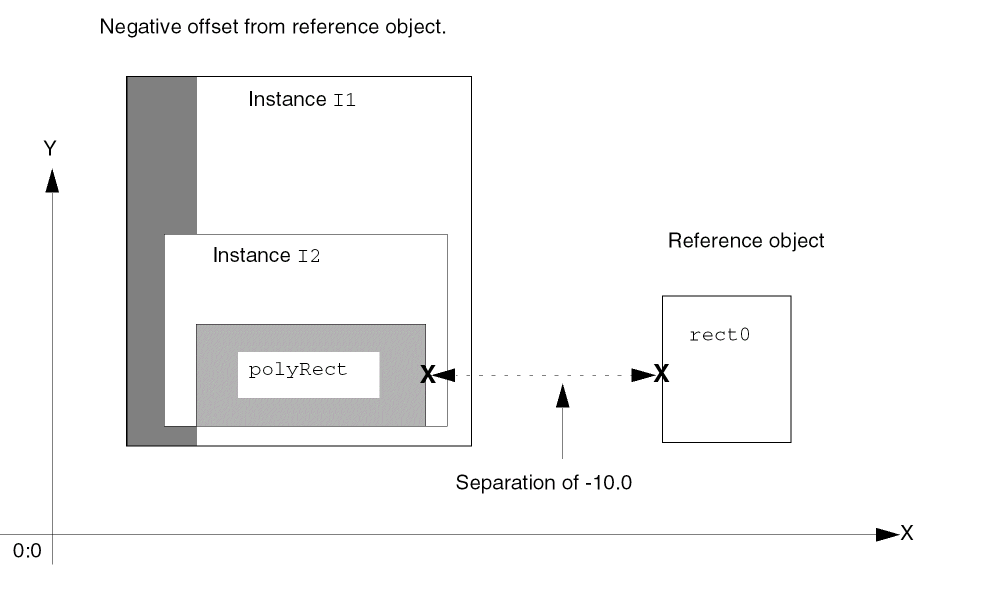
Figure 1-4 shows instance I1 and rect0 after alignment across hierarchy. rect0 is the reference object. The centerRight handle of I1/I2/polyRect is aligned to the centerLeft handle of rect0, with a -10 separation in the direction of the X axis.
Because the offset is negative along the X axis, the aligned object I1/I2/polyRect is on the left side of the reference object rect0. Subsequently, if you move rect0, instance I1 and everything in it moves with rect0, maintaining the correct alignment; also, if you move instance I1, rect0 moves with it.
Figure 1-4 Instance and Rectangle After Alignment
Querying an Object for Alignment
You can query any named object to see what the object is aligned to. When you query a hierarchical object, the system displays all top-level alignments for the object. To see the alignments for an object, you can use the Virtuoso layout editor Edit Properties command (the ROD section) or type commands in the CIW, as shown in the examples below.
As shown in the example, I1/I2/polyRect is aligned to rect0. To query rect0 in Figure 1-4 for alignments, type the following in the CIW:
cvId = deGetCellView()
rodGetObj( "rect0" cvId )~>align
The system displays text similar to the following in the CIW:
((rodObj:2585108 "cR" rodObj:2585114 "cL" -10.0
        0.0
    )
)
The text above states that the centerRight (cR) handle on I1/I2/polyRect (rodObj:2585108) is aligned to the centerLeft (cL) handle on rect0 (rodObj:2585114), with a separation of -10.0 along the X axis and no separation along the Y axis.
Moving Aligned Objects
When you move a ROD object that is aligned to one or more ROD objects, the aligned objects also move. When you move a ROD object that is aligned to a reference point, the system changes the value of the reference point handle to keep the point in the same relationship with the object.
rodAssignHandleToParameter
rodAssignHandleToParameter( [ ?parameterS_parameter] [ ?rodObjR_rodObj] [ ?handleNameSl_handleName] [ ?displayNameS_displayName] [ ?displayExpressionS_displayExpression] [ ?stretchDirS_stretchDir] [ ?stretchTypeS_stretchType] [ ?moveOriging_moveOrigin] [ ?updateIncrementf_updateIncrement] [ ?userDatag_userData] [ ?userFunctionSl_userFunction] [ ?stretchKeyS_stretchKey] [ ?shapeS_shape] );end rodAssignHandleToParameter =>t/nil
Description
Assigns one or more user- or system-defined point handles on a ROD object within a SKILL-based parameterized cell (Pcell) to a single Pcell parameter, so you can change the value of the parameter by graphically stretching the handle(s). Stretching a handle has the same effect as changing the value of the associated parameter for the Pcell instance using the Edit Properties form. You cannot stretch handles on the Pcell master. All rodAssignHandleToParameter statements must occur within the body-of-code section of a SKILL-based Pcell.
For an overview of stretchable Pcells, see
Arguments
| S_display Name | S_display Expr | displayExpr Evals To | What You See |
|---|---|---|---|
|
If you do not specify S_displayExpression, the system treats S_displayName as an expression and evaluates it dynamically as you stretch the Pcell. The system displays both the string or symbol and the result of the evaluation, separated by the string displayName = displayName_evaluation_result
If S_displayName does not evaluate successfully, the system displays
For more information about specifying this argument, see “Additional Information”. |
|
|
Symbol or character string specifying an expression, such as a parameter name or equation. For example, the following are valid values: The system evaluates the value of this argument dynamically as you stretch the Pcell and displays the result next to the Pcell. When you specify this argument but do not specify the S_displayName argument, the system displays the result of the evaluation in the following format:
For example, for the expression
If you also specify S_displayName, the system displays both the value of S_displayName, without evaluating it, and the result of evaluating the S_displayExpression argument, separated by the string
string_or_symbol =
For more information about specifying this argument, see “Additional Information”. |
|
|
Symbol or character string specifying the axis along which you want the Pcell to stretch. Although you can stretch the Pcell in any direction, the system computes the change to S_parameter only in the direction of the axis specified by this argument; the system updates the associated Pcell parameter with a change in the direction of either the X or Y axis. |
|
|
Symbol or character string specifying whether the stretch is relative to the position of the handle or to the center of the Pcell. When the value is
For an
For examples showing relative vs. absolute, see |
|
|
Boolean value specifying whether the system can move the origin point of an instance during the stretch of a handle on the instance or on an object in the instance. When the value is When the origin point can move, the edges of the instance adjacent to the origin point can move also, which allows handles on those edges to move in the direction of the stretch. |
|
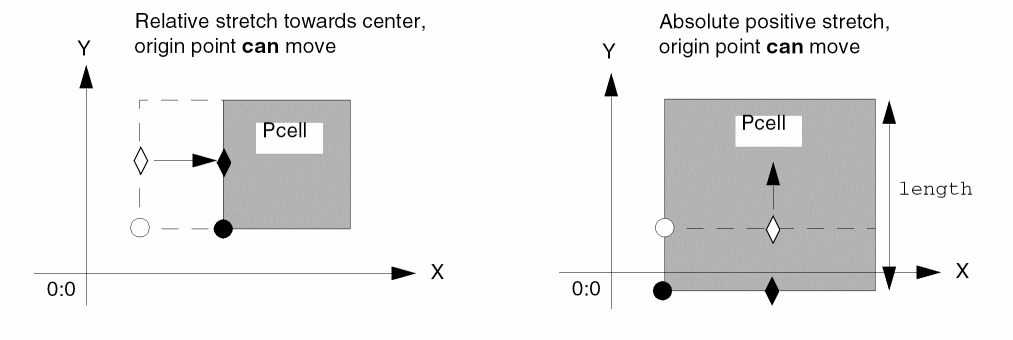 |
|
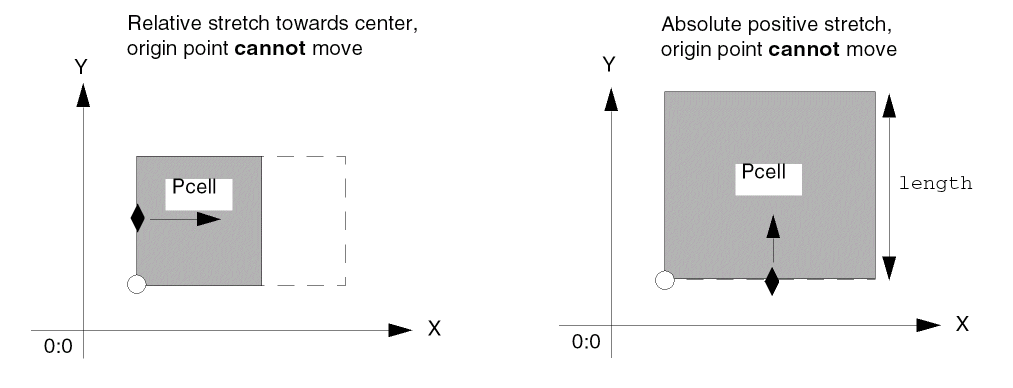 |
|
|
When the origin cannot move, the edges of the instance adjacent to the origin point cannot move either, which prevents handles on those edges from moving in the direction of the stretch. |
|
|
Floating-point number specifying how often the system updates the Pcell parameter (S_parameter) and regenerates the Pcell during a stretch operation. If you specify a negative number, the system uses the default. The default is the value of the layout editor environment variable |
|
|
User data of any data type. The system evaluates the data and includes the result as part of the r_defstruct structure that is passed to Sl_userFunction as input. This argument lets you pass the values of variables and constants defined in your Pcell code to a user-defined function. For example, you can pass the values of design rules, such as |
|
|
Symbol, string, or
It is recommended not to use lambda functions when using the Express Pcell feature. Instead, a normal function should be defined and passed as a function object to ROD for stretch handling. This is because in the Express Pcell feature, the Pcell code is evaluated and the submaster is stored in cache to avoid reevaluation. However, the lambda functions are temporary functions that need to be evaluated each time and therefore, cannot be stored in cache as a function object pointer. Therefore, any storage of the lambda functions as a function object becomes stale for the next session.
As input to the user-defined function, the system passes a defstruct that is predefined by the ROD software. A defstruct is a named SKILL structure containing a collection of one or more slots for variables.
In this syntax, the defstruct is referred to as r_defstruct. Replace defstruct with your own name, for example, See defstruct. |
|
|
This destruct contains the following predefined variable slots:
|
|
|
The system replaces the value of Sl_parameter with the value returned. If the value for Sl_parameter is also set using the
User-defined functions must return a value with the same data type as S_parameter, and the value assigned by a
For more information about the ROD predefined destruct, see “The r_defstruct Structure”. For more information about user-defined functions, see “User-Defined Functions”. |
|
|
Symbol or character string that you can specify as per your requirement. The internal representation of this string is allocated dynamically. It is a null string, until a key is specified in the |
|
|
Symbol or character string that you can use to control the default shape of the stretch handle. |
|
Value Returned
Additional Information
Displaying Parameter Information
You can define information to be displayed for a Pcell parameter by specifying the S_displayName and S_displayExpression arguments. For S_displayExpression, you can include any Pcell parameter in the expression. The system displays the information next to the upper-right corner of the Pcell when you select the assigned stretch handle and updates the information as you drag the handle.
For example, for a Pcell that contains only a rectangle and has one parameter, width, you might want to display the name of the parameter and its new value as you stretch the Pcell.
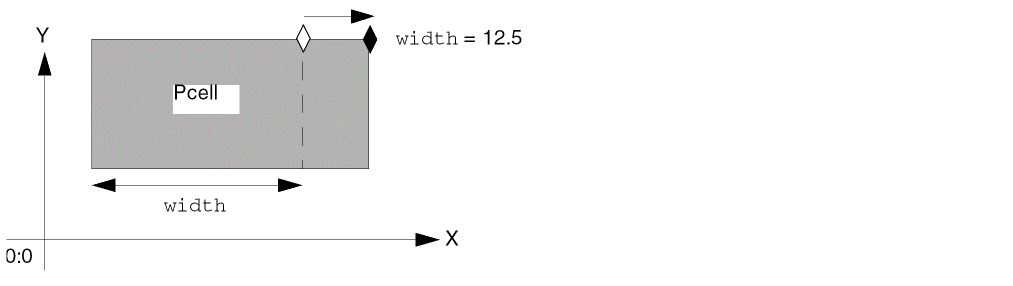
Depending on the information you want to display, specify the arguments as follows:
-
To display
specify only the S_displayName argument. The system displays its contents as an unevaluated text string on the left and the result of evaluating the S_displayName argument on the right, separated by the stringdisplayName=displayName_evaluation_result" = ".
The following examples show what the system displays when you specify only the S_displayName argument:
If no value is specified for S_displayName, nothing is displayed for it. -
To display
specify only the S_displayExpression argument. You can use any Pcell parameter in the expression. The system evaluates the expression and displays the result.displayExpression_evaluation_result
For example, if S_displayExpression contains the expressionwidth + 3, and the variablewidthis currently equal to5.0, the system displays the following:8.0 -
To display
specify both the S_displayName and S_displayExpression arguments. The system displays the contents of S_displayName as an unevaluated text string on the left and the result of evaluating S_displayExpression on the right, separated by the stringdisplayName=displayExpression_evaluation_result" = ".
The following examples show what the system displays when you specify both display arguments:
Examples of Display Information
In the following example, the Pcell contains only a rectangle, with handles assigned to the three Pcell parameters: capacitance, width, and length. The Pcell code contains three rodAssignHandleToParameter statements:
-
One
rodAssignHandleToParameterstatement assigns theupperRighthandle to thecapacitanceparameter. -
A second
rodAssignHandleToParameterstatement assigns thelowerRighthandle to thewidthparameter. -
A third
rodAssignHandleToParameterstatement assigns thelowerRighthandle to thelengthparameter.
In each statement, the information to be displayed is specified as follows: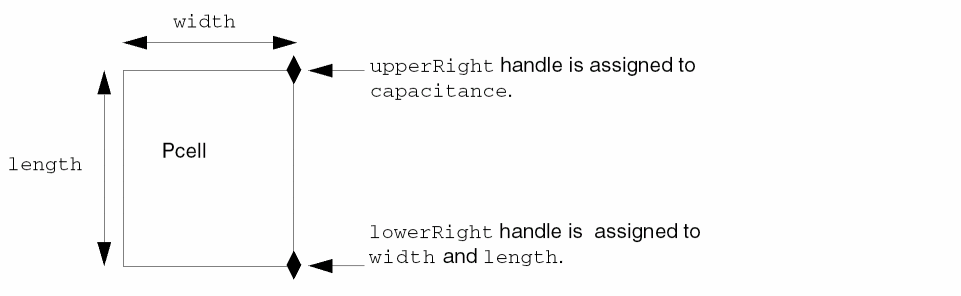
-
For the
capacitanceparameter, S_displayName iscapand S_displayExpression is the expressionwidth*length/capCoeff -
For the
widthparameter, S_displayName iswidthand S_displayExpression is not specified. -
For the
lengthparameter, S_displayName islengthand S_displayExpression is not specified.
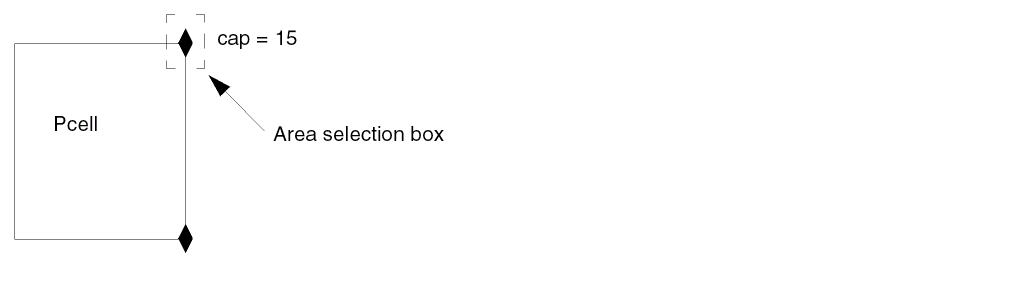
When you select the upperRight handle, you see the following information displayed:
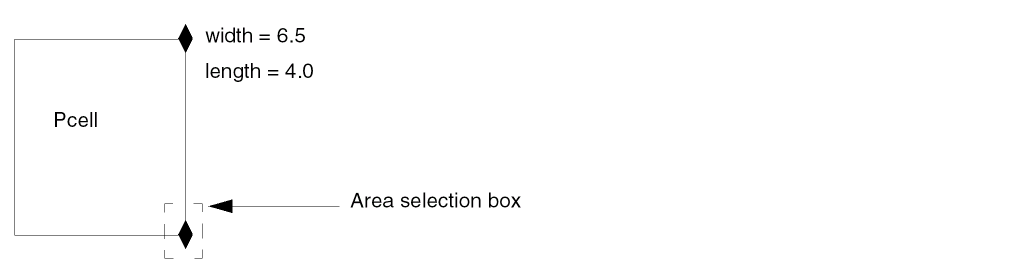
When you select the lowerRight handle, you see the following information displayed:
For a table showing examples of how to specify the display arguments, see Table 1-2.
The following table shows the results of specifying one or both of the S_display arguments.
| S_displayName | S_display Expression | Evaluates To | What You See |
|---|---|---|---|
User-Defined Functions
When you assign a handle to a parameter, you can define your own function (Sl_userFunction) to calculate the value of the Pcell parameter (S_parameter) to which you are assigning the handle. These functions are executed when the Pcell is stretched; they cannot depend on Pcell parameters.
Information Passed to a User-Defined Function
As input to user-defined functions, the ROD software passes a predefined, user-named defstruct (r_defstruct). For a description of the contents of the defstruct, see the Sl_userFunction
Specifying Values for Parameters Using the -> Operator
Within a user-defined function, you can use the following construct to set the value for any Pcell parameter:
myDefstruct->parameters->parameter_name=parameter_value
where myDefstruct is your name for the defstruct and parameter_value must be the same data type or evaluate to the same data type as parameter_name. For example,
myDefstruct->parameters->width = 6.0
The system stores all such constructs in the place-holder variable g_parameters within the r_defstruct structure.
The system executes the user-defined function, which calculates and returns a new value for S_parameter. After the user-defined function completes, the system looks at the variable g_parameters within the r_defstruct structure and, if values were set for any parameters, uses those values as the new values for the parameters.
myDefstruct->parameters-> construct, the system uses the value assigned by the construct rather than the value returned by the user-defined function.Loading User-Defined Functions
When there are user-defined functions specified, the system calls them at each drag increment during the stretch and when you complete the stretch operation. You need to make sure that user-defined functions are loaded into the system before the system needs them. User-defined functions must be loaded prior to dragging a stretch handle belonging to a Pcell.
The safest way to make sure that user-defined functions are always available when needed is to attach them to your library. Then the system automatically loads them when the library is opened.
Follow the steps below to attach a source file for a user-defined function to a library:
- Place the source file within the library directory.
-
Create a file named
libInit.ilin the library directory. -
The system automatically loads the
libInit.ilfile when the library is opened. -
Within the
libInit.ilfile, write aloadstatement like this:load( strcat( ddGetObjReadPath( ddGetObj( "
libName" )) "/filename.il" ) ; end strcat ) ; end load
hiSetBindKey in your libInit.il file; doing so will result in an error. For more information see “What to Avoid in the libInit.il File” in the Virtuoso Parameterized Cell Reference.Lambda Functions
Using a lambda function lets you define a function without a name, in the form of a list. This is useful for writing temporary or local functions.
The syntax for a lambda function is:
lambda( (l_formalArguments)g_expr1...) =>U_result) ); end lambda
|
Identifies the following arguments as belonging to an unnamed function. |
|
|
The remaining elements in the list are SKILL expressions that are evaluated when the |
For example, the following lambda function defines an unnamed function capable of computing the length of the diagonal side of a right-angled triangle:
lambda( (x y) (sqrt (x*x + y*y))
When x = 3 and y = 4, the value returned is 5.0.
You do not need to precede a lambda function with a single quotation mark.
For more information about lambda functions, see
r_defstruct is a user-named structure that is predefined by the ROD software to contain a series of slots for specific variables. A defstruct behaves just like a disembodied property list. The system passes the defstruct as input to user-defined functions defined within the rodAssignHandleToParameter function. For more information, see defstruct.
You can access the value of the variables in the r_defstruct structure by using the name you assigned to the defstruct, the structure access operator ( ->) and the name of the variable. For example, to access the value of the variable R_rodObj, type the following:
myDefstruct->rodObj
The following examples use user-defined functions.
The following user-defined function adds the value of n_increment to g_paramVal, prints the current values of the myDefstruct variable slots, displays a warning message if the return value is less than zero, and returns the new value of g_paramVal.
procedure( exampleUserFunction(myDefstruct)
    let(((returnVal myDefstruct->paramVal + myDefstruct->increment))
         ;; print all parameter values:
        printf("myDefstruct->handleName = %s\n", myDefstruct->handleName)
        printf("myDefstruct->increment = %f\n", myDefstruct->increment)
        printf("myDefstruct->origInstId = %L\n", myDefstruct->origInstId)
        printf("myDefstruct->parameter = %s\n", myDefstruct->parameter)
        printf("myDefstruct->paramVal = %L\n", myDefstruct->paramVal)
        printf("myDefstruct->rodObj = %L\n", myDefstruct->rodObj)
        printf("myDefstruct->stretchDir = %s\n", myDefstruct->stretchDir)
        printf("myDefstruct->stretchMaster = %L\n\n",
                myDefstruct->stretchMaster)
        if( (returnVal <= 0.000001)
            progn(warn("returnVal for parameter %s must be > 0\n"
                        myDefstruct->parameter)

             ) ; end of progn
        ) ; end if
        returnVal
    ) ; end of let
) ; end or procedure
The user-defined function produces the following output:
myDefstruct->handleName = upperRight
myDefstruct->increment = 0.300000
myDefstruct->origInstId = db:67200100
myDefstruct->parameter = length
myDefstruct->paramVal = 1.0
myDefstruct->rodObj = rodObj:66969624
myDefstruct->stretchDir = y
myDefstruct->stretchMaster = db:67195948
The following example shows how to specify the g_userData argument and the g_parameters element of the r_defstruct structure for user-defined functions.
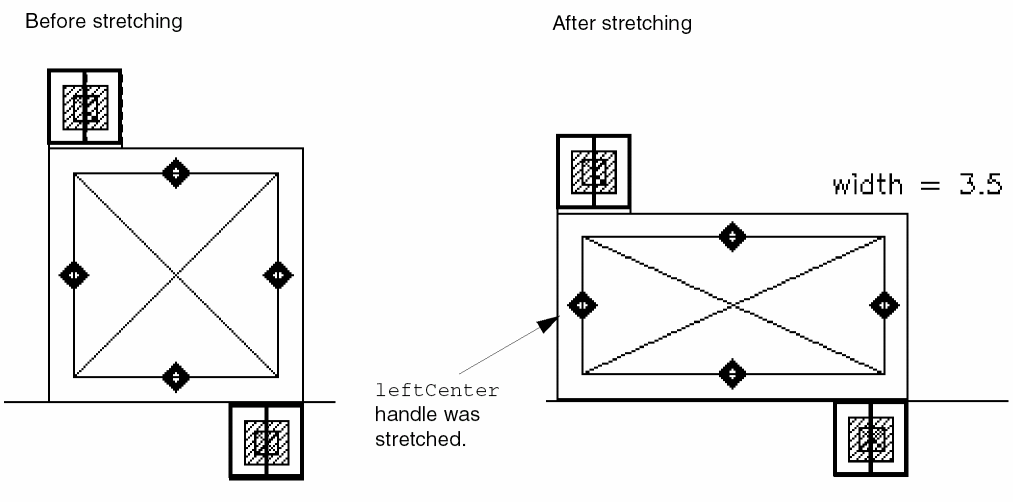
In the example, a capacitor has a fixed capacitance parameter (cap) and variable width and length parameters. As length is stretched, the system automatically adjusts width to maintain the fixed capacitance value; the converse is also true.
The figure below shows what the capacitor looks like before and after stretching the leftCenter handle to increase width. The system decreases length to keep the capacitance constant.
To make the Pcell process independent, design rules such as minSpacing were retrieved from the technology file and passed to the user-defined function with the optional g_userData argument.
In the code below, each section does the following:
- Section 1 is the part of the Pcell code that gets the technology file ID and uses it to retrieve the technology rules used in the input to the user-defined function in Section 3.
-
Section 2 is the part of the Pcell code that assigns the
leftCenterandrightCenterhandles to thewidthparameter. -
Section 3 is a user-defined function that is called from within the Pcell, but which is not part of the Pcell code. The procedure updates
lengthwhenwidthis stretched. The g_userData argument passes technology rule values to the user-defined function.
As a SKILL Pcell author, you can write a process-independent Pcell by using design rules from your technology file, such as minSpacing and minEnclosure. The g_userData parameter lets you pass values for constants and variables, such as the values of technology rules, directly to your user-defined function.
;; SECTION 1: Pcell code that gets minimum values from technology file
tfId = techGetTechFile( pcCellView )
capCoeff = techGetParam( tfId "capCoeff" )
;layer1 and layer2 are top and bottom layers for capacitor
 lay1Ovia = techGetOrderedSpacingRule( tfId "minEnclosure"
                                     layer1 "cont")
 lay2Ovia = techGetOrderedSpacingRule( tfId "minEnclosure"
                                     layer2 "cont" )
 viaW = techGetSpacingRule( tfId "minWidth""cont" )
 grid = techGetMfgGridResolution( tfId )
 minCap = techGetParam( tfId "minCap" )
;; SECTION 2: Pcell code that assigns handles to parameters
rodAssignHandleToParameter(
    ?parameter "width"
    ?rodObj cnt
    ?displayName "width"
    ?handleName list("leftCenter" "rightCenter")
    ?stretchType "absolute"
    ?stretchDir "x"
    ?userData list(list(capCoeff lay1Ovia lay2Ovia viaW grid
                 minCap ))
    ?userFunction "myfunc"
) ; end rodAssignHandleToParameter
;; SECTION 3:User-defined function called from within pcell.
;; The procedure updates the length when width is changed by
;; the stretch operation.
procedure(myfunc(myDefstruct)
    let((returnVal mylist capCoeff lay1Ovia lay2Ovia viaW grid
            minCap)
        returnVal = myDefstruct->paramVal + myDefstruct->increment
        mylist = car(myDefstruct->userData)
        capCoeff = nth(0 mylist)
        lay1Ovia = nth(1 mylist)
        lay2Ovia = nth(2 mylist)
        viaW = nth(3 mylist)
        grid = nth(4 mylist)
        minCap = nth(5 mylist)
        cap = (myDefstruct->stretchMaster)~>parameters~>cap
        if(lay1Ovia > lay2Ovia then
             minCapWidth = (2 * lay1Ovia + viaW)
        else
            minCapWidth = (2 * lay2Ovia + viaW)
         ); end if
        ;; Calculate the current length
        length = spcRound((cap/capCoeff/returnVal) grid)
        when(length < minCapWidth
            progn(warn("returnVal for parameter %s must be >
                     minCapWidth %L\n" "length" minCapWidth))
            length = minCapWidth
            returnVal = spcRound((cap/capCoeff/length) grid)
        ); end when
        ;; Reset the length so the capacitance value remains fixed.
        myDefstruct->parameters->length = length
        returnVal
    ); end let
); end procedure
For more information about structures, see defstruct function SKILL Language Reference.
The following example shows a MOS transistor Pcell with stretch handles on the source and drain contact arrays. The MOS transistor Pcell calls two user-defined functions.
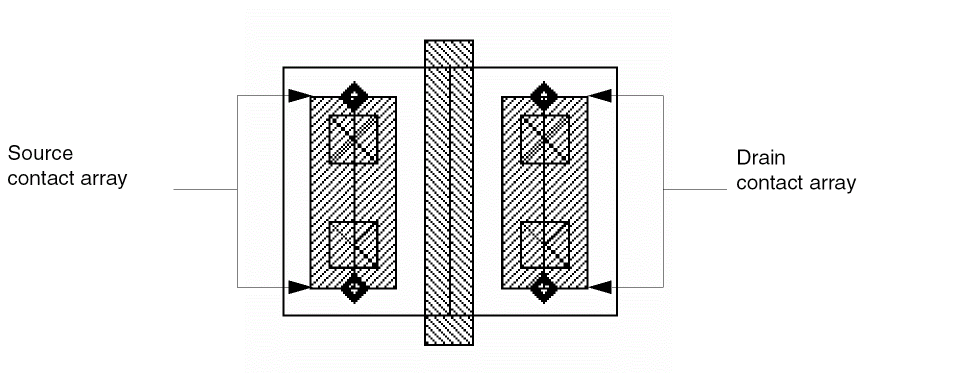
The MOS transistor Pcell parameters are specified as follows:
| Parameter Name | Default Value | Parameter Description |
|---|---|---|
The contact arrays are aligned to the gate. For example, when leftPos equals top, the upperLeft point handle of the gate is aligned to the upperRight point handle of the left contact array, with an offset along both the X and Y axes.
The stretch handles are assigned as follows:
-
To make the source contacts stretchable, the
upperCenterandlowerCenterpoint handles on the source contact array are assigned to the Pcell parameterleftcovwith the stretch typerelativeand the stretch directionY. -
To make the drain contacts stretchable, the
upperCenterandlowerCenterpoint handles on the drain contact array are assigned to the Pcell parameterrightcovwith the stretch typerelativeand the stretch directionY.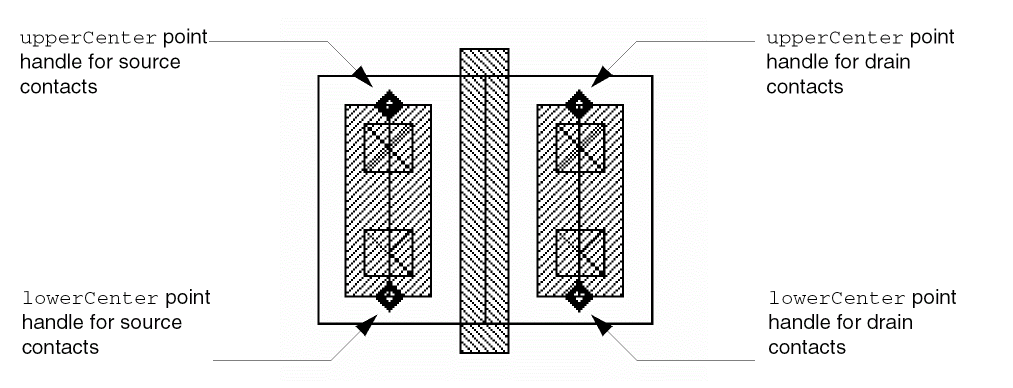
Two user-defined functions control the number of contacts generated and whether they are aligned to the top or bottom of the diffusion:
- The user-defined function contcov sets a range for the contacts from a 100% coverage to the minimum contact width for the layer from the technology file.
- The user-defined function myStretch identifies the handle currently being stretched. It determines whether the contacts are aligned to the top or bottom of the diffusion.
To look at the code for the Pcell and the user-defined functions, see
Example 4: Stretching the Sample MOS Transistor
You can stretch the MOS transistor shown in Example 3 in a negative direction towards the Y axis to reduce the number of contacts in the array to one, using the Virtuoso layout editor Stretch command.
- Choose Edit – Stretch.
-
Select the
upperCenterstretch handle on the left contact array using an area-selection box. -
To specify the reference point, click the
upperCenterstretch handle on the left contact array.
Notice that the following information appears to the right of the Pcell:leftcov = 1
-
To specify the new location, click above the bottom transistor.
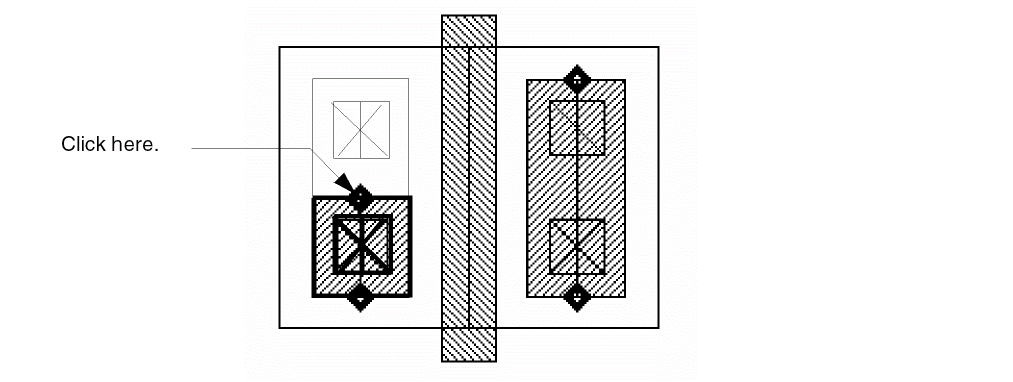
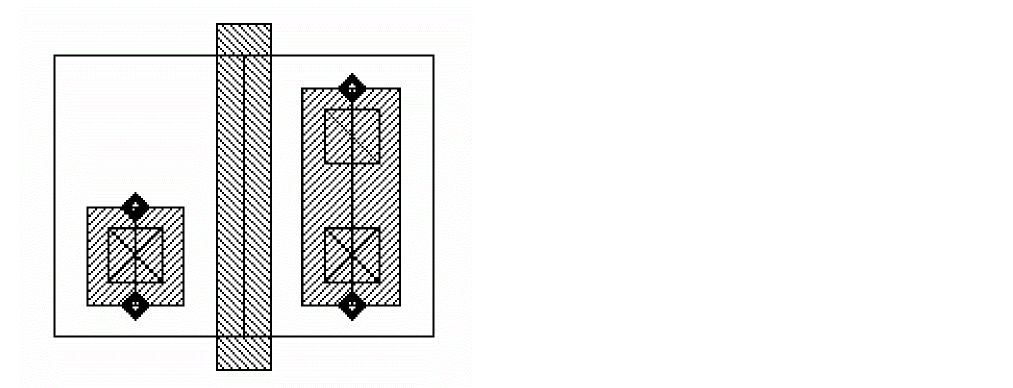
The MOS transistor Pcell instance now looks like this:
rodCheck
rodCheck( d_cvID [g_createMarkers] ); end rodCheck =>Rl_rodObj
Description
Searches the specified cellview for multipart paths (MPPs) for which the geometry does not match the definition information, and returns a list of the ROD object IDs. The MPPs found by this function include those that have lost their subshape definition information. By default, this function places warning markers over the potentially affected MPPs. (If you do not want to see warning markers, set the g_createMarkers argument to nil.) Although subparts with missing definition information are still visible graphically, their definitions have been deleted from the database. Editing an affected MPP causes an immediate loss of the subpart graphics.
Arguments
Value Returned
|
ROD object ID or list of ROD object IDs that identifies the multipart paths for which the geometry does not match the definition information. |
rodCheckAllMPPsInCellView
rodCheckAllMPPsInCellView(t_libName t_cellName t_viewName g_fix g_createMarkers); end rodCheckAllMPPsInCellView =>l_defectiveMPPIds/ nil
Description
Finds and opens the design specified by t_libName, t_cellName, and t_viewName, and checks if any MPP in the design contains defective internal data. If MPPs containing defective internal data are found, rodCheckAllMPPsInCellView fixes them and creates markers on them depending on the values of g_fix and g_createMarkers arguments.
Arguments
Value Returned
|
ROD object ID or list of ROD object IDs that identifies the multipart paths containing defective internal data. |
|
|
Returns |
Possible outputs
| g_fix | g_createMarkers | Output |
|---|---|---|
|
Do not fix or create markers. Returns the list of defective MPP IDs. |
||
rodCheckMPPs
rodCheckMPPs(d_cellViewId R_rodObj| list(R_rodObj...)g_fix g_createMarkers);end rodCheckMPPs =>l_defectiveMPPIds/ nil
Description
Checks if the given list of multipart paths (MPPs) contains corrupt internal data. If MPPs containing defective internal data are found, rodCheckMPPs fixes or creates markers to highlight them, or does both.
Arguments
Value Returned
|
Returns the list of |
|
|
Returns |
Possible outputs
| g_fix | g_createMarkers | Output |
|---|---|---|
|
Do not fix or create markers. Returns the list of defective MPPIds. |
||
rodCreateHandle
rodCreateHandle( [ ?nameS_name] [ ?typeS_type] [ ?valueg_value] [ ?rodObjR_rodObj] );end rodCreateHandle =>t/nil
Description
Creates a user-defined handle for any ROD object (named shape, instance, or cellview); the object must be at level zero in the hierarchy. For example, you can create a handle for polyRect or for instance I1, but not for I1/polyRect.
To create a handle for a cellview, you must first get the ROD object ID for the cellview with the rodGetObj function.
After you create a handle, you can access it through hierarchy using the rodGetHandle function and the database access operator (~>). The rodGetHandle function automatically transforms (converts) the coordinates of the ROD object into the coordinate system of the top-most cellview.
Arguments
Value Returned
Example
rodCreateHandle( ?name "myHandle1" ?type "point" ?value list(x y) ?rodObj rodId)
rodCreatePath
rodCreatePath( [ ?nameS_name] [ ?layertxl_layer] [ ?widthn_width] [ ?ptsl_pts] [ ?justificationS_justification] [ ?offsetn_offset] [ ?endTypeS_endType] [ ?beginExtn_beginExt] [ ?endExtn_endExt] [ ?choppableg_choppable] [ ?cvIdd_cvId] [ ?fromObjRl_fromObj] [ ?sizetxf_size] [ ?startHandlel_startHandle] [ ?endHandlel_endHandle] [ ?propl_prop] [rodConnectivityArgs...] ;start ROD Connectivity Arguments (rodConnectivityArgs)[ ?netNameS_netName] [ ?termNameS_termName] [ ?termIOTypeS_termIOType] [ ?ping_pin] [ ?pinAccessDirtl_pinAccessDir] [ ?pinLabelg_pinLabel] [ ?pinLabelHeightn_pinLabelHeight] [ ?pinLabelLayertxl_pinLabelLayer] [ ?pinLabelFontS_pinLabelFont] [ ?pinLabelDraftingg_pinLabelDrafting] [ ?pinLabelOrientS_pinLabelOrient] [ ?pinLabelOffsetPointl_pinLabelOffsetPoint] [ ?pinLabelJustS_pinLabelJust] [ ?pinLabelRefHandleS_pinLabelRefHandle] ;end ROD Connectivity Arguments [ ?offsetSubPathl_offsetSubpathArgs... ] ;start Offset Subpath Arguments (l_offsetSubpathArgs)list( list( [ ?layertxl_layer] [ ?widthn_width] [ ?choppableg_choppable] [ ?sepn_sep] [ ?justificationS_justification] [ ?beginOffsetn_beginOffset] [ ?endOffsetn_endOffset] [ ?propl_prop] ;repeat ROD Connectivity Arguments here );end first offset subpath list ... );end offset subpath lists ;end Offset Subpath Arguments [ ?encSubPathl_encSubpathArgs... ] ;start Enclosure Subpath Arguments (l_encSubpathArgs)list( list( [ ?layertxl_layer] [ ?enclosuren_enclosure] [ ?choppableg_choppable] [ ?beginOffsetn_beginOffset] [ ?endOffsetn_endOffset] [ ?propl_prop];repeat ROD Connectivity Arguments here);end first enclosure subpath list ... ;end of enclosure subpath lists ;end Enclosure Subpath Arguments [ ?subRectl_subrectArgs... ] ;start Subrectangle Arguments (l_subrectArgs)list( list( [ ?layertxl_layer] [ ?widthn_width] [ ?lengthn_length] [ ?choppableg_choppable] [ ?sepn_sep] [ ?justificationS_justification] [ ?spacen_space] [ ?beginOffsetn_beginOffset] [ ?endOffsetn_endOffset] [ ?beginSegOffsetn_beginSegOffset] [ ?endSegOffsetn_endSegOffset] [ ?propl_prop] [ ?gapS_gap] ;repeat ROD Connectivity Arguments here [ ?diagonalg_diagonalSubRect] );end first subrectangle list ... ;end subrectangle lists );end Subrectangle Arguments );end rodCreatePath =>R_rodObj/nil
Description
Creates a path consisting of one or more parts at level zero in the hierarchy on the same or on different layers from a list of points or from one or more existing objects. A path consisting of multiple parts is called a multipart path. You can use the rodCreatePath function to create one-part paths, simple multipart paths, or complex multipart paths such as guard rings, transistors, buses, and shielded paths. You can assign one or more property names and values to a multipart path.
rodCreatePath is a core database SKILL function that checks only for even multiples of database units to create a path. As a result, the created path can be off grid. To create a path with required constraints and additional level of automation use an end-application SKILL function, such as leCreatePath. A multipart path consists of a single master path and one or more subparts. The master path is an ordinary path; however, it is the defining part of a multipart path; all subparts are based on the master path. You can assign a property name and value, or a list of property names and values, to the master path and/or to each subpart. The subparts can be any or all of the following: offset subpaths, enclosure subpaths, and sets of subrectangles.
You can create any number of subparts. All subparts exist in relation to and depend on the master path. A subrectangle in a set of subrectangles is not an individual shape; it is part of that specific set of subrectangles. In the Virtuoso layout editor, you cannot select or edit an individual subrectangle. Subrectangles are created on grid.
For a detailed overview of multipart paths, see
You can also create MPPs and save them as templates in your technology file by using the graphical user interface or by editing the ASCII version of your technology file. For information about using the graphical user interface, see
The following topics are discussed in this section, following the argument descriptions:
- Creating Self-Intersecting Paths
- Specifying Arguments as nil
- Formatting List-of-Lists Arguments for Subparts
- How the System Follows to Create Subrectangles
- Disconnecting Shapes in a Multipart Path
Arguments Master Path Arguments
|
Symbol or character string specifying the name for the master path. Enclose character strings in quotation marks (""); precede symbols with a single quotation mark ('). ROD converts symbols to character strings. |
|
|
The name must be unique for the cellview. If you do not specify a name, the system assigns a unique name, consisting of the prefix |
|
|
Text string, integer, or list specifying the layer or layer-purpose pair for the master path, such as
Enclose string values in quotation marks. Do not use a symbol. For lists, use the following format:
Examples of layer-purpose pairs:
You are required to specify a layer. |
|
|
Positive integer or floating-point number specifying the width of the master path. If you do not specify the width, the system uses the
Default: the |
|
|
List of points defining the centerline of the master path. Specify a point for the start and end of the first segment, and specify a point for the end of subsequent segments. You must specify at least two noncoincident points. You cannot create self-intersecting master paths. You are required to specify a list of points. The system discards duplicate and collinear points before creating the path but does not consider them an error.
Use one of the following formats: |
|
|
Symbol or character string specifying the part of the master path to offset from the point list: centerline, left edge, or right edge. Justification is relative to the direction of the path. |
|
|
Signed integer or floating-point number specifying the distance by which the master path edge or centerline, depending on S_justification, is offset from the point list specified by the l_pts argument. A positive value creates the master path to the left of the point list; a negative value creates the master path to the right of the point list. For a detailed description about offsetting the master path, see |
|
|
Symbol or character string specifying the type of ends of the master path. |
|
|
Zero or positive integer or floating-point number specifying the distance by which the starting end of the master path extends beyond its first point. This argument is ignored unless S_endType is set to |
|
|
Zero or positive integer or floating-point number specifying the distance by which the ending end of the master path extends beyond its last point. This argument is ignored unless S_endType is set to |
|
|
Boolean value indicating whether or not a ROD path can be chopped. The value must be |
|
|
Database ID for the cellview in which you are creating a ROD path. If |
|
|
ROD object ID or list of ROD object IDs identifying a named object or list of named objects that you want to use as a source for creating a new ROD path. The source objects can be instances, rectangles, polygons, paths, lines, dots, labels, and/or text-display objects. You must specify either the Rl_fromObj argument or the l_pts argument. If you specify both, the system ignores the l_pts argument. |
|
|
A signed integer, floating-point number, or Cadence SKILL language expression specifying the distance between a bounding box around the source object (Rl_fromObj) and the centerline of the generated master path. When the source is more than one object, txf_size specifies the distance between a bounding box around all of the objects and the centerline of the master path. |
|
|
By default, the generated path has four segments and forms a ring. A positive number creates a path that is longer than the circumference of the bounding box; a negative number creates a path that is shorter than the circumference of the bounding box. |
|
|
When you specify a SKILL expression, it must evaluate to a positive or negative integer or floating-point number. SKILL expressions are evaluated only when the new path is created.
If you specify a source object (Rl_fromObj) but do not specify txf_size, then txf_size defaults to |
|
|
Symbol or character string specifying the starting point for the generated path, such as |
|
|
Symbol or character string specifying the ending point for the generated path, such as
Valid Values: |
|
|
A list or lists of lists, where each list contains the name of a property and its value. When the property name is a string, enclose it in quotes. For a description of the valid data types, see the and a list of properties as follows:
For a more detailed description about specifying lists of lists, see Formatting List-of-Lists Arguments for Subparts. |
|
|
A list containing rod connectivity arguments. For more details on these arguments, see ROD Connectivity Arguments (rodConnectivityArgs). |
|
|
A list containing one or more lists, each of which specifies the arguments for one offset subpath. The subpath is created in relationship to the master path. For information about how to specify lists of lists, see Formatting List-of-Lists Arguments for Subparts. For more information on l_encSubPathArgs arguments, see Enclosure Subpath Arguments (l_encSubpathArgs). |
|
|
A list containing one or more lists, each of which specifies the arguments for one enclosure subpath. The enclosure subpath is created in relationship to the centerline of the master path. For information about how to specify lists of lists, see Formatting List-of-Lists Arguments for Subparts. |
|
|
For more information on l_offsetSubpathArgs, see Enclosure Subpath Arguments (l_encSubpathArgs). |
|
|
A list containing one or more lists, each of which specifies the arguments for one set of unnamed subrectangles. The set of subrectangles is created in relationship to the centerline of the master path. For information about how to specify lists of lists, see Formatting List-of-Lists Arguments for Subparts. For more information on l_subRectArgs, see Subrectangle Arguments (l_subrectArgs). |
|
ROD Connectivity Arguments (rodConnectivityArgs)
|
Symbol or character string specifying the name of the net with which you want to associate the shape. Enclose character strings in quotation marks (""); precede symbols with a single quotation mark ('). |
|
|
Symbol or character string specifying the name of the terminal and net with which you want to associate the shape. Enclose character strings in quotation marks (""); precede symbols with a single quotation mark ('). |
|
|
If you specify both S_termName and S_netName, their values must be the same. If a terminal with the specified name already exists, the net it belongs to must have the same name. If the net name does not match the terminal name, the function reports an error. |
|
|
Symbol or character string specifying the direction type (I/O type) for the terminal. If S_termName is not specified, the S_termIOType argument is ignored. If a terminal with the name specified by S_termName already exists, it must have the same direction type as specified by S_termIOType; if the direction type is not the same, the function reports an error. |
|
|
Symbol or character string specifying the direction type (I/O type) for the terminal. If S_termName is not specified, the S_termIOType argument is ignored. If a terminal with the name specified by S_termName already exists, it must have the same direction type as specified by S_termIOType; if the direction type is not the same, the function reports an error. |
|
|
Boolean value indicating whether or not to make the shape into a pin. The value must be |
|
|
Text string or list specifying the access direction(s) for the pin. Enclose string values in quotation marks. Do not use a symbol. An example of a list is |
|
|
Boolean value indicating whether or not to add a text display object for the pin, where the text is the contents of the S_termName argument. The value must be |
|
|
Positive integer or floating-point number specifying the vertical height of the pin text-display label in user units. |
|
|
Text string, integer, or list specifying the layer or layer-purpose pair for the pin text-display label, such as
Enclose string values in quotation marks. Do not use a symbol. For lists, use the following format: |
|
|
Examples of layer-purpose pairs:
When you specify only the layer, the purpose defaults to the purpose defined by l_layer. |
|
|
Symbol or character string specifying the name of the font for the pin text-display label. |
|
|
Valid Values: |
|
|
Boolean value indicating whether or not to allow rotation of the pin text-display label by more than 90 degrees. The value must be |
|
|
Symbol or character string specifying the orientation of the pin text-display label. |
|
|
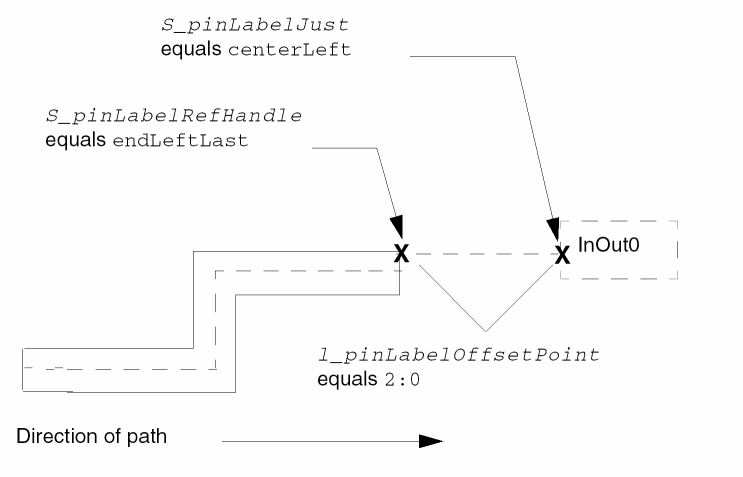
Lists one set of coordinates specifying the X and Y offset of the origin of the pin text-display label from a point handle on the shape. The label origin is specified by S_pinLabelJust, and the shape point handle is specified by S_pinLabelRefHandle. |
|
 |
|
|
Use one of the following formats: |
|
|
Symbol or character string specifying the origin point for the text-display label. |
|
|
Symbol or character string specifying the point handle on the shape from which you want to offset the origin point of the text-display label. You can specify the name of any bounding box or segment point handle. |
|
|
For a detailed description of system-defined point handles, see |
|
|
Valid Values for bounding box point handles: |
|
|
Valid Values for segment point handles for all ROD shapes: |
|
|
Valid Values for segment point handles for ROD paths: |
|
Offset Subpath Arguments (l_offsetSubpathArgs)
For a detailed description of offset subpaths, see
|
Text string, integer, or list specifying the layer or layer-purpose pair for the subpath, such as: |
|
|
Enclose string values in quotation marks. |
|
|
Positive integer or floating-point number specifying the width of the offset subpath.
If you do not specify the width, the system uses the
Default: |
|
|
Signed integer or floating-point number specifying the separation between the centerline or an edge of the subpath and the centerline or an edge of the master path, depending on the value of S_justification. |
|
|
Symbol or character string specifying from which part of the master path to separate the subpath, in relation to the direction of the master path. Enclose character strings in quotation marks (""); precede symbols with a single quotation mark ('). ROD converts symbols to character strings.
When |
|
|
Signed integer or floating-point number specifying the starting edge of the subpath in relation to the starting edge of the master path. A positive number extends the end of the subpath beyond the end of the master path; a negative number retracts the end of the subpath from the end of the master path. |
|
|
Signed integer or floating-point number specifying the ending edge of the subpath in relation to the ending edge of the master path. A positive number extends the end of the subpath beyond the end of the master path; a negative number retracts the end of the subpath from the end of the master path. |
|
|
Boolean value indicating whether or not the subpath can be chopped. The value must be |
|
|
A list or lists of lists, where each list contains the name of a property and its value. When the property name is a string, enclose it in quotes. For a description of the valid data types, see the |
|
|
and a list of properties as follows:
For a more detailed description about specifying lists of lists, see Formatting List-of-Lists Arguments for Subparts. |
|
Enclosure Subpath Arguments (l_encSubpathArgs)
For a detailed description of enclosure subpaths, see
|
Text string, integer, or list specifying the layer or layer-purpose pair for the subpath, such as
Enclose string values in quotation marks. Do not use a symbol. Use the one of the formats defined for the master path argument |
|
|
Signed integer or floating-point number specifying the enclosure of the subpath in relation to the master path. The system computes the width of an enclosure subpath as follows: |
|
|
If you do not specify this argument, the system uses the |
|
|
Signed integer or floating-point number specifying the starting edge of the subpath in relation to the starting edge of the master path. A positive number extends the end of the subpath beyond the end of the master path; a negative number retracts the end of the subpath from the end of the master path. |
|
|
Signed integer or floating-point number specifying the ending edge of the subpath in relation to the ending edge of the master path. |
|
|
A positive number extends the end of the subpath beyond the end of the master path; a negative number retracts the end of the subpath from the end of the master path. |
|
|
Boolean value indicating whether or not the subpath can be chopped. The value must be |
|
|
A list or lists of lists, where each list contains the name of a property and its value. When the property name is a string, enclose it in quotes. For a description of the valid data types, see the |
|
|
and a list of properties as follows:
For a more detailed description about specifying lists of lists, see Formatting List-of-Lists Arguments for Subparts. |
|
Subrectangle Arguments (l_subrectArgs)
For a detailed description of sets of subrectangles for rodCreatePath, see
|
Text string, integer, or list specifying the layer or layer-purpose pair for the subrectangle(s), such as |
|
|
Enclose string values in quotation marks. Do not use a symbol. Use the one of the formats defined for the master path argument |
|
|
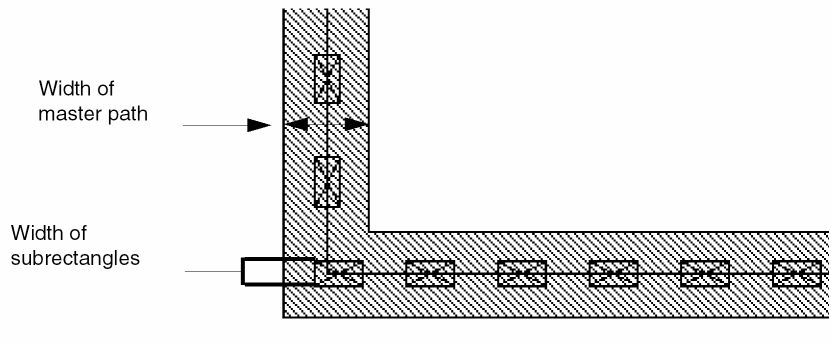
Positive integer or floating-point number specifying the width of the rectangle(s), where the width is parallel to the width of the master path.
If not specified, the system uses n_length; if neither is specified, the system uses the |
|
 |
|
|
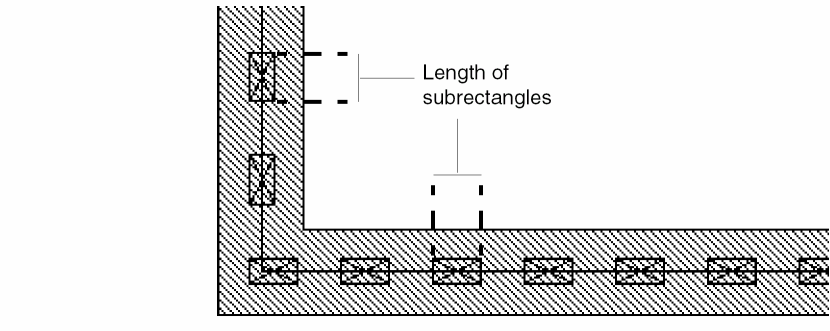
Positive integer or floating-point number specifying the length of the subrectangle(s), where the length is parallel to the master path centerline. |
|
 |
|
|
If not specified, the system uses n_width; if neither is specified, the system uses the |
|
|
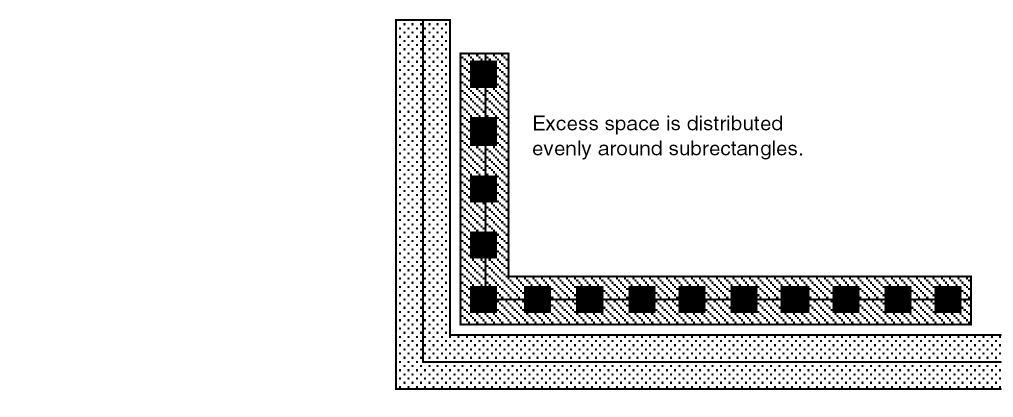
Symbol or character string specifying the method the system uses to place subrectangles within each segment. Enclose character strings in quotation marks (""); precede symbols with a single quotation mark ('). ROD converts symbols to character strings.
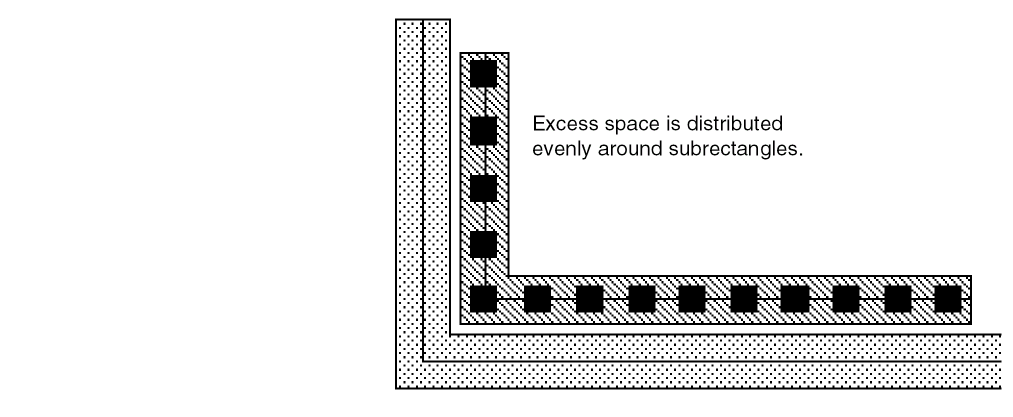
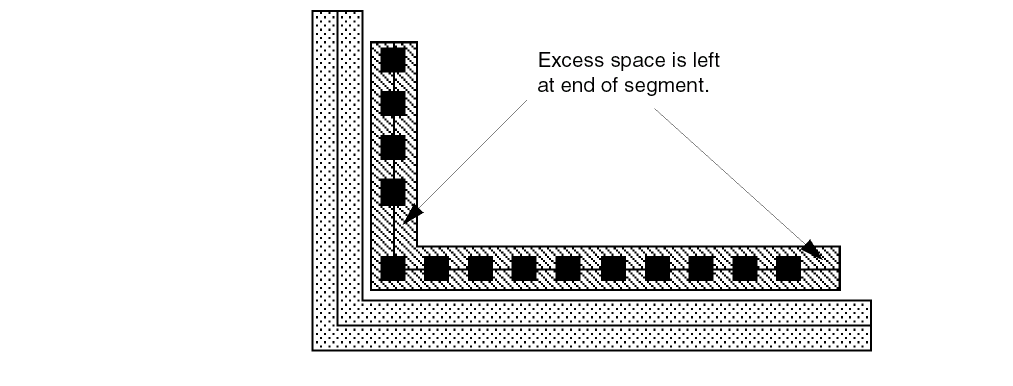
The system always uses the value of n_space for minimum space between subrectangles and calculates the maximum number of rectangles that fit in the segment, allowing for the space needed by n_beginOffset and n_endOffset. When the value of S_gap is |
|
 |
|
|
When the value of S_gap is
When the value of S_gap is |
|
 |
|
|
Signed integer or floating-point number specifying the separation between the centerline or an edge of the subrectangles and the centerline or an edge of the master path, depending on the value of S_justification. The system places subrectangles on grid, as close to the specified separation as possible. |
|
|
Symbol or character string specifying from which part of the master path to separate the subrectangles, in relation to the direction of the master path. When |
|
|
Signed integer or floating-point number specifying the offset of the edge of the first subrectangle from the starting edge of the master path. A positive number extends the beginning of the subrectangles beyond the beginning of the master path; a negative number retracts the beginning of the subrectangles from the beginning of the master path. |
|
|
Signed integer or floating-point number specifying the offset of the edge of the last subrectangle from the ending edge of the master path. A positive number extends the end of the subrectangles beyond the end of the master path; a negative number retracts the end of the subrectangles from the end of the master path. |
|
|
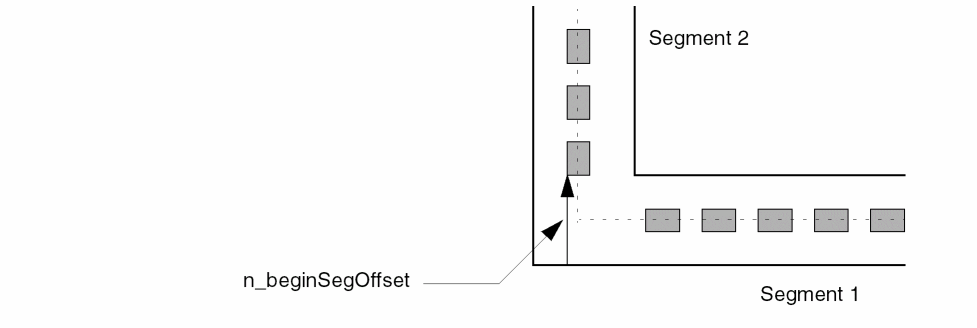
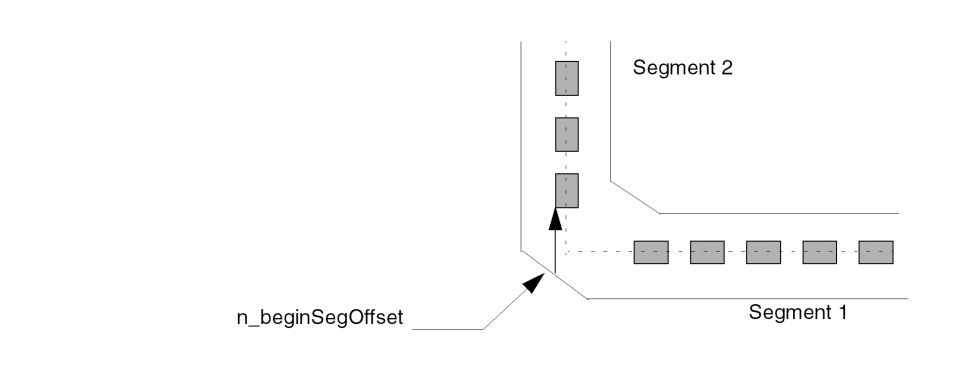
Positive, signed integer or floating-point number that, together with the other offset arguments, lets you control whether there is a subrectangle in the corner of a segment. Specifies the offset of the first subrectangle in a segment measured from the edge of the master path. Does not apply to the first segment; the position of the first subrectangle in the first segment is determined by the value of the n_beginOffset argument. |
|
 |
|
 |
|
|
If the segment begins before the full distance specified by n_beginSegOffset, then n_beginSegOffset is not applied, and a subrectangle could be placed at the corner of the subrectangle path. When applying offset specifications, the system will not create a spacing error; if the first subrectangle in a segment would be too close to the last subrectangle in the previous segment, the system discards the last subrectangle in the previous segment. This could result in more space at the corner than desired. Default: |
|
|
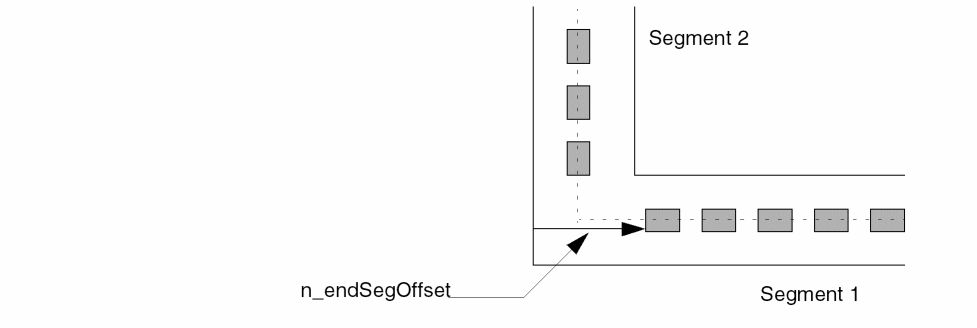
Positive, signed integer or floating-point number that, together with the other offset arguments, lets you control whether there is a subrectangle in the corner of a segment. Specifies the offset of the last subrectangle in a segment from the edge of the master path. Does not apply to the last segment; the position of the last subrectangle in the last segment is determined by the value of the n_endOffset argument. |
|
 |
|
|
If the segment ends before the full distance specified by n_endSegOffset, then n_endSegOffset is not applied, and a subrectangle could be placed at the corner of the subrectangle path. |
|
|
Positive integer or floating-point number specifying the distance between the edges of adjoining rectangles. If not specified, the system uses the |
|
|
Boolean value indicating whether or not the subrectangle(s) can be chopped. The value must be |
|
|
A list or lists of lists, where each list contains the name of a property and its value. When the property name is a string, enclose it in quotes. For a description of the valid data types, see the and a list of properties as follows:
For a more detailed description about specifying lists of lists, see Formatting List-of-Lists Arguments for Subparts. |
|
|
Optional keyword-value pair argument specifying whether to create subrectangles on diagonal portions of the path. |
|
|
When defined, this argument must appear at the end of the subrectangle argument list, after any list specifying connectivity, immediately prior to the closing parentheses. Setting this argument to |
|
Value Returned
|
The ROD object ID for the single layer or multipart ROD path that was created. |
|
Additional Information
Creating Self-Intersecting Paths
You cannot create self-intersecting paths using rodCreatePath. If you specify the function arguments so that the master path and/or one or more subpaths would self-intersect, the system will not create the path.
For example, if you create a guard ring with abutted ends, and the ends of a subpath have a positive offset, the subpath will extend beyond the master path, which could cause intersection.
If your code tries to create a self-intersecting path, the path is not created, and the system displays a warning in the CIW.
Specifying Arguments as nil
For the rodCreatePath function, a value of nil means the following, depending on the type of argument:
-
For Boolean arguments,
nilis a valid value, and the system uses it. TherodCreatePathBoolean arguments are:
g_choppable g_pin g_pinLabel g_pinLabelDrafting -
For non-Boolean arguments, specifying
nilcauses the system to use the default as it is defined in this document for that argument. Specifyingnilis equivalent to not specifying a value for the argument. -
For the following Connectivity arguments, the default value is
nil:
S_netName S_termName g_pin
When you specify any of the arguments listed above asnil, it is equivalent to not specifying a value for the argument.
Specifying Pins
When you specify the g_pin argument, you must also specify the S_netName and/or S_termName argument with a value other than nil. If you specify g_pin but do not specify S_netName and/or S_termName with a value other than nil, the system ignores all connectivity arguments but does not report an error.
Formatting List-of-Lists Arguments for Subparts
You must use a list of lists to specify arguments for an offset subpath, enclosure subpath, or set of subrectangles. The top-level list contains one or more sublists. Each sublist defines a unique subpath or set of subrectangles.
Each sublist consists of one or more keyword-value pairs, where the keyword identifies the argument. To specify the value as a character string, enclose it in quotation marks (""); to specify the value as a symbol, precede it with a single quotation mark (').
For any keyword that returns either a string or symbol, you can specify a Cadence SKILL language expression (constant, variable, or function call) as the value.
As an example, the syntax format for specifying an enclosure subpath as part of a rodCreatePath function is shown on the following page.
?encSubPath list( list( ?layertxl_layer?enclosuren_enclosure?beginOffsetn_beginOffset?endOffsetn_endOffset?choppableg_choppable) ;End of first enclosure subpath
list( ?layertxl_layer?enclosuren_enclosure?beginOffsetn_beginOffset?endOffsetn_endOffset?choppableg_choppable);End of second enclosure subpath
.
.
.
) ;End of encSubPath list
An example showing values for an enclosure subpath within a rodCreatePath function specification might look like this:
poly1EndOffset = -0.4
tfId = = techGetTechFile( pcCellView )
?encSubPath list(    list( ?layer         "metal2"
                           ?enclosure
                                 techGetParam( tfId "m1m2enc" )
                           ?beginOffset   -.4
                           ?choppable     nil
                         ) ; end of 1st enclosure subpath
                     list( ?layer         "poly1"
                           ?enclosure     .1
                           ?beginOffset   0
                           ?endOffset     poly1EndOffset
                           ?choppable     nil
                         ) ; end 2nd enclosure subpath
                ) ; end of 2nd enclosure subpath
where poly1EndOffset is a variable and techGetParam( tfId "m1m2enc" ) is a function call.
How the System Follows to Create Subrectangles
The system follows these steps to create subrectangles:
-
Creates all subrectangles on the specified layer, with the subrectangle centerline separated from the master path centerline by n_sep.
When n_sep is zero, the master path centerline bisects the width of the subrectangles. When n_sep is less than or greater than zero, the subrectangles are offset from the master path centerline.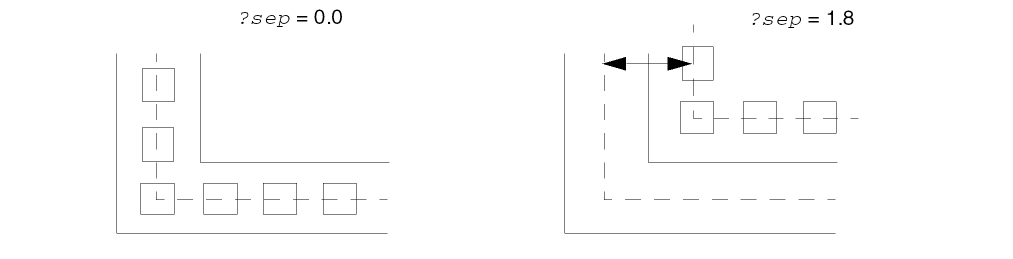
-
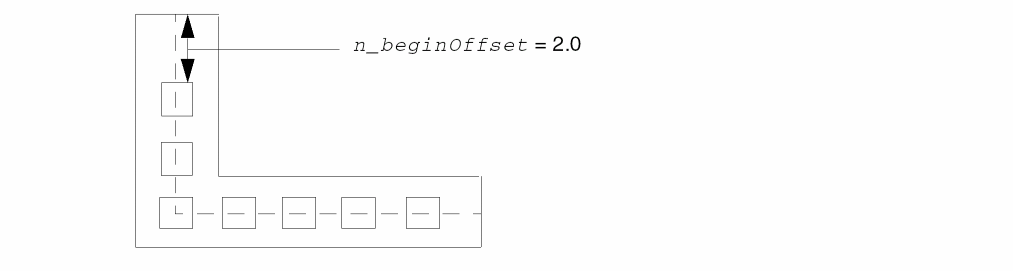
For the first path segment, offsets the edge of the first subrectangle from the starting edge of the master path by the distance specified in n_beginOffset.
-
Uses the value of n_space to compute the maximum number of subrectangles that fit on grid in the segment, and the value of S_gap to determine what to do with excess space, as follows:
-
When S_gap equals
distribute(the default), distributes the space as evenly as possible, in multiples of the grid space specified bymfgGridResolution.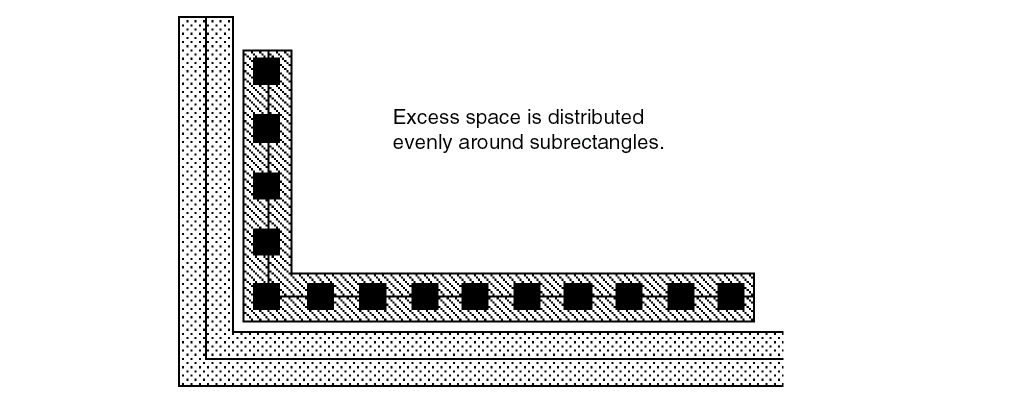
-
When S_gap equals
minimum, places subrectangles n_space apart until there is no space for another rectangle, then leaves the excess space after the last subrectangle in the segment.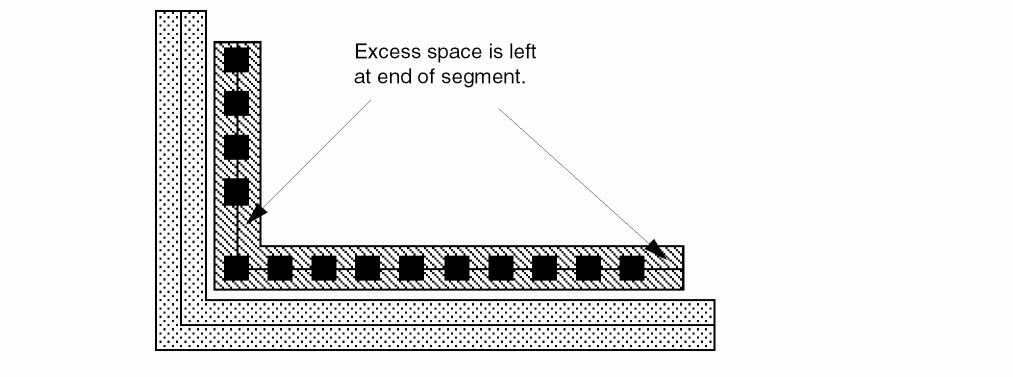
-
When S_gap equals
- For each subsequent path segment, the system
-
For the last path segment, the system offsets the edge of the last subrectangle from the ending edge of the master path by the distance specified in n_endOffset. For the remaining subrectangles in the last segment, the system repeats step 3.
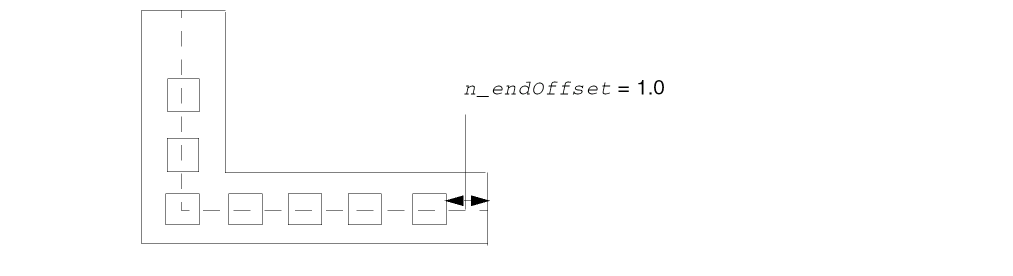
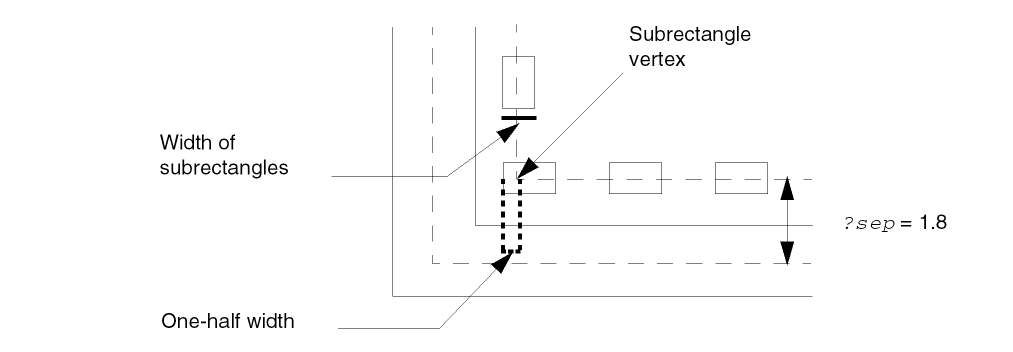
Subrectangles in the Corners of Segments
By default, the system creates a subrectangle in the corner formed by each segment of a subrectangle subpath, and then fills in the rest of the segment with subrectangles, following the spacing you specify with the rodCreatePath function.
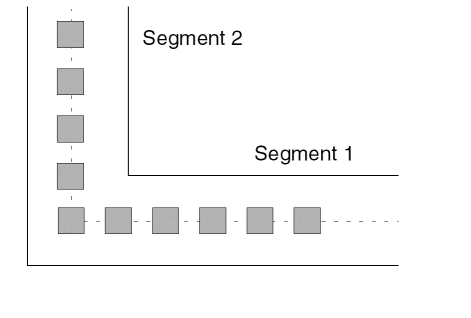
There are several reasons that you might want to keep subrectangles out of the corners of your subrectangle subpaths. For example, when you specify multiple subrectangle subpaths, placing rectangles in the corners of segments might cause individual subrectangles to be out of alignment vertically or horizontally with the subrectangles in the other subrectangle subpaths.
If you do not want subrectangles in the corners of segments, you can keep them out by specifying the n_beginSegOffset and n_endSegOffset arguments. The system measures the n_beginSegOffset and n_endSegOffset values from the edge of the master path, as shown below.
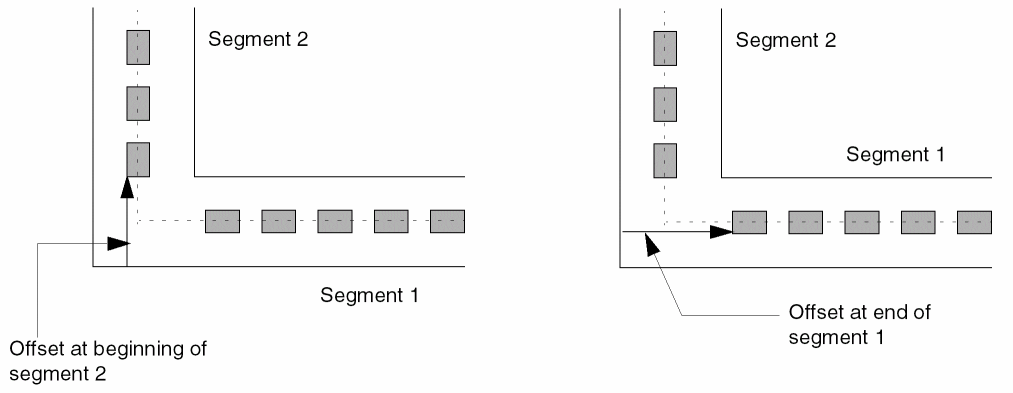
When specifying the segment offset arguments, keep in mind:
- The n_beginSegOffset value does not apply to the first segment; the position of the first subrectangle in the first segment is determined by the value of the n_beginOffset argument.
- The n_endSegOffset value does not apply to the last segment; the position of the last subrectangle in the last segment is determined by the value of the n_endOffset argument.
- The segment offset arguments work in combination with the n_beginOffset and n_endOffset arguments.
- If the segment begins before the full distance specified by the n_beginSegOffset argument, then n_beginSegOffset is not applied, and a subrectangle could be placed at the corner of the subrectangle subpath.
- If the segment ends before the full distance specified by the n_endOffset argument, then n_endOffset is not applied, and a subrectangle could be placed at the corner of the subrectangle subpath.
- When applying the offset options, the system will not create a spacing error. If the first subrectangle in a subrectangle subpath segment would be too close to the last subrectangle in the previous segment, the system discards the last subrectangle in the previous segment.
When you specify the offset options, you need to check the results to make sure the corners are as desired. If they are not, you should change the values of the offset arguments and try again.
Disconnecting Shapes in a Multipart Path
You can change a multipart path into separate, unrelated shapes by removing the name of the multipart path. Once you do this, all relationships between the shapes are removed.
-
To change all of the shapes in a multipart path into separate, unrelated shapes, remove the name of the multipart path using the
rodUnNameShapefunction.
Now the master path is a separate, unnamed path; each subpath is a separate, unnamed path; and each rectangle is a separate, unnamed shape. None of them is a ROD object, and there is no relationship between them.
Making a Former MPP Part into a ROD Object
You can make any shape that was formerly part of a multipart path (the master path, any subpath, or any individual subrectangle) into a ROD object by assigning it a unique name.
-
To make a shape into a ROD object, assign a unique name to the shape using the
rodNameShapefunction.
Each shape to which you assign a name is now a separate, unique ROD object.
rodCreatePolygon
rodCreatePolygon( [ ?nameS_name] [ ?layertxl_layer] [ ?ptsl_pts] [ ?cvIdd_cvId] [ ?fromObjRl_fromObj] [ ?sizetxf_size] [ ?propl_prop] ; ROD Connectivity Arguments for Polygons[ ?netNameS_netName] [ ?termNameS_termName] [ ?termIOTypeS_termIOType] [ ?ping_pin] [ ?pinAccessDirtl_pinAccessDir] [ ?pinLabelg_pinLabel] [ ?pinLabelHeightn_pinLabelHeight] [ ?pinLabelLayertxl_pinLabelLayer] [ ?pinLabelFontS_pinLabelFont] [ ?pinLabelDraftingg_pinLabelDrafting] [ ?pinLabelOrientS_pinLabelOrient] [ ?pinLabelOffsetPointl_pinLabelOffsetPoint] [ ?pinLabelJustS_pinLabelJust] [ ?pinLabelRefHandleS_pinLabelRefHandle] );end rodCreatePolygon =>R_rodObj/nil
Description
Creates one polygon from a list of points or from one or more named objects. Also creates a ROD object containing information associated with the polygon, including its name and database ID. The associated ROD object is identified by a ROD object ID. The polygon is created at level zero in the hierarchy. You can assign a property name and value, or a list of property names and values, to the polygon. You can specify connectivity for the polygon by associating it with a specific terminal and net. You can also make the polygon into a pin.
When you specify two or more existing named objects as the source for creating a polygon, as shown in the example below,
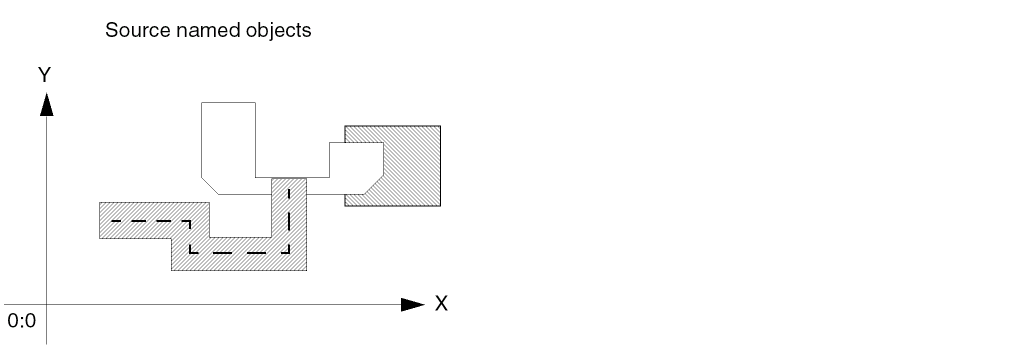
the system creates a four-sided, rectangular polygon based on a bounding box around all of the object(s).
The new rectangular polygon is larger or smaller than the bounding box, depending on whether you specify a positive or negative size.
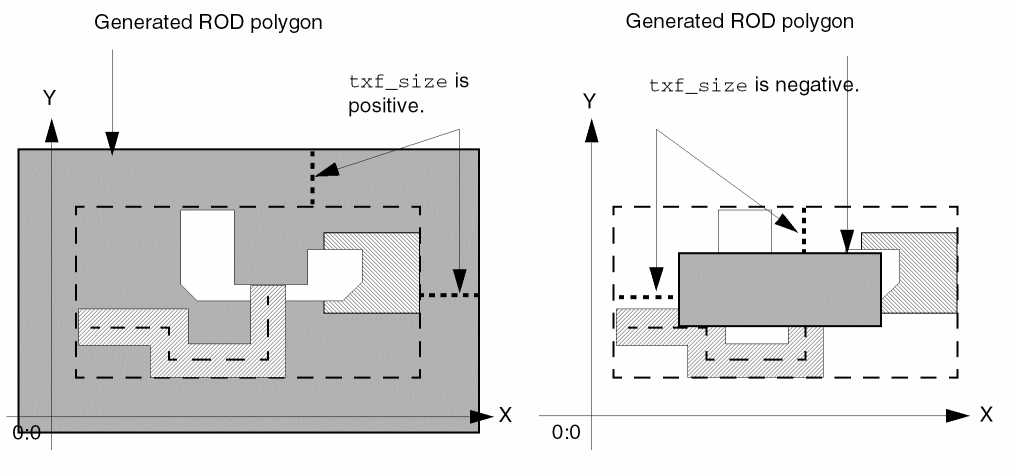
For a detailed overview of creating polygons from other objects, see
Arguments
|
Symbol or character string specifying the name for the polygon. Enclose character strings in quotation marks (""); precede symbols with a single quotation mark (‘). ROD converts symbols to character strings.
The name must be unique for the cellview. When you do not specify a name, the system assigns a unique name, consisting of the prefix |
|
|
Text string, integer, or list specifying the layer or layer-purpose pair for the polygon, such as
Enclose string values in quotation marks. Do not use a symbol. For lists, use the following format:
Examples of layer-purpose pairs:
You are required to specify a layer. |
|
|
List of points defining the edges of the polygon. Specify a point for the beginning and end of the first edge and the end of subsequent edges. The system creates a closed shape by connecting the first and last points in the list. You cannot create a polygon with self-intersecting edges. |
|
|
The system discards duplicate points and excess collinear points without considering them errors. However, you must specify at least three noncoincident, noncollinear points. Coincident points have the same coordinate values. Collinear points are on the same line. If you specify more than two points on the same line, the system uses only the first and last points specified. An example of excess collinear points is |
|
|
Database ID for the cellview in which you are creating a ROD path. If |
|
|
ROD object ID or list of ROD object IDs identifying a named object or list of named objects that you want to use as a source for creating a new ROD polygon. The source objects can be instances, rectangles, polygons, paths, lines, dots, labels, and/or text-display objects. You must specify either the Rl_fromObj argument or the l_pts argument. If you specify both, the system ignores the l_pts argument. |
|
|
A signed integer, floating-point number, or Cadence SKILL language expression specifying the difference between the size of the source object (Rl_fromObj) and the size of the generated polygon. When the source is more than one object, txf_size specifies the difference between a bounding box around all of the objects and the size of the generated polygon. A positive number creates a polygon that is larger than the source object(s); a negative number creates a polygon that is smaller than the source object(s). When you specify a SKILL expression, it must evaluate to a positive or negative integer or floating-point number. SKILL expressions are evaluated only when the new polygon is created.
If you specify a source object (Rl_fromObj) but do not specify txf_size, then txf_size defaults to |
|
|
A list or lists of lists, where each list contains the name of a property and its value. When the property name is a string, enclose it in quotes. For a description of the valid data types, see the and a list of properties as follows:
For a more detailed description about specifying lists of lists, see Formatting List-of-Lists Arguments for Subparts. |
|
ROD Connectivity Arguments for Polygons
The connectivity arguments for polygons are the same as the connectivity arguments for rectangles. See ROD Connectivity Arguments for Rectangles (rodRectConnectivityArgs).
Value Returned
rodCreateRect
rodCreateRect( [ ?nameS_name] [ ?layertxl_layer] [ ?widthn_width] [ ?lengthn_length] [ ?originl_origin] [ ?bBoxl_bBox] [ ?elementsXx_elementsX] [ ?elementsYx_elementsY] [ ?spaceXn_spaceX] [ ?spaceYn_spaceY] [ ?cvIdd_cvId] [ ?fillBBoxl_fillBBox] [ ?fromObjRl_fromObj] [ ?sizetxf_size] [ ?propl_prop] [ ?returnBooleang_returnBoolean] [rodRectConnectivityArgs...] ; start ROD Connectivity Arguments for Rectangles (rodRectConnectivityArgs) [ ?netNameS_netName] [ ?termNameS_termName] [ ?termIOTypeS_termIOType] [ ?ping_pin] [ ?pinAccessDirtl_pinAccessDir] [ ?pinLabelg_pinLabel] [ ?pinLabelHeightn_pinLabelHeight] [ ?pinLabelLayertxl_pinLabelLayer] [ ?pinLabelFontS_pinLabelFont] [ ?pinLabelDraftingg_pinLabelDrafting] [ ?pinLabelOrientS_pinLabelOrient] [ ?pinLabelOffsetPointl_pinLabelOffsetPoint] [ ?pinLabelJustS_pinLabelJust] [ ?pinLabelRefHandleS_pinLabelRefHandle] ;end ROD Connectivity Arguments for Rectangles [ ?subRectArray l_subrectArgs... ] ;start l_subrectArgs Subrectangle Arguments (l_subrectArgs)list( list( [ ?layertxl_layer] [ ?widthn_width] [ ?lengthn_length] [ ?gapS_gap] [ ?lowerLeftOffsetXn_lowerLeftOffsetX] [ ?lowerLeftOffsetYn_lowerLeftOffsetY] [ ?upperRightOffsetXn_upperRightOffsetX] [ ?upperRightOffsetYn_upperRightOffsetY] [ ?spaceXn_spaceX] [ ?spaceYn_spaceY] [ ?propl_prop] ;Repeat ROD Connectivity Arguments here );end first subrectangle list ... ) ;end all subrectangle lists ;end l_subrectArgs );end rodCreateRect => R_rodObj | t / nil
Description
Creates a single named rectangle, one or more rows and/or columns of named rectangles, or fills a bounding box with named rectangles, where each rectangle has ROD attributes. You can create these named rectangles with the arguments S_name through g_returnBoolean. Each named rectangle is a separate object, created at level zero in the hierarchy. You can also create multipart rectangles by specifying one or more arrays of unnamed subrectangles for each named rectangle, where each unnamed subrectangle is an ordinary database shape, with no ROD attributes, created at level zero in the hierarchy. The named rectangles in a multipart rectangle are referred to as master rectangles.
You can assign a property name and value (or a list of property names and values) to named rectangles and/or to any set of unnamed subrectangles. You can specify connectivity to associate named rectangles with the same terminal and net and to turn named rectangles into pins on a specified terminal and net. You can also specify connectivity for each set of unnamed subrectangles to associate it with a terminal and net and turn each subrectangle into a pin.
Although a set of unnamed subrectangles is treated as a single shape, you can get a list of the database IDs for the individual subrectangles in the set by using the ROD object ID for the multipart path with the database access operator (~>) and the attribute name subShapes. For more information, see
Arguments
|
Symbol or character string specifying the name for the rectangle you want to create. Enclose character strings in quotation marks (""); precede symbols with a single quotation mark ('). ROD converts symbols to character strings.
The name must be unique for the cellview. If you do not assign a name, the system assigns a unique name, consisting of the prefix
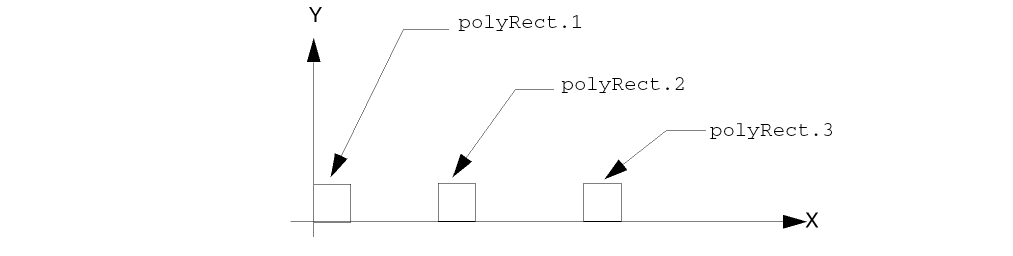
Single row or column of rectangles: When you create a single row or column of rectangles, the system uses your specified name (or
For example, if you create a row of three rectangles (rectangles in the direction of the X axis) and assign the name |
|
 |
|
|
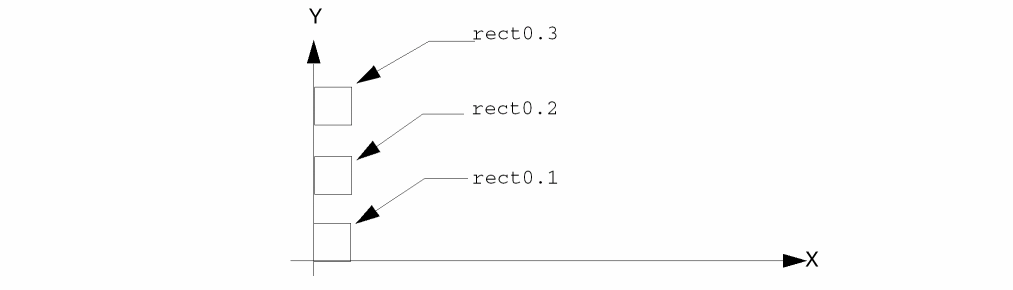
If you create a column of three rectangles (rectangles in the direction of the Y axis) and you do not assign a name, the system names the three rectangles |
|
 |
|
|
Multiple rows and columns of rectangles: When you create multiple rows and columns of rectangles, the system uses your specified name as a base and adds the suffix .x.y, where .x.y is the number of the row and column. For example, if you specify three rows and four columns, the system names the rectangles as follows: |
|
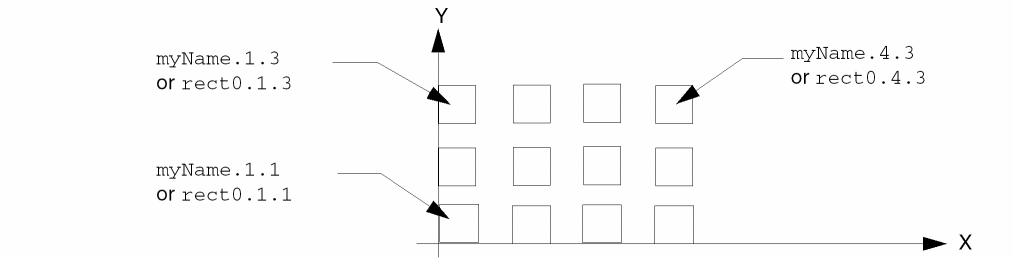 |
|
|
Text string, integer, or list specifying the layer or layer-purpose pair for the rectangle(s), such as
Enclose string values in quotation marks. Do not use a symbol. For lists, use the following format: |
|
|
Examples of layer-purpose pairs are |
|
|
Positive integer or floating-point number specifying the horizontal measurement of the rectangle, in user units. |
|
 |
|
|
The value of l_bBox overrides the value of n_width when you specify both. If you specify neither n_width nor l_bBox, the system uses the value of n_length. |
|
|
If you do not specify n_length, the system uses the value for |
|
|
Positive integer or floating-point number specifying the vertical measurement of the rectangle, in user units. |
|
 |
|
|
The value of l_bBox overrides the value of n_length when you specify both. If you specify neither n_length nor l_bBox, the system uses the value of n_width. If you do not specify n_width, the system uses the value for |
|
|
Single point or list of coordinates specifying the lower left corner of the first rectangle; use one of the following formats: |
|
|
The value of l_bBox overrides the value of l_origin when you specify both. |
|
|
List of two points specifying opposite corners of a bounding box for the size of the rectangle. You can start the box in any corner. The system determines the location of the first rectangle by using the difference between the coordinates for the specified opposite corners. Use one of the following formats:
Example 1 starts in the bounding box in the lower-left corner. |
|
 |
|
|
Example 2 starts the bounding box in the upper-left corner. |
|
 |
|
|
When you specify a rectangle size with l_bBox, the value of l_bBox overrides the values of n_width, n_length, and l_origin. |
|
|
Positive integer specifying the number of rectangles to create in a row parallel to the X axis. If you also specify l_fillBBox, x_elementsX specifies the maximum number of rectangles to create in the direction of the X axis. |
|
|
Positive integer specifying the number of rectangles to create in a column parallel to the Y axis. If you also specify l_fillBBox, x_elementsY specifies the maximum number of rectangles to create in the direction of the Y axis. |
|
|
Positive integer or floating-point number specifying the distance between the edges of rectangles in the direction of the X axis. This argument is ignored when a row contains only one rectangle. |
|
 |
|
|
If you do not specify n_spaceX, the system uses the value of n_spaceY. If you specify neither, the system uses the value for |
|
|
Positive integer or floating-point number specifying the distance between the edges of rectangles in the direction of the Y axis. This argument is ignored when a row contains only one rectangle. |
|
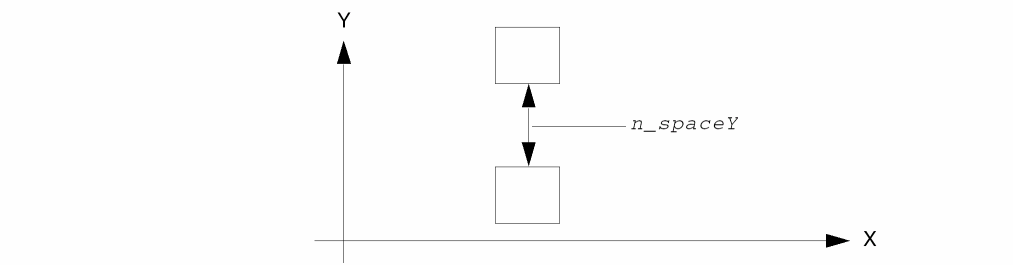 |
|
|
If you do not specify n_spaceY, the system uses the value of n_spaceX. If you specify neither, the system uses the value of |
|
|
Database ID for the cellview in which you are creating a rectangle. |
|
|
List of two points defining opposite corners of a bounding box to fill with rectangles, referred to as a fill-bounding box. The first point specifies any corner and the second point specifies the opposite corner. Use one of the following formats: |
|
|
You can specify the maximum number of rectangles the system creates in the fill-bounding box with x_elementsX and x_elementsY. If the number specified exceeds the space available in the fill-bounding box, the system creates only the number of rectangles that fit. |
|
|
You can specify the distance between rectangles in the fill-bounding box with n_spaceX and n_spaceY. When you use l_bBox argument with l_fillBBox, the system uses the l_bBox coordinates only to compute the size of the rectangles. The system always places the first rectangle in the lower-left corner of the fill-bounding box. For example, the following argument values define a 14-by-10 fill-bounding box with its lower-left corner at 2:2: |
|
|
The coordinates of the first rectangle ( The size of the rectangles is 4 units wide by 2 units long. The rectangles are spaced 1 unit apart in the direction of the X axis and 2 units apart in the direction of the Y axis. |
|
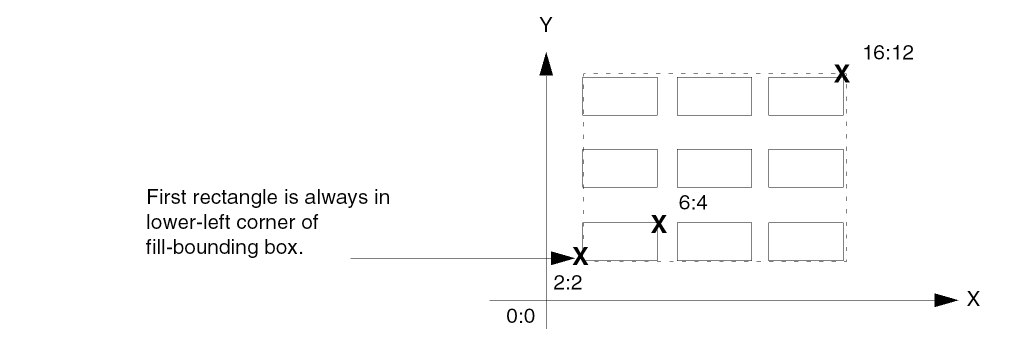 |
|
|
The fill-bounding box is shown by a dashed line because |
|
|
ROD object ID or list of ROD object IDs identifying a named object or list of named objects that you want to use as a source for creating a new named rectangle. The source objects can be instances, rectangles, polygons, paths, lines, dots, labels, and/or text-display objects. When you specify Rl_fromObj, the value of the Rl_fromObj argument overrides other arguments that directly or indirectly specified coordinates for the generated rectangle: n_width, n_length, l_origin, and l_bBox. |
|
|
A signed integer, floating-point number, or Cadence® SKILL language expression specifying the difference between the size of the source object (Rl_fromObj) and the size of the generated rectangle. When the source is more than one object, txf_size specifies the difference between a bounding box around all of the objects and the size of the generated rectangle. A positive number creates a rectangle that is larger than the source objects; a negative number creates a rectangle that is smaller than the source objects. When you specify a SKILL expression, it must evaluate to a positive or negative integer or floating-point number. SKILL expressions are evaluated only when the new rectangle is created.
If you specify a source object (Rl_fromObj) but do not specify txf_size, then txf_size defaults to |
|
|
A list or lists of lists, where each list contains the name of a property and its value. When the property name is a string, enclose it in quotes. For a description of the valid data types, see the |
|
|
And, a list of properties as follows:
For a more detailed description about specifying lists of lists, see Formatting List-of-Lists Arguments for Subparts. |
|
|
Boolean value indicating whether or not the |
|
|
A list containing rod connectivity arguments for rectangles.
For more information on rod_RectConnectivityArgs, see |
|
|
A list containing one or more lists, each of which specifies the arguments for one set of unnamed subrectangles. Each list creates a set of unnamed subrectangles for each master rectangle in the multipart rectangle; each set of subrectangles is created in relationship to the lower-left corner of each master rectangle. For information about how to specify lists of lists, see Formatting List-of-Lists Arguments for Subparts.
For more information onf l_subrectArgs, see |
|
ROD Connectivity Arguments for Rectangles (rodRectConnectivityArgs)
|
Symbol or character string specifying the name of the net with which you want to associate the shape. Enclose character strings in quotation marks (""); precede symbols with a single quotation mark ('). ROD converts symbols to character strings. If the net does not exist, the system creates the net, naming it with S_netName. To associate the shape with a net, this argument is required. |
|
|
Symbol or character string specifying the name of the terminal and net with which you want to associate the shape. Enclose character strings in quotation marks (""); precede symbols with a single quotation mark ('). ROD converts symbols to character strings. If the terminal and net does not exist, the system creates them, naming them S_termName.
If you specify both S_termName and S_netName, their names must be the same. If a terminal with the specified name already exists, the net it belongs to must have the same name. If the net name does not match the terminal name, the function reports an error. To associate the shape with a terminal and net, this argument is required. |
|
|
Symbol or character string specifying the direction type (I/O type) for the terminal. If S_termName is not specified, S_termIOType is ignored. If a terminal with the name specified by S_termName already exists, it must have the same direction type as specified by S_termIOType; if the direction type is not the same, the function reports an error. |
|
|
Boolean value indicating whether or not to make the shape into a pin. The value must be |
|
|
When you specify g_pin, you must also specify S_netName and S_termName; if you do not, all connectivity arguments are ignored but no error is reported.
When the value is |
|
|
Text string or list specifying the access directions for the pin. Enclose string values in quotation marks. Do not use a symbol. An example of a list is |
|
|
Boolean value indicating whether or not to add a text-display label for the pin. The value must be |
|
|
Integer or floating-point number specifying the vertical height of the pin text-display label in user units. |
|
|
Text string, integer, or list specifying the layer or layer-purpose pair for the pin text-display label, such as |
|
|
Enclose string values in quotation marks. Do not use a symbol. For lists, use the following format:
Examples of layer-purpose pairs are When only the layer is specified, the purpose defaults to the purpose defined by l_layer. When neither layer nor purpose is specified, both layer and purpose default to the values defined by l_layer. |
|
|
Default: layer specified by l_layer; purpose specified by l_layer |
|
|
Symbol or character string specifying the name of the font for the pin text-display label. |
|
|
Boolean value indicating whether or not to rotate the pin text-display label more than 90 degrees. The value must be |
|
|
Symbol or character string specifying the orientation of the pin text-display label. |
|
|
Single set of coordinates specifying the X and Y offset of the origin of the pin text-display label from a point handle on the rectangle. The label origin is specified by S_pinLabelJust, and the rectangle point handle is specified by S_pinLabelRefHandle.
For example, to create a label on the rectangle |
|
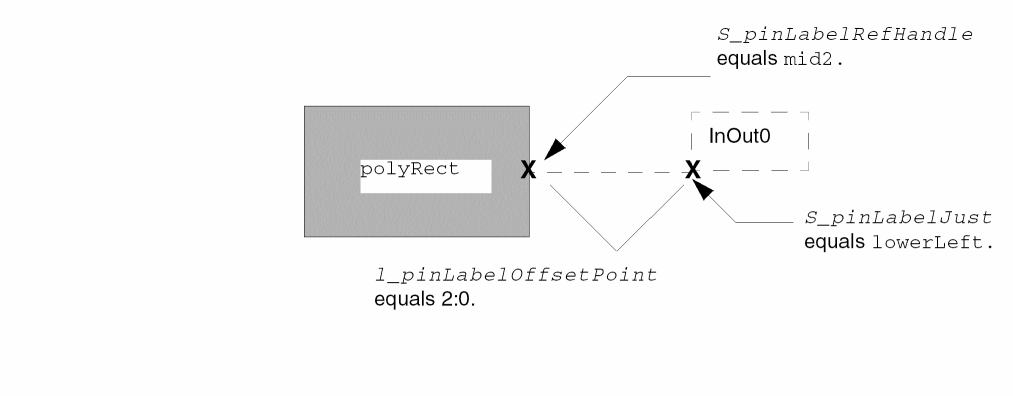 |
|
|
Use one of the following formats: |
|
|
Symbol or character string specifying the origin point of the label. You must specify both words; do not abbreviate them. |
|
|
Valid Values: |
|
|
Symbol or character string specifying the point handle on the rectangle with which you want to associate the origin point of the text-display label. You can specify the name of any bounding box or segment point handle. |
|
|
Bounding box point handle names: To specify a point handle on the bounding box of a rectangle, use either the two-word handle name or its two-character abbreviation, as shown in valid values. For example, you can use |
|
|
Segment point handle names: To specify a point handle on a segment of a rectangle, use the system-defined name for the handle. Each segment has three system-defined point handles, named |
|
|
The last segment also has the following point handles:
For a complete description of system-defined point handles, see |
|
Subrectangle Arguments (l_subrectArgs)
|
Text string, integer, or list specifying the layer or layer-purpose pair for the subrectangle(s), such as
Enclose string values in quotation marks. Do not use a symbol. Use one of the formats defined for the argument |
|
|
Positive integer or floating-point number specifying the horizontal measurement of the subrectangle(s) in user units. |
|
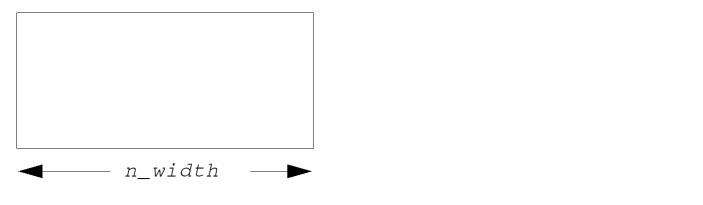 |
|
|
If not specified, the system uses n_length; if neither is specified, the system uses the |
|
|
Positive integer or floating-point number specifying the vertical measurement of the subrectangle(s) in user units. |
|
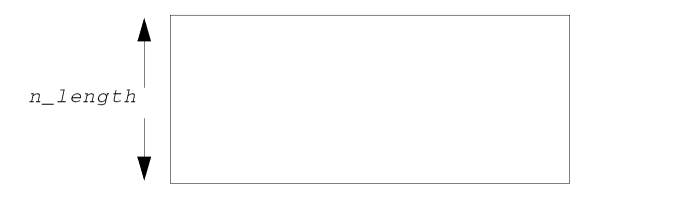 |
|
|
If not specified, the system uses n_width; if neither is specified, the system uses the |
|
|
Symbol or character string specifying the method the system uses to place subrectangles within each master rectangle. Enclose character strings in quotation marks (""); precede symbols with a single quotation mark ('). ROD converts symbols to character strings. The system automatically calculates the maximum number of rectangles that fit in the master rectangle, allowing for the space needed by the offset arguments, and using the value of the n_spaceX and n_spaceY arguments to determine the minimum space between subrectangles.
When the value of S_gap is |
|
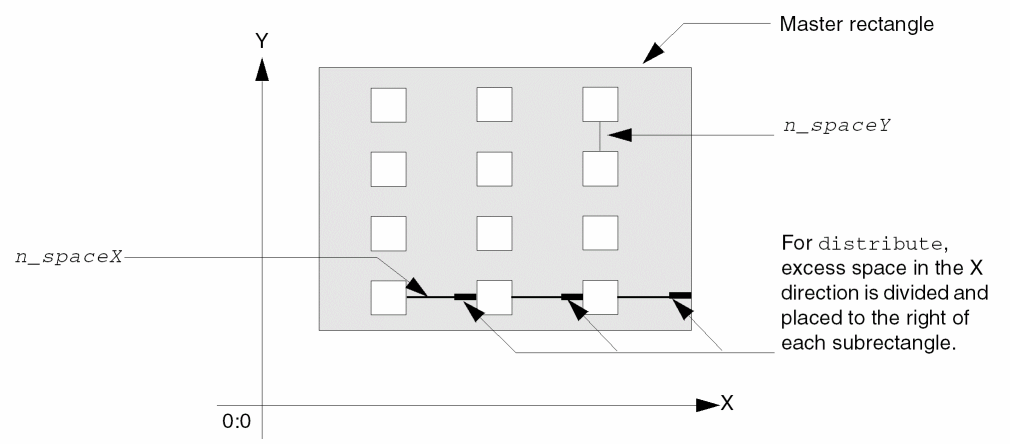 |
|
|
When the value of S_gap is
When the value of S_gap is |
|
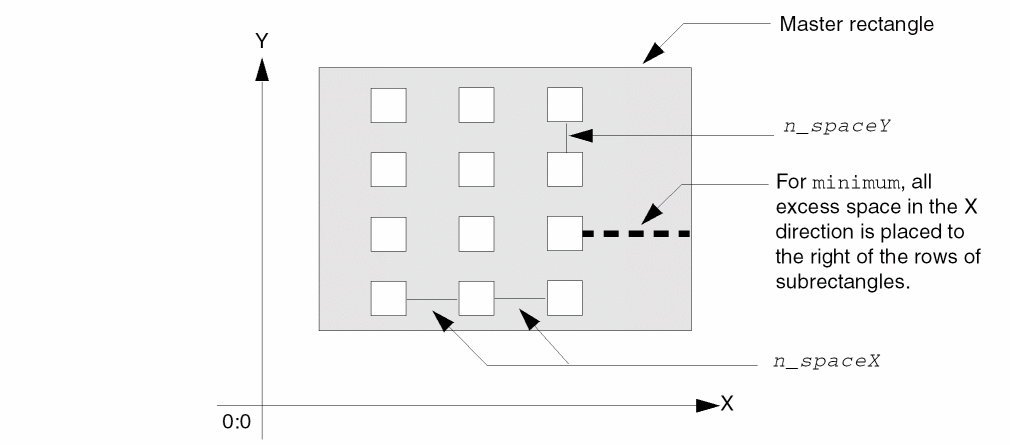 |
|
|
When the value of S_gap is |
|
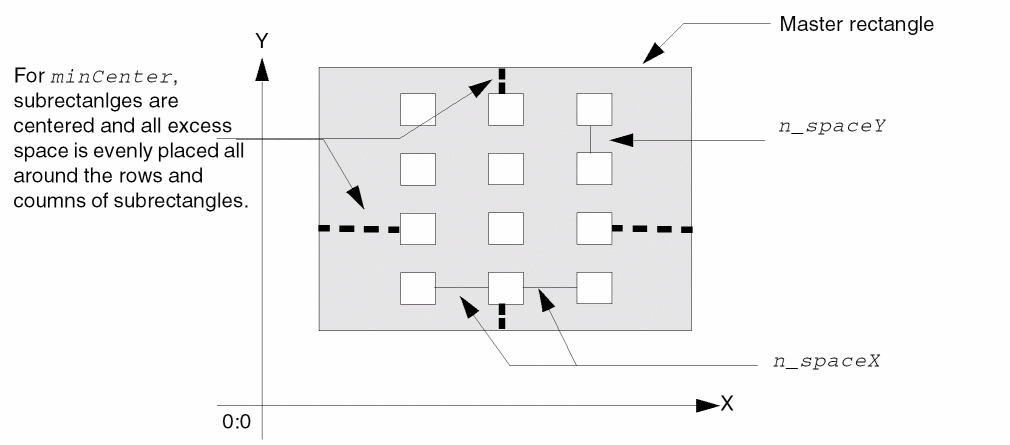 |
|
|
Valid Values: |
|
|
Signed integer or floating-point number specifying the offset along the X axis of the left edge of the lower-left subrectangle from the left edge of the master rectangle. A positive number starts the subrectangles to the right; a negative number starts the subrectangles outside the master rectangle. |
|
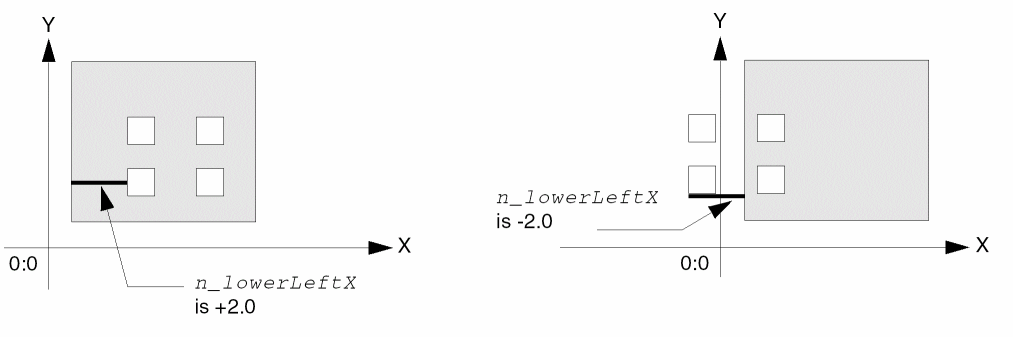 |
|
|
Signed integer or floating-point number specifying the offset along the Y axis of the bottom edge of the lower-left subrectangle from the bottom edge of the master rectangle. A positive number starts the subrectangles above the bottom edge of the master rectangle; a negative number starts the subrectangles outside the master rectangle. |
|
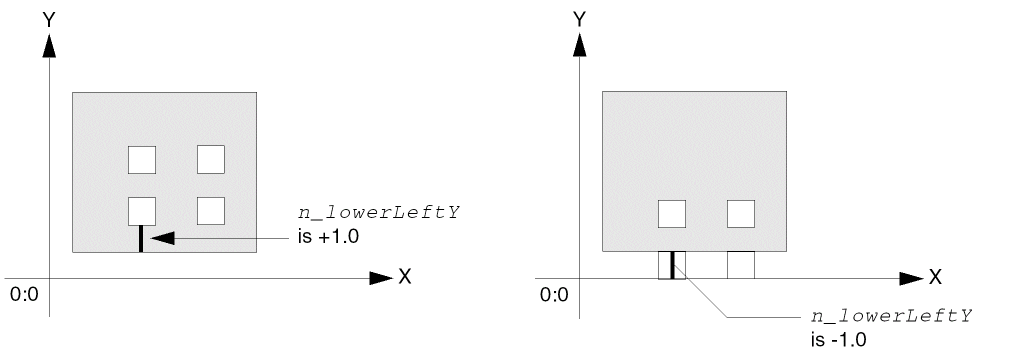 |
|
|
Signed integer or floating-point number specifying the offset along the X axis of the right edge of the upper-right subrectangle from the right edge of the master rectangle. A positive number starts the subrectangles outside of the master rectangle; a negative number starts the subrectangles to the left of the right edge of the master rectangle. |
|
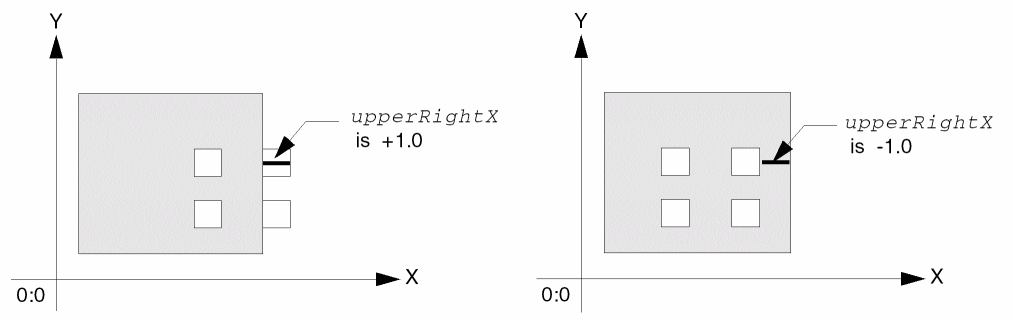 |
|
|
Signed integer or floating-point number specifying the offset along the Y axis of the top edge of the upper-right subrectangle from the top edge of the master rectangle. A positive number starts the subrectangles outside of the master rectangle; a negative number starts the subrectangles below the top edge of the master rectangle. |
|
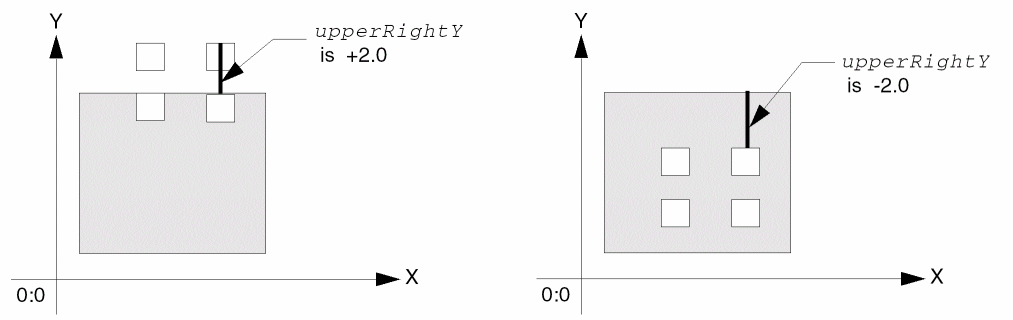 |
|
|
Positive integer or floating-point number specifying the distance between the edges of subrectangles in the direction of the X axis. If not specified, the system uses the |
|
|
Positive integer or floating-point number specifying the distance between the edges of subrectangles in the direction of the Y axis. If not specified, the system uses the |
|
|
A list or lists of lists, where each list contains the name of a property and its value. When the property name is a string, enclose it in quotes. For a description of the valid data types, see the and a list of properties as follows:
For a more detailed description about specifying lists of lists, see Formatting List-of-Lists Arguments for Subparts. |
|
Value Returned
The values returned by the rodCreateRect function is determined by how you specify the g_returnBoolean argument.
-
When g_returnBoolean is set to
t, the function returnstornil. -
When g_returnBoolean is set to
nil, the function returns a ROD object ID or list of ROD object IDs. -
When g_returnBoolean is set to
niland more than one rectangle is created,rodCreateRectreturns a list of ROD object IDs with the upper right rectangle listed first and the lower left rectangle listed last. For example,
("xxx.6.6" "xxx.6.5" "xxx.6.4" "xxx.6.3" "xxx.6.2" "xxx.6.1"
 "xxx.5.6" "xxx.5.5" "xxx.5.4" "xxx.5.3" "xxx.5.2" "xxx.5.1"
 "xxx.4.6" "xxx.4.5" "xxx.4.4" "xxx.4.3" "xxx.4.2" "xxx.4.1"
 "xxx.3.6" "xxx.3.5" "xxx.3.4" "xxx.3.3" "xxx.3.2" "xxx.3.1"
 "xxx.2.6" "xxx.2.5" "xxx.2.4" "xxx.2.3" "xxx.2.2" "xxx.2.1"
 "xxx.1.6" "xxx.1.5"  "xxx.1.4" "xxx.1.3" "xxx.1.2"  "xxx.1.1")
|
ROD object ID or a list of ROD object IDs in descending sequence for ROD object information associated with the new rectangle or multiple new rectangles. |
|
Examples
Example 1: Creating a Single Rectangle
dbCreateRect function instead of the rodCreateRect function; using dbCreateRect produces less overhead, resulting in faster performance.You can create a single named rectangle, with ROD attributes, as shown below:
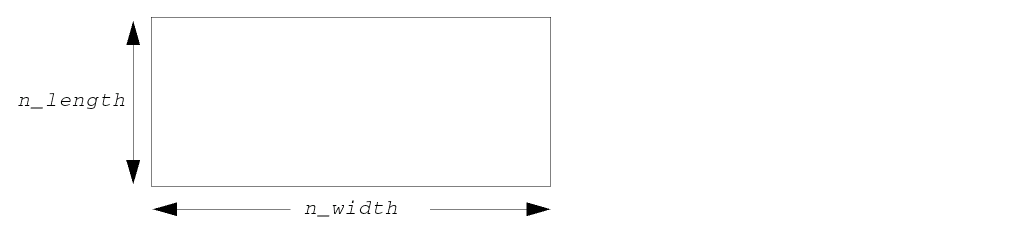
with code similar to the following:
rodCreateRect(
    ?layer    "metal2"
    ?width    4
    ?length   2
)
The return value is a single ROD object ID.
Example 2: Creating Rows and Columns of Named Rectangles
To create rows and columns of rectangles that are regular, unnamed database shapes, see
You can create rows and columns of named rectangles that have ROD attributes, as shown below:
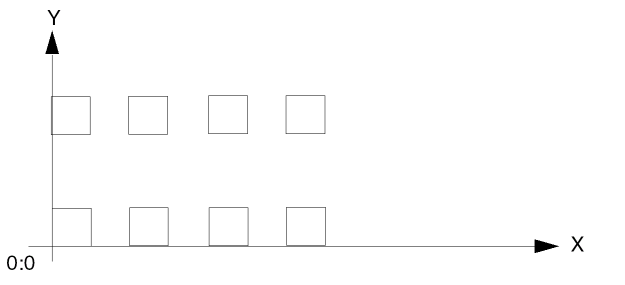
with code similar to the following.
rodCreateRect( ?layer "metal1" ?width 1 ?length 1?origin list( 0 0 )?elementsX4?elementsY2?spaceX 1
?spaceY 2)
The return value is a list of eight ROD object IDs.
Example 3: Filling a Bounding Box with Named Rectangles
To fill a bounding box with rectangles that are regular, unnamed database shapes, see
You can fill a bounding box with named rectangles that have ROD attributes, as shown below:
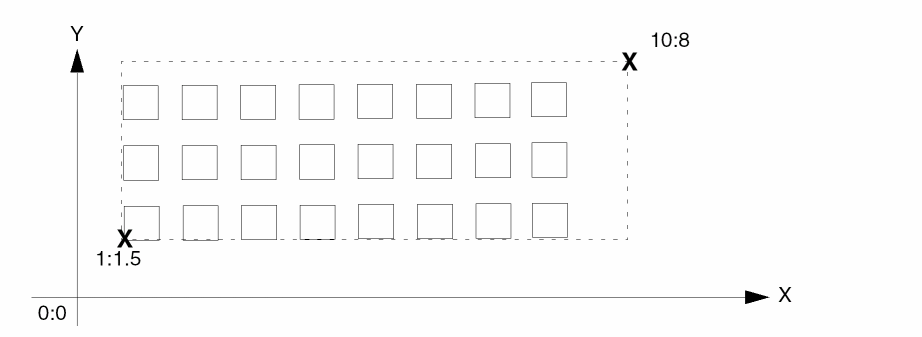
with code similar to the following (the first rectangle is always in the lower-left corner of the bounding box):
rodCreateRect(
    ?layer          "metal1"
    ?fillBBox       list( 1:1.5 10:5 )
    ?spaceX         0.5
    ?returnBoolean  t
)
Example 4: Creating a Multipart Rectangle
You can create a multipart rectangle consisting of a single master rectangle filled with unnamed subrectangles as shown below:
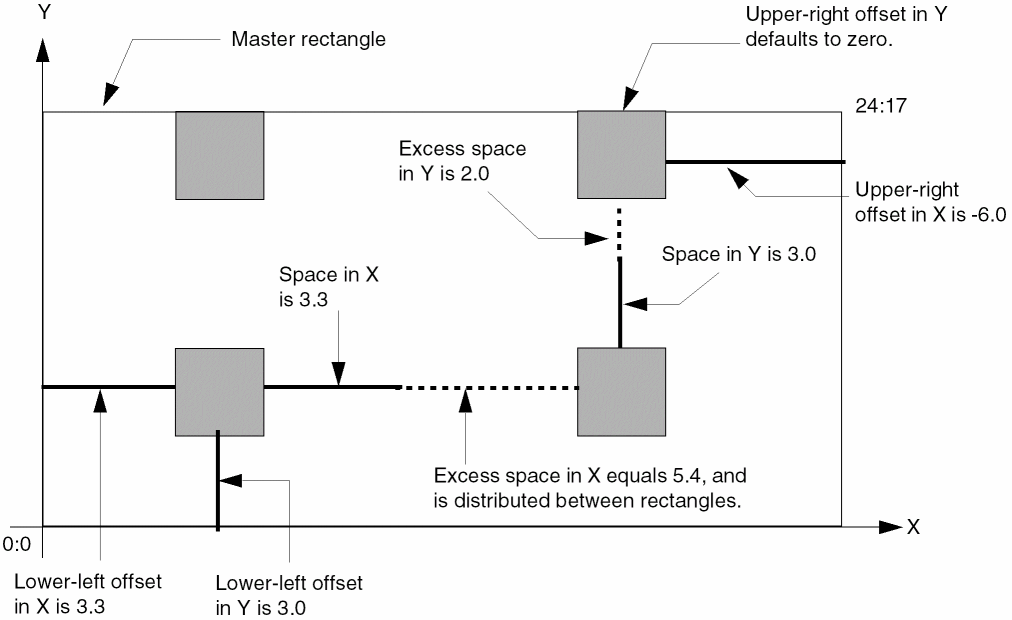
with code similar to the following. In this example, S_gap is not specified; it defaults to distribute, causing the excess space to be placed between the subrectangles.
cvId = deGetCellView()
rodCreateRect(
    ?layer         "metal1"
    ?width         24
    ?length        17
    ?origin        list( 0 0 )
    ?elementsX     1
    ?elementsY     1
    ?cvId          cvId
    ?subRectArray
     list(
           list(
                  ?layer               "metal2"
                  ?width               3
                  ?length              3
                  ?lowerLeftOffsetX    3.3
                  ?lowerLeftOffsetY    3
                  ?upperRightOffsetX   -6
                  ?spaceX              3.3
                  ?spaceY              3
  );end first subrectangle list
         );end all subrectangle lists
    ) ;end rodCreateRect
Specifying the Gaps as Minimum
To place excess space to the right or above the subrectangles, you can specify the S_gap argument as minimum, as shown below.
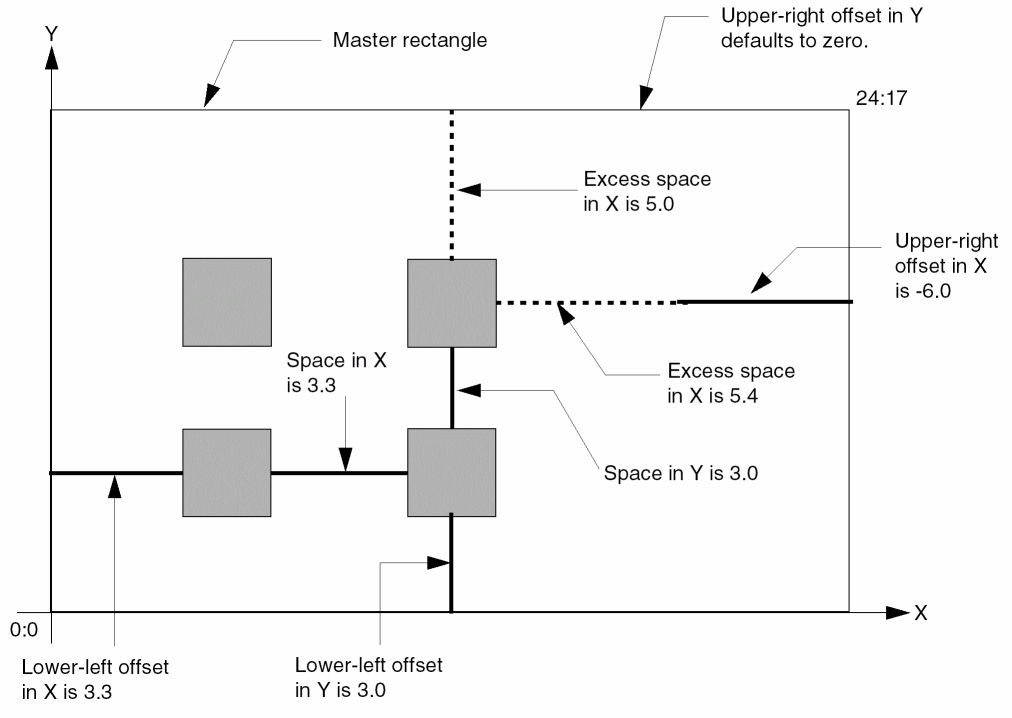
cvId = deGetCellView()
rodCreateRect(
     ?layer         "metal1"
  ?width         24
  ?length        17
  ?origin        list( 0 0 )
  ?elementsX     1
  ?elementsY     1
  ?cvId          cvId
      ?subRectArray
  list(
            list(
                ?layer            "metal2"
                ?width            3
                ?length           3
                ?gap              "minimum"
                ?lowerLeftOffsetX  3.3
                ?lowerLeftOffsetY  3
                ?upperRightOffsetX -6
                ?spaceX            3.3
                ?spaceY            3
             ) ;End first subrectangle list
          ) ;end all subrectangle lists
     ) ; end rodCreateRect
Example 5: Creating a Multipart Rectangle with Overlapping Subrectangles
You can create a multipart rectangle with overlapping unnamed subrectangles, as shown below:
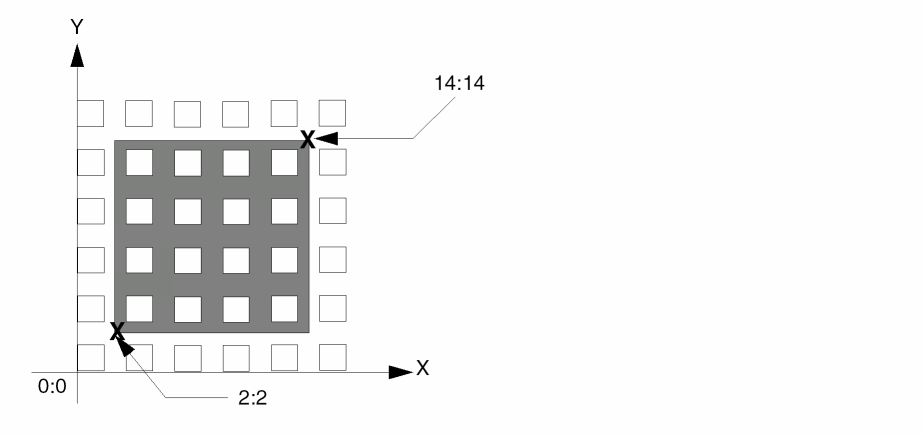
with code similar to the following;, where the lower-left offset arguments are less than zero and the upper-right offset arguments are greater than zero:
cvId = deGetCellView()
rodCreateRect(
    ?layer         "metal1"
    ?width         12
    ?length        12
    ?origin        list( 2 2 )
    ?elementsX     1
    ?elementsY     1
    ?cvId          cvId
     ?subRectArray
          list(
             list(
                  ?layer                "metal2"
                  ?width                1
                  ?length               1
                  ?lowerLeftOffsetX     -2
                  ?lowerLeftOffsetY     -2
                  ?upperRightOffsetX    2
                  ?upperRightOffsetY    2
                  ?spaceX               1
                  ?spaceY               1
               ) ;end first subrectangle list
         );end all subrectangle lists
    );end rodCreateRect
Example 6: Creating a Ground Rail and Contacts
You can create a ground rail with contacts, as shown below:
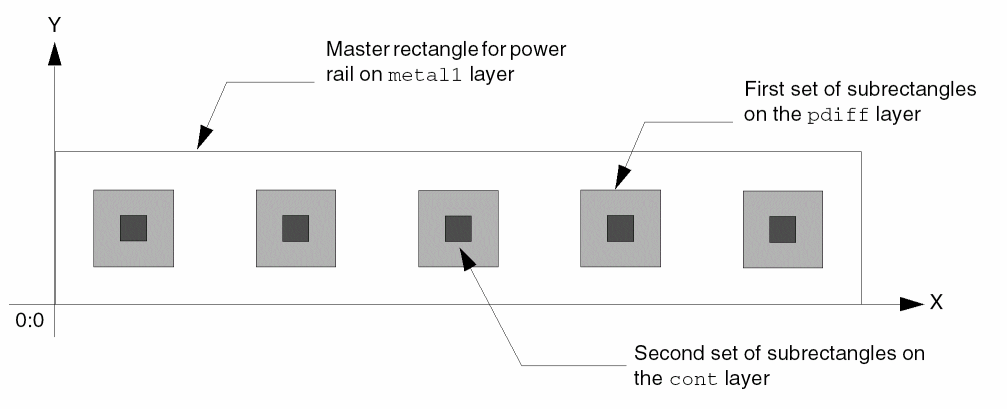
where with code similar to the following, you specify a named rectangle for the metal layer, a set of unnamed subrectangles on the p-diffusion layer, and a second set of unnamed subrectangles on the contact layer:
rodCreateRect(
    ?layer         "metal1"
    ?width         10
    ?length        2
    ?origin        list( 0 0 )
    ?elementsX     1
    ?elementsY     1
    ?cvId          cvId
    ?subRectArray
     list(
   list(
    ?layer                "pdiff"
    ?width                1
    ?length               1
    ?gap                  "minimum"
    ?lowerLeftOffsetX     0.5
    ?lowerLeftOffsetY      0.5
   ) ;End of first subrectangle list
   list(
    ?layer                "cont"
    ?width                0.5
    ?length               0.5
    ?gap                  "minimum"
    ?lowerLeftOffsetX     0.75
    ?lowerLeftOffsetY     0.75
    ?spaceX               1.5
    ?spaceY               1.5
   ) ;end second subrectangle list
  ) ;end all subrectangle lists
 ) ; end rodCreateRect
In this example, specifying the space arguments for the subrectangles is not necessary; the software uses the default values for the n_spaceX and n_spaceY arguments to create the number of contacts that fit. However, if you want to an amount of space between contacts that is different than the default when the power rail is stretched, you do need to specify the space arguments.
Example 7: Stretching a Multipart Rectangle
The following examples include stretching the master rectangle of a multipart rectangle in the direction of the Y axis. To make the subrectangles regenerate correctly, specifying n_spaceY is necessary. The space arguments default to the minimum spacing (minSpacing) defined for the subrectangle layers in the technology file, which, in this case, does not produce the desired result.
When you stretch a master rectangle using the Virtuoso® Layout Editor Edit – Stretch command, the system regenerates all sets of unnamed subrectangles. For example, stretching the master rectangle specified in the last example to the right, as shown below:
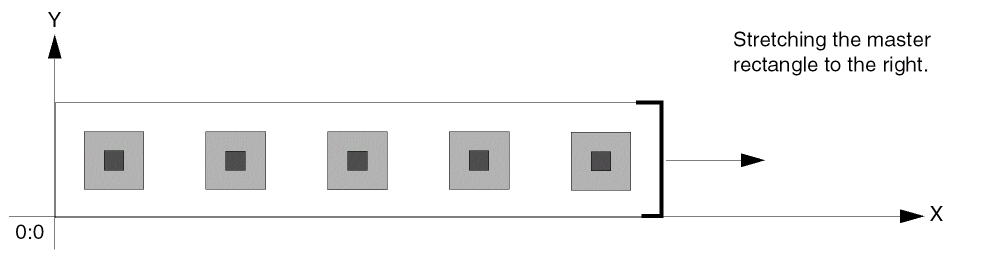
makes the power rail longer, adding more contacts horizontally, like this:
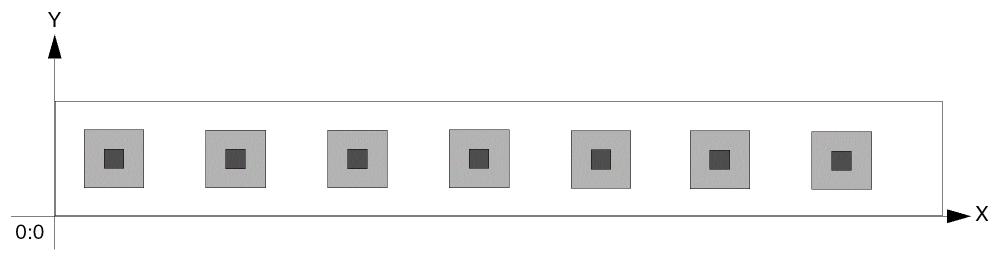
Stretching the master rectangle upward, as shown below:
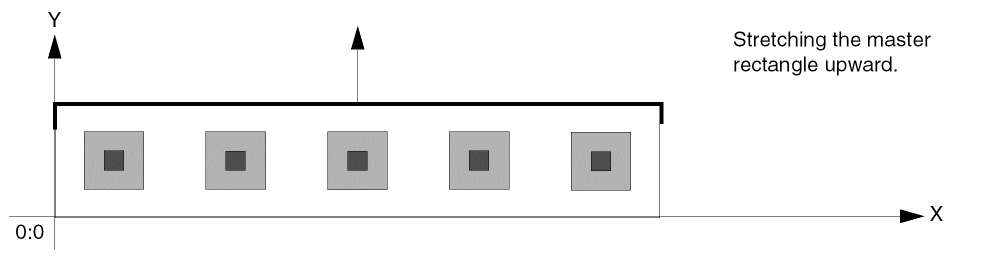
makes the power rail wider, adding more rows of contacts vertically, like this:
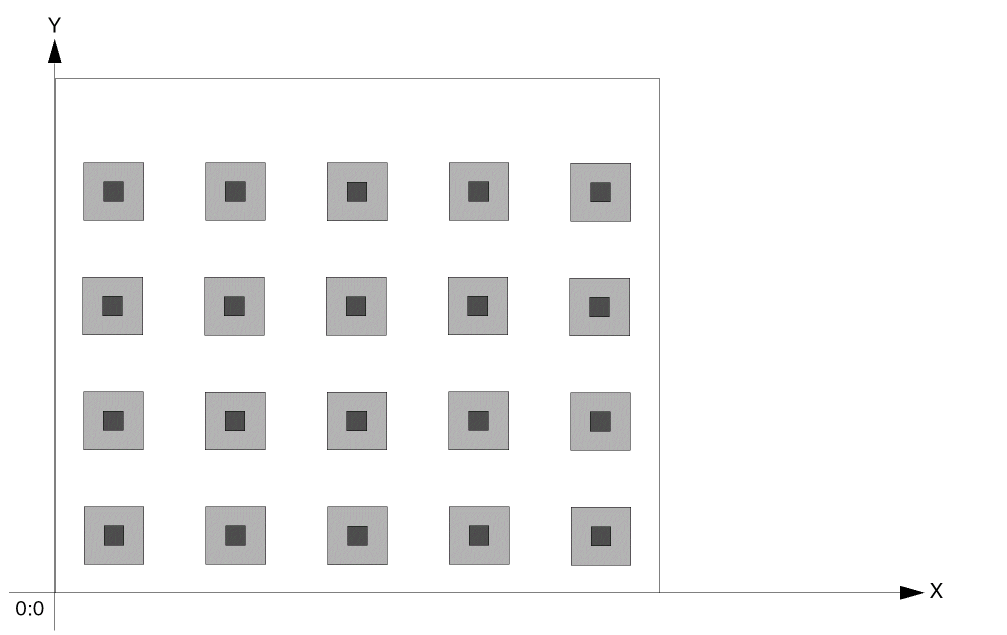
Example 8: Creating Multiple Master Rectangles Filled with Subrectangles
For a multipart rectangle, you can create rows and columns of master rectangles and fill them with unnamed subrectangles, as shown below:
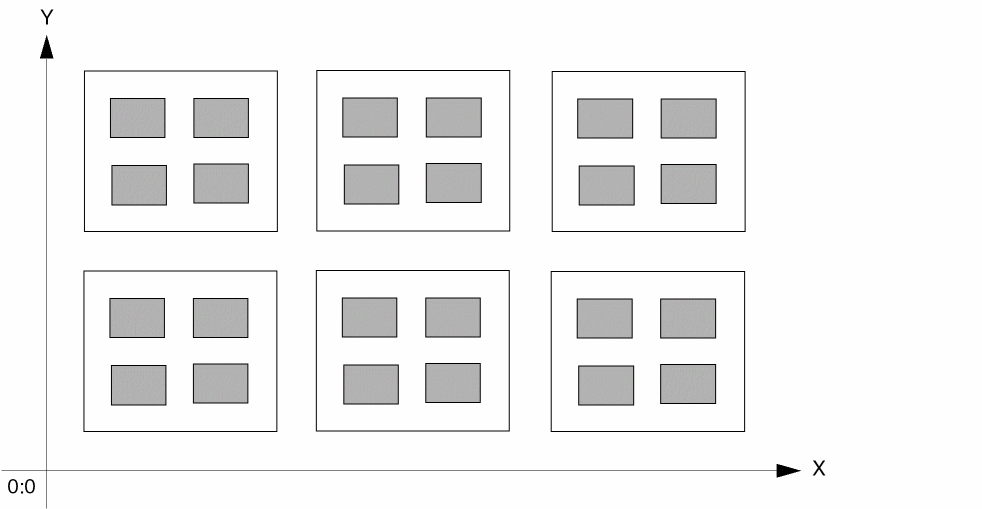
with code similar to the following:
cvId = deGetCellView()
rodCreateRect(
    ?layer         "metal1"
    ?width         3.5
    ?length        3
    ?origin        list( 0.75 0.75 )
    ?elementsX     3
    ?elementsY     2
    ?spaceX        0.75
    ?spaceY        0.75
    ?cvId          cvId
    ?subRectArray
    list(
           list(
                  ?layer               "metal2"
                  ?width               1
                  ?length              0.75
                  ?lowerLeftOffsetX    0.5
                  ?lowerLeftOffsetY    0.5
                  ?upperRightOffsetX   -0.5
                  ?upperRightOffsetY   -0.5
                  ?spaceX              0.5
                  ?spaceY              0.5
           );end first subrectangle list
        ) ;end all subrectangle lists
   ) ;end rodCreateRect
Example 9: Creating a Rectangle from Other Objects
You can specify the coordinates of a named rectangle with the n_width, n_length, and l_origin arguments or with the l_bBox argument. Optionally, you can use the Rl_fromObj argument to specify one or more named objects from which to generate a named rectangle. When you specify two or more named objects as the source for creating a rectangle, as shown in the example below:
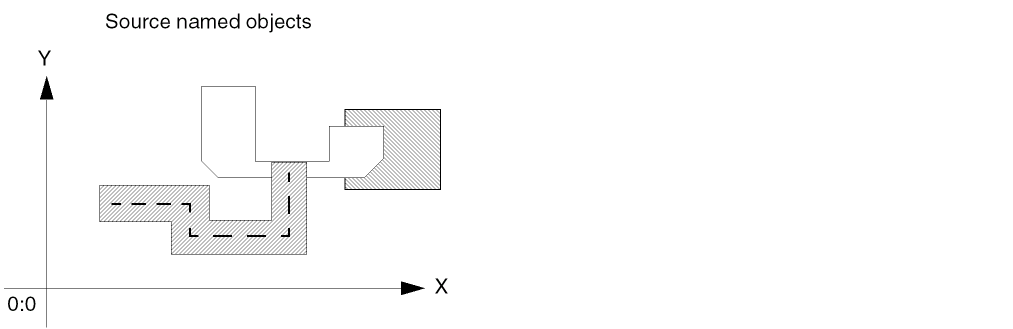
the system creates the rectangle based on a bounding box around the objects. The new rectangle is larger or smaller than the bounding box, depending on whether you specify a positive or negative size.
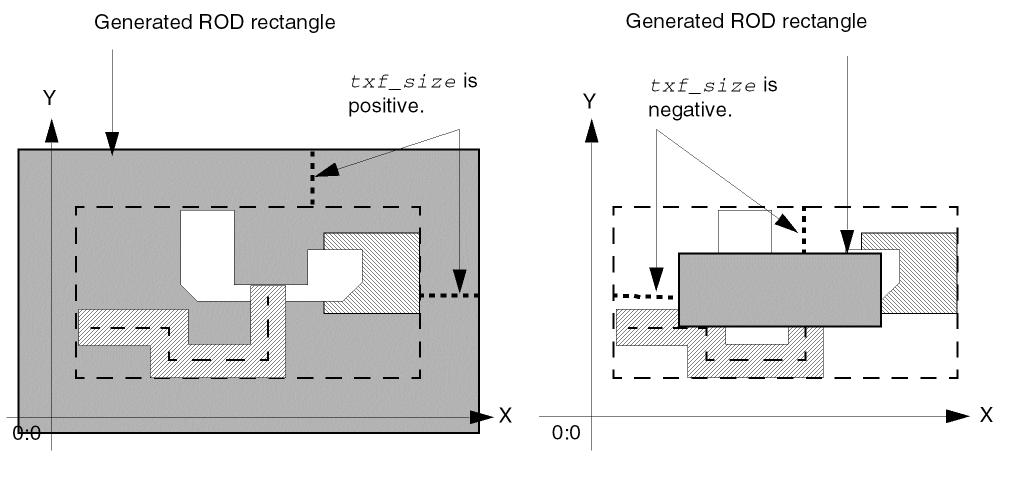
For a detailed overview of creating rectangles from other objects, see
rodDeleteHandle
rodDeleteHandle(R_rodObj S_name);end rodDeleteHandle =>t/nil
Description
Deletes a user-defined handle. You provide the ROD object ID and handle name.
Arguments
Value Returned
rodDeleteSubPart
rodDeleteSubPart(R_rodObjId t_subpartName);end rodDeleteSubPart =>t/nil
Description
Deletes the named subpart from the given multipart path (MPP).
Arguments
Value Returned
Example
rodDeleteSubPart(mppId, "subpart0")
Deletes the subpart named subpart0 from the MPP corresponding to mppId.
rodFillBBoxWithRects
rodFillBBoxWithRects( [ ?cvIdd_cvId] [ ?layertxl_layer] [ ?fillBBoxl_fillBBox] [ ?widthn_width] [ ?lengthn_length] [ ?gapS_gap] [ ?spaceXn_spaceX] [ ?spaceYn_spaceY] [ ?propl_prop] [ ?returnBooleang_returnBoolean] );end rodFillBBoxWithRects =>d_dbId /t / nil
Description
Fills a bounding box with rectangles, as many as fit within the bounding box you specify. The rectangles are ordinary unnamed shapes, identified by database IDs; the rectangles have no ROD attributes. You can assign a property name and value, or a list of property names and values, to the set of rectangles. The property or list of properties apply to every rectangle in the bounding box. You specify the return value of the function to be Boolean or a list of the database IDs for the rectangles. When you want to create a one- or two-dimensional array of rectangles, and the rectangles do not need to be ROD objects, use this function instead of rodCreateRect because regular database shapes require less overhead, contributing to faster performance.
Arguments
|
Database ID for the cellview in which you are creating rectangles. |
|
|
Text string, integer, or list specifying the layer or layer-purpose pair for the rectangle(s), such as: |
|
|
Enclose string values in quotation marks. Use one of the formats defined for the argument |
|
|
List of two points defining opposite corners of a bounding box to fill with rectangles. |
|
|
Positive integer or floating-point number specifying the horizontal measurement of the rectangle(s) in user units.
If not specified, the system uses n_length; if neither is specified, the system uses the |
|
|
Positive integer or floating-point number specifying the vertical measurement of the rectangle(s) in user units.
If not specified, the system uses n_width; if neither is specified, the system uses the |
|
|
Symbol or character string specifying the method the system uses to place rectangles within the bounding box. Enclose character strings in quotation marks (""); precede symbols with a single quotation mark ('). ROD converts symbols to character strings. |
|
|
The system always uses the value of n_spaceX and n_spaceY for minimum space between rectangles and calculates the maximum number of rectangles that fit in the bounding box. |
|
|
When the value of S_gap is
Note: When the value of S_gap is
When the value of S_gap is
When the value of S_gap is
Valid Values: |
|
|
Positive integer or floating-point number specifying the distance between the edges of rectangles in the direction of the X axis. If not specified, the system uses the |
|
|
If the |
|
|
Positive integer or floating-point number specifying the distance between the edges of rectangles in the direction of the Y axis. If not specified, the system uses the |
|
|
A list or lists of lists, where each list contains the name of a property and its value. When the property name is a string, enclose it in quotes. For a description of the valid data types, see the |
|
|
For a more detailed description about specifying lists of lists, see Formatting List-of-Lists Arguments for Subparts. |
|
|
Boolean value indicating whether or not the |
|
|
The value of the g_returnBoolean argument must be |
|
Value Returned
The value returned by the rodFillBBoxWithRects function is determined by how you specify the g_returnBoolean argument. ]
-
When g_returnBoolean is set to
t, the function returnstornil. -
When g_returnBoolean is set to
nil, the function returns a database ID or list of database IDs. (This function does not return ROD object IDs.) -
When g_returnBoolean is set to
niland more than one rectangle is created,rodFillBBoxWithRectsreturns a list of database IDs with the upper right rectangle listed first and the lower left rectangle listed last.
-
When g_returnBoolean is set to
The numbers in the illustration below show the sequence in which the database IDs of the rectangles would be returned.
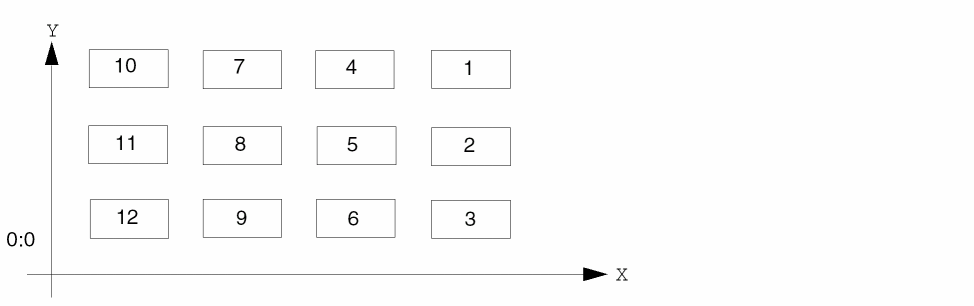
|
Database object ID or list of database object IDs (not the ROD object ID) for the rectangles created to fill the bounding box, in descending sequence. |
|
Additional Information
You can fill a bounding box with rectangles as shown below by defining the lower-left and upper-right points of the bounding box. Notice where the system places any excess space.
Figure 1-5 Filling a Bounding Box with Rectangles
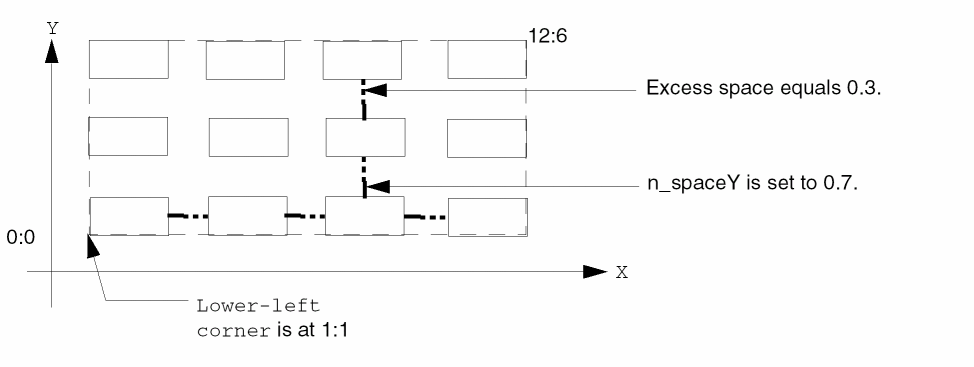
dbIdList = rodFillBBoxWithRects(
    ?cvId               cvId
    ?layer              "metal1"
    ?fillBBox           list( 1:1 12:6 )
    ?width              2.0
    ?length             1.0
    ?spaceX             0.7
    ?spaceY             0.7
    ?returnBoolean      nil
    ) ; end rodFillBBoxWithRects
In the example above, the S_gap argument is not specified, so it defaults to distribute, causing excess space to be placed between the subrectangles. Therefore, the space between rectangles along the Y axis is 0.3 more than the minimum of 0.7 specified by the n_spaceY argument. The example code returns the variable dbIdList, which contains a list of 12 database IDs.
You can fill the same bounding box specified above, but with the S_gap argument set to minimum, to create the rectangles shown below.
Figure 1-6 Filling a Bounding Box with Rectangles with Minimum Gaps
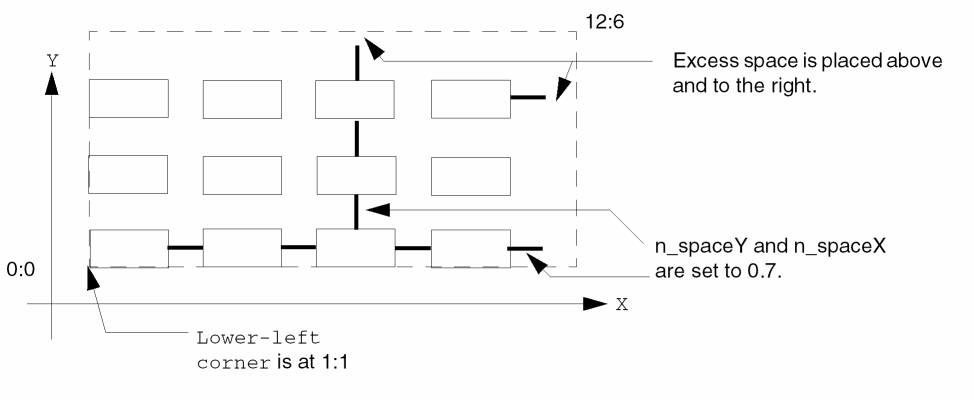
rc = rodFillBBoxWithRects(
     ?cvId               cvId
  ?layer              "metal1"
  ?fillBBox           list( 1:1 12:6 )
  ?width              2.0
  ?length             1.0
  ?gap                "minimum"
  ?spaceX             0.7
  ?spaceY             0.7
  ?returnBoolean      t
 ) ; end rodFillBBoxWithRects
The S_gap argument was set to minimum, so the system spaced the rectangles apart using the values of n_spaceX and n_spaceY, and placed the remaining space above and to the right of the rectangles.The example code returns the variable rc, which is set to t.
rodFillWithRects
rodFillWithRects( [ ?shapeIdd_shapeID] [ ?fillShapeLPPlpp] [ ?fillShapeWidthn_width] [ ?fillShapeLengthn_length] [ ?gapS_gap] [ ?justificationS_justification] [ ?keepOutl_ptList] [ ?spaceXn_spaceX] [ ?spaceYn_spaceY] [ ?enclosureXn_encX] [ ?enclosureYn_encY] [ ?gridn_grid] [ ?outputFillShapel_dbId] );end rodFillWithRects => t / nil
Description
Fills a base shape with rectangles. The base shape can be a rectangle, polygon or a path type.
Figure 1-7 Symmetric Shape Filling
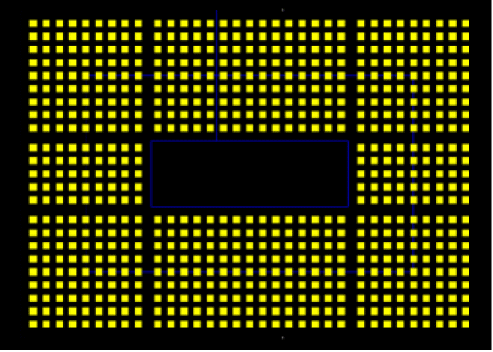
Figure 1-8 Asymmetric Shape Filling
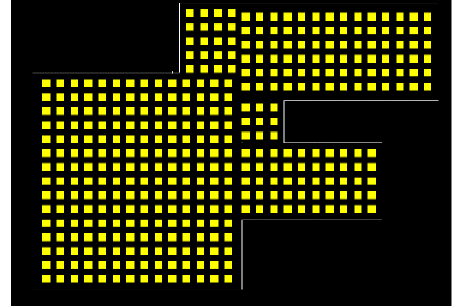
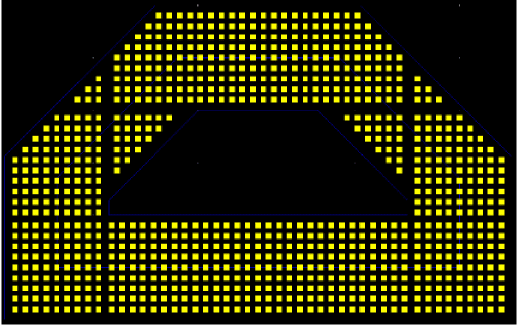
Arguments
Value Returned
If value for outputFillShape is not specified, or if the value specified is nil, the value returned is:
If value of outputFillShape is a groupid (valid group ID in database), the value returned is:
|
Base shape is filled successfully with the shapes associated with the given group ID and the group of the filled IDs is returned. |
|
If value of outputFillShape is a listShapes(valid list(nil) object), the value returned is:
|
Base shape is filled successfully with the given list and the list of filled IDs is returned. |
|
Examples
The following examples show the results of using rodFillWithRects in different circumstances:
Example 1: outputFilShape is specidfied as a valid list object
myList = list(nil)
returnList = rodFillWithRects(
  ?shapeId shapeId
  ?fillShapeLPP list("Cont" "drawing")
  ?fillShapeWidth 0.1
  ?fillShapeLength 0.1
  ?gap "minimum"
  ?justification "centerCenter"
  ?keepOut nil
  ?spaceX 0.1
  ?spaceY 0.1
  ?enclosureX 0.1
  ?enclosureY 0.1
  ?grid 0.005
  ?outputFillShape myList
)
-
returnListcontains list of filled shape IDs -
myListis the list of filled shape dbIds -
The return value
returnListis same asmyList, which is filled with shape IDs.
Example 2: outputFilShape is specidfied as a valid group object
returnGroup = rodFillWithRects(
     ?shapeId shapeId
  ?fillShapeLPP list("Cont" "drawing")
  ?fillShapeWidth 0.1
  ?fillShapeLength 0.1
  ?gap "minimum"
  ?justification "centerCenter"
  ?keepOut nil
  ?spaceX 0.1
  ?spaceY 0.1
  ?enclosureX 0.1
  ?enclosureY 0.1
  ?grid 0.005
  ?outputFillShape myGroup
)
-
myGroupis a valid database object of group ID. This group includes a list of filled shape dbIds -
The value returned is
returnGroup, which is same asmyGroupthat associates all filled shape IDs as members of this group.
Example 3: outputFilShape not given or given as nil
returnValue = rodFillWithRects(
     ?shapeId shapeId
  ?fillShapeLPP list("Cont" "drawing")
  ?fillShapeWidth 0.1
  ?fillShapeLength 0.1
  ?gap "minimum"
  ?justification "centerCenter"
  ?keepOut nil
  ?spaceX 0.1
  ?spaceY 0.1
  ?enclosureX 0.1
  ?enclosureY 0.1
  ?grid 0.005
)
The value returned is t if the function is successful in filling the base shape. The value returned is nil if the function fails in filling the base shape.
rodGetBBox
rodGetBBox( [ ?figIdd_figId] [ ?layert_layer] [ ?purposet_purpose] [ ?stopLevelx_stopLevel] [ ?filterTextg_filterText] );end rodGetBBox =>l_bBox/ nil
Description
Returns the coordinates of the rectangular bounding box enclosing all the elements of a specified figure on a specified layer. You can optionally limit the calculation to include only elements on a specified layer purpose and down to a specified level of design hierarchy. You can also exclude labels and text displays from the calculation.
Arguments
Value Returned
Example
The following example returns the bounding box of all the elements of the specified figure, taking into account shapes, instances, vias, and figGroups drawn on layer-purpose pair (Poly drawing) at the current level of hierarchy, but excluding labels and text displays.
rodGetBBox(?figId css() ?layer "Poly" ?purpose "drawing" ?stopLevel 1 ?filterText t)
=> ((0.935 4.75) (6.28 7.43))
rodForceUpdate
rodForceUpdate(
)
=> nil
Description
Applies all ROD update requests in the queue.
Arguments
Value Returned
|
The function has no specified return value but the requested updates were made. |
Example
rodForceUpdate()
All ROD update requests are applied.
rodGetHandle
rodGetHandle(R_rodObj S_name);end rodGetHandle =>g_handleValue/nil
Description
Returns the value of a system- or user-defined handle. You specify the handle name and the ROD object ID for the object with which the handle is associated.
For Boolean handles, the value can be either t or nil. When the value is nil, rodGetHandle returns an ambiguous result: nil could mean that the handle was not found or that the value of the handle is nil. To avoid ambiguity for Boolean handles, verify that the handle exists with the rodIsHandle function before you try to access it.
Arguments
Value Returned
rodGetNamedShapes
rodGetNamedShapes(d_cvId);end rodGetNamedShapes => lR_rodObjID/nil
Description
Returns a list of the ROD object IDs for all named shapes (rectangles, polygons, and paths) at level zero in the hierarchy within the specified cellview that are ROD objects. This function looks only at the top level of hierarchy and does not return the ROD object ID for instances or cellviews.
Arguments
Value Returned
|
A list of the ROD object IDs for all named shapes in the specified cellview that are ROD objects. |
|
|
No ROD objects or other named shapes exist in the cellview, or an error occurred. |
rodGetObj
rodGetObj(S_hierarchicalName|d_dbId[d_cellViewId] ); end rodGetObj =>R_rodObj/nil
Description
Lets you find a named object at any level of hierarchy in your cellview. You must specify either the database ID for the object or its hierarchical name. If you specify the hierarchical name, you must also specify the cellview ID. When you specify a cellview ID, it is not necessary to also specify the database ID; however, if you specify both, the cellview ID must be correct for the database ID you specify. If your rodGetObj statement occurs in the code for a Pcell (in the body of a pcDefinePCell function or tcCreateCDSDeviceClass function call), specifying the cellview ID is optional; if you do not specify it, the cellview ID defaults to pcCellView or tcCellView, respectively.
dbCreate* functions, such as dbCreateInst and dbCreateParamInst create named objects and as a result, have a ROD ID associated with them. You can use the rodGetObj SKILL function to fetch the ROD ID of these objects.Arguments

Value Returned
rodGetSubPart
rodGetSubPart(R_rodObjId t_subpartName);end rodGetSubPart =>R_rodSubpartId/nil
Description
Returns the subpart ID corresponding to the specified subpart name for the multipart path (MPP) specified as rodObjectId.
Arguments
|
ROD object ID associated with the multipart path (MPP).ROD object ID associated with the multipart path (MPP). |
|
|
String specifying the subpart name for which the subpart ID is to be retrieved. |
Value Returned
|
The subpart ID corresponding to the subpart name for the specified MPP. |
Example
subId = rodGetSubPart(mppId "subpart0")
rodIsFigNameUnused
rodIsFigNameUnused(S_name[d_cvId] ); rodIsFigNameUnused =>t/nil
Description
Determines whether the name specified by S_name is a valid name and whether it is already assigned to a ROD object, instance, or mosaic in the cellview specified by d_cvId. A valid name cannot contain hierarchy (indicated by one or more slashes) and cannot be an empty string.
You might want to verify whether a name is already assigned before you attempt to assign it to a shape with the
Arguments
Value Returned
rodIsHandle
rodIsHandle(R_rodObj S_name);end rodIsHandle =>t/nil
Description
Determines whether the name specified for S_name identifies a valid system- or user-defined handle associated with the object specified by R_rodObj. Use this function prior to the rodGetHandle function when you want to verify that the handle exists before you try to access it.
Arguments
Value Returned
|
The name is a valid system- or user-defined handle for the object identified by R_rodObj. |
|
|
The name is not a valid system- or user-defined handle for the object identified by R_rodObj. |
rodIsMasterChoppable
rodIsMasterChoppable(R_rodObjId)=>t/nil
Description
Returns the value of the MPP master path choppability attribute.
Arguments
Value Returned
Example
In the following example, when the choppable attribute of master path is set to nil, the first subpart of the given MPP is made non-choppable. In this MPP, the mppid variable contains the rodObjId value.
unless(rodIsMasterChoppable(mppId)
     car(mppId~>subParts)~>choppable = nil
)
rodIsObj
rodIsObj(g_object;end rodIsObj =>t/nil
Description
Determines whether the object specified for g_object identifies a valid ROD object. This function is useful for testing variables and parameters to see if they contain a ROD object ID.
For information about what happens to ROD object IDs when you do an Undo in a cellview, see
Arguments
|
Value of any data type. This argument is required. |
Value Returned
Examples
The following examples show the results of using rodIsObj in several circumstances.
Example 1
Using rodCreateRect to create a rectangle results in a ROD object, and the function returns the ROD object ID. Assigning the result to the variable rect sets rect equal to the ROD object ID.
rect = rodCreateRect( ?cvId geGetEditCellView() ?layer "metal1" )
=> rodObj:19984408
Using rodIsObj to test rect returns t, as the object is a ROD object:
rodIsObj( rect )
t
Example 2
Testing anything other than a valid ROD object ID, such as a number, returns nil:
rodIsObj( 42 )
nil
Example 3
As in Example 1, above, the variable rect contains the ROD object ID for the new rectangle:
rect = rodCreateRect(?cvId cv
     ?name "r1"
  ?layer "metal1"
  ?width 5
  ?length 10
 ) ; end rodCreateRect
=> rodObj:23494680
Testing rect returns a ROD object ID:
rect
rodObj:23494680
Using rodIsObj to test rect returns t, as the object is a ROD object:
rodIsObj( rect )
t
However, if you select the ROD rectangle, move it, and then do an Undo, the variable rect no longer contains a ROD object ID.
rect
rod:invalid
rodIsObj(rect)
nil
For more information about what happens when you do an Undo in a cellview that contains ROD objects, see
rodNameObject
rodNameObject ( [ ?nameS_name] [ ?shapeIdd_shapeId] [ ?permitRenameg_permitRename] );end rodNameObject =>R_rodObj/nil
Description
Assigns a name to an unnamed database shape or renames a ROD shape. Once the object is named, it can identified by a ROD object ID. This is an alias to an existing public function, rodNameShape.
Arguments
Value Returned
|
ROD object ID for ROD object information associated with the newly named shape. |
|
Example
rodNameObject(
              ?name "myObj1"
              ?shapeId car(geGetSelSet())
             )
This will name the object selected as myObj1 and return the newly created ROD objectId for the object.
rodNameShape
rodNameShape( [ ?nameS_name] [ ?shapeIdd_shapeId] [ ?permitRenameg_permitRename] );end rodNameShape =>R_rodObj/nil
Description
Assigns a name to an unnamed database shape or renames a ROD shape. Creates (or updates) a ROD object containing information associated with the shape, including its name and database ID. The associated ROD object is identified by a ROD object ID. Optionally, you can specify whether to rename an existing ROD object.
You can refer to a named shape through hierarchy using its hierarchical name. You can also access system-defined handles associated with a named shape and create user-defined handles for a named shape.
To assign a name to an unnamed shape, you must identify the shape by its database ID. You can specify a name that is unique within the cellview or let the system generate a name. If you attempt to assign a name to an object that already has a name, and the g_permitRename argument is set to nil, the system displays an error message.
You can assign a property name and value, or list of property names and values, to the shape you are naming. For example, you could assign a Boolean property named myProp and a value of t or nil to the shape you are renaming.
Before assigning a name, you might want to verify that the string is a valid name and that it has not already been used in the cellview. To do this, use the function.
Arguments
Value Returned
|
ROD object ID for ROD object information associated with the newly named shape. |
|
rodPointX
rodPointX(l_point);end rodPointX =>n_num/nil
Description
Returns the X coordinate of the point specified by l_point.
Arguments
|
A set of coordinates in one of the following formats: |
Value Returned
|
A signed integer or floating-point number that is the X coordinate of the point specified by l_point. |
|
rodPointY
rodPointY(l_point);end rodPointY =>n_num/nil
Description
Returns the Y coordinate of the point specified by l_point.
Arguments
|
A set of coordinates in one of the following formats: |
Value Returned
|
A signed integer or floating-point number that is the Y coordinate of the point specified by l_point. |
|
rodSetMasterChoppable
rodSetMasterChoppable(
R_rodObjId
g_setting { t | nil }
)
=> t / nil
Description
Sets the choppability attribute of an MPP master path to the specified value.
Arguments
|
The new setting for the choppability of the specified master path. |
Value Returned
Example
In the following example, the first subpart of an MPP created in the edited cellview, is made non-choppable.
cvId = geGetEditCellView()
mppId = rodCreatePath(
?layer "metal1"
?pts list(2:-15 2:-5 15:-5 15:-15)
?width .8
?justification "center"
?cvId cv
?offsetSubPath
list(
list(
?layer "vapox"
?justification "left"
?sep 1
?width .4
) ;end of offset sublist1
list(
?layer "vapox"
?justification "right"
?sep 1
?width .4
) ;end of offset sublist2
) ;end of offset list of lists
) ;end of rodCreatePath
when(rodSetMasterChoppable(mppId nil)
car(mppId~>subParts)~>choppable = nil
)
rodSubPoints
rodSubPoints(l_point1l_point2) ;end rodSubPoints =>l_point/nil
Description
Subtracts l_point2 from l_point1 and returns the resulting point as l_point.
Arguments
|
A set of coordinates in one of the following formats: |
|
|
A set of points in one of the following formats: |
Value Returned
|
The point resulting from subtracting l_point2 from l_point1. |
|
rodUnAlign
rodUnAlign(R_rodObj1[R_rodObj2] );end rodUnAlign =>t/nil
Description
When you specify only one ROD object ID, removes all alignments for the object specified. When you specify two ROD object IDs, removes only the alignment between the two objects.
Arguments
Value Returned
|
An error occurred and no alignment constraints were removed. |
rodUnNameShape
rodUnNameShape(Rl_rodObj);end rodUnNameShape =>t/nil
Description
Removes the name from a named shape or list of named shapes. The ROD object ID for the shape and all user-defined handles associated with it are deleted. If the object is an instance, the instance keeps its name but all user-defined handles associated with the instance are deleted. Also removes all alignment constraints that reference the shape.
Arguments
|
ROD object ID or list of ROD object IDs that identifies the named shape for which you want to remove the name. |
Value Returned
|
The name(s) of the shape(s) was removed and all alignment constraints that reference the shape(s) were deleted. |
|
Return to top